4 Cool Features in Accordance 10 (Review, part 2)

I am a new Accordance user. As I said in the first part of my review of Accordance: so far, so good.

I’m working my way through some of Accordance’s training materials so I can better utilize the program as I review it. Here is Episode 77 of their Lighting the Lamp podcast series. It is at the “basic level” and provides a “first look” at Accordance 10. It’s a good place to start.

Here I highlight, in no particular order, four cool features in Accordance 10. Each of these not only has a bit of a wow factor, but will also enhance my study of the Bible, especially in its original languages.

1. Pie charts, bar charts, statistics, oh my!

In Mark 1:42 I read: καὶ εὐθὺς ἀπῆλθεν ἀπ᾿ αὐτοῦ ἡ λέπρα, καὶ ἐκαθαρίσθη. (Note: I simply checked off a box in Preferences and was able to export this Greek text as unicode from Accordance into WordPress.) Then I “right click” on ἀπῆλθεν, select “Search For… Lemma,” and I can see all its New Testament occurrences pop up in a separate window. It also notes just under the search bar that my search results in 117 hits. The empty box at the bottom is the “Instant Details” window that shows parsing information when I hover over a word. See below and click for larger or open in a new tab:

You can see I have Mounce’s Greek Dictionary open at top right. This already includes word statistic information. But–and here’s cool feature #1–check out the “Analysis Pie Chart” at bottom right! This shows the ways and number of times ἀπέρχομαι is variously inflected. Or you can see it in bar chart form, which in this case affords a bit more detail than the pie chart:
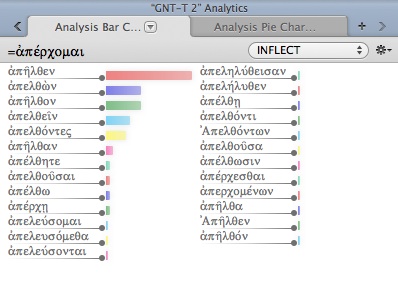
I quickly discover, in a visually appealing way, that my word at hand (ἀπῆλθεν) is the most common inflection of ἀπέρχομαι. This analysis tool allows multiple configurations. You can search by inflection, gender, tense, person, etc.

2. Customizable Toolbar

This has so far been one of the things about Accordance I’ve appreciated the most. New to Accordance 10 is the customizable Toolbar. Mine looks like this at the moment:

Users can easily add and re-arrange what they want in the toolbar, simply by “right clicking” in the toolbar area and going from there. (Note: “right clicking” for me on my Mac is just a two finger tap on the trackpad.) Right clicking on the toolbar allows you to customize it, which then gives you this:

Then, simply set it up how you want it. You can always revert back to the default, as noted at the bottom. The “separator” and “space” options are an especially nice touch. See the Accordance blog post here for more ways a user could customize Accordance 10.

3. Magnify this zone

Here’s a setup I’ve been using to work through the Hebrew text. You’ll note my library on the left, the Hebrew Masoretic Text side-by-side with the NET Bible in the middle, the Instant Details (parsing) box on the bottom, and the dictionary pane on the right. That’s a good setup for analyzing my way through the text. But if I just wanted to read the Hebrew (with the English next to it) with no other distractions, I easily could, without losing my other windows. “Magnify this zone” allows me to turn this:

into this:

With a single click I can easily return back to my full setup when I’m done.

4. A great one-volume commentary, and a great Bible dictionary

Both the Starter Collection in Accordance and Original Languages Collection (what I’m reviewing) come with the IVP New Bible Commentary and the Eerdmans Dictionary of the Bible. The IVP Commentary is integrated into the program such that you can have it sync with you through a passage while you read and study. Each of these is a handy resource to have at the ready while working through text.

My only complaint with these has been that the IVP commentary is a “Reference Tool” while the Eerdmans dictionary is an “English Tool.” This means that they’re in two separate places in the library, which wasn’t totally intuitive for me right away. However, this separation may be due to the fact that–from what I can tell–Reference Tools follow you with verse-by-verse integration whereas you have to do a specific look-up by word for the English Tools. All the same, it’s great having access to these texts.

There are more cool features in Accordance 10. I’ll continue to review the program in coming days. You can go here for an overview of some of Accordance’s newest features.

This series of reviews is made possible by my having received a review copy of Accordance 10, Original Languages Collection. I have not been asked or expected to provide a positive review–just an honest one. Part 1 of my review of Accordance 10 is here. UPDATEPart 3 of my review is hereUPDATE 2: Here is part 4, a review of the Original Languages Collection. UPDATE 3: Here is part 5, “Bells and Whistles.” UPDATE 4: part 6, “More Bells and Whistles.”

Would Mark’s Jesus have us handle snakes and drink poison? (part 1 of 2) (BibleWorks 9 review, continued)

First century snake handler?

Many believe that Mark’s Gospel ends rather abruptly at 16:8 (“for they were afraid”), but others have found it difficult to think of a Gospel ending with Jesus’ followers’ being afraid to say anything to anyone about the resurrection.

So there is the so-called shorter (add-on) ending of Mark, which adds to the above, “…the sacred and imperishable proclamation of eternal salvation” (RSV). This has 10 words that otherwise appear nowhere else in the book.  In my view the vocabulary and style of the shorter ending do not seem to fit well with the rest of the Gospel, and have the feel of an effort to give the book closure well after the fact of the writing.

Then there is the so-called longer ending of Mark, which is also not satisfied in ending with his followers’ fear. This records Jesus’ appearance to some of his followers, as well as the commissioning of his disciples, including the hard-to-understand reference to picking up snakes and drinking poison.

Mark could well have ended with “For they were afraid”–Mark is not unknown for being abrupt—nor would he have a problem upbraiding (or reporting Jesus’ upbraiding) people for their lack of faith or for their fear.  But would someone who started so positively with a proclamation of Jesus as “Son of God” in 1:1 have truly ended on such a dour note?  One possibility is that Mark’s original ending was lost.  R.T. France says, “It is one thing to emphasise and exploit paradoxical elements within the story of Jesus’ ministry and passion, as we have seen Mark doing again and again, but quite another to conclude his gospel with a note which appears to undermine not only his own message but also the received tradition of the church within which he was writing” (683).

Of course, lacking evidence of such a “lost” ending means that to postulate one is speculative, and it is perhaps a wiser hermeneutic to accept the text as we have it to be the intended one.

Can BibleWorks help here? One of the major new features in BibleWorks 9 is the BibleWorks Manuscript Project. From the BibleWorks site:

This massive project has been years in the making. BibleWorks 9 includes the first installment of this ongoing work. The BibleWorks Manuscript Project’s initial release covers the following:

  • Sinaiticus
  • Vaticanus
  • Alexandrinus
  • Bezae
  • Washingtonianus
  • Boernerianus
  • GA1141

For these manuscripts, the BibleWorks Manuscript Project includes the following:

  • New full NT transcriptions
  • Complete NT digital image sets (over 7.5 GB!!)
  • Verse location tagging in images
  • Extensive transcription notes
  • MSS comparison tool
  • Morphological tagging (not complete for all manuscripts but updates will be provided free of charge to BibleWorks 9 users as they become available)

Manuscripts are fully searchable and integrated with the full array of BibleWorks analysis tools. As you change verses in BibleWorks, the MS image display tracks with the current verse. Compare, inspect, and analyze the text and images of key original manuscripts. Tweak and enhance the manuscript images using the sophisticated image processing panel now included in BibleWorks.

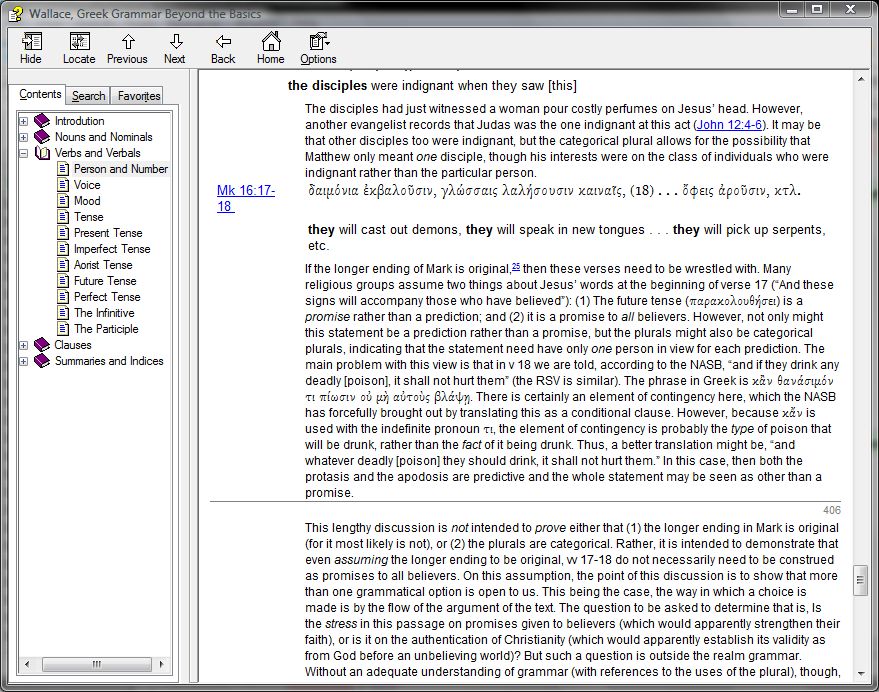
Before I could even get into the manuscripts, there were two ways BibleWorks immediately helped me to explore this issue. First, with my NET Bible notes open in the Verse Tab (which I review here), I see a nice, lengthy note that explains the options–with manuscript evidence–for Mark’s possible ending. (You can see the NET note itself by clicking on footnote 9 here.) That much I’ve come to expect from BibleWorks.

What pleasantly caught me by surprise was that the NET note mentions a section in Wallace’s Greek Grammar that discusses the grammar of the contested snake-handling verses. I quickly and easily navigated over to the “Resources” tab in my analysis window and looked it up (click for larger image, or open in a new tab):

Wallace’s grammar is free with BibleWorks, a nice bonus. And it’s set up so that as you’re working your way through a text, Wallace tracks with you, so you can easily look up what he has to say about a given verse or grammatical topic.

Already some great help from BibleWorks in exploring a difficult textual issue. In my next post, I’ll use BibleWorks to get into the Mark manuscripts themselves, exploring the possible endings of the Gospel of Mark.

See all that’s new in BibleWorks 9 here.

I received a free upgrade to BibleWorks 9 in exchange for an unbiased review. See my prolegomenon to a review here, part 1 (setup and layout) here, and part 2 (the Verse tab) here. You can order the full program here or upgrade here. It’s on Amazon, too.

In which I finally try out Accordance Bible Software for Mac (new version 10!)

I have been an avid and happy BibleWorks user since version 7 (they are now in version 9). But my first computing love is a Mac. (Too bad for expensive taste in that regard!) I have a cheap PC laptop at home on which I run BibleWorks, but have been interested in exploring Accordance for some time. Now, thanks to the kind folks at Accordance who have given me a copy for review, I can take Accordance for a spin.

I apparently got into Accordance at just the right time. This week they launched an upgrade from Accordance 9 to Accordance 10. And it looks like users are pretty happy with the switch.

In a series of posts, I will offer my review of Accordance 10, Original Languages Collection. In this post I report on my installation process and initial impressions as to the program’s layout and interface.

Download and installation was mercifully fast, even over a wireless Internet connection. In 30 minutes or so I was able to download the Accordance application to my computer and the Original Languages Collection with its various modules.

I appreciated the flexibility offered me even in the initial setup. For example, I could make choices at the following spots:

(Although, I confess, I don’t know what “Helvetica Neue Light” looks like off the top of my head! No matter–this can always be changed later.) This next option for text formatting immediately endeared me to Accordance:

These are perhaps little things, but Accordance’s customizability seems obvious from the beginning.

The only snag I hit in installation was being able to install one of the included modules, even after multiple attempts (the BHS Latin Key). Although, taking a look at the forums, I’m not alone. I expect the Accordance team is mighty busy with the new release. Accordance 10 is already in 10.0.1. I don’t think this is a sign of a buggy version released too soon, but rather an indication that the folks behind the software are quick, responsive, and eager to improve upon the program.

Once finishing installation, I played around a bit with my resources, and within just a few minutes and no prior knowledge of Accordance, was able to set things up this way (click image for larger or open in new tab):

On the left you can see my “library” which in this view shows some of the texts that come with the Original Languages Collection. Thing of beauty: it has the New English Translation of the Septuagint. With how often I am in (and blogging about) the Septuagint, this makes me happy to see. The NETS is far from a perfect translation, but it’s the best English translation on the market right now.

In the middle you can see I have the Greek of Genesis 1 open, with the NETS right next to it and the IVP New Bible Commentary on the right of the middle section.

Then in the top right corner I opened the LEH Greek-English Lexicon of the Septuagint, available in previous Accordance versions only as a paid, add-on module (from what I understand). The bottom right corner shows the Hebrew text of Genesis 1.

Each of these boxes/windows are changeable and rearrangeable. I look forward to spending more time exploring the various configurations available to me through Accordance.

In sum: A quick, easy install with just that one hiccup of a missing module–soon to be resolved with a released fix, I’m sure. (UPDATE 8/23/12: It’s fixed!) And the layout and its flexibility has really impressed me on first use.

And, oh. The interface? Absolutely stellar. I love seeing a high-powered Biblical languages-oriented program native to a Mac. The interface in Accordance is as smooth as any program I’ve ever seen from Apple.

So far, so good.

UPDATE: Parts 2 and 3 of my review are here and here.
UPDATE 2: Here is part 4, a review of the Original Languages Collection.
UPDATE 3: Here is part 5, “Bells and Whistles.” UPDATE 4: part 6, “More Bells and Whistles.”

The Verse Tab: Review of BibleWorks 9, part 2

I continue to be impressed with BibleWorks 9. The new Use Tab is likely my favorite new feature (I posted about it in part 1 of my review). The Verse Tab is another new feature. Here’s how the BibleWorks site describes it:

The Verse Tab tracks with any Bible version. For the current verse under the mouse, it displays the relevant sections in resources such as the CNTTS apparatus, the NET Bible textual notes, the Tischendorf apparatus, Metzger’s Textual Commentary (requires unlock), and the ESV Study Bible (requires unlock).

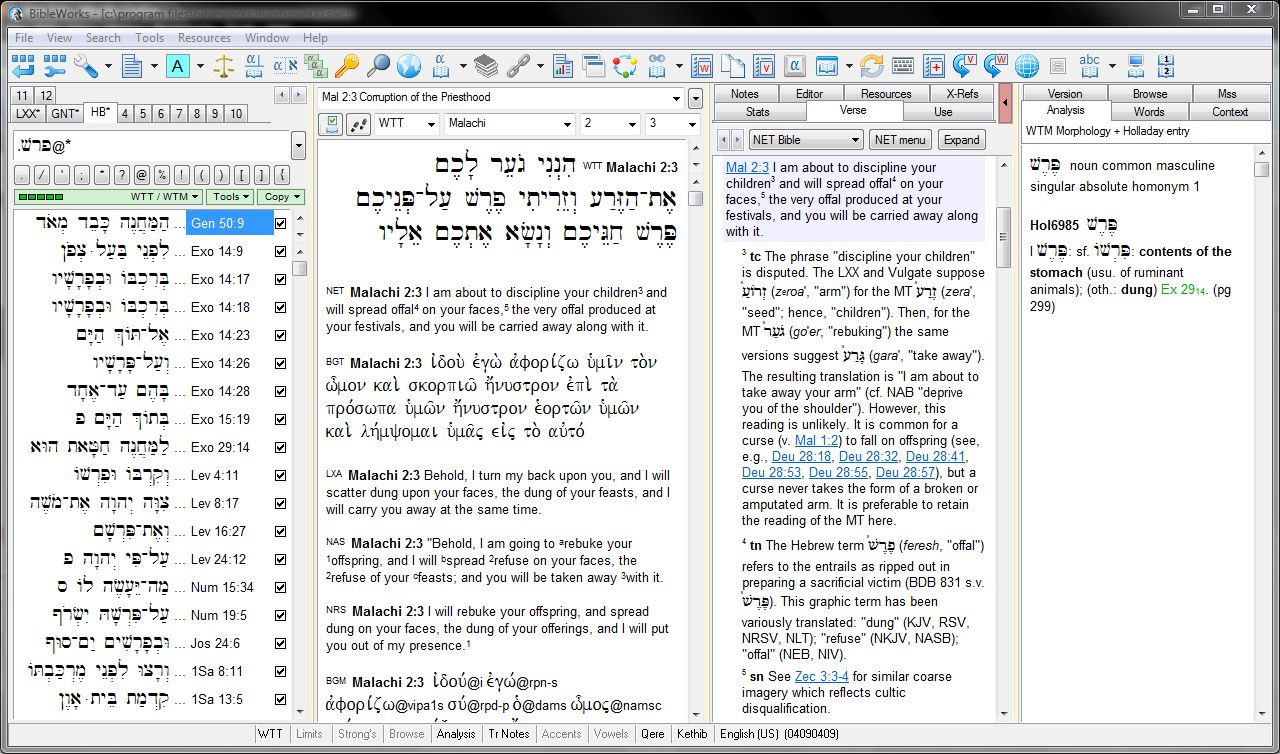
I will devote a future post to the CNTTS apparatus. Today I want to comment on and review the Verse Tab and its usefulness. Just so you can have a visual of what I’m working with, here’s a layout I’m currently using to look at the Hebrew of Malachi. (Click on the image below for larger.)

(Editorial note. File this under: can you believe that’s in the Bible? I had somehow never noticed this verse until the other day… thou shalt not trifle with the Lord, especially if you’re a priest or pastor. Take obedience to God seriously.)

Here’s the great thing about the Verse Tab. In previous versions of BibleWorks, the NET Bible study notes were only available via the Analysis Window. But this meant that if the Analysis Window were open to an NET study note, you couldn’t also at the same time easily see morphological analysis and lexical data–it was one or the other in that window. Now, however, as you can see above, you can easily access both study notes and a separate analysis window for individual word analysis. I find this new feature an immense help.

The NET study notes are fantastic. (It’s worth reading more about that translation and its notes here.) Honestly, a verse like the one I’ve chosen to highlight above might be a bit jarring to some–although in context it makes perfect sense. Yahweh was dealing with a corrupt and complacent priesthood. They were not making sacrifices in the way he had commanded (and they knew it, too). So his response in context really ought not to be a surprise. The NET note (see superscript number 4 and “tn” in the image above) clarifies that Yahweh is speaking of the entrails of to-be-sacrificed animals. The priests were supposed to dispose of these away from the sacrificial altar, but apparently were not in Malachi’s time. Bad idea. Clicking on Lev. 4:11 in the BibleWorks Search column (far left column) immediately takes me to the verse that explains this requirement.

One other neat thing about the Verse Tab: if you click on the “Expand” button, you can get a free-floating window that shows you all the NET notes for the whole Bible. This is easy to navigate through, as you can imagine:

I welcome the Verse Tab as an addition to the BibleWorks program. I’ve already made heavy use of it and will continue to in the future. For a mere $20 you can buy a module that gives you the notes and maps from the ESV Study Bible in that same tab. The program comes with the NET Bible notes already loaded.

See all that’s new in BibleWorks 9 here.

I received a free upgrade to BibleWorks 9 in exchange for an unbiased review. See my prolegomenon to a review here and part 1 (setup and layout) here. You can order the full program here or upgrade here. It’s on Amazon, too.

BibleWorks out of the box: Review of BibleWorks 9, part 1 (setup and layout)

The perennial question: Should I upgrade my BibleWorks program? I was perfectly happy with BibleWorks 7 until I upgraded to 8. (Then I was really happy with 8.) I thought 8 was such a vast improvement that when 9 came out, I saw no need… at least until I got to know version 9 a little better. Versions 7 or 8 are certainly still powerful in their own right, but my upgrade to 9 has been a great experience so far. In this and future posts, I’ll highlight why. Today: BibleWorks 9, out of the box.

The installation is easy and quick. I consider myself somewhat proficient when it comes to computer know-how, but certainly don’t have programming expertise. No matter. BibleWorks is easy to install and keep updated. And the BibleWorks staff is constant in making updates available if and as they find bugs in the program. Better than any other computer software I’ve used, in this sense.

BibleWorks 9 comes with a “Quick-Start Guide,” which has the Installation Instructions (they are mercifully short–three pages and easy to follow) and a 12-page Orientation to BibleWorks guide. The guide focuses on the Search Window, the Browse Window, and the Analysis Window, and gives instructions and specific examples as to how to best utilize each in studying the Biblical text. My only quibble with the helpful guide is that the images contained therein seem to be from BibleWorks 8, not 9. But that doesn’t really keep it from doing what it needs to, namely, quickly and effectively orienting the new or only somewhat experienced user to using the program well. (The instructions do detail the contents of the new tabs in version 9.)

BibleWorks 9 adds a delicious fourth column (essentially, a second analysis window). It looks like this (click on the png below for a larger view, if you wish):

Already this opens more options. There are also more available tabs in the Analysis Window. For example, the new “Use” tab, in my third column above, instantaneously shows you all the uses of a word with how many occurrences it has in that book and version (here, the WTT=Hebrew Bible). You had to search on a word in previous versions to do this (using the first column above). I find this particularly useful for vocabulary acquisition. As I come across a word I don’t know in the text, I can easily see–does this occur 121 times and I should know it? Or is it just in the text two or three times, so I was okay in not knowing right away what it means?

The “Verse” tab and the “Mss” tabs are new, too–those are worthy of their own post. (Anyone familiar with BibleWorks, whether they have 9 or not, may already know that this new version allows you to look at and work with images of original manuscripts.)

And, what I find best of all, you can drag and drop the tabs between the third and fourth columns so that you can customize your setup. I had already figured out a setup so that I had my own equivalent of a “fourth column” in BibleWorks 8. Now I can do even more! Check this out (from a previous post):

It’s a thing of beauty.

BibleWorks has unbeatable customer service. The user forums are active and always helpful. (Good things to know when you’re considering getting set up with them.) And they’ve provided quite a few videos to show users their way around the program. If you don’t want to wait for the rest of my review, you can see all that’s new in BibleWorks 9 here. You can order the full program here or upgrade here. It’s even on Amazon!

I received a free upgrade to BibleWorks 9 in exchange for an unbiased review. See my prolegomenon to a review here.

BibleWorks in the pew? (Not quite, but the next best thing)

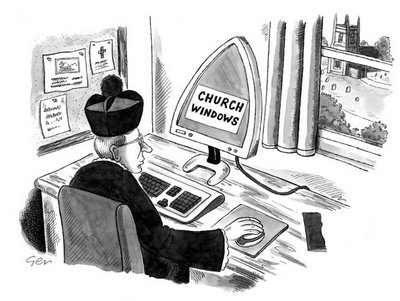
[GEEK ALERT] In an effort to integrate my learning of Biblical languages with church attendance and participation, I can be spotted at my church carrying this and this around. If I had an extra hand, I’d bring this, too. At first I feared it would look pretentious–it still may–but my motives are just to use my Greek and Hebrew in the context of corporate worship, while Scripture is being read aloud (in English, in my church’s case). So I follow along the Scripture readings, as best I can, in the original languages.

By Gerard Whyman (http://www.gerardwhyman.co.uk/)

To take it a step further, some time ago on the BibleWorks forums there was a user-initiated discussion about whether it is appropriate to have a laptop with BibleWorks open in the middle of a church service.

While I personally find the idea of a pew-sitter with a laptop tacky, I do understand the sentiment behind wanting to look at the Bible in the original languages while it’s being read and exposited in church. Hence my solution of having a print Bible with me. That’s not quite as out of place as a laptop would be.

So having my Greek and Hebrew Bibles with me is the next best thing to having BibleWorks open during church. However, there are two other next best things that do involve BibleWorks. First, there is a free user-created module that has the Revised Common Lectionary, linked to texts in BibleWorks. I rarely have time to use it on Sunday morning as we rush out the door, but I have at times been able to look ahead to the texts we’d be reading in church that week and use BibleWorks to work my way through them. The RCL module is really nifty. More about it here.

Today I found myself with the unexpected blessing of some time to play around with BibleWorks a bit. (I just received BibleWorks 9 in exchange for an unbiased review, which I will be offering in parts in coming weeks. Consider this a prologue of sorts.) Using the Report Generator, I was able to create a “Reader’s” version of Jeremiah 23:1-6, the Old Testament reading in church from the RCL this morning. Here’s the screen shot of how to get there, which also shows how I have my BibleWorks set up for Septuagint study. (Click on image for larger, or open it in a new tab.)

Once there, I set the Report Generator in the following way:

Then I clicked on “Build Report” and got a report with the text of Jeremiah 23:1-6 in Greek, followed by the listing of all words used in that passage, with frequency counts, followed by lexicon entries. After some manual organizing, I ended up with the below. Resources like this exist for the Hebrew Bible and the Greek New Testament (what I take to church with me), but there is not as of yet a “Reader’s” Septuagint.

Fellow language-lovers… what do you think? And do you take your languages with you to church? If so, how?

Jeremiah 23:1-6 (Rahlfs Septuagint)

–with footnoted vocabulary (glosses) for words that appear less than 200 times in entire Greek Bible (LXX+NT together). Glosses from here: print / BibleWorks module.

1 Ὦ[1] οἱ ποιμένες[2] οἱ διασκορπίζοντες[3] καὶ ἀπολλύοντες τὰ πρόβατα τῆς νομῆς[4] μου.
2 διὰ τοῦτο τάδε λέγει κύριος ἐπὶ τοὺς ποιμαίνοντας[5] τὸν λαόν μου Ὑμεῖς διεσκορπίσατε[6] τὰ πρόβατά μου καὶ ἐξώσατε[7] αὐτὰ καὶ οὐκ ἐπεσκέψασθε[8] αὐτά, ἰδοὺ ἐγὼ ἐκδικῶ[9] ἐφ’ ὑμᾶς κατὰ τὰ πονηρὰ ἐπιτηδεύματα[10] ὑμῶν·
3 καὶ ἐγὼ εἰσδέξομαι[11] τοὺς καταλοίπους[12] τοῦ λαοῦ μου ἀπὸ πάσης τῆς γῆς, οὗ ἐξῶσα[13] αὐτοὺς ἐκεῖ, καὶ καταστήσω αὐτοὺς εἰς τὴν νομὴν[14] αὐτῶν, καὶ αὐξηθήσονται[15] καὶ πληθυνθήσονται·
4 καὶ ἀναστήσω αὐτοῖς ποιμένας[16], οἳ ποιμανοῦσιν[17] αὐτούς, καὶ οὐ φοβηθήσονται ἔτι οὐδὲ πτοηθήσονται[18], λέγει κύριος.
5 Ἰδοὺ ἡμέραι ἔρχονται, λέγει κύριος, καὶ ἀναστήσω τῷ Δαυιδ ἀνατολὴν δικαίαν, καὶ βασιλεύσει βασιλεὺς καὶ συνήσει[19] καὶ ποιήσει κρίμα καὶ δικαιοσύνην ἐπὶ τῆς γῆς.
6 ἐν ταῖς ἡμέραις αὐτοῦ σωθήσεται Ιουδας, καὶ Ισραηλ κατασκηνώσει[20] πεποιθώς, καὶ τοῦτο τὸ ὄνομα αὐτοῦ, ὃ καλέσει αὐτὸν κύριος Ιωσεδεκ[21].


[1] ὦ (109) woe (to)
[2] ποιμήν (99) shepherd
[3] διασκορπίζω (64) scatter
[4] νομή (39) pasture
[5] ποιμαίνω (65) shepherd
[6] διασκορπίζω (64) scatter
[7] ἐξωθέω (31)  force out
[8] ἐπισκέπτομαι (181) visit
[9] ἐκδικέω (97) exact vengeance
[10] ἐπιτήδευμα (58) practice, way of living
[11] εἰσδέχομαι (20) gather
[12] κατάλοιπος (98) remnant
[13] ἐξωθέω (31)  force out
[14] νομή (39) pasture
[15] αὐξάνω (63) grow
[16] ποιμήν (99) shepherd
[17] ποιμαίνω (65) shepherd
[18] πτοέω (39) tremble
[19] συνίημι (144) have understanding
[20] κατασκηνόω (70) dwell, settle
[21] Ιωσεδεκ (18) proper noun (name)

BibleWorks and the Septuagint

I recently blogged on why you need the Septuagint. And here are some great resources to begin and further pursue Septuagint study.

One indispensable resource for Septuagint study that I use almost daily is the computer program BibleWorks. I have not yet made the upgrade from version 8 to version 9, but much if not all of what I have to say here will still be applicable to users of version 9 (and 7, for that matter).

Here is what my BibleWorks looks like for 1 Maccabees (click or open in a new tab to view larger):

The following features help me navigate my way through the Septuagint:

  • A nice, big Browse Window (middle column in the top window) so that I can see the whole Greek verse easily at once, with English translations below. Both the LXA (Brenton’s Septuagint with Apocrypha, in English) and the NRS (NRSV, which includes the Apocrypha) are part of BibleWorks.
  • A stand-alone Word Analysis Window (bottom right of the screen) so I can better use my other columns. I set the default lexicon to LEH (Lust/Eynikel/Hauspie’s Greek-English Lexicon of the Septuagint, Revised Edition).
    Not only is this a fantastic Septuagint-specific lexicon; it also includes word frequency counts. What I particularly like about this is that I can use the Stats window (in the Analysis Window, the right column in the top window) to find out how many times a word appears in the whole Greek Bible (LXX+New Testament). Then using the LEH frequency counts, I can get a quick number on how many times a word is used in the LXX and the NT. This is helpful if I see an LXX word that occurs 200+ times, have never heard of it, and then see it only appears 10 times in the NT.
  • The Resource Summary Window (bottom left of the screen). Here I can access Conybeare’s Grammar of Septuagint Greek, which comes with BibleWorks and is hyperlinked both by part of speech and Scripture index. Another nice feature is that I can pull up BibleWorks paradigms quickly for a given part of speech–a helpful grammatical refresher! The IVP Dictionary of Jesus and the Gospels in that window is an add-on from WordSearch, but their IVP Dictionary package has a bunch of great Septuagint articles.
  • Note: There is no punctuation in the BibleWorks Septuagint text. This is not a display error; it’s just how it is. There are accents and breathing marks, though. And, the way I see it, even if Rahlfs in print has punctuation, the original manuscripts did not, so no huge loss.
  • I hesitate to write too much more about the Analysis window (right column in the top window), because BibleWorks 9 has significantly changed (=improved) the layout. In fact, there are now four columns, as seen here. However, for anyone using 8 or less, the above configuration allows you to work with the LXX profitably. For BibleWorks 9, I’m sure you could use the above layout as is (BW9 lets you use just three columns if you want, I believe) or make whatever modifications you wanted in BW9.

1 Maccabees has no existing Hebrew text. The scholars I’ve read on it all think that the Greek of 1 Maccabees has the flavor of translation Greek, and so translated a Hebrew original. But we don’t have it. (BibleWorks is powerful, but not quite that powerful!)

How I use the LXX when there is a corresponding Hebrew text (e.g., when I’m reading Micah) looks a little different. For example, in addition to the above, I’ll have the Hebrew text and English translation displayed. BibleWorks has the amazing Tov-Polak Parallel Hebrew/LXX Database, too, that comes with the base package.

BibleWorks allows me to read through the Septuagint in Greek with English translations displayed underneath. (I can also hide them–that’s what my “No Eng.” tab is in the left column of the top window.) It gives me instant word analysis (its parsing and then word definition and frequency count through LEH). I get grammatical helps from Conybeare and BibleWorks paradigms. I can search on a word to see how it’s used throughout the Septuagint and/or New Testament (note the highlighted word above). And with the IVP add-ons, I get historical background, too.

Using BibleWorks is a fabulous way to read through the Septuagint. I feel very blessed to have access to such a tool as this.

And I know there is much more BibleWorks can do. Fellow BibleWorks users and lovers of the Septuagint, how do you use BibleWorks for LXX success?

Septuagint Sunday is a regular feature of Words on the Word. All my LXX posts are here. The full contents of BibleWorks (now in version 9) are listed here. You can buy the program here or here.