Christmas in the Middle of Something

image


And there were shepherds living out in the fields nearby, keeping watch over their flocks at night. An angel of the Lord appeared to them, and the glory of the Lord shone around them, and they were terrified. But the angel said to them, “Do not be afraid. I bring you good news that will cause great joy for all the people. Today in the town of David a Savior has been born to you; he is the Messiah, the Lord. This will be a sign to you: You will find a baby wrapped in cloths and lying in a manger.”

Suddenly a great company of the heavenly host appeared with the angel, praising God and saying,“Glory to God in the highest heaven, and on earth peace to those on whom his favor rests.”

When the angels had left them and gone into heaven, the shepherds said to one another, “Let’s go to Bethlehem and see this thing that has happened, which the Lord has told us about.”

—Luke 2:8-15

Where were you the first time you remember hearing about Jesus? Or if you can’t remember a “first time,” what are some early memories you have of encounters with the God who came to earth? And just as important: how and where and in whom have you seen Jesus these last few weeks, days, and even hours?

The shepherds were just minding their own business, really. They were “keeping watch over their flocks at night.” That phrasing has become virtually poetic to us now, so tied is it to this beautiful story. It’s merely a preamble to the glory of the angels and of the Lord, a glory improbably made manifest in a “baby wrapped in cloths and lying in a manger.”

But this is also just like saying, “They were at work when God’s glory found them.” Or, “They were standing at the sink washing dishes when the Lord’s invitation came.” Or, “They were fixing a chain on a bicycle when Christ came to them.” Or, “They were practicing their caregiving role when they caught a sudden glimpse of God’s great love.”

No matter how well saturated we are with Scripture, no matter how solid our Christology, no matter how long we’ve been following Jesus, we simply do not know all the times and places where Christ is going to meet us. Chances are he will come to us while we’re in the middle of something else.

Encounters with the living God can be intense. But just as Luke is keen to point out Mary’s obedience to a seemingly bizarre call, he is eager to show us the willingness of the shepherds to drop their staffs (and leave their sheep momentarily unattended? or bring them along?) to “go… and see this thing that has happened,” which God told them about.

Christ has come to earth! He came in the form of a servant, taking on human likeness. Christ will come again! He will come in a glory that will surpass even that of the “great company of the heavenly host.” Christ comes to us! He comes and visits us each day in myriad ways, big and small, obvious and subtle, extraordinary and mundane.

Like these shepherds who were surely caught off guard by the interruption, may we have the willingness to see Christ whenever and however he comes to us. And may we hasten to the places where he is today, running to his feet, bowing down, and worshiping him.


The above is adapted from an Advent reflection I wrote as part of a devotional our church’s Deacons prepared for our congregation this Advent.

1Writer: The Best Text Editor (and Blogging App!) for iOS

1Writer Icon


1Writer has been living in both my iPhone and iPad docks for a number of months now. It’s high time I wrote a proper review! It’s easily my favorite text editing app for iOS.


About 1Writer


Here’s a paragraph description of the app from the 1Writer site:

1Writer provides a distraction free writing environment. You can create and edit plain text or Markdown files. It does have many features including inline Markdown preview, word count, dark theme, TextExpander support, insert photo, an extra keyboard row, and many more. The extra keyboard row is a convenient row of buttons for navigation, formatting, special characters and actions. See the formatted results with inline Markdown preview while you write and a full, rich-text preview when you’re done.

My favorite feature is its ability to insert images right from an iOS device, making it the first iOS app I’ve found that is actually suitable for blogging.


1Writer: The Pros


Sync

Whether you want to use Dropbox or iCloud, 1Writer has excellent syncing capabilities. I have a couple Dropbox folders I sync to 1Writer, which is now where I keep blog post drafts. I can update a document from iPhone or iPad–or even use a Mac to update a draft with an OS X Markdown app.


Images!!!

You can blog from 1Writer. It has been surprisingly difficult to find an iOS app that can do this well, including WordPress’s native blogging app. One downside is that you can’t resize the images once you insert them into the post, so it’s still not as flexible as blogging with images through the WordPress Web interface on OS X. The fastidious among us may want to double-check layout in WordPress itself before posting anyway, so this is not a deal-breaker, if not ideal.


Works Great with an External Keyboard

You can type CMD-B for bold and CMD-I for italics, and it both inserts the markdown markup and shows you the inline preview. Not even Editorial can do this. You can also insert links with a keyboard shortcut.


Built-in Web Browser

Because 1Writer has a built in Web browser, you can search for images without even leaving the app, and then insert them into your document. There is also a really nice hyperlinking functionality, and you don’t have to leave 1Writer to find a link you want to include in a document or Web post. One especially nice touch is once you’ve got a link copied, the hyperlink button gives you the pop-up option of just pasting the clipboard contents (your link), so you can save a tap there.


Built-in Web Browser


Great-Looking Interface

The interface is easy to look at for a long time when writing:


1Writer Text


Tagging System

1Writer has a built-in tagging system, so you can even more easily organize your documents.


Tags 1


Tags 2


Actions

Like Drafts 4, 1Writer has a number of actions you can perform on your text. Whether you want to use a pre-installed action to export your document as plain text or PDF, or install something from the 1Writer action directory, there’s not much missing here.


Actions


My personal favorite action is “Jump to Section,” which allows you to navigate by headings. This is especially useful for long documents where you quickly want to go between sections. The interface of this feature is not quite as smooth as Editorial’s similar function, but it still gets the job done.


iOS9-Ready

Speaking of Editorial… that’s a fine app, but it’s still not iOS9-ready. 1Writer is, so you can utilize Slide Over and Split View functions.


Customizable Keyboard Row

There’s an extra, customizable keyboard row–including the ability to assign a character or even action to a button.


Top-Notch Developer

The developer is amazingly responsive. He totally knows what he’s doing, and has built an excellent app already. Insofar as there are small, desired improvements, he takes feedback seriously.


1Writer: Just a Few Minor Drawbacks


The built-in Web browser does not allow for multi-tabbed browsing. I found this to be a limitation, though since iOS9, when I want to search the Web, I tend to do it via Safari in Split View with 1Writer open separately anyway.

Another drawback: you can’t sync actions between devices. You have to manually set this up in any iOS device you use. Documents themselves sync perfectly, of course, just not these custom actions.


Concluding Evaluation


There are people who swear by Drafts (I am one!) and Editorial (there’s a lot to like about that app). But 1Writer is exceedingly underrated. (Though that may change now that Viticci reviewed it!) If you’re a blogger, especially, this is the app that will finally allow you to blog from your iOS device.

It’s (no question) the best thing on iOS for bloggers. And maybe even the best note-taking app, too.

You can find it in the App Store here. And, yes, I did write much of this post in 1Writer, exported the Markdown to HTML (from 1Writer), and then published.


Thanks to 1Writer for the review copy of the app, given to me for this review but with no expectation as to its content.

Zondervan’s Newest (NIV11-UBS5) Greek-English New Testament

Cover in Wrapping


Yes, I’m aware that it’s probably better to practice Greek reading with a Reader’s Bible (N.T. Wright even told me that!) than with a Greek-English diglot.

That said, Zondervan’s new NIV11-UBS5 diglot is an excellent Greek Bible to have on hand and use for both reading and research.


What It Is


  • Zondervan’s recently revised New International Version 2011 is the English text. Read more about the 2011 NIV here
  • The Greek text is the United Bible Societies’ updated 5th edition of the Greek New Testament. If you haven’t familiarized yourself yet with this edition and the changes it contains (summary: general epistles), check out this post, especially the infographic
  • The UBS5 text is accompanied by the full critical apparatus
  • Unlike other diglots I’ve seen, the Greek is always on the left page and the English on the right page
  • Both texts are in single columns


What I Like About It


Overall this edition is really nicely produced. Here are some highlights:

  • The pages are thicker than I expected–this makes for a better reading experience
  • It’s light and portable
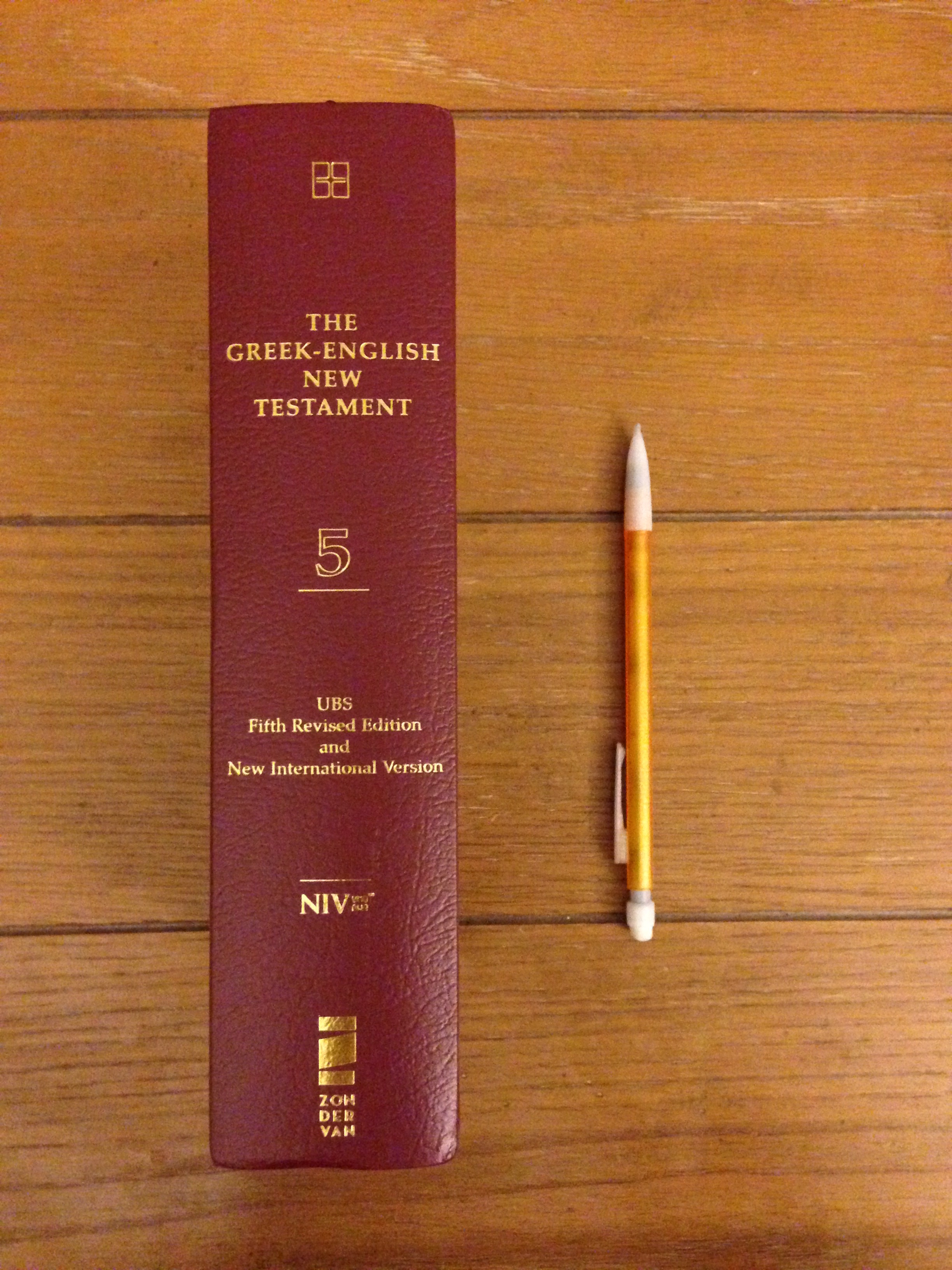
  • The exterior of the book is classy :


Spine and Pencil


  • It lays flat! Even when you’re reading the prefatory material
  • Old Testament quotations are in bold font
  • There’s a really nice ribbon marker
  • And… the Greek font looks great. Check it out:


Mark 1 in Greek


What Could Have Been Better


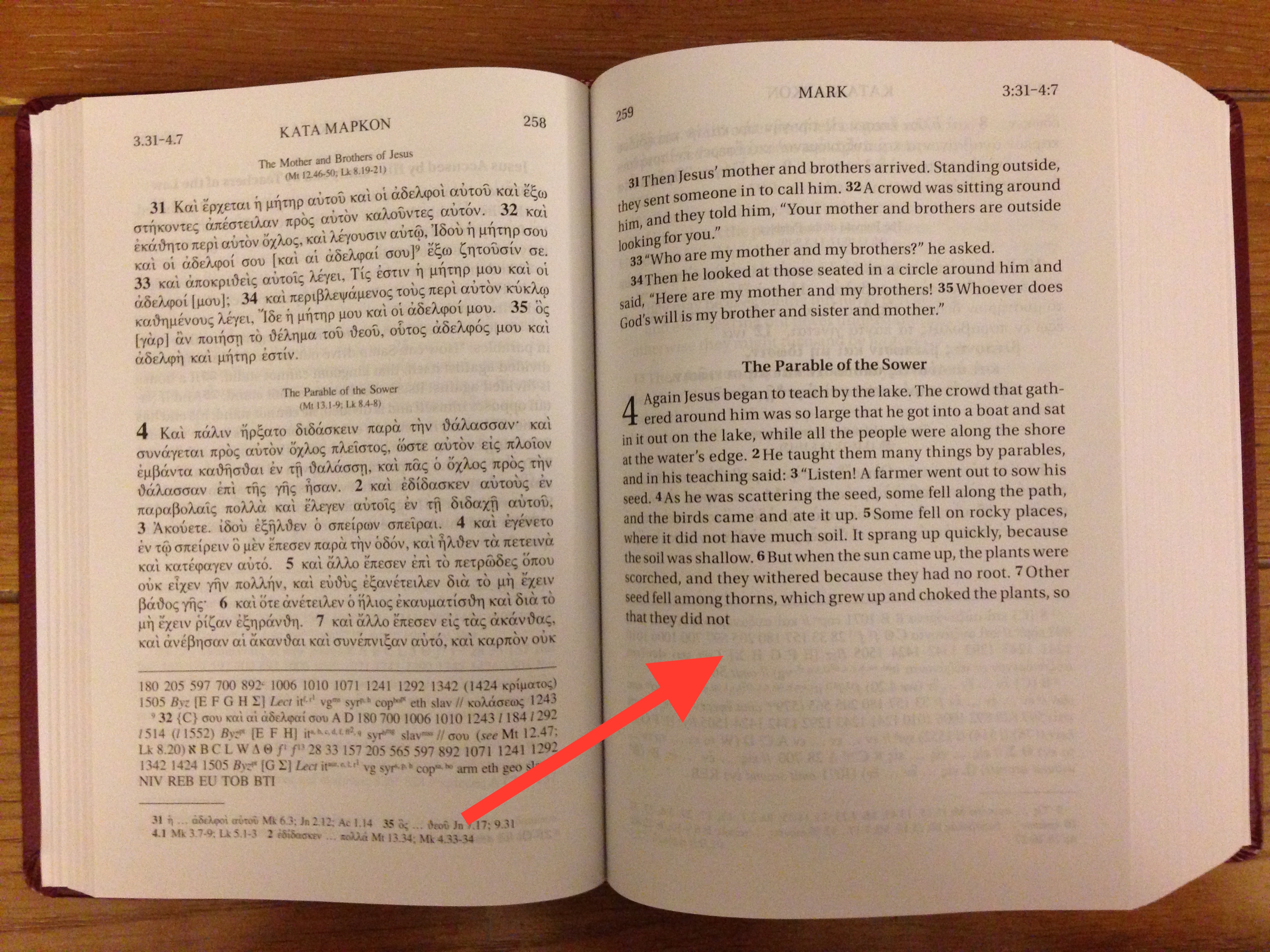
No bullet points here–just one major critique. In a deliberate move, the English on a page may cut off mid-sentence to try to more exactly match the Greek. Of course a one-to-one match is impossible because of the differences between the two languages (not the least of which is word order), but the intention is good, if not always perfectly executed in terms of matching English to Greek. Regardless, the unexpected editorial decision leads to awkward looking pages like this one (click image to enlarge):


Greek and English


To each their own, I guess, but I still haven’t gotten used to it, even after reading through full chapters of text.

But everything else (layout, font, book construction, feel, etc.) is spot on. I’m a fan of this Bible, and while I’m pushing myself to use a Reader’s edition (Greek only), when I want English and Greek side-by-side, this is my new go-to.

You can learn more at the Bible’s product page here. It’s on sale at Amazon here.


Thanks to Zondervan for the copy, provided to me as part of a series of ongoing posts about the 2011 NIV–though there was no expectation as to the content of my review.

IVP’s 5-Volume Ancient Christian Doctrine in Accordance

Ancient Christian DoctrineI just finished two systematic theology courses this semester. Phew! One resource that was really helpful to be able to reach for was Intervarsity Press’s 5-Volume Ancient Christian Doctrine.

It’s similar to the 29-volume Ancient Christian Commentary on Scripture set–like ACCSAncient Christian Doctrine compiles primary sources from early church theologians as a running commentary. ACD, however, is a full-blown compendium of commentary on the Nicene Creed.

It was an excellent resource, too, for helping me think through this last week’s sermon in my church’s Advent preaching series: “Who is This Jesus We Are Waiting For?”

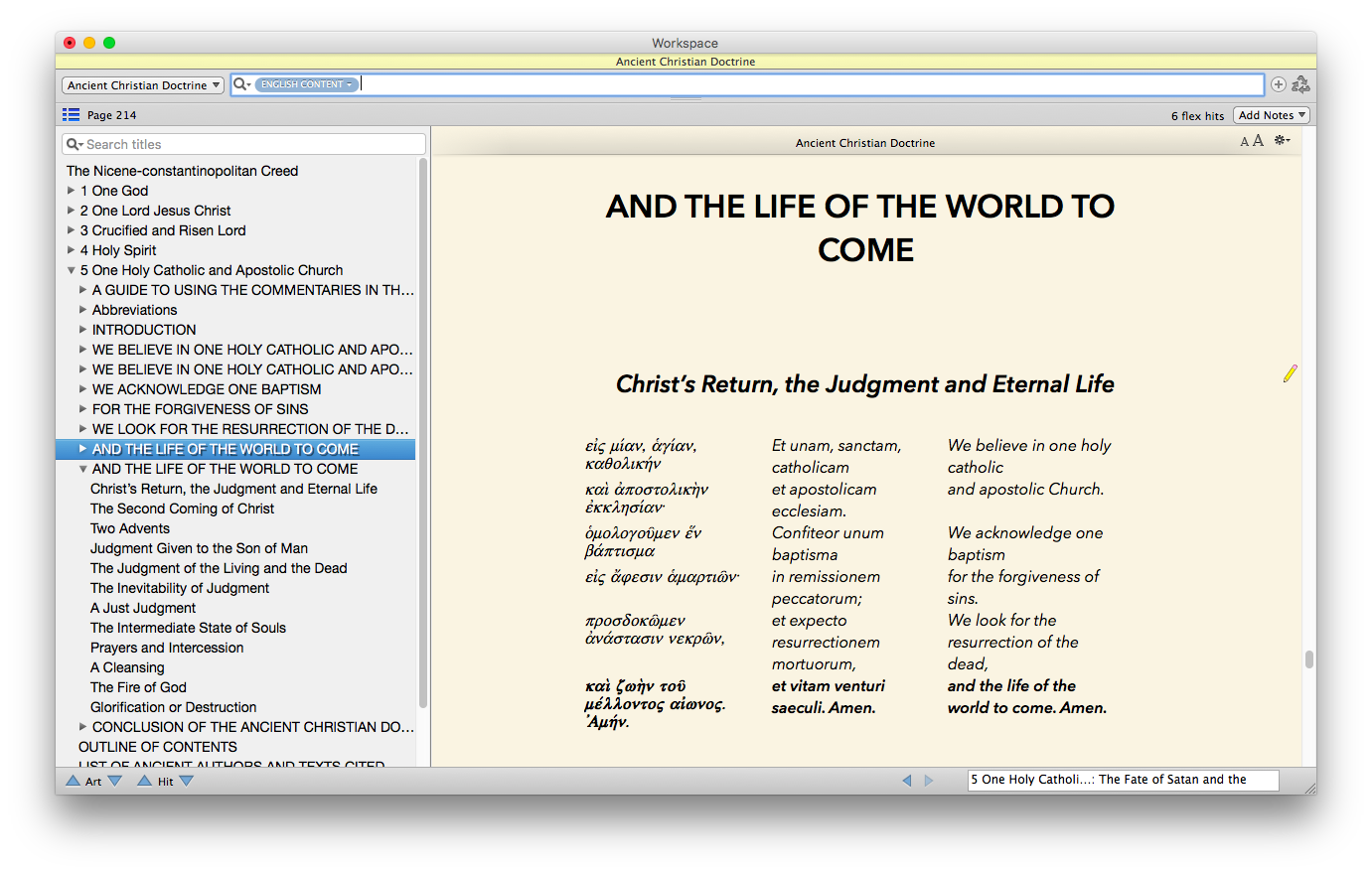
I skipped ahead in my research to the Creed’s final phrase, “…the life of the world to come.” Here’s what you see at the beginning of the section in the Accordance edition I’ve been using:


Ancient Christian Doctrine in Accordance
Click to enlarge image


You get the Creed in Greek, Latin, and English. Then, as you can see in the sidebar Table of Contents at the left, there is the commentary on that phrase–categorized helpfully in the volumes into sections like, “Two Advents” and, “The Intermediate State of Souls.”

Here was a powerful piece from Tertullian from that section:

We affirm that, as there are two conditions demonstrated by the prophets to belong to Christ, so these two conditions presignified the same number of advents. One of the advents, and that being the first, was to be in lowliness when he had to be led as a sheep to be slain as a victim and to be as a lamb dumb before the shearer, not opening his mouth, and not fair to look on. For, says the prophet, we have announced concerning him, “He is like a tender plant, like a root out of a thirsty ground; he has no form nor comeliness; and we beheld him, and he was without beauty: his form was disfigured,” “marred more than the sons of men; a man stricken with sorrows, and knowing how to bear our infirmity,” “placed by the Father as a stone of stumbling and a rock of offense,” “made by him a little lower than the angels,” declaring himself to be “a worm and not a man, a reproach of men, and despised of the people.” Now these signs of degradation suit his first coming quite well, just as the tokens of his majesty do his second advent when he will no longer remain “a stone of stumbling and a rock of offense” but after his rejection become “the chief cornerstone,” accepted and elevated to the top place of the temple, even his church, being that very stone in Daniel, cut out of the mountain that was to strike and crush the image of the secular kingdom. Of this advent the same prophet says, “Behold, one like the Son of man came with the clouds of heaven, and came to the Ancient of days; and they brought him before him, and dominion and glory were given to him as well as a kingdom so that all people, nations, and languages should serve him. His dominion is an everlasting dominion, which will not pass away; and his kingdom is that which will not be destroyed.”

I’ve gotten this resource in Accordance so I can preview it at some of my upcoming Accordance Webinars, the schedule for which is soon to be posted. And I’ve also found it quite helpful in writing pieces of theology and sermon preparation.

This week it’s on sale through Accordance (here).

Let me leave you with this inspiration from Hilary of Poitiers:

He is born as man, while remaining God: this is in contradiction of our natural understanding. That he should remain God, though born as man, does not contradict our natural hope. For the birth of a higher nature into a lower state gives us confidence that a lower nature can be born into a higher condition.


See my other Accordance posts (there are many) gathered here.

Advent: At Least It’s Not Lent!

If branding and marketing tag lines had been a thing when Advent found its way into the church calendar, the church of the late sixth century could have used: “Advent: At Least It’s Not Lent!”

It’s true—December just feels more exciting than February-March, and the four Sundays of Advent seem to get to the point more efficiently than what can seem like the 40-day slog of Lent. Besides, who’s ever heard of fasting from sweets in the weeks leading up to Christmas?

But both Advent and Lent share an important—if at times challenging—characteristic: they offer us church folk a chance to carve out deliberate spaces to look inward to our own spiritual state and outward to the person and work of Jesus.


advent wreath


We remind ourselves in Advent that we live in a waiting room of sorts. We have the fortunate lot in life to not have to wait for the coming of Jesus to earth—we know it happened and we still have the eyewitness accounts! But, ah… that second coming. No one knows when it will be. Even Jesus-on-earth said he didn’t know the hour.

So we wait. And wait. And wait. Each Advent that comes and goes is a poignant reminder that the kingdom is (still!) not yet fully present among us.

But that’s no reason to give up hope and stop waiting. On the contrary, we wait all the more eagerly. Luke 12 says:

Be dressed ready for service and keep your lamps burning, like servants waiting for their master to return from a wedding banquet, so that when he comes and knocks they can immediately open the door for him. It will be good for those servants whose master finds them watching when he comes. …You also must be ready, because the Son of Man will come at an hour when you do not expect him.

To our waiting we add watching and making ready.

The master has not yet returned, and our lamps too often dim when we forget to tend to them in the rush of other commitments. This Advent, may we keep our lamps brightly lit, persistent in our waiting, watching, and making ready for the coming of our King.


The above is adapted from an Advent reflection I wrote as part of a devotional our church’s Deacons prepared for our congregation this Advent.

Task Management via The Hit List

Viticci put it well: “There’s only one thing I like more than switching todo apps: writing about it.” My 2Do review is much shorter than his, but I resonate with his sentiment.

That might explain why today I give you a review of another worthy task management app: The Hit List.


What I Like About The Hit List


THL for iPhone icon 512@2xThe Hit List is much more robust than Apple’s native Reminders app. Its proprietary Sync Service is fast, and keeps your tasks and lists updated across Mac, iPad, iPhone, and Watch (depending on what you have).

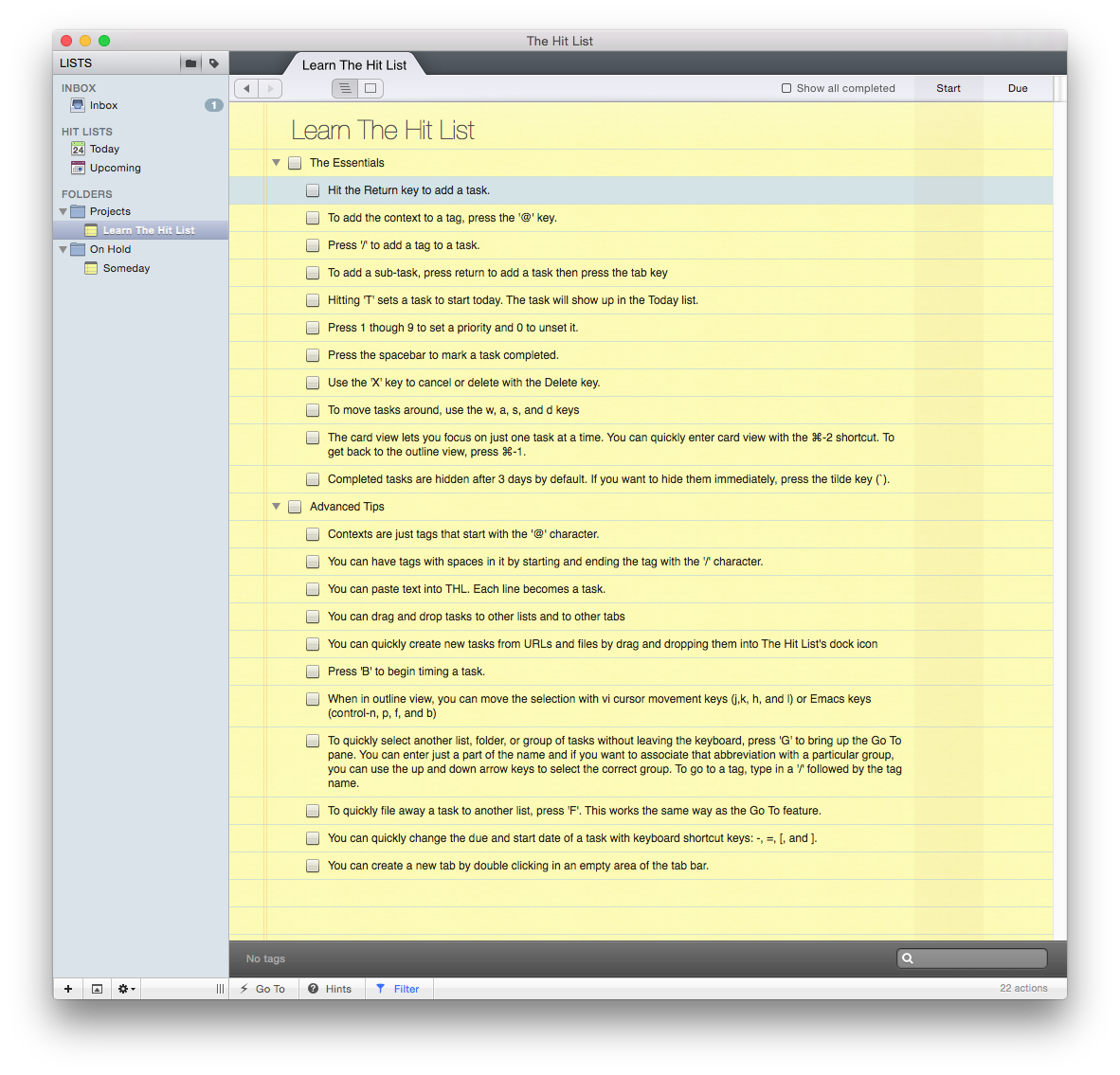
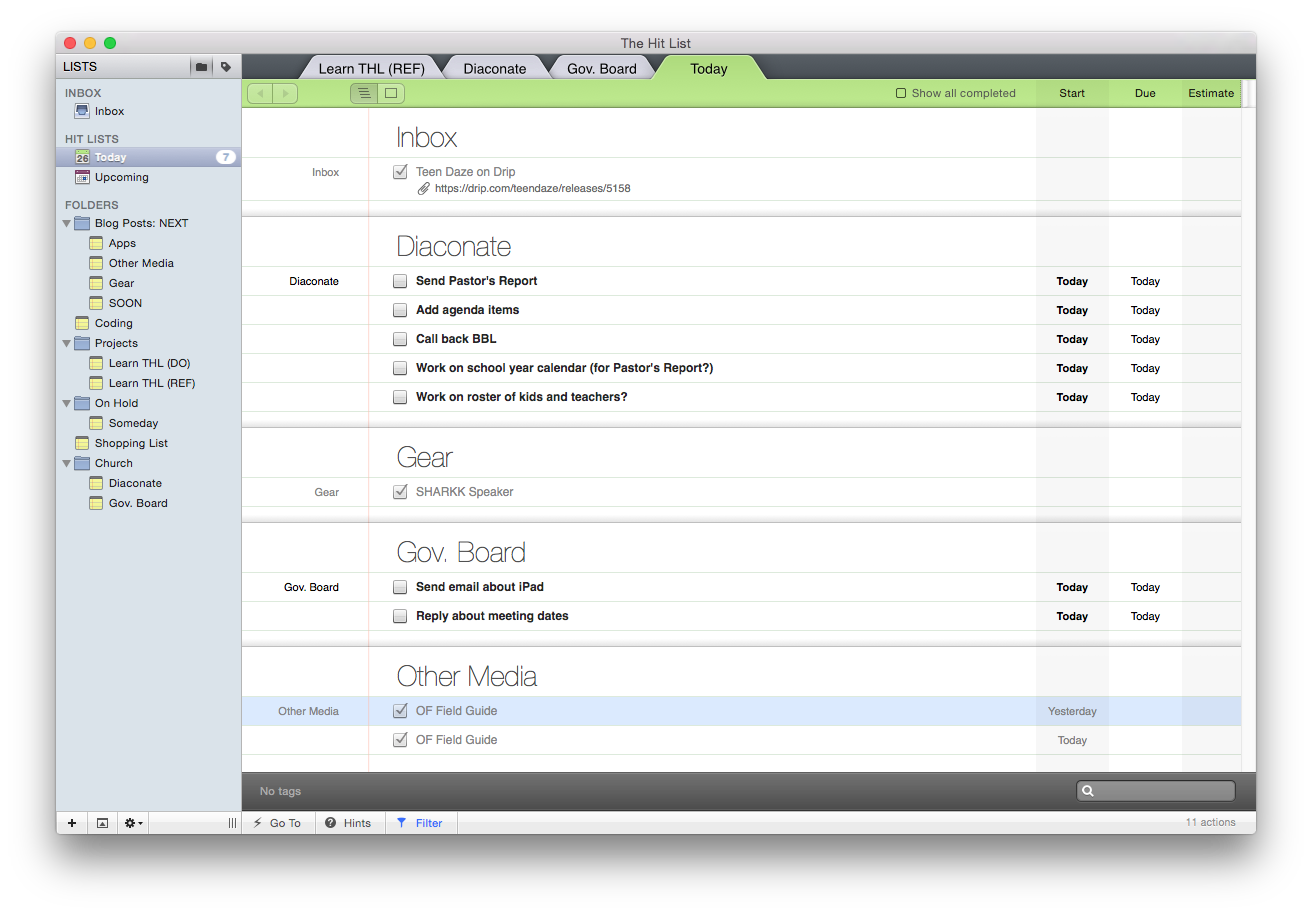
Perhaps the most noteworthy feature is the extensive system of one-stroke keyboard shortcuts on the Mac app. You can do just about anything without having to move your hand to the mouse. And The Hit List (hereafter THL) comes with a nice built-in tutorial to get you going:


Learn THL
(click image to enlarge)


The Mac layout doesn’t totally match the rest of El Capitan, but I don’t mind that at all. I especially like that you can have multiple lists open at once–in one window–as various tabs. This mirrors how we browse the Web, yet out of all the task management apps I’ve tried, THL is the only one to incorporate it.


Mac_Multiple tabs
Tabbed task management! (click to enlarge)


It’s a really nice touch, especially if you are actually working on a few projects at once and want to be able to close tabs as you go. Or if you want to toggle between your time-sensitive “Today” tasks and other projects.

The tagging system on all platforms is neat. By typing “task /tag” you automatically can tag a task. It then shows up in a different color on the task entry line and puts itself into the right tag.

You can give sub-tasks to tasks, which is often what happens in real life! Our tasks turn into a series of sub-tasks, too. Of course you could just separate a multi-task task into its own project, but the ability to rapidly enter sub-tasks is great.

Probably my favorite part about THL is its task timing integration. Yes, you read that right. You can both assign estimated time to tasks, as well as track it! It’s not as robust as a dedicated time tracking software–you can’t get to-the-minute readouts of your day. But it’s a pretty sweet feature on the Mac app.


Time Estimates


Counting Clock


The iPad app just came out, and it’s got Slide Over and Split Screen support right out of the box. It’s very cool to finally see THL on a bigger screen. (The iPad app is lacking in any external keyboard shortcuts however; future updates should add these in.)


What I Found Lacking in THL


1. No Save+.


Rapid-fire brain dumping is tricky in THL. Well, it’s not impossible, but on iOS there’s no Save+ button so you can just add a bunch of tasks at once without multiple taps. Keyboard shortcuts make it quick on the Mac app, though.


2. You can’t email a task to the app.


It continues to perplex me that this is not standard issue in a task management app. I don’t know… maybe it’s just hard to implement. In THL there is no way to convert or forward emails to tasks from wherever you are. Evernote and OmniFocus allow this, as will 2Do soon. This functionality is essential to me in a task management app.


3. The iOS app isn’t as configurable as one might like.


The criticism that you have to understand the app on its own terms often gets leveled toward OmniFocus, but I experienced some confusion in THL with the “Today” list. Support was outstanding in helping me to understand it (which I do now), but the Today list shows all your tasks that start today. You can’t adjust it to show just your tasks that are due today, which feels to me a more natural way to use it. You can’t even really trick Today into doing what you want, since a task with no start date that is due tomorrow still pops up in Today.

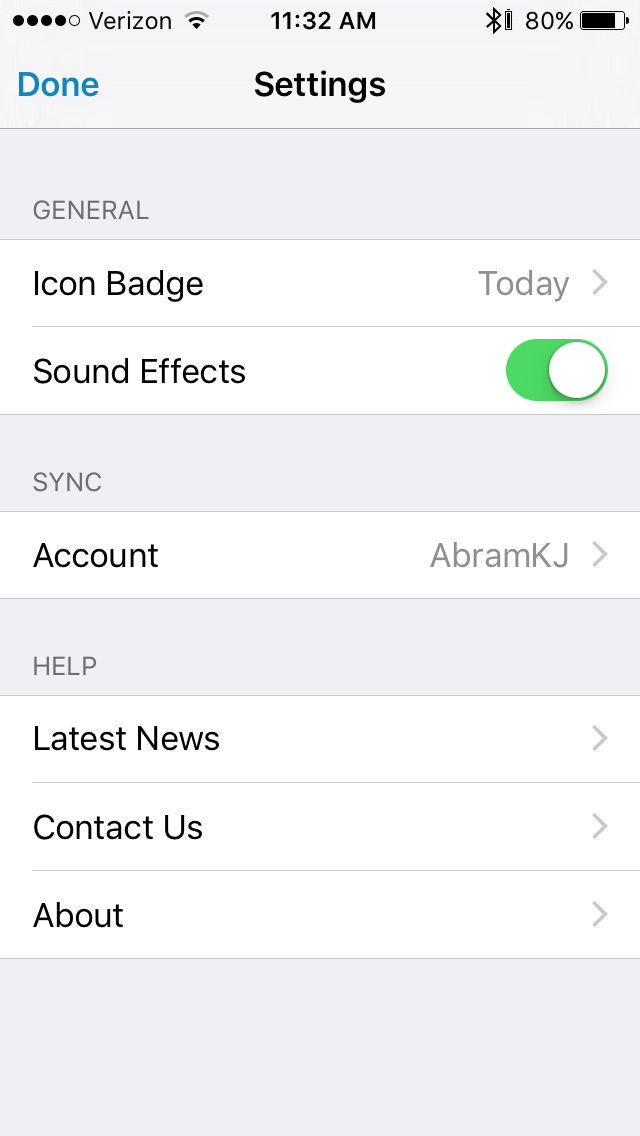
On the iOS app, there are few settings you can configure:


iOS Settings


THL also sort of forces you (if you’re going to use the app) into its Inbox–Today–Upcoming logic. (These three “hit lists” give the app its name.) This could be a limitation for some. That way of setting up things, to which you can add your own lists, appeals to me, so it’s fine. On Mac you could create a “Due Today” smart list, so there is flexibility in that regard.


Three Lists


4. You can’t attach anything to tasks in iOS.


There is no way (whether in iOS or OS X) to attach photos or files to an item. It’s hard to envision a week where there isn’t at least one time when I want to take a picture of something as a reminder or attach a .pdf I need to complete a task. You can link to actual files on a desktop with the THL Mac app, but that’s not the same as attaching the file to the task, so the file doesn’t show up on iOS (just an error message). There’s a notes field, so you can leave additional text, but attachments aren’t really a working feature in THL.


Concluding Thoughts and How to Get THL


There’s more to say, of course. The Today widget and Share extension features in iOS work nicely. The layout and interface of the apps is executed well on all platforms. It runs really smoothly, and looks great in its new iPad incarnation. Smart lists can help you customize your experience. Recurring tasks are easy to set up. You can quickly swipe a task on iOS to change the due date or move it to a different list and folder.

This is a little thing, but I think my favorite thing about the app is the sound effect that goes off when you complete a task. I wish every app had that option! It’s like a little “congratulations!” every time you get something done. Very satisfying to hear that tone.

Their support is excellent, too. THL even made a feature addition that I had requested–the ability to drag handles to reorder task lists on iOS.

Okay, okay, one more nice little touch: the icon for note detail attached to a task is excellent. Just by looking at a task, you can tell if there’s an associated note. Similarly, a number icon shows you how many sub-tasks are connected to a task. Thoughtful design, for sure.

To sum up: the sound effects on iOS, tabbed list views on OS X, and integrated time tracking set THL apart from other apps, so if those appeal to you, this might be your app of choice. Lack of email integration makes it hard for me to think about switching to THL as my go-to task management app, but perhaps future updates will add that feature. Overall, THL is at least on par with Things and certainly an option one could consider alongside 2Do and OmniFocus.

You can find the app here (OS X) and here (iOS).


Thanks so much to the makers of The Hit List for giving me a download in iOS and OS X for the review. Check out the Karelia Software site here.

“No Hay Mal Que Por Bien No Venga”

Galilean JourneyThere is a compelling book about Jesus that I’ve been working my way through again recently: Galilean Journey: The Mexican-American Promise, by Virgilio Elizondo. Elizondo’s context is that of one who, as an ethnic minority in the United States, has experienced oppression and racism, which he connects to Jesus’ own experience of being ostracized as a Galilean with a non-mainstream identity.

He says:

Jesus can have compassion on the weak and erring because he himself has lived through the same situation. Without ceasing to be God, he entered the world of the voiceless, the sick, the hungry, the oppressed, the public sinners, the emarginated, the suffering. He did not come just to do certain things for them: he came to become one of them, so as to enable them to find new life in him and thus be able to do things for themselves.

I could go on about how rich the book is (and it’s barely 130 pages). But I especially wanted to share these lines, where he describes what he calls the resurrection principle:

Only love can triumph over evil, and no human power can prevail against the power of unlimited love. The more that the sinful world tries to crush and destroy the ways of unstinted love, the greater will be love’s triumph. A Spanish dicho can be applied here: no hay mal que por bien no venga (“there is no evil from which good cannot come”).

Good words for us to cling to!

Carta Publishing: 3 New Titles, at Introductory Discount

Carta 25 Off Banner


Carta–one of my favorite publishers–has just announced the release of some new titles. As with anything I’ve seen from Carta, they each look fascinating and thorough, even if the books themselves are brief.

Thanks to Carta, readers of Words on the Word (and anyone, really) can get 25% off a Web order at Carta’s online store. Simply click on any cover image below to go to that title, and enter the code 25-off to receive the discount. The offer is good through December 15 (UPDATE: December 31) or so.

Jerusalem City of the Great King

1. Jerusalem: City of the Great King, by R. Steven Notley (whose excellent works I have reviewed here and here)

This volume, the second of four in The Carta New Testament Atlas series, presents the latest advances in the history and archaeology of Jerusalem. The last fifty years in particular have seen significantly increased efforts to discover the city’s past. New finds every year render what is previously written almost out of date before the ink is dry. With an acknowledgement of this reality, together with a recognition that much of the Old City of Jerusalem remains inaccessible to archaeological investigation, the present work lays its shoulder to the challenge.

2. Understanding the Boat from the Time of Jesus: Galilean Seafaring, by Shelley Wachsmann

Understanding the BoatYes, an entire book (even if only 40 pages) devoted to understanding the state of the boat in Jesus’ time. When I flipped it open yesterday, I found myself drawn to and reading the two-page glossary of terms first! It’s a good sign that even the glossary is interesting. I’m excited to dig in to this one. Here’s the publisher’s description:

The ancient boat from the Sea of Galilee exhibited at the Yigal Allon Museum at Kibbutz Ginosar speaks of pivotal times on the lake two millennia ago, when an itinerant rabbi walked its shores and sailed its waters with his followers, and changed the world forever.

This volume aims to give the non-expert reader an in-depth understanding of the boat, the story of her discovery and excavation and, most importantly, her significance for illuminating Jesus’ ministry by helping us better understand its contemporaneous milieu of seafaring and fishing on the Sea of Galilee.

3. Understanding the Life of Jesus: An Introductory Atlas, by Michael Avi-Yonah, updated by R.Steven Notley

Understanding the Life of JesusUnderstanding the land of Jesus is a necessary component to comprehending the message he proclaimed. From the beginning of the four Gospels until their end, the Evangelists assume that we possess an intimate knowledge of the historical and geographical stage onto which Jesus stepped.

For most Christian readers this is unfortunately not true. Many have not had the opportunity to visit the Holy Land. Even for those who have, it can prove to be a confusing experience. Much about life in this land has changed over the course of two millennia.…

It is hoped that the maps [in this book] and the brief texts that accompany them can serve as a guide for the Christian reader to navigate the geographical stages in the Gospel accounts. …May the reader be aided in their pursuit to follow the steps of the Master and to grasp more clearly the message he preached.

As I have a chance to explore these titles more, I’ll report back. Again, the code is 25-off at Carta’s online store. (UPDATE 2: This code is good for the titles above and anything else in the store, not the least of which is this beauty of a book.) Also, if you have 13 seconds, are on Twitter, and like to share your opinions about printed maps, check out this poll, which particularly has the last title above in mind.


View my reviews of Carta works here. Check out their site here, and go here to see their works via Hendrickson, their U.S. distributor. For the next few weeks, however, the titles above are only available through Carta’s site.

Toy Review: 2015 Hess Fire Truck And Ladder Rescue

Actually *two* trucks! (Image via Hess)
2015 Hess Fire Truck and Ladder Rescue (Image via Hess)


Only the Hess toy trucks at the babysitting room at our local Y have convinced our two boys to accept a drop-off there. They’re much better built and way cooler to play with than one might otherwise expect from a toy made by a gasoline station.

Hess, it turns out, has been producing its Toy Truck line since 1964. The first make was a tanker trailer, modeled after the ones that brought gas to the stations. For $1.29 (including batteries!) you could put the tanker trailer under the Christmas tree for your little one.

2015’s model is especially awesome:

This year’s Hess Toy is a red Fire Truck with oversized tires, swiveling chrome-detailed fire hose nozzles, LED lights including a high-powered pivoting LED searchlight, a slide-out ramp and 4 realistic sound effects. The accompanying Ladder Rescue features a rotating extension ladder with a movable nozzle and push-activated friction motor.         (source)

Here it is (click on any image in this post to enlarge):


Hess Box


Hess Box Open


You’re really getting two trucks for the price of one. Which is good, because the toy is $30.99. That’s more than most parents I know would want to spend on a truck for their kid, but it also includes free shipping and batteries. Given its high-quality construction, the truck looks like it will last a long time, so I don’t think it’s an unfair–if high–price, especially considering all its features.

Here’s what the trucks look like with lights on:


Both Trucks Lit Up


I got quite a start when I pulled out the ramp at the back of the larger truck–it makes a robust sound that you’d expect from a real-life mechanical ramp. It’s not the kind of annoying sound that will bug you when on repeat, but this might be a toy for kids to take out of their brother’s bedroom and into the living room when they wake up at 6:30 a.m. to play. The ramp makes for an easy entrance/exit for the Ladder Rescue truck to go do its own thing.

The Fire Truck has more sounds than the ramp. There is also an Ignition button (very realistic), a Horn, and a Siren. Each sound plays for about 10 seconds and is–this is worth repeating–not something to play with while baby sister is napping. But that makes the toy all the more fun and awesome. The horn sounds like there’s a real emergency at your house. (Not to mention the siren!) If need be, you don’t have to wait 10 seconds for it to stop; you can just push the button again to silence it. (That’s a thoughtful feature!) So long as your neighbors know it’s just the Hess Toy Truck and don’t go calling 9-1-1 on you, you’ll be fine.

You can turn just the lights on via the switch under the truck. There are two options: you can have the lights solidly on, or turn them on in flasher mode. Regardless of what you do at the bottom of the truck, turning on any sounds causes the lights to flash. There’s also a button on top of the truck that turns just the spotlight on.

The wheels are on both trucks really securely, so you can run them across the kitchen floor at full speed and not worry about it running into the fridge. It’s a smooth ride.

The smaller Ladder Rescue truck is fun in its own right. It’s got a fully extendable plastic ladder with a small water spout (not real!) on the end. Both trucks are sturdy and made of hard, solid plastic. The trim pieces (mirrors, ladder hose, front visors) feel a little flimsier than one might hope, but it would take a child’s deliberate act to break anything here. (Not outside the realm of possibility.) The ladder swivels a full 360 degrees and can be snapped into place when not extended.


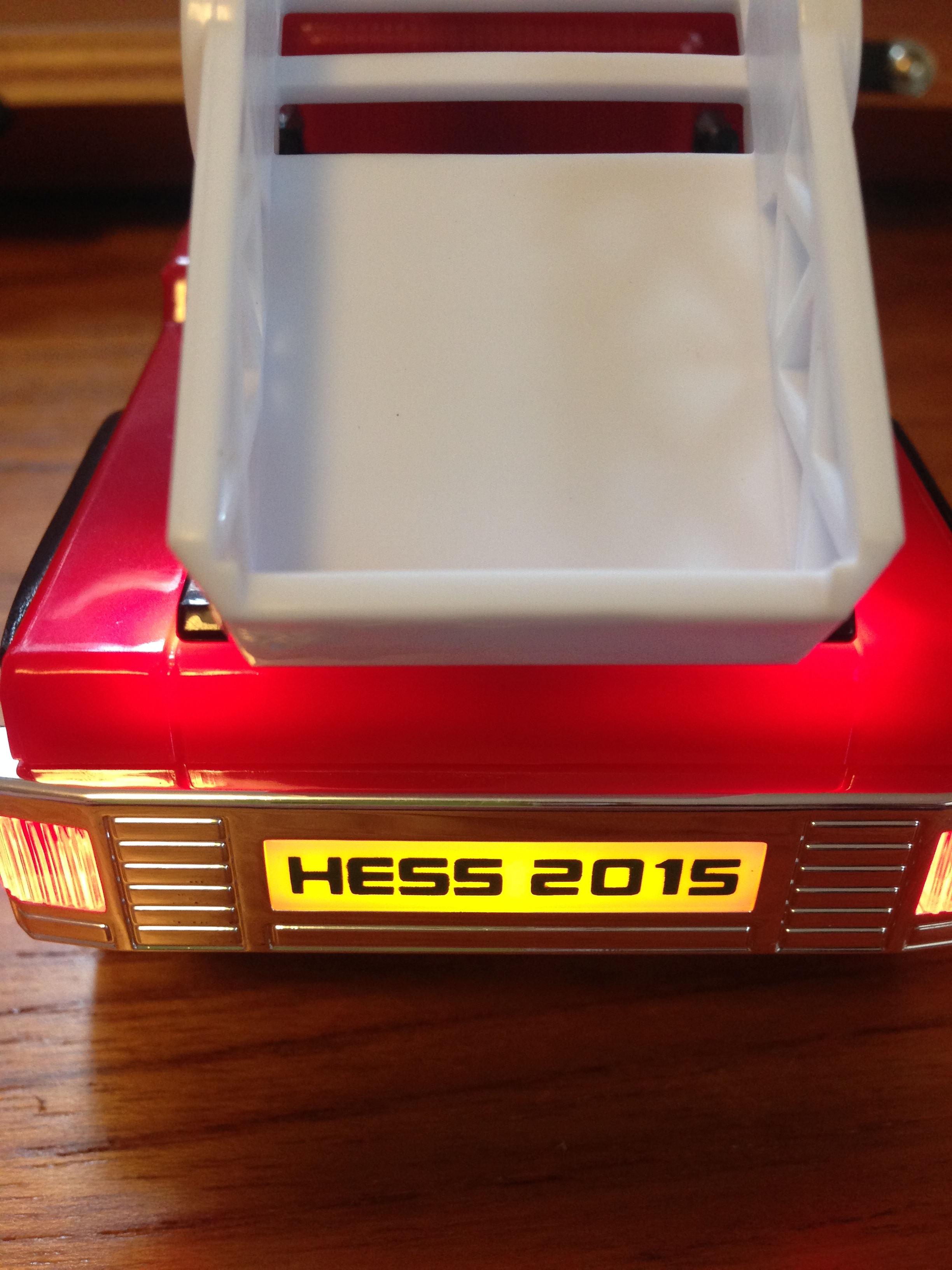
Ladder Rescue Lit Up Extended Ladder


The Ladder Rescue truck also lights up via an on/off switch on the bottom of the truck. What this means for parents is that your child will turn off all the lights and find the darkest place in the house right away, so as to test the truck properly. 🙂 Parents will also want to make sure to turn the toy off at night so as to not let the batteries drain.

You can’t open the doors to either truck, so your LEGO minifigures will have to latch on somewhere else, but there is plenty of room for them to hop on and go fight fires.

This is really an awesome toy, and the more I played with it (yes, I played with it), the more I enjoyed it. Hours of countless fun for children are inevitable. Both trucks are thoughtfully designed and excellently executed. And the Fire Truck is pretty giant as far as children’s toy vehicles go, so you could do well to make this the “big” present you’re getting your child(ren) this Christmas.


Back of Ladder Rescue


One other cool thing: Hess has made 100 individually numbered Silver Editions of the Fire Truck and Ladder Rescue toy. I got the expected red one and was not disappointed.

You find out more and purchase the truck here. You can find the Hess Toy Truck on social media (#2015HessToyTruck) here: Facebook/Twitter/Instagram.


Many thanks to the fine folks doing PR for Hess who set me up with the free product sample for review, with no expectations as the the review’s content.