Mediac: This Is The Most Serene Republic in 2015


IMG_0137


The first half-minute of ambience that opens Mediac took me right back to the first time I listened to The Most Serene Republic’s fantastic debut Underwater Cinematographer. I have my sister-in-law to continue to thank for introducing me to that still-ahead-of-its-time album.


Unique Toronto, Unique Toronto


TMSR always has been and still is a band very much their own. Are there 4 members? 8? 126? It doesn’t really matter, because they all (there are actually 6) play in sync with each other, even while contributing unique lines you might not otherwise think could be combined in a single song.

That’s part of the band’s unique genius. Sometimes you’re experiencing the music as one unified groove, as in the poppy “I Haven’t Seen You Around,” Mediac’s second track, or as in “Ontario Morning,” the album’s first single. Other times you hear the instruments more disparately and have to work harder to take a song in, as in “Brain Etiquette,” the album’s second-to-last song.

TMSR is not afraid to challenge their listeners, a trait I admire in a band. What other rock sextet do you know of that routinely incorporates brass and strings as if it were second nature? Well, okay, maybe a lot do, but not this creatively. “Failure of Anger,” the sixth track, makes you wonder why you haven’t heard more banjo and electric guitar fuzz in the same song before this.

But back to the beginning for a minute.


TMSR Through the Years


Underwater Cinematographer came in 2005. And on a blog that has long since disappeared from the Internet, Phages was my 2006 Album of the Year… even though it was an EP. That’s how good these guys are. Their live show matched the energy and quality of their recordings. They were probably my favorite band of the mid-oughts, or whatever we finally ended up deciding to call that decade. Their second full-length, Population (2007), was my favorite outdoor running companion for many months.

I sort of lost touch with the band at that point, and they actually have been on hiatus themselves for the last five years. Well, they’ve worked the last four years on Mediac, but I don’t know who knew that until now.

 

PR Photo of Some Cool-Looking Dudes


Word Association


Ready for some album reviewer’s word association?

Creativity? They’ve still got it.

Quality production? Check. (Brought to you by Ryan Lenssen from the band and David Newfield, who has overseen Broken Social Scene, Super Furry Animals, and Los Campesinos!).

Memorable hooks? Done, throughout.

Lush, interweaving guitars? Yes, even if it’s not a priority as such.

Thought-provoking, critical-of-the-mainstream lyrics? Uh, yeah. In “Capitalist Waltz” (which, awesomely, is not a waltz) Adrian Jewett snarkily sings, “I’ll advertise for you,” an impulse we reviewers have to face cautiously, much as we may love the bands we write about.

In that spirit, some lyrics hit me as a little obtuse:

To fill the day with an effigy of you,

while Earth’s cigarette is freshly lit

in the modern times, the modern times.

(Et tu, Facebook? he Tweeted.)

That same song is still catchy, though:

A montage of you turning around, turning around, turning around

And, okay, I’ll admit–if I’m understanding the song right, referring to Facebook (and/or Instagram) as “Earth’s cigarette” is actually right on the money.


Concluding Evaluation and Where to Get Mediac


I’m thrilled these guys are back in action with another full-length. Their first few records showed real progression, while each being winners in their own right. Medaic is a little harder for me to know how to place in the TMSR corpus, all of which I’ve listened to. It has some real bright moments, though I didn’t initially experience it as being as cohesive or as innovative as previous efforts.

That said, if you have never listened to TMSR, they exude talent, passion, conviction, and RAWK on any album they put their hands to.

And even as I wrap up this review, some weeks after starting to listen to Mediac, it’s growing on me with each listen. I find more hooks, melodies, motifs, and layers to latch onto each time.

You probably will, too, so definitely untangle those headphones in your jeans pocket, download the album, and queue up your iPod. The Most Serene Republic is back.

Mediac releases today, November 13. You can find it on Amazon here, iTunes here, or at the band’s site here.


Thanks to the fine folks doing PR for TMSR, who provided me with an advance copy of the album so I could review it.

Habit List: A Sophisticated iOS Habit Tracker

I noted in September that the App Store has seen quite a few habit tracker apps of late.

Why not just use your task management app, you might ask?

Well, one can get tired of seeing the same “Update YNAB” task every day. Or the same “Study Greek” reminder. Habits and tasks aren’t the same per se.

This may be splitting hairs, but since getting past my initial skepticism, I’ve been using one habit tracker or another for much of the fall. The interface of Streaks is unparalleled, and Productive makes a cool sound when you complete a habit.

Habit List, on the other hand, is the most powerful and customizable of the three.


Options Galore


Habit List takes the cake in what it allows you to do with regard to scheduling your habits. Every potential use I imagined I could accomplish with the app.

You can set up a habit with just about any frequency imaginable, whether certain days or x times per week, and set a reminder. If I want to work out three times a week, I can set up a habit for that, without it having to be the same three days in a given week.


Habit Frequency


Set Habit Reminder


I came to Habit List from another app and could easily backdate edit my habits-in-progress so I didn’t have to start at zero just because I was using a new app. This was unexpected and a great touch.

This also means that if you are completing the habit but forget to track it for a few days, you can easily make the manual adjustment in Habit List.

You can view stats for individual habits, presented in a variety of ways:


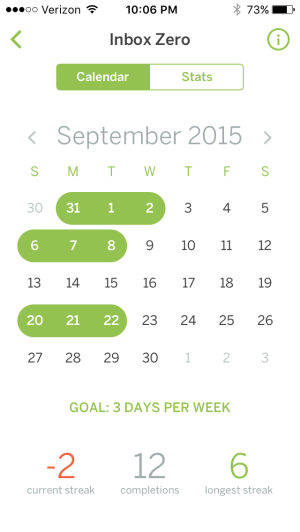
Calendar Stats


Monthly Stats


There is no limit (at least that I could find) to the number of habits you can track. So, sure, why not go ahead and add, “Take out trash Friday mornings”?

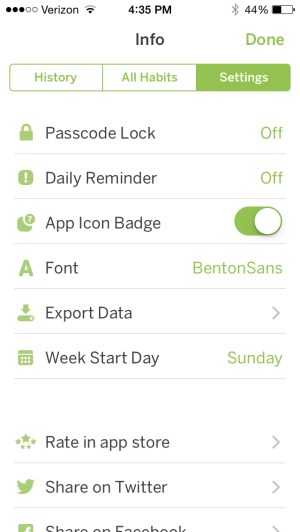
Here is a look at more app settings:


App Settings


For Future Updates?


Marking the completion of habits in Habit List feels very much like crossing off a list. The interface is exactly that. You swipe your finger across a habit to signify you’ve done it. No filled-in circles, no animations, no sounds. This will be fine for many, but there may also be more aesthetically pleasing user interface options for future updates to explore–whether color changes, distinct habit icons, etc.

Maybe this is draconian or just Pavlovian on my part, but I found myself wanting more from the UI that would give me a sense of satisfaction when crossing off a habit. (I know… what do you want, people cheering??? Well….)


Final Words and Where to Get the App


TL;DR: Habit List doesn’t quite have the pretty layout of some other similar apps. But it has the most functionality of any habit tracking app I’ve tried. There are no limits on what you can track, as well as a great degree of flexibility. If you’re serious about tracking some specific habits and don’t mind a minimalist layout, you may have found your app.

Find Habit List in the App Store here.


Thanks to the good folks who make Habit List for the review copy of the app, given to me for this review but with no expectation as to its content.

Cozy Classics: Best Board Books Ever

I finally read War and Peace last week… in about two minutes!

At first I thought Cozy Classics, 12-word board book summaries of classic works of literature, were gimmicky. But then I read War and Peace and Les Misérables. And the cuteness nearly melted me. (“So adorable it makes our hearts hurt,” rightly said one reviewer.)

My kids (ranging in age from pre-school to lower elementary) love the books, and my littlest one can easily memorize them. They’re perfect reading practice for my middle child.

Yes, it’s really impressive that anyone could even attempt to summarize such massive tomes in a dozen words. Les Mis begins:

poor
rich
sad

But what stands out even more is the beautifully detailed images of needle-felted characters. Check out the detail of the first page of Les Mis. (And note the page in the background!)


From the adult version of the book:

Cosette was made to run on errands, to sweep the rooms, the courtyard, the street, to wash the dishes, to even carry burdens… It was a heart-breaking thing to see this poor child, not yet six years old, shivering in the winter in her old rags of linen, full of holes, sweeping the street before daylight, with an enormous broom in her tiny red hands, and a tear in her great eyes.

Or, as the Cozy Classic puts it:

sad


Both Les Mis and War and Peace initially make for a quick read, as you might guess. But my kids have really enjoyed the detail of the images (as have I!), and having so few words makes them easy to understand and retain. I did have to explain “stroll” to my three-year-old, but that provided a nice little vocabulary lesson.


Image from War and Peace


These books are not only adorable; you’ll feel like a great parent in introducing your kids to these classics.

Check out Les Mis’s product page here and War and Peace here. All the Cozy Classics are here. AND… there is now a Star Wars trilogy.


Thanks to Simply Read Books for the review copies, given with no expectation as to the content of the review.

Why I am a Pastor, in 10 Words


We hiked through the woods on a perfect fall day, our whole family and another family, whom we love spending time with.

My wife and I were talking about my potential as a small business owner. I told her how much I’d love being at the helm of a startup.

But what kind of startup to start?

I: What does the world need that it doesn’t have?

She: Jesus.

I: Exactly! That’s why I’m a pastor.

The startup can wait for me, at least for now.

Biblia Hebraica Quinta (BHQ): Genesis!!

Though it’s been long in coming, the Biblia Hebraica Quinta (BHQ) is meant to supercede the current scholarly edition of the Hebrew Bible, the Biblia Hebraica Stuttgartensia (BHS).

What is the BHQ? Start here and you’ll get a good grasp of it. I updated my readers in 2014 with what was then some new information. To my great surprise, in a .pdf from Hendrickson Publishers today, I saw a cover image for the Genesis volume!

Look on the far right:


BHQ Genesis


So new is it that Amazon and Hendrickson both don’t have it listed by ISBN or any other means. Hopefully it really will show up soon!

UPDATE: I have received word that the expected release date is Spring 2016.

Alternote: An Alternative to Evernote for Mac

Alternote App IconAlternote is an Evernote client–yes! an Evernote client does exist–for Mac. If you use Evernote and have any level of dissatisfaction, especially with its layout, you should consider Alternote. It may not be a fully suitable replacement for Evernote, though. I explain why in my review below.


The Basics


As with Evernote, Alternote gives you three panes: the sidebar, the Notes pane, and the editor window with Note content. You can hide the sidebar to have two panes, or go into distraction-free mode, where you simply view the note you’re writing in.

There are some nice font options, as well as the option to get into a visually pleasing Night Mode:


Alternote Layout


This makes Alternote a much more appealing app for writing on a Mac. If you use Evernote to organize substantial amounts of text (i.e., more than just Web links), you’ll appreciate the look and feel of Alternote.


Evaluation


You can successfully drag a file or image into a Note in Alternote. What does not work in Alternote is dragging a PDF, for example, into the app to make it its own Note. I hope a future update adds this feature, as I consider it to be somewhat basic Evernote functionality.

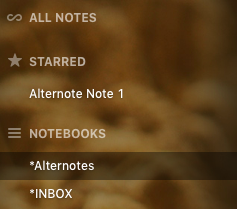
Starred NotesYou cannot create Notebook Shortcuts in the left sidebar–which is another big part of how I use Evernote. You can star certain Notes for easy access—and can just drag the Notes into the sidebar to do it–but not Notebooks.

This means Notebooks—especially the few you use most—are a little trickier to navigate in Alternote. You can scroll down the sidebar list, of course, or—what may be quicker—access them via a drop-down menu.

Alternote feels lighter than Evernote, for which I appreciate it, but it’s not necessarily faster or higher-performing. I had expected it would be. On the other hand, if you’re using the Basic Evernote level, you won’t get bombarded in Alternote with a steady stream of upgrade ads!

One nice touch in Alternote is that you can selectively sync your Evernote content.

Alternote SyncThat said, automatic sync maxes out at every 15 minutes in Alternote, which will not be automatic *enough* for some. I was worried when I was writing this review (in Alternote!) and it crashed without having finished a sync. (Alternote is pretty good but still a little buggy on El Cap.) Fortunately my text was still there in Alternote, but I was eager to force a manual sync after that. I’d had some initial sync misses with my initial setup, which a revision had fixed, so hopefully Alternote will sort all this out soon. I haven’t lost any data, however, so you’re safe in using it, for the most part.

The greatest asset in Alternote is its more uncluttered interface, which makes it better than Evernote for just plain writing. If Alternote would improve its sync issues, overall speed, and add other bits of core Evernote functionality, it could easily become your go-to app for managing Evernote.

An Alternote iOS app is in the works and slated for Spring 2016. Get it in the Mac App Store here, and check out the Alternote site here. If you don’t have an Evernote account, I recommend it; learn more here.


Thanks to the people at Alternote for the app download for the purposes of review.

Jesus’ and James’s “Spring of Water”

Spring Water


I’ve been preaching through the amazing book of James this fall. As I am able, I hope to post more of the sermons. In the meantime, here is something that occurred to me after I’d preached a particular passage.

To the woman at the well in John 4, Jesus says:

Everyone who drinks this water will be thirsty again, but whoever drinks the water I give them will never thirst. Indeed, the water I give them will become in them a spring of water welling up to eternal life.

A spring of water… that wells up into eternal life. This led me to think of something James, brother of Jesus (probably), says:

Can both fresh water and salt water flow from the same spring?  My brothers and sisters, can a fig tree bear olives, or a grapevine bear figs? Neither can a salt spring produce fresh water. (James 3:11-12)

James never quotes it, but much of his letter is a fleshing out of Jesus’ saying, “Out of the overflow of the heart, the mouth speaks.”

It seems James could have that in mind here: it is out of the overflow of the spring of water of eternal life–given to us by Jesus himself–that we use our words to bless others.

NIV Application Commentaries (Including Bundles), Less than $5 a Book

NIVAC sale


There is another big sale on Zondervan’s NIV Application Commentary series, with each of the ebooks selling at $4.99–on, among other places, Amazon. For the first time Zondervan is offering various discounted bundles, too. Check them out here.

As I’ve said before, I really liked Psalms vol. 1 in this series. There are a lot of really good volumes in NIVAC, like Genesis, Peter Enns’s Exodus, and the sleeper hit of the series: James (David P. Nystrom). (Seriously–I think it might be the best of the bunch.)

All the Table of Contents now are hyperlinked, so navigating via Kindle or iBooks should be relatively manageable. You won’t get the same sort of search power you’d get in Accordance or Logos, but the price is tough to beat.

Blink: An App for “Better Affiliate Links”

File_002 

Words on the Word is barely monetized. I’ve said before that I write the blog for love of the game, i.e., because:

  • it’s a creative outlet for me
  • I enjoy writing
  • I want to help resource others with the best books, biblical commentaries, apps, workflows, music, toys, and so on… whether it be for their parenting, pastoring, or personal enjoyment of life
  • other reasons, probably

In the monetization department, I participate in a couple of affiliate programs, most recently the one through iTunes, where I receive a tiny commision from Apple on any apps or tunes you readers purchase through affiliate links. I think I’m up to $0.70 now!

It’s not impossible to just go and fetch an affiliate link through a Web browser, but John and Owen Voorhees of Squibner LLC have a first-rate app, Blink, that allows you to effortlessly make affiliate links. It works for the App Store (iOS), the Mac App Store (OS X), the iTunes Store (music, videos, etc.), and the iBooks store.

Here’s what it looks like:


File_003


I find that I mostly use the plain text links, and then copy them over to a writing app (I’m writing this blog post in 1Writer, and yes, that hyperlink was generated via Blink in about two seconds). But Markdown formats are also available.

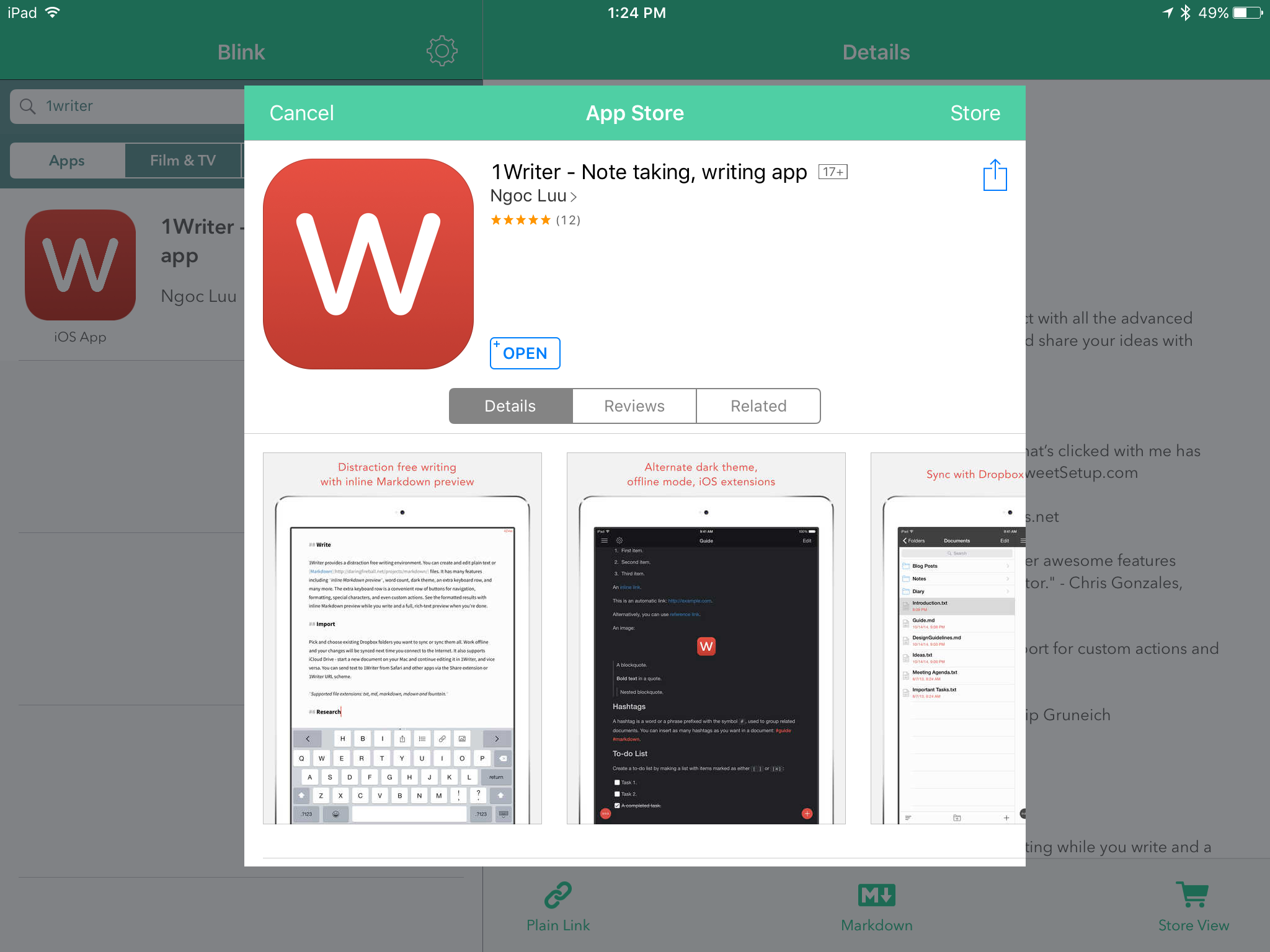
You can use Blink’s extension to a create a link with your affiliate ID from the App Store itself. In other words, you don’t have to go into Blink and look up the app you’re already viewing in the App Store:


File_004


They’ve just updated the app, too, to 2.0. Here are the highlights of what’s new:

• Blink now requires iOS 9
• iPad split screen multitasking on supported devices
• External keyboard shortcuts
• Multiple affiliate token support with nicknaming for easy management
• Ability to change geo linking and music settings from Blink’s extension
• Edit links within Blink’s extension
• For apps, view app type and price information within Blink and its extension
• Also view pricing information for music and books in Blink and its extension
• Podcast app support

I don’t use campaign tokens, but those who do will find it easy to manage specific campaign tokens via Blink. Also cool is the App Store view, which you can access from within Blink:


File_000


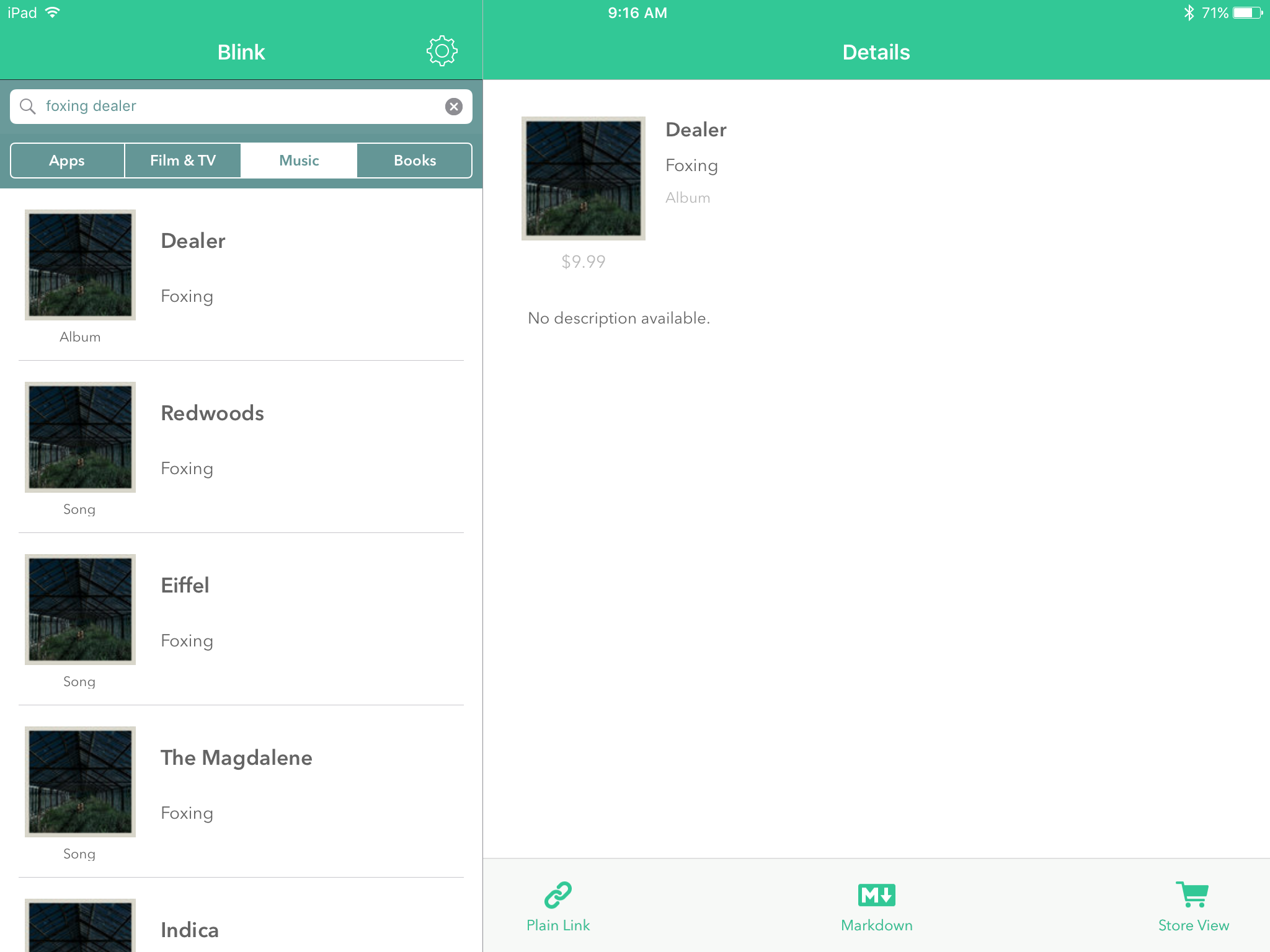
The attention to detail is evident in the app, as shown here, for example, when a music search differentiates between Song and Album before you have to click through:


File_001


You can use multiple affiliate IDs, if you need to.

My sole negative/constructive critique of this app is that I wish there were a way in-app to save searches and/or links you create. This is not insurmountalbe, though, since link generation is so fast.

Pay for Blink once, and you get it for both iPad and iPhone. You’ll probably earn back the $4.99 cost of the app in affiliate links anyway, which will now be quite hassle-free.

Five stars and two emoji thumbs up for this simple, focused, and perfectly executed app. Which, by the way, you can find here.


Thanks to the good folks at Squibner for the app download for the purposes of review.