Logos 4 Review: The Septuagint

I enjoy reading the Septuagint in Greek (as best I can), and I enjoy using Bible software programs to do it. In this post I offer part 2 of my Logos 4 review (part 1 is here), focusing on the Septuagint in Logos.

Here is what the Original Languages Library has by way of Septuagint resources:

  • Septuagint with Logos Morphology (Rahlfs-Hanhart)
  • A Greek-English Lexicon of the Septuagint (Lust/Eynikel/Hauspie)
  • An Intermediate Greek-English Lexicon (Liddell/Scott)
  • The Parallel Aligned Hebrew–Aramaic and Greek Texts of Jewish Scripture (Logos product page here)
  • The BHS Hebrew Bible with WIVU morphological analysis (as well as other Hebrew-related resources)

As far as texts go, the standard base is there (Rahlfs). And there’s instant morphological analysis so you can hover over a word to see its parsing right away. The LEX Septuagint lexicon is my personal go-to, and adding the Liddell-Scott abridgement is an especially nice touch. Students can do decent lexical analysis of words in their Septuagint-specific context.

The best part is the inclusion of the Parallel Aligned Hebrew-Aramaic and Greek Texts of Jewish Scripture. Here’s what Logos says:

Prof. Tov’s Parallel shows how the Hebrew and Aramaic line up against the Greek text on a word-by-word basis, but it does far more. In places where the Greek text doesn’t follow the Masoretic reading, Dr. Tov has provided a reconstruction of what the Hebrew or Aramaic text that the Greek translators were looking at might have been. In addition to these theoretical reconstructions, this database includes copious notes on the translation techniques used by the Septuagint translators, making this work a rather specialized commentary on the text. Did the Greek translators change the word order for grammatical or stylistic reasons? Did they change the voice of a verb from passive to active? Did they use a genitive absolute to translate an infinitive absolute? These types of observations are exhaustively noted in the alignment.

Dig this:

It’s a really nice feature, and presented especially well in Logos.

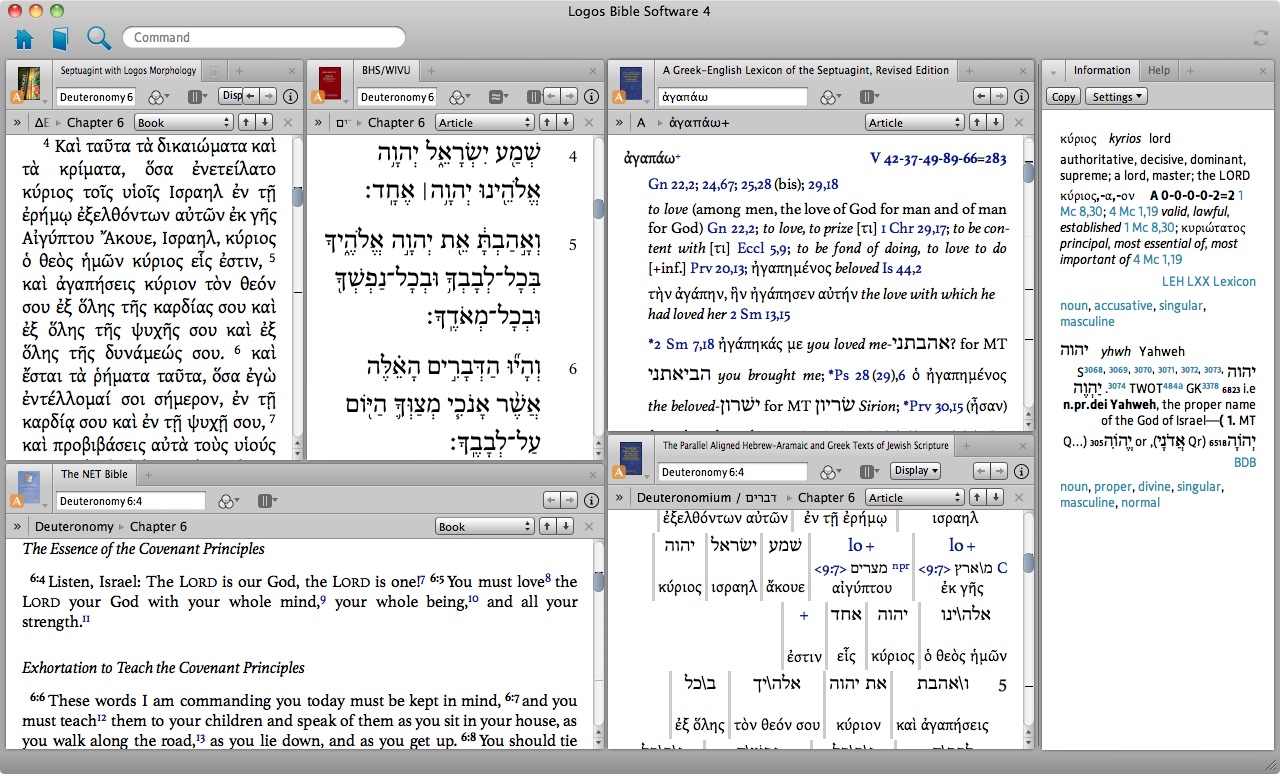
With all of the above in use, here’s what my Septuagint layout looks like in Logos 4 (click to enlarge):

That’s six resources open at once, each of which is plenty visible! And moving around which tabs go where, re-sizing, opening “in a floating window,” and saving the layout is easy.

The little orange A next to each resource icon/image is a “Link Set.” By clicking on the icon/image of the resource, I can assign it a letter in a Link Set, which then means each of the tabs and resources updates as any one of them moves ahead. So if I move ahead through the Greek LXX, the Hebrew MT follows, as does the NET Bible, as does the MT/LXX Parallel. Nice.

It was easy enough to figure out how to make LEH my default lexicon (“prioritize” it, in Logos parlance). Now double clicking on any Greek word opens up the corresponding entry in that lexicon.

The Information tab at the right in the screen shot above gives lexical and morphological analysis of any word. And something that’s not present in the image above: the bottom gray portion of Logos (just under the bottom left tab) also updates with morphological analysis as you move over a word. That part of the screen updates faster than the Information tab, which has just a slight delay in displaying new information.

One thing that stands out as a possible oversight is that there is no English translation of the Septuagint bundled with the Original Languages Library. In other major Bible software programs for a comparable price and package level, there is at least one English translation of the Septuagint, so Logos is unique here. (Logos does have Brenton’s English translation available, though you have to purchase it in addition to this package to use it.)

The MT-LXX Parallel, the two solid LXX-related lexica, and the customizability of the layout are standouts when it comes to using the Septuagint in Logos 4. One other thing worth mentioning is the availability of the Göttingen Septuagint and apparatus in Logos. It’s an add-on module that’s not cheap, but its price for how much it offers is hard to beat anywhere, digitally or in print. There are other Septuagint resources that Logos has digitized, too, that would be good additions to a digital library.

Thanks to Logos for the review copy of Logos 4 with the Original Languages Library included. For the review copy I will be giving my honest impressions of the program in a multi-part review. The couple Amazon links in this post are Amazon Affiliate links.

My Accordance 10 review: all six parts (plus Beale/Carson module review)

Here, collected in one place, are all six parts of my review of the Bible software program Accordance 10, as well as my two-part review of the Accordance module for Commentary on the New Testament Use of the Old Testament, edited by G.K. Beale and D.A. Carson.

Part 1In which I finally try out Accordance Bible Software for Mac (new version 10!)

Part 24 Cool Features in Accordance 10

Part 33 Powerful Ways to Search in Accordance 10

Part 4The Original Languages Collection in Accordance 10 meets Septuagint Sunday

Part 5Accordance 10: Bells and Whistles

Part 6: More Bells and Whistles in Accordance 10

Review of Commentary on the New Testament Use of the Old Testament, edited by G.K. Beale and D.A. Carson:
part 1 / part 2.

UPDATE: Go here to see my comparative review of BibleWorks, Accordance, and Logos.

UPDATE 12/29/12: Here I review the User Notes feature.

Thanks again to Accordance for the review copies of the Original Languages Collection and the Beale/Carson module. Five stars for all of the above.

Review: Accordance 10’s Commentary on the New Testament Use of the Old Testament, by Beale and Carson (part 2 of 2: the content)

Commentary on the New Testament Use of the Old Testament, edited by G.K. Beale and D.A. Carson, is available as an add-on module in Accordance 10. In the first part of my review of the module, I focused on Accordance’s presentation of the commentary. Here I review the content of the commentary itself, but still with a close eye on how I’ve experienced it in Accordance.

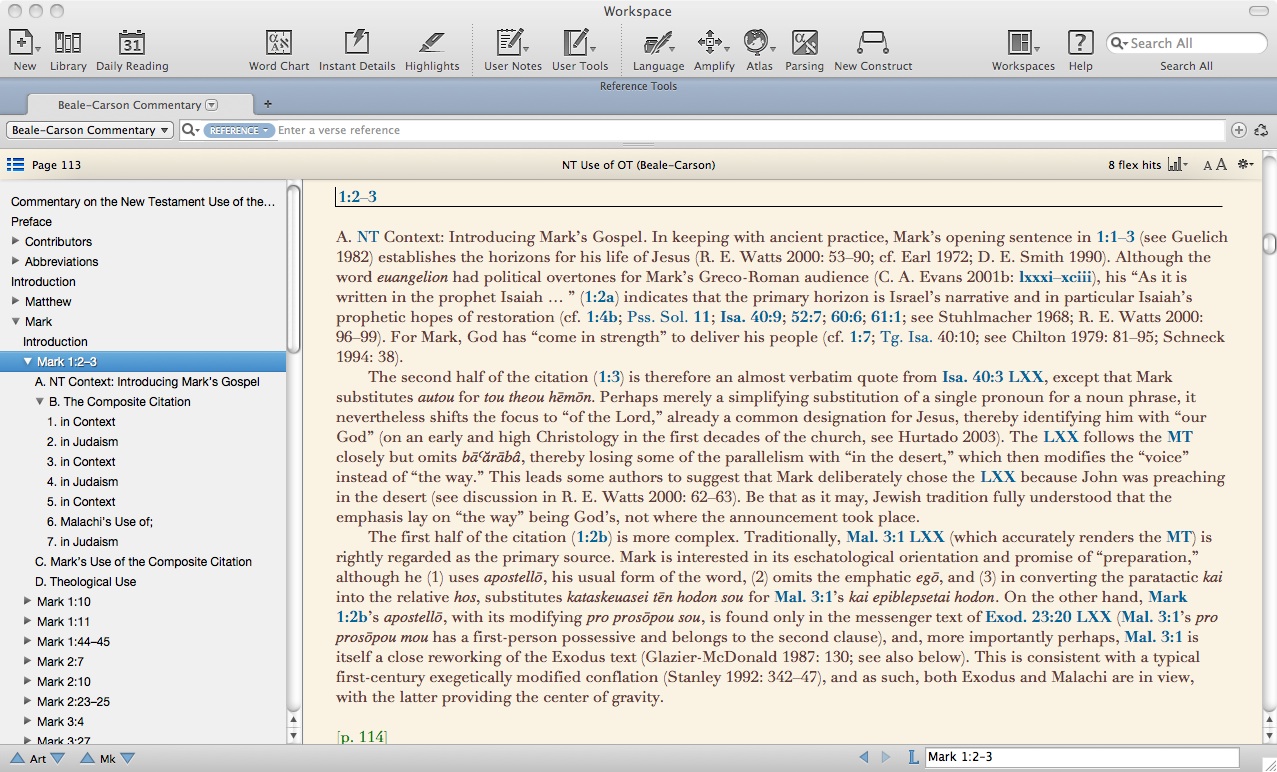
I mentioned in my last post that for reading this commentary straight through (e.g., if I want to spend some time absorbing the introduction to any given book), I can easily detach it from a given workspace where it has shown up as a “Reference Tool.” I also noted that navigating through the various headings and sub-headings of the commentary is very easy, as Accordance lays it out.

To quickly view hyperlinks you can do a “Popover” for Instant Details by holding a click on a hyperlink or by pressing option-click. Or, as I’ve begun doing since my last post, you can just have the Instant Details always open. This way I can quickly read the text of a verse that is merely referenced in the commentary, and not lose my place in the body of the commentary.

Highlighting is also mercifully easy, so that my commentary currently looks like this:

One thing to appreciate about the content of the commentary right off the bat is that it succeeds in its hope that

Readers will be helped to think through how a particular NT book or writer habitually uses the OT; they will be stimulated to see how certain OT passages and themes keep recurring in the various NT corpora.

Take D.A. Carson’s introduction to 1 Peter, for example:

The OT is cited or alluded to in 1 Peter in rich profusion. In a handful of instances quotations are introduced by formulae: dioti gegraptai, “wherefore it is written” (1:16, citing Lev. 19:2), dioti periechei en graphē, “wherefore it stands in Scripture” (2:6–8, citing Isa. 28:16; Ps. 118:22; Isa. 8:14), or, more simply, by dioti, “wherefore” (1:24–25a, citing Isa. 40:6–8) or by gar, “for” (3:10–12, citing Ps. 34:13–17). About twenty quotations are sufficiently lengthy and specific that there is little doubt regarding their specific OT provenance. For a book of only five short chapters, there is a remarkable record of quotation. Yet the quotations tell only a small part of the story, for 1 Peter is also laced with allusions to the OT.

Andreas J. Köstenberger’s introduction to John is remarkably thorough in this regard, containing (among other things!) a table of introductory formulas John used for OT quotations, a comparison between how John uses a given OT text and how other NT writers use it, how John’s quotations relate to potentially underlying Hebrew and Greek texts, and so on.

As noted above, there are several ways I can easily use Instant Details to look up each of the verses mentioned in the commentary, without losing my place in the main body. Note that the commentary uses transliteration for Greek and Hebrew throughout. For those who are not huge fans of transliteration (myself included), this is offset by the ease with which I can look up any of those verses in Accordance in the original texts, right alongside the commentary.

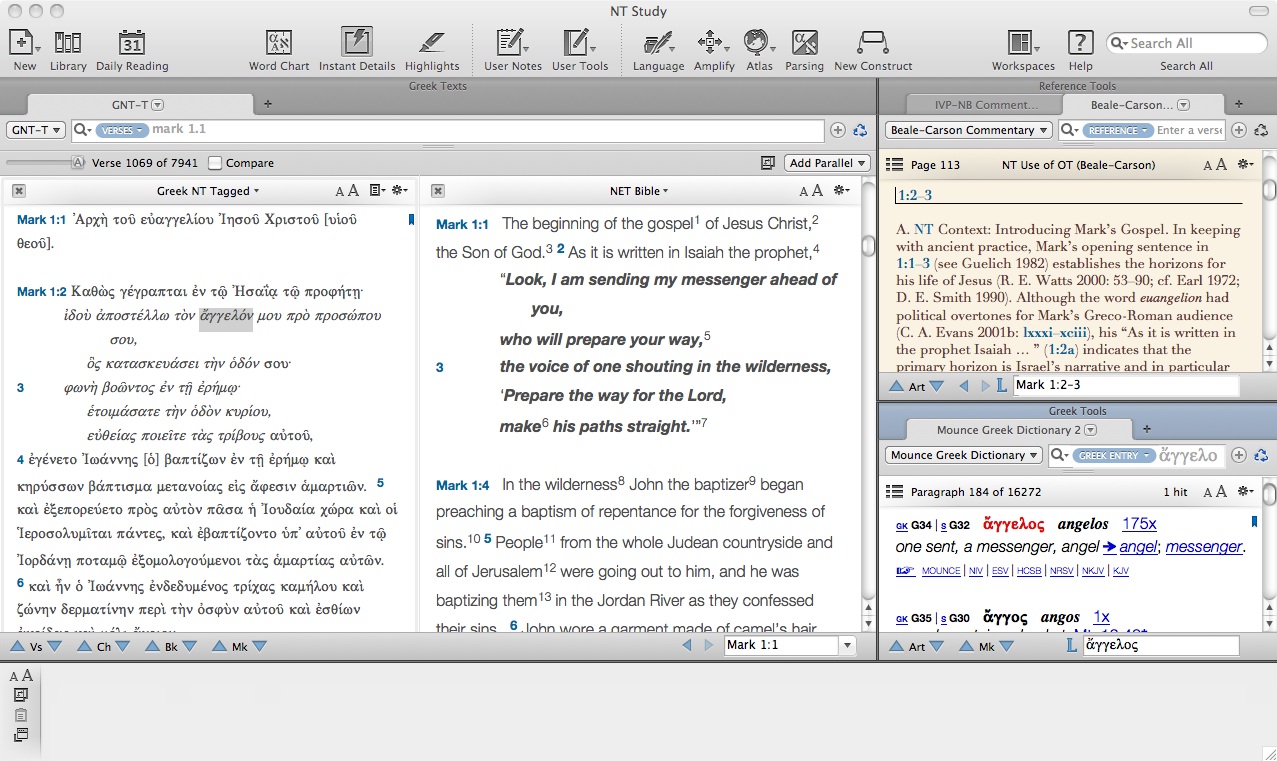
In the below screen shot I have the GNT-T text at bottom left tied to the Beale-Carson Commentary. This is simple to set up with a right click on the tab, then going to “Tab Ties.” This means that as I advance through 1 Peter, for example, the GNT-T text follows me. In the instance below, I have the parallel NET open, so that a Greek-English diglot follows me through the commentary. In the “Context” zone at the right I have the Hebrew Masoretic Text and the Old Greek (LXX) open with my favorite corresponding English translations (NET and NETS) below.

One thing I sort of stumbled on that is really neat. Besides clicking on a hyperlinked verse in the text (to show me that single verse in the Context zone), command-clikcing on a hyperlinked verse gives me all the verses in my commentary’s paragraph that are hyperlinked. Note the “Verse 1 of 12” below, and how Isaiah 8:14 is right below Leviticus 19:2 in my LXX. What a nice feature!

Okay. Back to the content of the commentary itself. The introductions to each NT book, then, do well to orient the reader to trends in how that particular writer interacts with the OT text. The list of contributors is impressive–see it here. The commentary seeks to analyze not only instances where the NT quotes the OT, but also “all probable allusions” as well.

Generally speaking, each citation or allusion in question is organized around these facets:

  • The New Testament context: “the topic of discussion, the flow of thought, and, where relevant, the literary structure, genre, and rhetoric of the passage”
  • The Old Testament context of the source of the quotation or allusion–already things get interesting here, because NT writers do seem to feel free to recontextualize or resituate OT passages…
  • How early Judaism literature understood the given OT text. Even when there is little evidence of citation in early Judaism, there is still explanation. Köstenberger, for example, on John 2:17 briefly discusses the Jewish valuing of zeal, drawing on Phinehas, the Maccabees, and the Qumran community.
  • Textual issues, e.g., changes in verb tense from the LXX to the NT, and explorations of what text (proto-MT, LXX, etc.) or texts might inform the NT author’s quotation, including good discussion of textual variants (in the MT, LXX, and GNT!)
  • “How the NT is using or appealing to the OT,” i.e., are they so steeped in the OT that its language comes out naturally and not as a deliberate quotation? Does the NT writer have fulfilled prophecy in view? Etc.
  • The “theological use” of the OT by the NT writer

This last category ties much of the other content together. For example, on the theological use of Mark 1:2-3, Rick E. Watts says, “As such, eschatologically, in Jesus Isaiah’s long-delayed new-exodus deliverance of Israel has begun in Malachi’s great and terrible day of the Lord (Mal. 4:5).” Watts is dense here, but delightfully so, in my opinion. He develops these themes further–especially that of the new exodus–throughout his analysis on Mark.

I mentioned in my last post that you can search this module in a dozen different ways. The search bar is similar to Google, in that you can search English content by a single word, but also by a phrase in quotation marks, so that that exact phrase comes up in your search. Unfortunately the “Greek Content” and “Hebrew Content” searches (which search using Greek and Hebrew letters) are not available in this module, but that’s no fault of Accordance’s, since the commentary uses transliteration.

Fortunately, “Transliteration” is a search option, so you can easily look up how the commentary treats a given Greek or Hebrew word. Searching hilastērion, I see that all seven of its uses in the commentary are at Romans 3:25.

There were a few times when I wanted to go deeper into a passage than the commentary allowed. For example, Paul’s citation of Malachi in Romans 9:13 has, “Jacob I loved, but Esau I hated.” It’s hard to imagine anyone using a commentary who doesn’t want at least a little explanation of “hated” here. The commentary, to be fair, does have, “This choice of Jacob meant the rejection of Esau,” but doesn’t connect this rejection with the verb “hate.”

This just means that Beale and Carson’s commentary won’t be the only place I turn for in-depth study of a passage, but all my seminary professors say don’t use just one commentary anyway! Not a major loss here. The book is already huge (though not on a computer, thankfully), and attempts to be only “reasonably comprehensive” (which it very much is), not exhaustively so.

Besides that, it took me about three seconds to find in Accordance the NET Bible note on Malachi 1:3:

The context indicates this is technical covenant vocabulary in which “love” and “hate” are synonymous with “choose” and “reject” respectively (see Deut 7:8; Jer 31:3; Hos 3:1; 9:15; 11:1).

This commentary is what we book reviewers like to call a monumental achievement. It sits in the carrel of many a student in my seminary’s library. For good reason. And Accordance has done a magnificent job if seamlessly integrating a rich and multi-facted commentary into its software. This is a five star commentary with five star integration into Accordance 10.

Beale and Carson say in their introduction:

If this volume helps some scholars and preachers to think more coherently about the Bible and teach “the whole counsel of God” with greater understanding, depth, reverence, and edification for fellow believers, contributors and editors alike will happily conclude that the thousands of hours invested in this book were a very small price to pay.

After consulting the original biblical texts, this commentary will always be the first place I turn when I am looking to better understand (and share with others) how the New Testament uses the Old. I am grateful for those “thousands of hours invested in this book.”

Thank you to Accordance for providing me with a copy of the Beale/Carson commentary module for review. Scroll through for all six parts of my Accordance 10 review here.

All six parts of my BibleWorks 9 review

Here, collected in one place, are all six parts of my review of the excellent Bible software program, BibleWorks 9:

Prologue: BibleWorks in the pew? (Not quite, but the next best thing) (link)

Part 1: BibleWorks out of the box (setup and layout) (link)

Part 2: The Verse tab (link)

Part 3: Would Mark’s Jesus have us drink snakes and handle poison? 1 of 2: textual criticism in BibleWorks (link)

Part 4: These 4 Perks are Divine in BibleWorks 9 (link)

Part 5: Would Mark’s Jesus have us drink snakes and handle poison? 2 of 2: the BibleWorks Manuscript Project and CNNTS apparatus (link)

My thanks again to the staff at BibleWorks for the review copy. I highly recommend this program to PC users for in-depth Bible study: personal, academic, and/or for ministry purposes. Find the full program contents here.

UPDATE: Go here to see my comparative review of BibleWorks, Accordance, and Logos.

Logos 4 Review: Install and Initial Impressions

I am a first-time user of Logos Bible software. I’ve used other Bible software programs before, on both a PC and a Mac, but here I will review Logos 4 in a series of posts. Today: the installation process and my initial impressions.

For those of you curious about specs, I’m running Logos 4 on Mac OSX (10.8.1) with a recent memory upgrade (4GB of 1067 MHz DDR3) and 2GHz Intel Core 2 Duo. It’s a three-plus-year-old machine, but in good condition and with decent speed.

Having downloaded Logos 4 to my machine, I signed in to read, “Preparing to download: This may take a while.” Fortunately that part didn’t take that long–under two minutes. “Downloading resources” then followed:

Five minutes later it was just at 6%. Six minutes after that, 14%. But it’s 3.53 GB. The Original Languages Library is big, and I had a few other freebies in my account already. Within 45 minutes all was downloaded. Good time, I thought. Then it went into “Preparing your library: This may take a while…”

But that only took 15 minutes. Just over an hour–start to finish–is pretty good for installing a program of this size and power. What I will want to keep an eye out for is how long it takes to start the program on a daily basis each time I want to use it.

Everything in the installation happens online. There are no DVDs to insert–just create a Logos account, sign in, and Logos knows what to download for you to get you up-to-date. The one log-in works across multiple computers. I’ve got Logos on my Mac right now, but I can just as easily put it on my PC, too. (!) As far as I’m aware, Logos 4 is the only major Bible software that works natively in both the PC and Mac platforms. (BibleWorks at one time had a Mac version under development but has since scrapped it; Mac’s Accordance is coming to Windows in 2013.)

After completing the installation process, the next morning I opened Logos 4. With just two (inactive) Web browsers open, it took about two minutes from the time I clicked the Logos icon to the time it was ready to go. This does seem a longish time (in computer time!) for a program to start. I came to this home screen:

I like being able to see what resources of mine were “updated,” and the “enter passage or topic” search bar is easy to spot right away. As much as I love John Owen, I wasn’t a huge fan of what looked and felt like ads greeting me as I opened this Bible software. This is the program default, but it’s easy to change:

Then, the second time I booted the program up, it was ready to go in less than 45 seconds. Much better.

This morning I received a notification that an update for Logos 4 was ready to be installed. This came automatically. Already I think I am noticing a real strength of this program–how automated everything is with regard to updates, library maintenance, etc.

As a someone whose church uses the lectionary, I especially appreciate being able to see the readings for this Sunday (and “Proper 18”) in the top right of the home screen.

Now for an initial search in that “enter passage or topic” box. Let’s go with Deuteronomy 6:4-9. And… wow. A wealth of information comes up (click for larger):

I can’t wait to use the Andersen-Forbes Phrase Marker Analysis for the Hebrew Bible. It’s exclusive to Logos. (See Logos blog from some time ago on it here and links to tutorial videos here.)

On the left I’ve got a “Passage Guide,” with some of what it pulls up displayed above, and another tab called “Exegetical Guide,” which gives me more detailed information about grammar, visualizations, word-for-word analysis, etc. There are plenty of windows and tabs open, which are easy to move around and re-arrange as I desire.

Getting Logos 4 and the Original Languages library set up was an easy install process. I’m glad for everything taking place so easily over an Internet connection, and I’m hoping that the time it takes to start the program up each time is not much. Time will tell how long the “This may take a while…” screen will actually take each time I use Logos. But with all the tools available above, and many more besides, it looks like I’ll be able to do quite a bit with Logos 4.

Thanks to Logos for the review copy of Logos 4 with the Original Languages Library included. For the review copy I will be giving my honest impressions of the program in a multi-part review.

Would Mark’s Jesus have us handle snakes and drink poison? (part 2 of 2) (BibleWorks 9 review, concluded)

The Gospel of Mark has a couple of possible (disputed) endings. I wrote a couple of weeks ago about the options for how to understand Mark’s closing chapter.

It is the so-called longer ending of Mark that has Jesus appearing to some of his followers and talking about their picking up snakes and drinking poison.

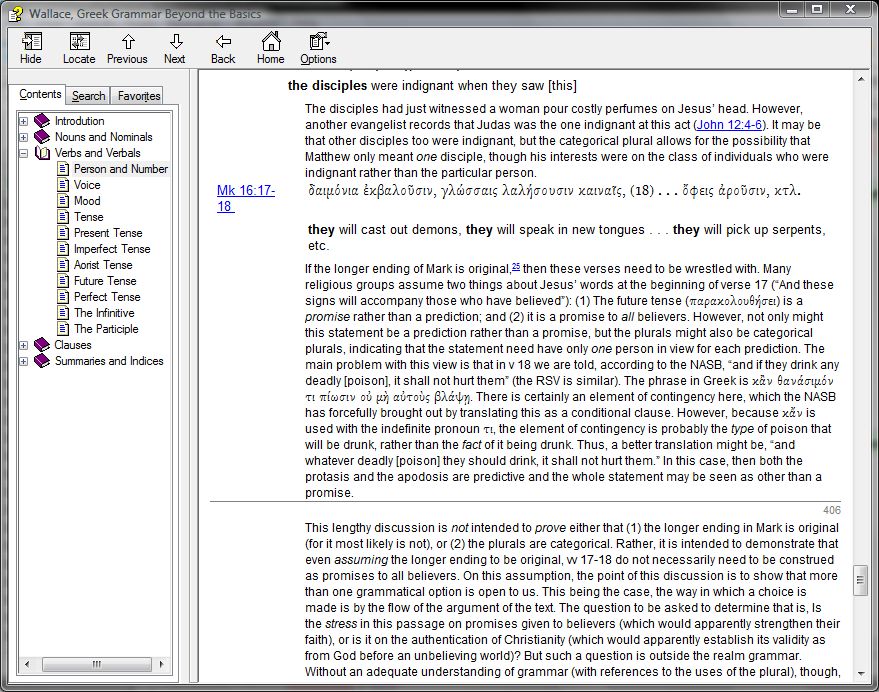
Of course, even if the longer ending is authentic and original to Mark, there is still the matter of interpretation. As a way to complete my review of BibleWorks 9, I set out to use BibleWorks to try to examine some of the manuscript evidence. A BibleWorks module of Daniel Wallace’s Greek grammar (included in BW9) offered some insight into interpretation, which you can read briefly here (screenshot).

BibleWorks 9 features the BibleWorks Manuscript Project, where you can “compare and analyze original manuscript text and images.” As a part of the Analysis Window, the manuscripts are integrated with the Browse Window, so that as you move around in the latter, the former tracks with you. The perfect complement to the Manuscripts Project is the Center for New Testament Textual Studies’ (CNTTS) NT Critical Apparatus. BibleWorks describes it:

For the first time, the New Testament Critical Apparatus from the Center for New Testament Textual Studies is available for PCs. This exhaustive apparatus covers the entire New Testament. The BibleWorks version has been enhanced to show a matrix of Aland categories and time period for the mss for each reading. Users will especially appreciate having the apparatus track and update as the mouse moves over the text in the BibleWorks main window. In addition, the start of each verse entry summarizes the significant, insignificant, and singular variants. When examining a variant, the text of the verse is shown with the variant text highlighted. No unlock required!

You can’t get NA27 and its textual apparatus in BibleWorks but with what CNTTS offers (it’s thorough), it doesn’t matter! Greek textual critics benefit immensely from the additions in BibleWorks from version 8 to 9.

BibleWorks has some great mini-training videos. Here they explain the CNTTS Apparatus. And here they discuss the Manuscripts Tab. If you’re serious about either (a) considering purchasing BibleWorks 9 or (b) have it and want to figure out how to use those two features, those two videos will get you there.

Now, on to the manuscript evidence regarding Mark’s ending in BibleWorks 9. This gives an idea of what the program can do in an applied Bible study.

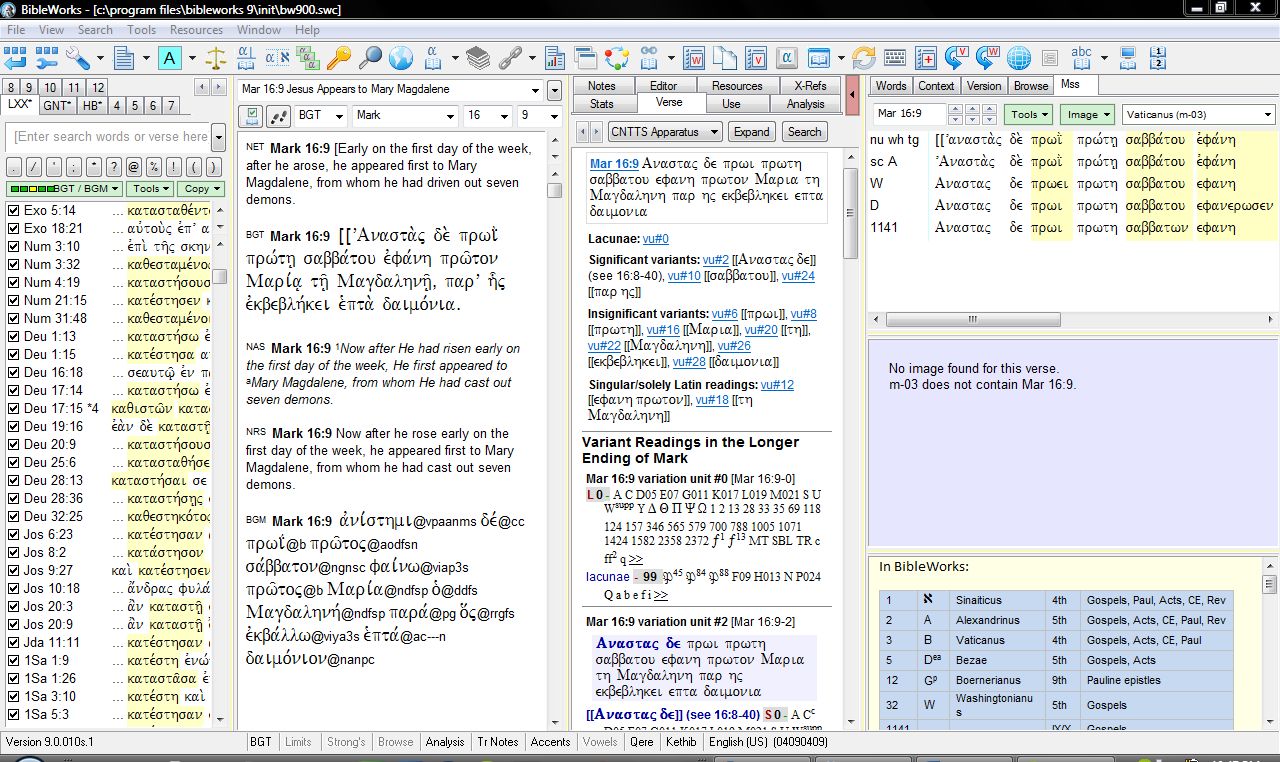
If I’m wondering what Codex Vaticanus (“B”) has in Mark 16:9, I can simply select that Codex in the drop-down menu in the Mss Tab. (BibleWorks refers to it as m-3, too.) The screenshot below (click for larger) shows that there’s no image for Vaticanus at 16:9. This is because Vaticanus ends Mark at 16:8.

Note, too, something I find exceedingly helpful in the bottom right of the shot above–a key to not only BibleWorks’ manuscript numbering system but to abbreviations for manuscripts, their dates, and their contents. This is the stuff budding text critics always have to look up, flipping from page to page and resource to resource. (Or just using that little insert in the NA27. But this is easier!)

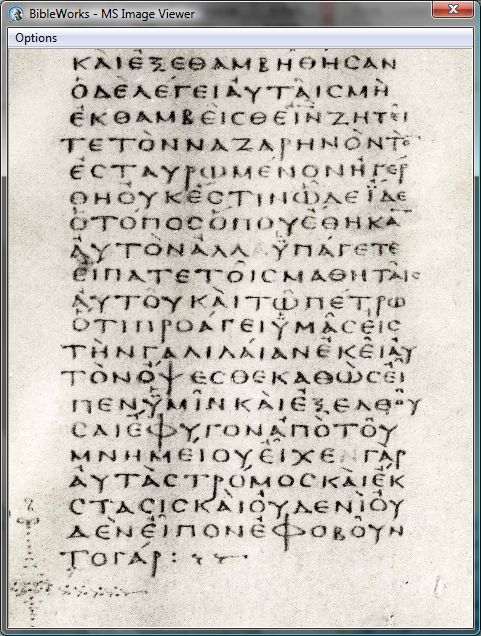
In fact, by right-clicking when you do see an image (e.g., Vaticanus at Mark 16:8), you can “load image in viewer” to pull it out and look at it more closely. There you can zoom and drag your way through the various parts of the text. It looks like this:

The top right section of the Mss Tab (in the full screenshot image above) lines up the various readings available in the manuscripts that BibleWorks contains. I can quickly see that “A” (Alexandrinus) and “W” (Washingtonianus) do have text for a longer ending of mark. Pulling up the image for Alexandrinus, I see this for Mark 16:9 ff.:

Hovering over the verse references (superimposed over the manuscript) brings up the pop-up window that you see there, where I can compare the given manuscript, the English, and the BGT Greek text in BibleWorks. (!!) This is all pretty amazing.

The Mss Tab is easy to figure out. Using the CNNTS Apparatus was less than intuitive for me. But this BibleWorks video explained it quite well. I’ve had to work at it to figure out how to best use it, but having done that, it’s a great apparatus. Especially helpful is its classification of variation types (significant, insignificant, lacunae, etc.). The Apparatus is chock full of abbreviations to learn, but what critical apparatus isn’t? And this one hyperlinks the abbreviations to what they stand for, so it’s not too bad.

For the Greek manuscripts that include some parts of the Septuagint (Sinaiticus, Vaticanus, Alexandrinus), I would love to be able to see both testaments in future BibleWorks editions. That was a loss for me, especially given my appreciation of the Septuagint. So be aware that even though BibleWorks has images of manuscripts that contain parts of the LXX, it’s just the New Testament that appears in BibleWorks.

But the images are already some 8 GB, and this is a work in progress (with future updates promised), so the lack of the LXX/Old Greek is understandable. Viewing Hebrew manuscripts in the future would also be awesome! Until then, what BibleWorks includes and gives the user access to (as part of the purchase price) is pretty remarkable.

BibleWorks won’t actually answer the question I posed in the title of this post: Would Mark’s Jesus have us handle snakes and drink poison? Exegetes will always have to interpret and answer questions like this. (This one’s a bit of a softball, admittedly.) BibleWorks also can’t determine with certainty what the actual ending of Mark is.

But it can sure show you a lot of evidence, and give you just about everything you need to try to have an informed opinion on the matter. Being able to look at images of actual manuscripts still boggles my mind. And it’s not only being able to view those manuscripts (much of which you could do online anyway)–it’s the fact that they’re tied to BibleWorks’ analysis tools that’s truly astounding to me. BibleWorks has enhanced my Bible study immensely.

BibleWorks 9 is easily a five-star program in my book. I’ve enjoyed being able to review it.

See all that’s new in BibleWorks 9 here.

I received a free upgrade to BibleWorks 9 in exchange for an unbiased review. (Thank you, BibleWorks!) See the other parts of my BibleWorks review here. You can order the full program here or upgrade here. It’s on Amazon (affiliate link), too.

The Gospel According to Isaiah 53, reviewed

Isaiah 53 is one of the clearest prophecies of Jesus the Messiah in the Hebrew Scriptures. This chapter has changed the lives of thousands of people–both Jews and Gentiles–who have read the text and believed in the One who fulfilled these prophecies in glorious detail.

Thus begins Mitch Glaser’s Introduction in The Gospel According to Isaiah 53: Encountering the Suffering Servant in Jewish and Christian Theology (affiliate link). In three parts the book expounds how the prophecies of Isaiah 53 relate to and are ultimately fulfilled in the person of Jesus. (The full passage the book treats is Isaiah 52:13-Isaiah 53.)

The first section, a sort of exegetical prelude, discusses “Christian interpretations” and “Jewish interpretations” of Isaiah 53. The second section is a biblical theology of Isaiah 53 (with particular attention to its use throughout Scripture). The third and concluding section speaks to “Isaiah 53 and Practical Theology,” with an emphasis on how to preach the passage, both from the pulpit and in conversation.

The book is “designed to enable pastors and lay leaders to deepen their understanding of Isaiah 53 and to better equip the saints for ministry among the Jewish people.”

The first thing I noticed about the book is that it’s just as much an apologetic for Jesus-as-suffering-servant as it is an academic study of Isaiah 53. It’s not that it lacks academic substance, though. This is a meaty book, and pleasingly so.

Regarding the book’s explicitly evangelistic intent–there may be some who are uncomfortable with the description of Chosen People Ministries’ “Isaiah 53 Campaign” (including 75,000 postcards to Jewish homes and 40,000 voice blasts=robo-calls?). I’ll admit that I question the potential efficacy of pre-recorded phone messages for reaching anyone with the Gospel (though God can use anything!). But see blogger Joel Watts for his helpful (refreshing!) take on the blending of the academic and evangelistic enterprises, especially in the context of this book.

You can find a full list of contributors in the table of contents here (pdf). A few names to highlight are Walter C. Kaiser Jr., Darrell L. Bock (one of the co-editors), Craig A. Evans, and Donald R. Sunukjian. I particularly appreciated the book’s treatment of the New Testament use of Isaiah 53. The chapter by Michael J. Wilkins lists the quotations of Isaiah 53 in the NT and additional allusions to it in the Gospels. (He makes a key point, that Jesus himself understood “his mission and death in the light of Isaiah 53.”) Darrell Bock goes in depth with a comparison of the Greek and Hebrew texts of Isaiah 53:7-8, highlighting its use in Acts 8 where Philip explains the passage to the Ethiopian eunuch.

Something to critique in this book is that there were a few generalizations of Jews that I found to be unfair, particularly in the chapter “Using Isaiah 53 in Jewish Evangelism.” Mitch Glaser writes:

I think I can safely say that, in the United States, most Jewish people would recognize Isaiah as the first name of a professional athlete sooner than they would recognize the prophet of biblical literature.

Granted, he is operating from the assumption that “most Jewish people are not Lubavitch, Hasidic, or Orthodox,” but still…. What was more surprising to me: “Most Jewish people do not understand or believe in biblical prophecy” and, “Most Jewish people do not believe in sin.” Glaser does (only later) qualify these with, “We must note that all of the above does not apply to those who hold to traditional Jewish theological positions,” but he would have been better off saying something like “many secular or ethnic but non-religious Jews…” or at least supporting his statements with statistics from surveys rather than anecdotal evidence. Glaser himself is a converted Jew who has a compelling conversion story, but I still found those characterizations to be frustrating. I wonder how helpful such statements could be in advancing an evangelistic cause in conversation with another Jew.

This next thing to highlight may seem a small point to some, but as someone seeking to keep my Hebrew and Greek going, I appreciated the actual Hebrew and Greek fonts throughout the book (i.e., not just transliteration), which are clear and easy to read. I did think, however, about an intended audience of “pastors and lay leaders” who may have desired transliteration, too. (All Hebrew and Greek is translated into English.)

Darrell Bock’s conclusion summarizes all the essays of the book, with key quotations. Having this there was a big help in piecing everything together again. The Gospel According to Isaiah 53 will not be far from my reach in coming months and years. I expect I will often reference this compendium of biblical scholarship on a vital text. My hesitations about the characterizations of Jews above notwithstanding, there is a good deal here that can be useful for Christian-Jewish conversations about the Suffering Servant.

I received a free copy of The Gospel According to Isaiah 53 with the only expectations of providing an (unbiased and honest) review on this blog. Its publisher’s product page is here. It’s on Amazon here (affiliate link).

Review: Accordance 10’s Commentary on the New Testament Use of the Old Testament, by Beale and Carson (part 1 of 2: the module)

Baker Academic has made its way to Accordance 10 Bible Software. The first offering is Commentary on the New Testament Use of the Old Testament, edited by G.K. Beale and D.A. Carson. Here I review it, with this first part of the review covering Accordance’s version of it.

One nice thing about Accordance’s setup is that I can use Commentary on the NT Use of the OT just as any other Accordance tool (for the below and all images in this post, click or open in new tab for larger):

Or I can right-click on the tab to “detach it,” so that it’s its own workspace. For reading through a good deal of text at once, this is ideal. One other great feature, as you’ll see in the left sidebar below, is how easy it is to navigate through all the sections and sub-sections of the book:

But what about how I’d actually need to use this resource? To really make sense of it, I’d need the Hebrew MT, Greek LXX, possibly English translations of each, and the Greek NT all open and easy to view. Combining that kind of layout with the hyperlinking in Accordance’s version of this commentary would be sweet. Wonderfully… it’s possible. Check this out:

For a resource that can be had in print for under $40, it seems like paying nearly $60 for the Accordance module could only be justified if the electronic version could do things the print version can’t. The electronic version can, indeed, do some unique things. (See the image above.) Especially for a commentary like this with lots of cross-references and constant movement between Greek, Hebrew, and other versions, being able to see multiple versions at once–together with the commentary–is a huge benefit. It saves time and allows me to better grasp how NT writers used OT texts by seeing a quotation alongside its original context.

The Instant Details (which I happen to have closed above to maximize screen space for different versions) show whatever hyperlink you hover over–this gives you yet another window for text display, and is particularly useful for, say, quickly seeing a longer passage in English. Things did get a little buggy when I opened the Instant Details the first time, but I assume that was because of how many windows I had open (not the module itself, necessarily):

I was able to get rid of the jumbling on the top right by closing and re-opening the Instant Details. See now below:

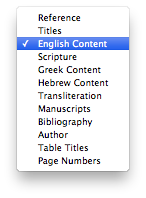
One really nice feature about Accordance’s Beale and Carson commentary module is how many ways you can search it. Accordance then tells you how many hits come up for your search, and using the “move down one mark” arrow keys, you can easily move through the results. You can even see the “real” (i.e., print) page numbers! Look again at that image at right–that’s 12 different ways you can search Beale/Carson. Pretty handy.

Most folks interested in Commentary on the New Testament Use of the Old Testament likely know of its solid reputation and are perhaps now merely trying to decide between a print and electronic version. (In a second post I’ll review the content of the commentary.) If you use Bible software regularly already, I think it is well worth the extra cost to own Accordance’s module. It’s facile to get around, hyperlinked nicely, easy to line up with original language texts, highly searchable, and quite readable as a detachable resource. I, for one, am really glad to have this module on my computer.

Thank you to Accordance for providing me with a copy of the Beale/Carson commentary module for review. Scroll through for all six parts of my Accordance 10 review here.

UPDATE: Read the rest of my review of Beale/Carson here.

These 4 Perks are Divine in BibleWorks 9

Okay–not divine per se, but pretty indispensable for Bible study. Here are four perks in BibleWorks 9 that, the more I use the program, the more I appreciate.

1. Archer and Chirichigno’s Old Testament Quotations in the New Testament

Sure, this is perhaps an obscure thing to highlight. But it’s a major perk in my book! Archer and Chirichigno’s resource is already an invaluable one, particularly for studying the NT use of the OT. But the way it’s laid out in BibleWorks opens up possibilities unavailable to the owner of just the print version.

Because the focus is on OT Quotations, everything is listed in Old Testament canonical order. So if you’re wondering where Exodus 20 (the 10 Commandments) shows up in the New Testament, you can skip ahead to that section and find (click for larger):

Everything in Archer and Chirichigno’s book is there–their commentary at the bottom, their comparison of MT/LXX/NT. You can hide or display the English in BibleWorks (I have it shown above). Also, when you mouse over a blue hyperlinked verse, as I’ve done in the image above, you see a popup with that verse in three different versions. This seems to be an underrated part of BibleWorks, but if you’re serious about LXX or OT/NT study, having this is a great help.

2. Lots of how-to videos

Some six hours worth, according to the BibleWorks site. The videos I’ve watched have been clear, simple, and substantive.

3. Intermediate Hebrew and Greek grammars included

BibleWorks 9 comes with these three classics included:

They’re keyed to individual verses so that the appropriate information from each of these grammars will automatically show in the “Resources” window at any given verse. Using even Amazon prices, just these three grammars cost more than $150 in print. And having them lined up with the OT and NT texts as I use them in BibleWorks saves me time from flipping through indices and physical pages. (See this portion of my BibleWorks review to see Wallace in action.)

4. The Use Tab

In an earlier part of my review I wrote:

[T]he new “Use” tab … instantaneously shows you all the uses of a word with how many occurrences it has in that book and version…. You had to search on a word in previous versions to do this…. I find this particularly useful for vocabulary acquisition. As I come across a word I don’t know in the text, I can easily see–does this occur 121 times and I should know it? Or is it just in the text two or three times, so I was okay in not knowing right away what it means?

This feature was reason enough for me to pursue an upgrade from version 8 to version 9. (!) With the new fourth column (which I mention at more length at the same link above), the Use tab can be open together with an additional analysis window.

Although I still regularly use print copies of the Bible (Greek, Hebrew, and English), BibleWorks has been a useful companion in my personal Bible study and devotions for the last couple years. Especially when I want to do word studies or delve into the grammar of the text or compare multiple translations, BibleWorks has been a great program to use.

See all that’s new in BibleWorks 9 here.

I received a free upgrade to BibleWorks 9 in exchange for an unbiased review. See my prolegomenon to a review here, part 1 (setup and layout) here, part 2 (the Verse tab) here, and part 3 (text criticism 1 of 2) here, with the completion of the text criticism mini-series coming soon.  You can order the full program here or upgrade here. It’s on Amazon, too.

More Bells and Whistles in Accordance 10 (final installment of my review)

Here are a few more bells and whistles in Accordance 10. These are to add to the bells and whistles I mentioned yesterday.

    1. The Context Slider  

I’m in James. Wondering about wisdom.

So I right click on “wisdom” to search for the word in the rest of the Bible. I get the following results:

Great for a word search. I can scroll through the results, seeing one verse at a time–every verse containing “wisdom.” Note that next to the context slider it says there are 202 verses displayed. The frequency count for “wisdom,” though, is toward the top right of the image above, just under the search bar–212 flex hits. (I wrote more about Flex Search here.)

But what if I want to see each of those uses in context, without having to open up a bunch of new windows? Easy, I just slide the context slider one notch to the right:

Note that while my “212 flex hits” stay the same, there are now 546 verses listed. This means a bit more context is listed for each occurrence. Moving the context slider to 3, I get even more context for each use of “wisdom”:

The Context Slider goes all the way to the right for the setting “A,” which shows me all the uses of “wisdom” still marked in red, but with the context of the entire Bible surrounding it:

As you can imagine, being able to see the word search results with varying degrees of context makes for fruitful word studies.

2. Constructs

This feature looks a little more complicated, at least on first glance. But it’s well worth spending the time to figure out how to use it, because of all that it can do.

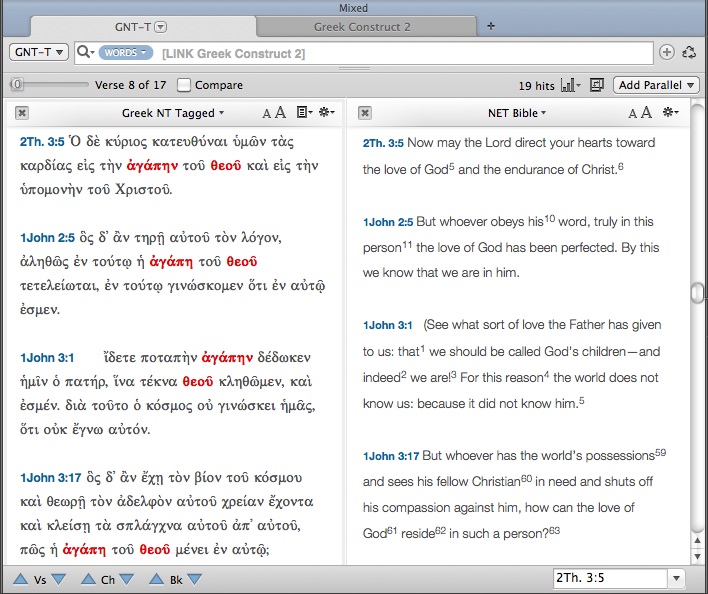
Accordance Constructs are a graphical interface that allow for more complicated searches… you know, things like, “How many times do the words God and love appear in the New Testament within seven words of each other… in Greek?” Setting up this search using the Construct feature looks like this and takes a very short time to do:

Clicking on Search at bottom right, I get the following results:

But that’s a lot of Greek to wade through. If I need an English translation, clicking on “Add Parallel” above gives me the same results, translated:

There is much more the Construct search can do–but this gives an idea of its potential utility. More from Accordance on Constructs can be found in their help files here.

3. Modules

Accordance sells a number of add-on modules. Though I have not used them, two that look to be particularly useful are a bundle for Hebrew text criticism (including the BHS text and apparatus, and new BHQ volumes with apparatus) and some volumes of the critical Göttingen text of the Septuagint (e.g., here and here). Accordance also offers add-ons of various commentaries, including the NIGTC series, NICNT, the JPS Torah Commentary, and quite a few more. Though there are certainly strong opinions in the biblical studies community as to whether one should own commentaries as physical books or as 1s and 0s, Accordance makes the latter possible with modules that integrate with the rest of the program.

———————————————————————————————-

I’ve really enjoyed learning and reviewing Accordance 10 this last week. It’s a great program. I love being able to use Bible software that is native to a Mac, and a really good software at that. Accordance can do a lot. I think what has impressed me the most has been how customizable all the panes, zones, tabs, etc. are, without sacrificing any quality. Already in the last week I’ve been able to use Accordance to speed up some tasks in both my studies and my ministry.

For ease of reference, here are all the parts of my review of Accordance 10, which this post (#6) completes.

Part 1: In which I finally try out Accordance Bible Software for Mac (new version 10!)
Part 2: 4 Cool Features in Accordance 10
Part 3: 3 Powerful Ways to Search in Accordance 10
Part 4: The Original Languages Collection in Accordance 10 meets Septuagint Sunday
Part 5: Accordance 10: Bells and Whistles

Coming soon: Review of Beale and Carson’s Commentary on the New Testament Use of the Old Testament add-on module.

I received a free copy of Accordance 10 for review. There were no expectations placed on me as to the nature (or length!) of my review, whether positive or negative.