I really appreciated Constantine R. Campbell’s Basics of Verbal Aspect in Biblical Greek. Yes, I read it cover to cover. And no, it was not even for a book review or class! Just for fun. I don’t know enough to wade intelligently into the minutiae of the verbal aspect debate, but I do know that Campbell presented his view succinctly and clearly in that work. I felt like I had a good, basic grasp on aspect after working through that book.
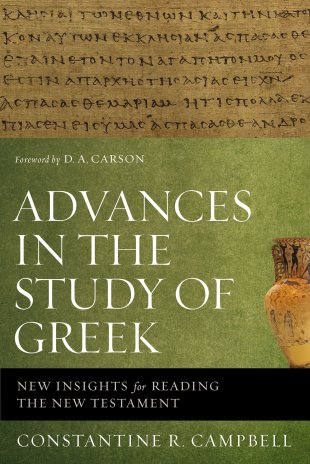
Now Advances in the Study of Greek releases this month. It surveys the thoughts, studies, and work of many Greek scholars. It’s got a chapter on aspect, but covers much more territory than just that.
Advances in the Study of Greek offers an introduction to issues of interest in the current world of Greek scholarship. Those within Greek scholarship will welcome this book as a tool that puts students, pastors, professors, and commentators firmly in touch with what is going on in Greek studies. Those outside Greek scholarship will warmly receive Advances in the Study of Greek as a resource to get themselves up to speed in Greek studies. Free of technical linguistic jargon, the scholarship contained within is highly accessible to outsiders.
Advances in the Study of Greek provides an accessible introduction for students, pastors, professors, and commentators to understand the current issues of interest in this period of paradigm shift.
I’m looking forward to reading it and writing the review, which will be published in an upcoming issue of Bible Study Magazine. Check out the book here.
There is a proliferation of external keyboards for iPads and iPhones. Logitech’s Bluetooth Easy-Switch Keyboard K811 is by far the best.
Here is a short video of the keyboard in action:
This is no foldable, plastic, tag-along keyboard. It looks and feels like something native to an aluminum-body Mac Laptop.
This is what’s great about the keyboard:
It’s backlit. You can use it in the dark and make out all of the keys easily.
It’s got three keyboard shortcuts for toggling between three Apple devices at a time. So once you’ve paired it with, say, a computer, an iPhone, and an iPad, you can switch between any device the keyboard is paired with… with just one press of a button. You don’t have to pair, un-pair, re-pair, etc.
That backlit keyboard? It’s smart. The keyboard has sensors that allow it to adjust the illumination level based on the light in the room. Amazing. (You can also manually adjust the keyboard brightness via its F5 and F6 keys.)
The battery life is long. It’s rechargeable via an (included) USB cable. And there’s an on/off switch, of course, so you don’t drain the battery between uses.
There’s no lag. The Bluetooth connection is fast, so there’s really no lag between the time you type and see a character on the screen, regardless of the device you’re using.
It is a full keyboard. Nothing is missing–the command key, volume up/down keys, the escape key… all here.
It’s got “hand proximity detection.” From the product page: “A motion sensor detects your hands as they approach the keyboard and turns the backlight on/off to help you save power when you are not typing.” From what I can tell, this feature also helps to preserve and prolong the battery life.
Setup couldn’t have been any simpler. I probably could have figured it out without the manual, but the manual succinctly and clearly explained how to pair with devices.
Having easy access to up/down and left-right arrow keys for iPad and iPhone is really cool.
And here is what I really like about the keyboard:
If feels better than any other keyboard (portable or otherwise) I’ve typed on. Very smooth, and just the right amount of resistance on the keys.
You can use keyboard shortcuts with iPad as easily as you would on a desktop computer. The app Drafts and this Logitech keyboard make for a great combo. I started this blog post in Drafts, for example, and then with a single key stroke had sent the draft to Evernote for backup and future work across devices.
This is a little thing, but there is a keyboard key (on the actual keyboard) that lets you toggle your iPad on-screen keyboard on and off. Unlike other external keyboards, you can even have your native iPad on-screen keyboard up at the same time as using this physical one.
As for drawbacks? Nothing significant, that’s for sure. It’s not foldable, so of course it’s less portable than other external keyboards, but that is the (small) price one pays for its durability and full-size feel. I don’t mind that it can’t be folded up. It would be nice if the keyboard came with a carrying case or simple sleeve, though–you’ll have to figure that one out on your own.
The keyboard isn’t inexpensive, but it’s the best external keyboard on the market, easily. Find out more at the product page here, or via Amazon here.
Thanks to Logitech for the product review sample, given to me for purposes of review, but with no expectations or influence on the review’s content.
I’ve received permission to post the full .pdf of my comparative review of software for Septuagint studies. It appears in volume 47 (2014) of the Journal of Septuagint and Cognate Studies (JSCS). In the review I consider and evaluate Accordance 10, BibleWorks 9, and Logos 5, specifically with an eye toward their use and resources in the field of Septuagint studies.
You can subscribe to JSCS and see information about the International Organization for Septuagint and Cognate Studies (IOSCS) at this link. Journal Table of Contents are on Eisenbrauns’s site here.
Yeah, I know: it’s weird to refer to a phone charger as “impossibly cute,” but this little guy (pictured at left) from Anker looks great. More important, it charges a device (or two at once) just as fast as your typical wall charger.
You can connect any USB cable to it, allowing you to charge your iPhone (of any generation), iPad, or other device. The best thing about it is that you can charge two devices at once–so you and your friend don’t have to fight over whose turn it is to charge a phone on a long road trip.
Here are a few things I like about the charger (with no counterbalancing complaints so far to lodge):
As with another Anker charger I tested, the PowerDrive 2 Lite charges a device quickly. I have an Apple wall charger that gets warm when plugged in, but this one maintains a normal temperature.
It’s small. You can easily fit it in your pocket, or stash it in even the smallest compartment of your car. Anker lists its weight as 0.7 ounces. (!)
The design isn’t fancy, but it looks great. The red and black color combo gives it an attractive look.
It pops in and out of the cigarette lighter (what else do you call that port in your car?) really easily. It’s nice and secure when plugged in.
Despite its size and being 12W as opposed to a 24W model Anker makes, this model gets the charging job done just fine. At the time of writing, the 12W model appears out of stock on Amazon, but the (comparable) 24W model is here. (UPDATE: Here‘s the in-stock link to the model I’m reviewing here.)
And you can check out the 12W PowerDrive 2 Lite at Anker’s page here, with all the specs.
Thanks to Anker for the review sample, offered for my honest impressions.
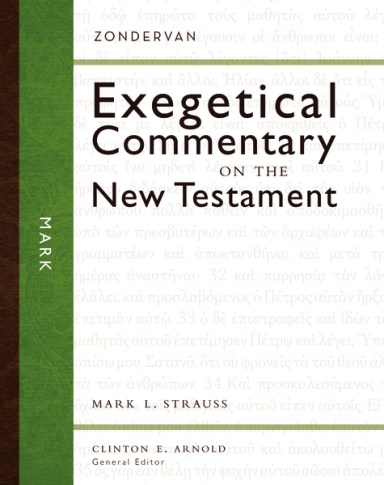
I really dig Zondervan’s Exegetical Commentary on the New Testament, as you can see by the multiple volumes I’ve reviewed here. The series continues production, with 10 volumes now available. Recent additions are Karen H. Jobes’s 1, 2, and 3 John and Mark L. Strauss’s Mark.
Here’s how the series is laid out:
The Greek text of the book of the Bible, verse by verse, or split up phrase by phrase
The author’s original English translation
First, showing up in the graphical layout preceding each passage
Second, verse by verse, together with the Greek
Author’s graphical layout of Mark 1:1-8
The book’s broader Literary Context for each passage
An outline of the passage in its immediate context
The Main Idea (perhaps they had preachers in mind?)
Structure and literary form
An Exegetical Outline of the passage under consideration
Explanation of the Text, which includes the Greek and English mentioned above–this is the bulk of the commentary
The concluding Theology in Application section (i.e., what does the passage mean for us, what are its themes, and so on)
As I’ve said before: This sounds like a lot, but the result is not a cluttered commentary. Rather, as one gets accustomed to the series format, it becomes easy to quickly find specific information about a passage. The section headings are in large, bold font.
Here’s Strauss on Jesus in Mark 3, who asks, “Who are my brothers and mother?”
At one point, [Jesus] refused to see his family, saying that his true mother and brothers were those who did God’s will (Mark 3:31–35, par.). Jesus is not repudiating his family but rather is affirming deeper spiritual bonds. It is not surprising that the early believers referred to each other as “brothers and sisters” (adelphoi). As Jewish followers of Jesus were increasingly expelled from the synagogues and Jewish families were divided, this emphasis on spiritual kinship became extremely important.
And:
In the context of the Beelzebub controversy, the point is clear: kinship in the kingdom of God is based not on ethnic identity or family background but on a relationship with God through Jesus.
I’m following the lectionary through parts of early Mark right now, and though there are already a host of great commentaries on book (not the least of which is this gem), Strauss’s volume has been a welcome addition to my sermon preparation process!
Find the book here at Zondervan’s product page or here on Amazon.
“Leningrad Codex Carpet page e” by Shmuel ben Ya’akov. Public Domain via Wikimedia CommonsThe Leningrad Codex is the basis for the Biblia Hebraica Stuttgartensia (BHS), the critical edition of the Hebrew Bible. Leningrad is the earliest complete Masoretic manuscript still available to us, dating from the 11th century. BHS is what’s called a diplomatic edition–it uses Leningrad as the best available text with a critical apparatus at bottom.
Images of Codex Leningradensis, as it is also known, are available freely online. (See here, for example.) But users of Bible software still have hoped for something more integrated and easier to use than a .pdf.
BibleWorks 10 offers Leningrad images, fully integrated with the rest of the software’s texts. There are even verse markers so you know where you are in the manuscript. You can toggle verse markers off if you want to read through with no help.
Here’s what it looks like:
Click image or open in new tab to enlarge
You can see in the image above that I can view the Leningrad Codex (with verse markers) in tandem with BibleWorks’s Search Window (far left), Browse Window (second from left and showing multiple versions of my choosing), and Analysis Window (second from right, here featuring lexical data that automatically appears as I hover over words in the Browse window).
It’s possible to zoom in and out of the image at far right to get a closer look at the manuscript detail if you desire. Or you can open it in its own window, like so:
Click image or open in new tab to enlarge
Now you can navigate the Leningrad Codex using the sidebar at left.
One other really cool feature–by hovering over the verse reference in the codex, you bring up a pop-up window showing you multiple versions:
Click image or open in new tab to enlarge
Very impressive. Note, too, the nifty blue and yellow color scheme in the image above.
My only critique of this new, flagship feature (which is executed really well) is that there’s not a keyboard shortcut to zoom in and out of the codex images. You have to right-click, then navigate through the contextual menu for the zoom percentage you want, then select it. Somewhat making up for this, however, is the ability to simply click-hold and drag your way through the images.
Check out a short video of the codex in BW10 here:
BibleWorks 9 took a huge leap forward in offerings of Greek manuscripts:
Now BibleWorks 10 starts to bring the program’s Hebrew offerings to parity with the Greek. There is still much more by way of Greek MSS in BW10 (might we hope for the Aleppo Codex in BW11?). But BibleWorks is the first software to offer the images of Leningrad to its users. A big step forward to readers and students of Hebrew.
I received a free upgrade to BibleWorks 10 for the purposes of offering an unbiased review. See my other BibleWorks posts here. You can order the full program here or upgrade here. It’s on Amazon, too.
I think I am actually on pace to finish my Bible-in-a-Year reading plan in two years–but, as I’ve said before, as much as I value getting a good overview of all of Scripture in a short time, it’s so deep and rich (and sometimes surprising and/or befuddling) that I keep wanting to go slow. This is not, of course, a bad thing. The reading plan can wait.
The JPS Torah Commentary has been my go-to companion for reading through the first five books of the Bible. I’m three volumes in, and each one has been excellent. See what I say about the Genesis volume here, and the Exodus volume here and here. Now I’ve found myself similarly aided by Baruch A. Levine’s JPS Torah Commentary: Leviticus as I’ve made my way through that dense book of the Bible.
Levine’s commentary is more difficult to sit down and read through than Nahum Sarna’s Genesis or Exodus volumes, but this is less because of Levine and more because Leviticus does not have the same narrative flow of Genesis and Exodus. Its descriptions of laws and rituals are difficult for the uninitiated (um… and for the initiated) to wade through. It’s dense.
But Levine matches the density of the text with detail of his own, drawing also on rabbinical traditions to help the reader understand the world of the text. Levine addresses historical background and theology, as well as exegetical detail at the word level. But even his detailed exegesis highlights the larger literary context, so you can see the interrelations of Scripture as you read this commentary.
Allow me to share a specific example.
Here is the Hebrew text (nicely included in this commentary) of the admittedly harsh-sounding Leviticus 26:21:
Here’s the verse in the Jewish Publication Society’s New JPS translation–also included in this edition:
And if you remain hostile toward Me and refuse to obey Me, I will go on smiting you sevenfold for your sins.
Levine’s comment for the verse focuses on the phrase, “And if you remain hostile toward Me.” Note how he balances lexical analysis with both extrabiblical and biblical references (the Hebrew in the commentary is transliterated throughout):
Here, again, is a transition, where the conditions for God’s forgiveness are stated.
Hebrew keri, “hostility,” and the idiom halakh ʿim. . . be-keri, “to walk with. . . in hostility,” are unique to this chapter. Targum Onkelos translates be-kashyu, “with hardness, obstinacy,” deriving keri from the root k-r-r, “to be cold.” Compare the noun form karah, “cold wave,” in Nahum 3:17, and mekerah, “cool chamber,” in Judges 3:24. The reverse of “walking in hostility” is “agreeing to obey” (ʾavah li-shmoʿa) suggesting that keri is synonymous with meri, “rebelliousness.” Note the contrast in Isaiah 1:19–20: “If, then, you agree and give heed, / You will eat the good things of the earth; / But if you refuse and disobey (u-meritem), / You will be devoured by the sword.” The notion of meri as “rebelliousness” is a major theme in the prophecies of Ezekiel, but the term keri occurs nowhere else in the Bible; hence its meaning remains uncertain.
There is one other portion I need to quote at length, since it comes in Levine’s opening explanation of the sacrificial system in Leviticus 1. Maybe I’m obtuse or just not familiar enough with Leviticus, but I had somehow missed until now that one could not sacrifice to expiate for intentional sins:
It should be emphasized here, as the workings of the sacrificial system are introduced to the reader, that the laws of the Torah did not permit Israelites to expiate intentional or premeditated offenses by means of sacrifice. There was no vicarious, ritual remedy—substitution of one’s property or wealth—for such violations, whether they were perpetrated against other individuals or against God Himself. In those cases, the law dealt directly with the offender, imposing real punishments and acting to prevent recurrences. The entire expiatory system ordained in the Torah must be understood in this light. Ritual expiation was restricted to situations where a reasonable doubt existed as to the willfulness of the offense. Even then, restitution was always required where loss or injury to another person had occurred. The mistaken notion that ritual worship could atone for criminality or intentional religious desecration was persistently attacked by the prophets of Israel, who considered it a major threat to the entire covenantal relationship between Israel and God.
Is this why David in Psalm 51 says,” For you have no delight in sacrifice;if I were to give a burnt offering, you would not be pleased”?
Levine comes back to this theme as Leviticus introduces the various offering types. He also explains the difference between sin and impurity, in a way that is really helpful for more fully engaging Leviticus.
The Introduction is some 30 pages, addressing both “The Leviticus Text” (which summarizes the book, highlights its structure, discusses its formation, and compares early versions) and “The Context” (Levine spells out how this commentary supports “the realism of Leviticus”). The 11 Excursuses (spanning some 40 pages) are utterly fascinating, covering topics like dietary laws, the scapegoat ritual, the festivals, and more.
All that is already more than enough to help the reader or teacher in her/his quest to better enter the world of Leviticus. But then the icing on the cake is the section called, “Leviticus in the Ongoing Jewish Tradition.” Here Levine hopes that “the reader of the Commentary may catch a glimpse of continuity and change and focus attention on the lasting relevance of Leviticus.”
And here’s some icing to go on that other icing: the binding is sewn and the book is beautifully bound. I’m quite sure I’ll be returning to this commentary again, but first–I’ve got more of the Torah to read through.
Tolle, lege.
Many thanks to the folks at University of Nebraska Press/Jewish Publication Society for sending me a copy of the commentary for review. The book’s JPS product page is here; you can order it through Nebraska Press here. Find it on Amazon here.
Prefer an electronic edition? Accordance has the JPS Torah Commentary here.
When I preached through Jonah last Advent, I knew the JPS Commentary on Jonah would be helpful. What I wasn’t expecting was how often I would eagerly turn to Kevin J. Youngblood’s new Jonah volume in the recently begun Hearing the Message of Scripture commentary series. It might be the best commentary (in this reviewer’s humble opinion) written on Jonah.
Format of the Commentary
Each passage of Jonah includes the following sections:
Main Idea of the Passage–a short, couple-sentence overview, where Youngblood helps you get oriented to the text.
Literary Context–The author shows how the passage under consideration ties in with the rest of the book.
Translation and Outline–the author’s original translation and visual layout of the biblical text.
Structure and Literary Form–this looks at literary features and the rhetorical aims of Jonah. This section is especially strong.
Explanation of the Text–the primary section of each passage, comprising the verse-by-verse commentary proper.
Canonical and Practical Significance–though Youngblood is plenty practical throughout, this section is especially helpful for preachers, teachers, or any Bible reader wanting to know how to apply the message of the text.
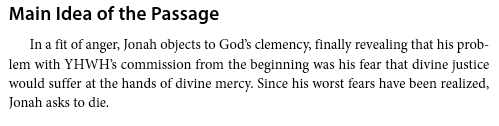
For example, here is Youngblood on the main idea of Jonah 4:1-4:
He then situates the passage in its larger context:
From there he relates Jonah 4:1-4 to the patterns of the rest of the book (“Every encounter with Gentiles brings Jonah to a crisis point”), surmises why Jonah wants to die (“Jonah cannot see how YHWH could simultaneously maintain his covenant faithfulness to Israel and grant clemency to Nineveh”), explains the text in detail, and then relates it to Moses and the other prophets and their interactions with “the nations.”
Youngblood’s Insights Make the Text Come Even More Alive
Youngblood makes the literary features of the text come alive. Regarding Jonah’s short stint in the belly of a fish, Youngblood writes:
The fish, however, functions as a means of deliverance and transportation from the murky depths back to the orderly realm of dry land. In this respect, the fish is the antithesis of the ship, which carried Jonah from the orderly realm of dry land out to the chaotic deadly sea.
Correspondingly, Jonah’s disposition and activity in the fish is the antithesis of his disposition and activity on the ship. Whereas Jonah pays out of his own pocket for passage on the ship, the journey in the fish back to land and life is free, courtesy of YHWH.
He continues to unpack the “important contrast” between ship and fish to help the readers with “the peak episode of the book’s first main section.”
This sort of analysis and clear explanation is emblematic of what the reader will find in every section of the book.
Final Evaluation: Easily a Top 3 Jonah Commentary
And what’s not to love about the first paragraph of the Introduction mentioning a Bruce Springsteen song? Here it is, by the way:
To write a nearly 200-page commentary with a 20-page introduction on a 4-chapter book of the Bible is no small feat; and none of what’s here is fluff. Youngblood notes in his introduction: “An understanding of three overlapping contexts–canonical, historical, and literary–is critical to the book’s interpretation.” He helps the reader attain ample understanding of those contexts and more.
Youngblood says only that this volume “strives to advance the discussion regarding Jonah’s message.” I think it does far more. This is easily a top 3 Jonah commentary–maybe even the best one I’ve used.
You can read a .pdf sample of the commentary here. See also my review of Obadiah in the same series.
I am grateful to Zondervan for the gratis review copy of this commentary, which was offered for an unbiased review. You can find the book on Amazon here. The Zondervan product page is here.
I’ve reviewed enough software to know over-hyped copy writing when I see it, so I was initially skeptical at the Things app’s claim to be “a delightful and easy to use task manager” (my italics).
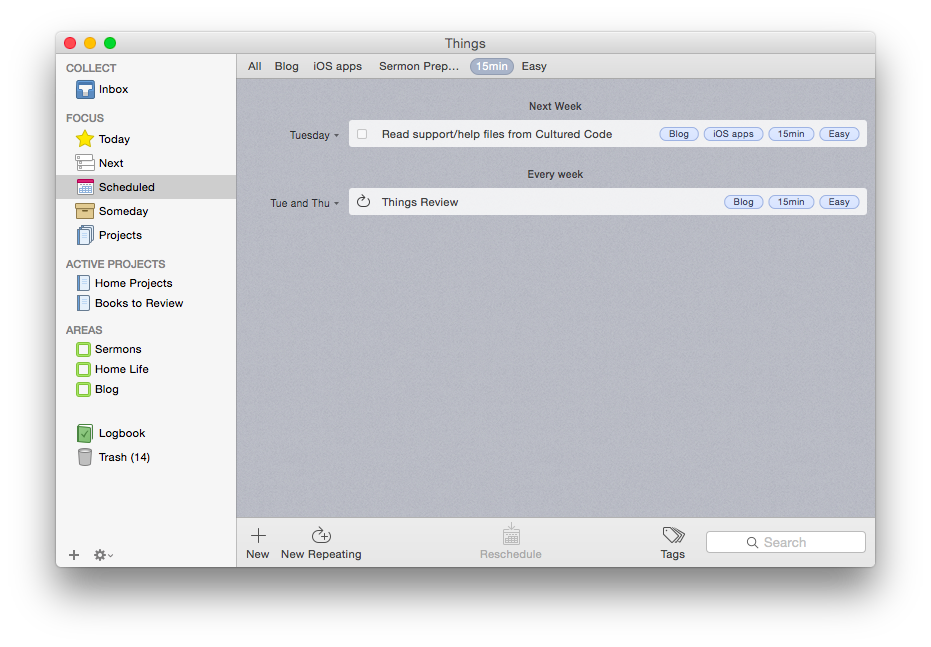
But its aesthetic and usability really are pleasing and enjoyable. The layout is very simple and clean. It has almost a cartoonish (in a comforting way) feel to it. It looks like this:
Mac OSX version (click image to enlarge)
iPhone version
Readers of this blog (especially patient ones) know that I’m a user of OmniFocus, but I’ve also been putting Things through its paces these last few months.
Today is the list for to-dos that you want to start before the day ends. They’re your priorities.
Next is home for all of the to-dos you could start at any time. It’s a good place to look when putting together your Today list, or when you’ve finished everything there and you need more to do.
Scheduled is for to-dos that you’d like to start on a later date, either because there’s nothing you can do to start them yet, or you’d just rather be reminded of them on a specific day.
Someday is the place for to-dos that you might like to get to, but you’re not sure when. Regularly review what you’ve added here to decide if it’s time to act.
It all starts with the Inbox, where you can put items until you’re ready to decide when to do them. Things also allows you to organize by multi-step Projects and Areas of Responsibility, as well as make extensive use of Tags.
Strengths
Things syncs instantaneously via its own cloud service across multiple devices. This makes using it on both a phone and a computer, for example, really easy—you never have to worry about an outdated notification showing up on your device. This is one of the few drawbacks of OmniFocus—if you don’t keep OF open and make sure it’s synced on all your devices, you’ll get a reminder on your iPhone to complete a task you already checked off on your computer. This is not an issue with Things, and it takes away an extra step in the task management process, so you can direct that energy to actually working through your task list.
Things is head and shoulders above other task management apps in this regard.
Things has a really nice tagging system. No GTD-style “contexts,” per se, though you could certainly use your tags as contexts if you wanted to. You can even assign sub-tags to your tags, a feature I really like. So I can tag a task under the category “Blog,” but also assign sub-tags such as “Future post” and “Learn apps.” I used this tagging system to track thank-you notes last Christmas—writing down presents (and who they were from) as we opened them, and then sorting by tag (giver) so that I knew what all I was thanking someone for when I came to their note! Handy, indeed.
The desktop app is feature-rich. As you might expect, in addition to seamless sync with the mobile apps, the desktop version of Things (pictured above) is fuller-bodied than the iOS apps. There is the Quick Entry feature, where a keyboard shortcut (no matter what app you’re using in the foreground, so long as Things is open somewhere) will let you enter a task before you forget. There is a really smooth way of accessing, displaying, and adjusting all your tags (where Things really shines). Editing a task is fast. And it looks good.
The iOS apps have a useful Today widget. Some Today widgets are better than others, and this one is good. You can view items due today, check them off (both without ever opening the app), and tap on New To-Do to be taken to the Things app to make a new entry.
Siri and Things work together (quite nicely). You can set up Things so that reminders you voice dictate to Siri go right into that app as tasks. So that you can use Things safely while driving. As OmniFocus is my task management app of choice, a comparison again is inevitable: to get Siri-generated reminders to show in OF, you have to actually open OF and let it sync. Not so in Things: the reminder goes to your Things Inbox for processing immediately.
Limitations
There are some things that Things can’t do, which I had hoped it could.
There is no way (whether in iOS or OSX) to attach photos or files to an item. I find this a noteworthy lack. In OmniFocus and Evernote you can take a photo of something and immediately set it up with a to-do reminder. Sometimes life’s “inputs” come as visuals, and taking a picture and setting a due date is easiest. That’s not doable in Things. (You can link to actual files on a desktop, but that’s not the same as attaching the file itself, and the file doesn’t show up on an iPad.) There is a “Notes” field that attaches to your to-do, which is essential, though that field just accepts text entry.
The cosmos (or just your co-workers and bosses) also like to give to-do items via email. There’s no way to automate moving from an email into a task in Things. In OmniFocus you can just forward an email to your special OmniFocus email address, and it automatically becomes a task in your inbox. Todoist, like Outlook, can let you turn an email into a task in just a click, without even having to forward it anywhere. Evernote even lets you send an email as a Note to a specific Notebook with Tags, if you phrase your subject line right. Things may add this email-in-to-Inbox feature in the future, but for now, you have to take the extra step of copy-pasting an email into a new task yourself. Not as automated as I’d have liked.
You can get to a new task via the + button on the bottom right screen on iOS—so entering a new task right away is easy—but there is not the “Save +” option that other apps offer… so you have to add an extra tap when doing a rapid-fire brain dump. (This is not as much an issue on the desktop version of the app.)
You can set up repeating tasks, but not easily. This process was not as immediately intuitive as the rest of the app is. Things’s support page (which is awesome) details how you can do it from iOS and OSX. But, wow, did I spend a lot of time figuring out the very specific way in which this must be done in Things—and a couple of methods that you’d think would get you there… don’t.
Conclusion
So many reviews of task management apps affirm that there’s a personal element to what app works best for you. One user’s “intuitive” is another user’s, “Huh?” I’ve bought into the OmniFocus methodology and layout (mostly), which is intuitive enough but not easy out of the box. Things, on the other hand, is easy to figure out how to use right away without using a manual. The “Today” part of the app functions as a sort of daily review, though I prefer OmniFocus’s Forecast and actual Review perspectives. But you might be totally different on that!
In terms of complexity and capability, I’d put Things somewhere between Reminders and OmniFocus. It’s far more robust than Reminders, but not quite the souped-up to-do app some users might need. (Although one could just use the robust tagging system to customize Things for higher levels of complexity.)
Things is well-designed, looks great, and the seamless sync is a huge plus. Try it for yourself here (download link) with a free trial.
Thanks to the fine folks at Cultured Code, the makers of Things, for giving me downloads for the Mac and iOS apps for this review. See my other AppTastic Tuesday reviews here.
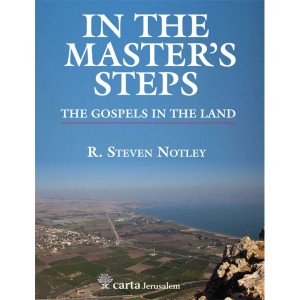
Far and away, The Sacred Bridge is the best Bible atlas–and one of the most impressive books–I’ve ever used. Now Carta is beginning to publish bite-sized adaptations from that massive and beautiful work. In the Master’s Steps: The Gospels in the Land is Volume 1 of The Carta New Testament Atlas, to be released in four total volumes. In the Master’s Steps is “partially excerpted” from The Sacred Bridge (TSB). (EDIT/UPDATE: Volume 2 will not be an excerpt from TSB–it’s a new work.)
The hope of the book, author R. Steven Notley writes, “is that a better understanding of the physical setting and events that framed the life of Jesus can assist us to hear more clearly the message he proclaimed.” Or, as St. Jerome puts it (quoted in this book):
Five gospels record the life of Jesus. Four you will find in books and the one you will find in the land they call Holy. Read the fifth gospel and the world of the four will open to you.
Those of us who have not yet had occasion to travel to Israel will have to settle for books such as Notley’s. However, as one makes her or his way through Notley’s careful writing, the vivid images, and the flawlessly rendered maps–one realizes there is no settling with this book. It’s the next best thing until such a day as one can make it to the Holy Land.
This book does not differ very much from its corresponding TSB sections, though this one is intended for a wider, more popular audience. Owners of TSB do not need to buy this volume, which does, however, carry with it the advantage of being portable, affordable, and concisely addressing the life of Jesus. If you don’t have TSB and are interested in geography and the New Testament, definitely pick up this work.
A few highlights in review:
Like all Carta books I’ve put my hands on, this one is of high quality. It’s paperback, but the thick, semi-glossy paper helps the full-color images really pop, and is perfect for making marginal notes in pencil.
As with The Sacred Bridge there is an index of place names, but not an index of Scripture references. Notley includes plenty of references, especially at the multiple points where he seeks to explain what could be, in fact, a harmony of apparently divergent gospel accounts when it comes to certain geographical details. Or if no harmonization is possible, Notley at least offers side-by-side comparisons.
The content of In the Master’s Steps is culled from chapter 22 of The Sacred Bridge, which, as it turns out, is the chapter I chose to profile most in-depth in my TSB review. Rather than repeat myself here, I simply refer you to my section 4 (“Case Study: The Sacred Bridge on The Holy Gospels”) here. Most, if not all, of what I say about the content there would apply to this book under review.
Here are the chapters of In the Master’s Steps:
The Birth of Jesus and the Flight into Egypt
The Ministry of John and the Baptism of Jesus
The Travels of Jesus
The Sea of Galilee: Development of an Early Christian Toponym
The First-century Environs of the Sea of Galilee
The Last Days of Jesus
Jesus and the Myth of an Essene Quarter in Jerusalem
The Arrest and Death of Jesus
From the Empty Tomb to the Road to Emmaus
Okay, I will quote this one helpful paragraph that leads off chapter 5 of In The Master’s Steps:
Events recorded in the ministry of Jesus outside of Jerusalem are primarily located in the region around the Sea of Galilee, specifically in the north and northwest area of the lake. The Gospels are an important historical witness for Jewish settlement in this region. Scholarship seldom notes that for many of these settlements, their first mention in the literary witnesses is in the New Testament. After a confrontation in the synagogue in Nazareth, his boyhood home, Jesus relocated to Capernaum on the Sea of Galilee (Mt 4:13; Mk 1:21; Lk 4:31). This village would become the center of his ministry in the region. We now turn our attention to settlements around the Sea of Galilee that find mention in the New Testament.
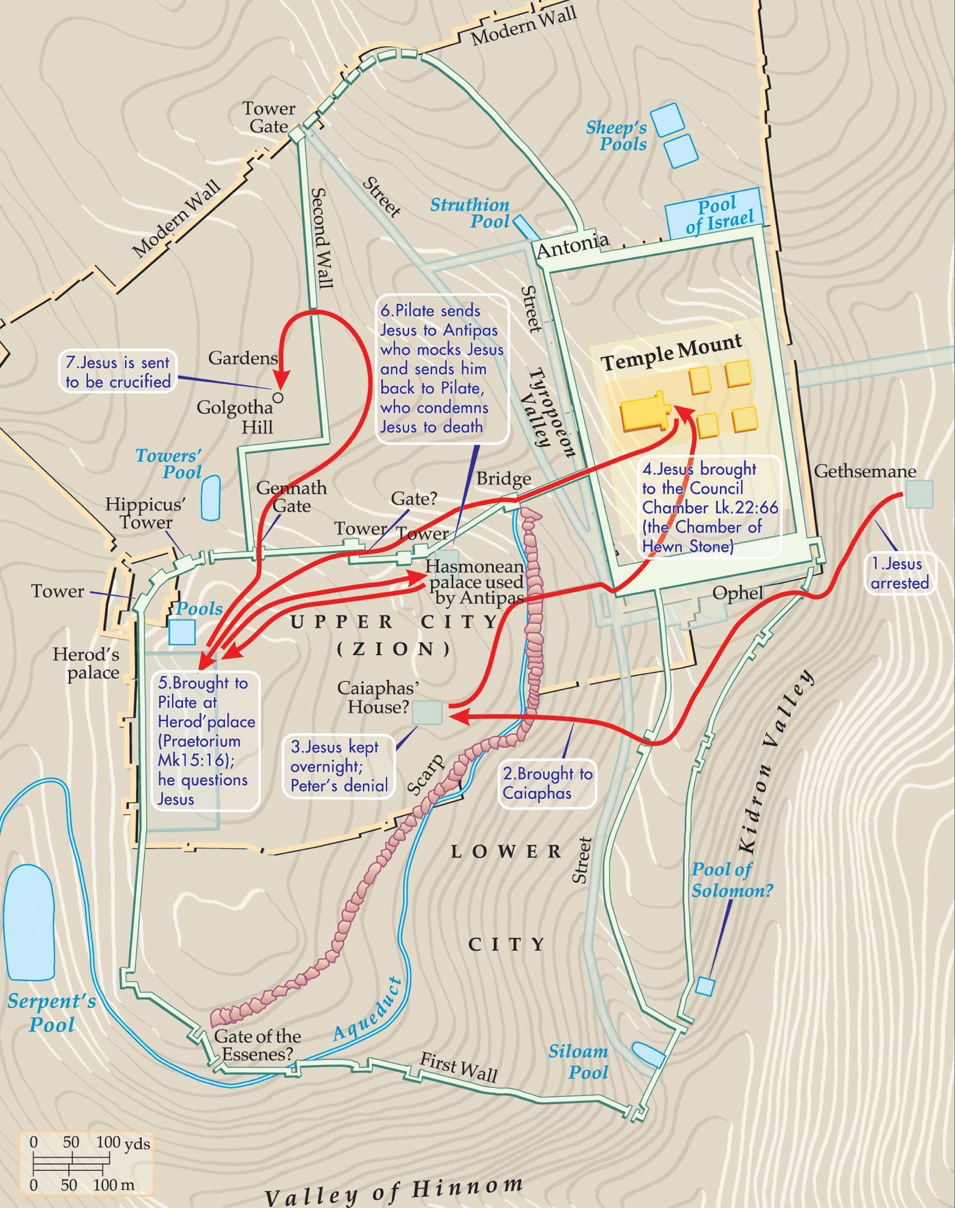
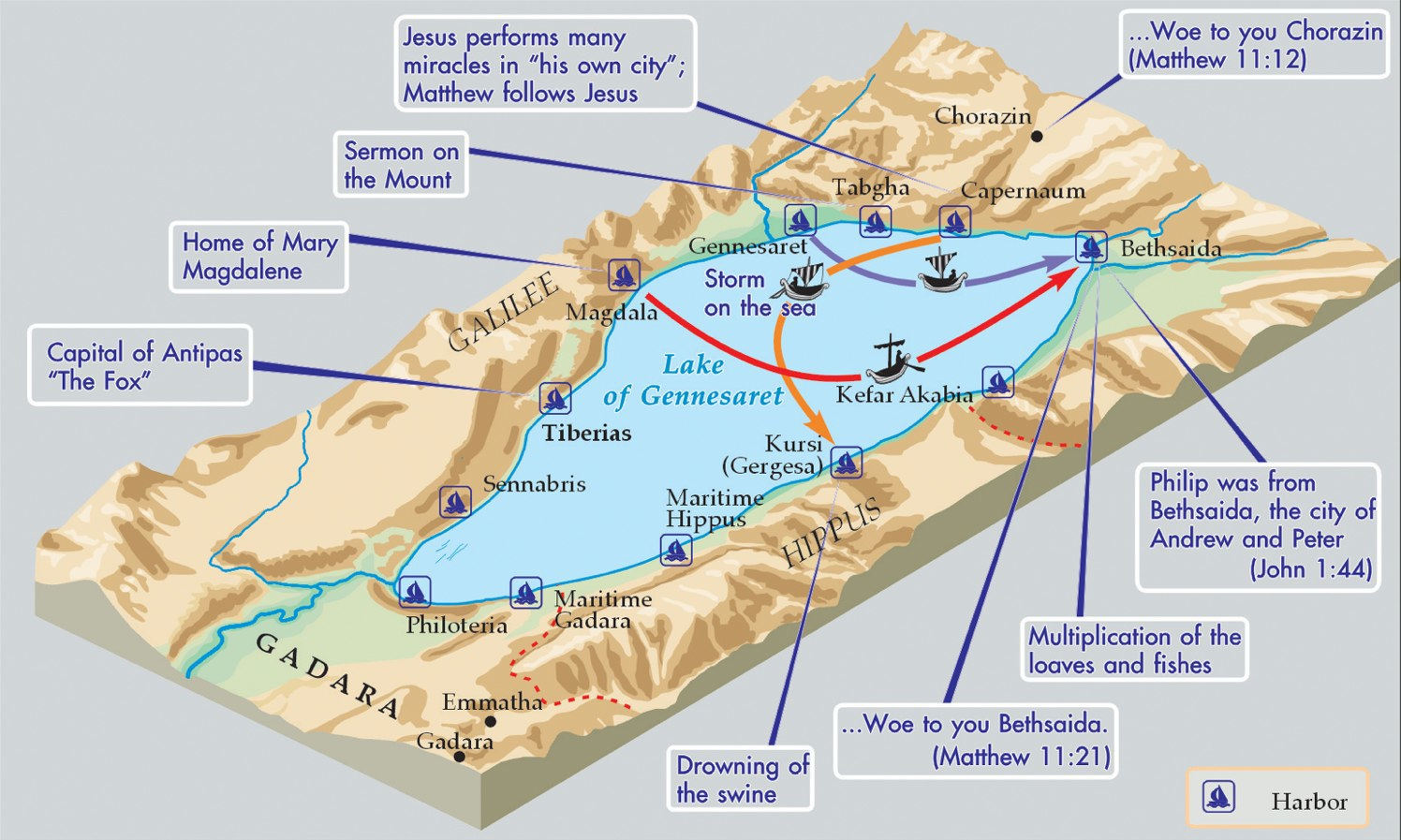
Here is a sample of the graphics and maps to be enjoyed (click on each image to enlarge):
Carta Caption: The arrest, interrogation and execution of Jesus
Around the Sea of Galilee (Carta’s caption)
To book’s hope, to revisit it again, “is that a better understanding of the physical setting and events that framed the life of Jesus can assist us to hear more clearly the message he proclaimed.” Reading through In the Master’s Steps will certainly offer such an understanding for the teacher, student, reader, or person of faith who picks up the book. The connections between geography and theological applications are not often made explicit here, but the reader will have more than enough historical background and imagery to begin to make those associations for herself or himself.
Many thanks to the good folks at Carta for sending the book. They didn’t ask for a review, so I write this of my own volition! I think they are one of the finest publishers in the business today. Check out their site here, and go here to see their works via Hendrickson, their U.S. distributor.







!["Leningrad Codex Carpet page e" by Shmuel ben Ya'akov - [2]. Licensed under Public Domain via Wikimedia Commons](https://abramkj.com/wp-content/uploads/2015/06/leningrad-codex-cover.jpg)














 Words on the Word