Habit List: A Sophisticated iOS Habit Tracker

I noted in September that the App Store has seen quite a few habit tracker apps of late.

Why not just use your task management app, you might ask?

Well, one can get tired of seeing the same “Update YNAB” task every day. Or the same “Study Greek” reminder. Habits and tasks aren’t the same per se.

This may be splitting hairs, but since getting past my initial skepticism, I’ve been using one habit tracker or another for much of the fall. The interface of Streaks is unparalleled, and Productive makes a cool sound when you complete a habit.

Habit List, on the other hand, is the most powerful and customizable of the three.


Options Galore


Habit List takes the cake in what it allows you to do with regard to scheduling your habits. Every potential use I imagined I could accomplish with the app.

You can set up a habit with just about any frequency imaginable, whether certain days or x times per week, and set a reminder. If I want to work out three times a week, I can set up a habit for that, without it having to be the same three days in a given week.


Habit Frequency


Set Habit Reminder


I came to Habit List from another app and could easily backdate edit my habits-in-progress so I didn’t have to start at zero just because I was using a new app. This was unexpected and a great touch.

This also means that if you are completing the habit but forget to track it for a few days, you can easily make the manual adjustment in Habit List.

You can view stats for individual habits, presented in a variety of ways:
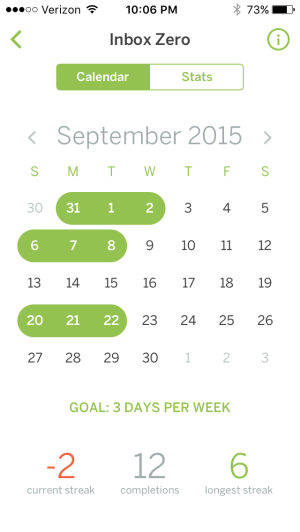
 

Calendar Stats


Monthly Stats


There is no limit (at least that I could find) to the number of habits you can track. So, sure, why not go ahead and add, “Take out trash Friday mornings”?

Here is a look at more app settings:
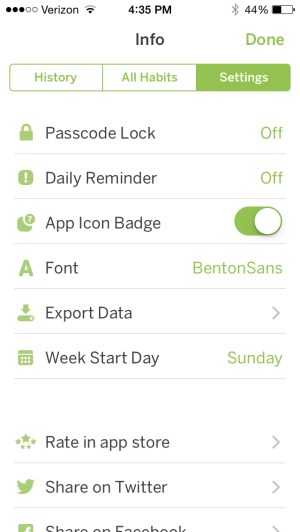
 

App Settings


For Future Updates?


Marking the completion of habits in Habit List feels very much like crossing off a list. The interface is exactly that. You swipe your finger across a habit to signify you’ve done it. No filled-in circles, no animations, no sounds. This will be fine for many, but there may also be more aesthetically pleasing user interface options for future updates to explore–whether color changes, distinct habit icons, etc.

Maybe this is draconian or just Pavlovian on my part, but I found myself wanting more from the UI that would give me a sense of satisfaction when crossing off a habit. (I know… what do you want, people cheering??? Well….)


Final Words and Where to Get the App


TL;DR: Habit List doesn’t quite have the pretty layout of some other similar apps. But it has the most functionality of any habit tracking app I’ve tried. There are no limits on what you can track, as well as a great degree of flexibility. If you’re serious about tracking some specific habits and don’t mind a minimalist layout, you may have found your app.

Find Habit List in the App Store here.


Thanks to the good folks who make Habit List for the review copy of the app, given to me for this review but with no expectation as to its content.

Cozy Classics: Best Board Books Ever

I finally read War and Peace last week… in about two minutes!

At first I thought Cozy Classics, 12-word board book summaries of classic works of literature, were gimmicky. But then I read War and Peace and Les Misérables. And the cuteness nearly melted me. (“So adorable it makes our hearts hurt,” rightly said one reviewer.)

My kids (ranging in age from pre-school to lower elementary) love the books, and my littlest one can easily memorize them. They’re perfect reading practice for my middle child.

Yes, it’s really impressive that anyone could even attempt to summarize such massive tomes in a dozen words. Les Mis begins:

poor
rich
sad

But what stands out even more is the beautifully detailed images of needle-felted characters. Check out the detail of the first page of Les Mis. (And note the page in the background!)


From the adult version of the book:

Cosette was made to run on errands, to sweep the rooms, the courtyard, the street, to wash the dishes, to even carry burdens… It was a heart-breaking thing to see this poor child, not yet six years old, shivering in the winter in her old rags of linen, full of holes, sweeping the street before daylight, with an enormous broom in her tiny red hands, and a tear in her great eyes.

Or, as the Cozy Classic puts it:

sad


Both Les Mis and War and Peace initially make for a quick read, as you might guess. But my kids have really enjoyed the detail of the images (as have I!), and having so few words makes them easy to understand and retain. I did have to explain “stroll” to my three-year-old, but that provided a nice little vocabulary lesson.


Image from War and Peace


These books are not only adorable; you’ll feel like a great parent in introducing your kids to these classics.

Check out Les Mis’s product page here and War and Peace here. All the Cozy Classics are here. AND… there is now a Star Wars trilogy.


Thanks to Simply Read Books for the review copies, given with no expectation as to the content of the review.

Why I am a Pastor, in 10 Words


We hiked through the woods on a perfect fall day, our whole family and another family, whom we love spending time with.

My wife and I were talking about my potential as a small business owner. I told her how much I’d love being at the helm of a startup.

But what kind of startup to start?

I: What does the world need that it doesn’t have?

She: Jesus.

I: Exactly! That’s why I’m a pastor.

The startup can wait for me, at least for now.

Biblia Hebraica Quinta (BHQ): Genesis!!

Though it’s been long in coming, the Biblia Hebraica Quinta (BHQ) is meant to supercede the current scholarly edition of the Hebrew Bible, the Biblia Hebraica Stuttgartensia (BHS).

What is the BHQ? Start here and you’ll get a good grasp of it. I updated my readers in 2014 with what was then some new information. To my great surprise, in a .pdf from Hendrickson Publishers today, I saw a cover image for the Genesis volume!

Look on the far right:


BHQ Genesis


So new is it that Amazon and Hendrickson both don’t have it listed by ISBN or any other means. Hopefully it really will show up soon!

UPDATE: I have received word that the expected release date is Spring 2016.

Alternote: An Alternative to Evernote for Mac

Alternote App IconAlternote is an Evernote client–yes! an Evernote client does exist–for Mac. If you use Evernote and have any level of dissatisfaction, especially with its layout, you should consider Alternote. It may not be a fully suitable replacement for Evernote, though. I explain why in my review below.


The Basics


As with Evernote, Alternote gives you three panes: the sidebar, the Notes pane, and the editor window with Note content. You can hide the sidebar to have two panes, or go into distraction-free mode, where you simply view the note you’re writing in.

There are some nice font options, as well as the option to get into a visually pleasing Night Mode:


Alternote Layout


This makes Alternote a much more appealing app for writing on a Mac. If you use Evernote to organize substantial amounts of text (i.e., more than just Web links), you’ll appreciate the look and feel of Alternote.


Evaluation


You can successfully drag a file or image into a Note in Alternote. What does not work in Alternote is dragging a PDF, for example, into the app to make it its own Note. I hope a future update adds this feature, as I consider it to be somewhat basic Evernote functionality.

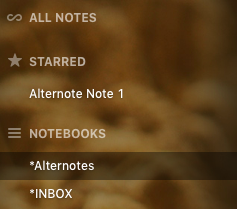
Starred NotesYou cannot create Notebook Shortcuts in the left sidebar–which is another big part of how I use Evernote. You can star certain Notes for easy access—and can just drag the Notes into the sidebar to do it–but not Notebooks.

This means Notebooks—especially the few you use most—are a little trickier to navigate in Alternote. You can scroll down the sidebar list, of course, or—what may be quicker—access them via a drop-down menu.

Alternote feels lighter than Evernote, for which I appreciate it, but it’s not necessarily faster or higher-performing. I had expected it would be. On the other hand, if you’re using the Basic Evernote level, you won’t get bombarded in Alternote with a steady stream of upgrade ads!

One nice touch in Alternote is that you can selectively sync your Evernote content.

Alternote SyncThat said, automatic sync maxes out at every 15 minutes in Alternote, which will not be automatic *enough* for some. I was worried when I was writing this review (in Alternote!) and it crashed without having finished a sync. (Alternote is pretty good but still a little buggy on El Cap.) Fortunately my text was still there in Alternote, but I was eager to force a manual sync after that. I’d had some initial sync misses with my initial setup, which a revision had fixed, so hopefully Alternote will sort all this out soon. I haven’t lost any data, however, so you’re safe in using it, for the most part.

The greatest asset in Alternote is its more uncluttered interface, which makes it better than Evernote for just plain writing. If Alternote would improve its sync issues, overall speed, and add other bits of core Evernote functionality, it could easily become your go-to app for managing Evernote.

An Alternote iOS app is in the works and slated for Spring 2016. Get it in the Mac App Store here, and check out the Alternote site here. If you don’t have an Evernote account, I recommend it; learn more here.


Thanks to the people at Alternote for the app download for the purposes of review.

Jesus’ and James’s “Spring of Water”

Spring Water


I’ve been preaching through the amazing book of James this fall. As I am able, I hope to post more of the sermons. In the meantime, here is something that occurred to me after I’d preached a particular passage.

To the woman at the well in John 4, Jesus says:

Everyone who drinks this water will be thirsty again, but whoever drinks the water I give them will never thirst. Indeed, the water I give them will become in them a spring of water welling up to eternal life.

A spring of water… that wells up into eternal life. This led me to think of something James, brother of Jesus (probably), says:

Can both fresh water and salt water flow from the same spring?  My brothers and sisters, can a fig tree bear olives, or a grapevine bear figs? Neither can a salt spring produce fresh water. (James 3:11-12)

James never quotes it, but much of his letter is a fleshing out of Jesus’ saying, “Out of the overflow of the heart, the mouth speaks.”

It seems James could have that in mind here: it is out of the overflow of the spring of water of eternal life–given to us by Jesus himself–that we use our words to bless others.

NIV Application Commentaries (Including Bundles), Less than $5 a Book

NIVAC sale


There is another big sale on Zondervan’s NIV Application Commentary series, with each of the ebooks selling at $4.99–on, among other places, Amazon. For the first time Zondervan is offering various discounted bundles, too. Check them out here.

As I’ve said before, I really liked Psalms vol. 1 in this series. There are a lot of really good volumes in NIVAC, like Genesis, Peter Enns’s Exodus, and the sleeper hit of the series: James (David P. Nystrom). (Seriously–I think it might be the best of the bunch.)

All the Table of Contents now are hyperlinked, so navigating via Kindle or iBooks should be relatively manageable. You won’t get the same sort of search power you’d get in Accordance or Logos, but the price is tough to beat.

Blink: An App for “Better Affiliate Links”

File_002 

Words on the Word is barely monetized. I’ve said before that I write the blog for love of the game, i.e., because:

  • it’s a creative outlet for me
  • I enjoy writing
  • I want to help resource others with the best books, biblical commentaries, apps, workflows, music, toys, and so on… whether it be for their parenting, pastoring, or personal enjoyment of life
  • other reasons, probably

In the monetization department, I participate in a couple of affiliate programs, most recently the one through iTunes, where I receive a tiny commision from Apple on any apps or tunes you readers purchase through affiliate links. I think I’m up to $0.70 now!

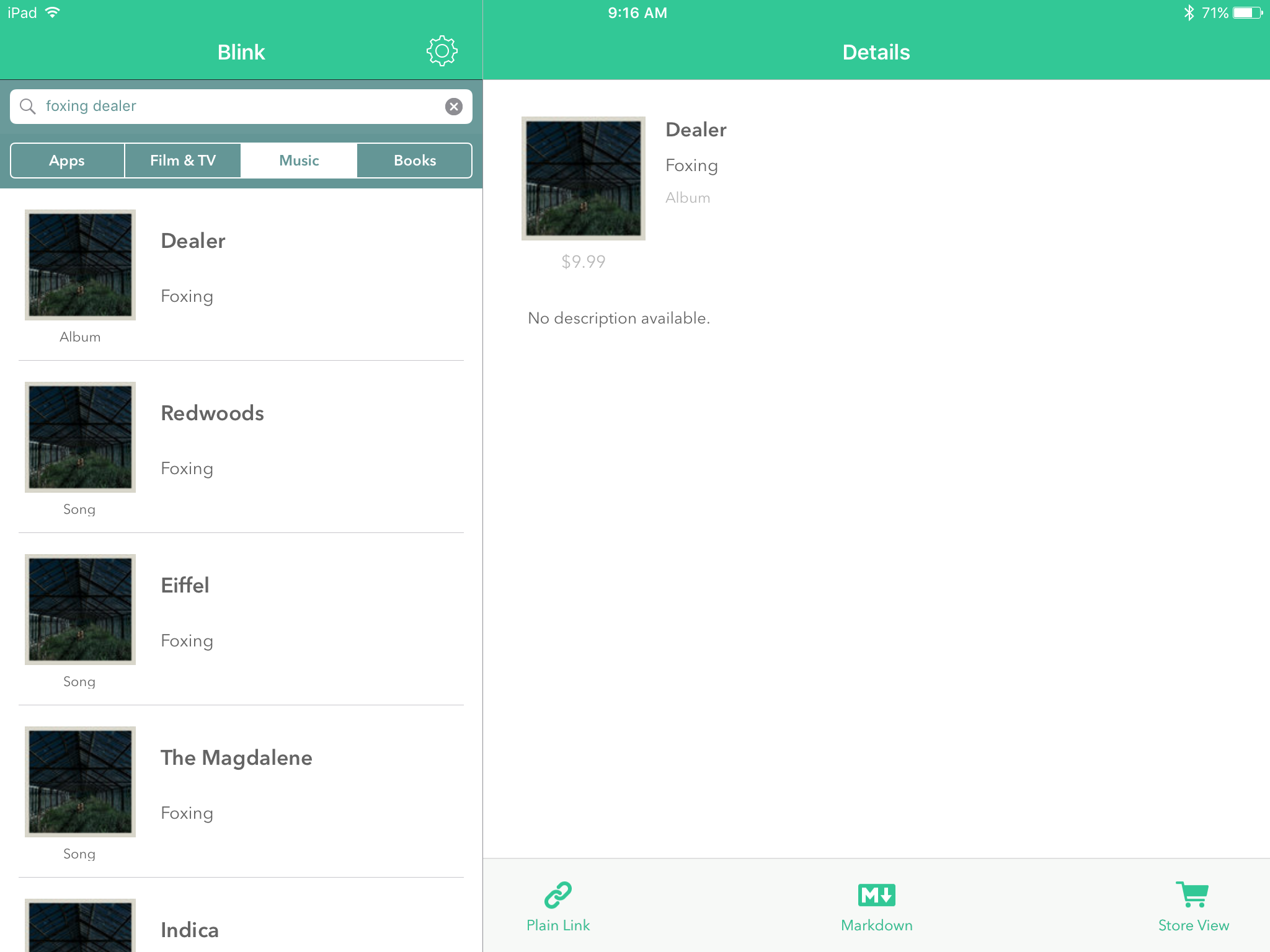
It’s not impossible to just go and fetch an affiliate link through a Web browser, but John and Owen Voorhees of Squibner LLC have a first-rate app, Blink, that allows you to effortlessly make affiliate links. It works for the App Store (iOS), the Mac App Store (OS X), the iTunes Store (music, videos, etc.), and the iBooks store.

Here’s what it looks like:


File_003


I find that I mostly use the plain text links, and then copy them over to a writing app (I’m writing this blog post in 1Writer, and yes, that hyperlink was generated via Blink in about two seconds). But Markdown formats are also available.

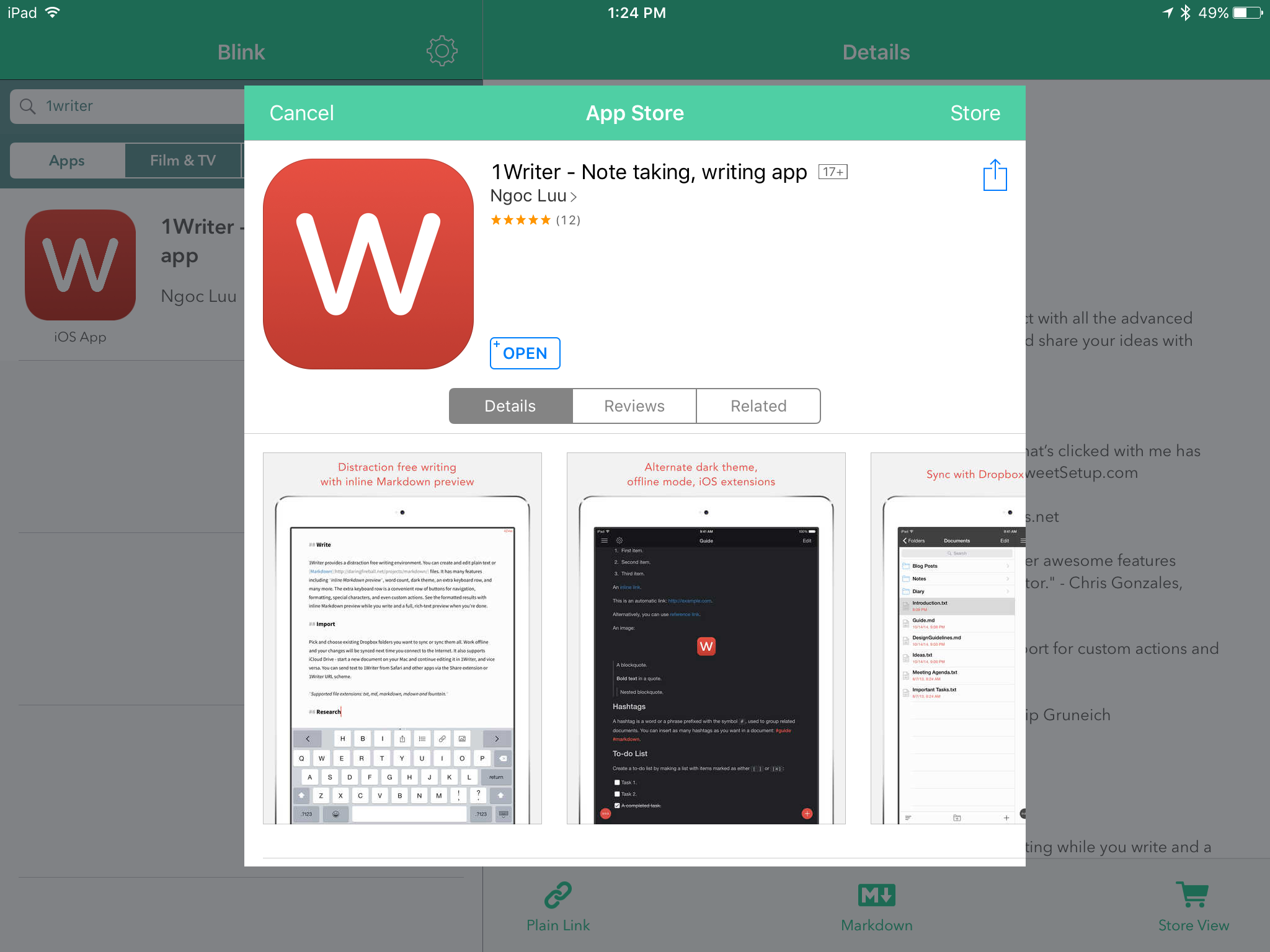
You can use Blink’s extension to a create a link with your affiliate ID from the App Store itself. In other words, you don’t have to go into Blink and look up the app you’re already viewing in the App Store:


File_004


They’ve just updated the app, too, to 2.0. Here are the highlights of what’s new:

• Blink now requires iOS 9
• iPad split screen multitasking on supported devices
• External keyboard shortcuts
• Multiple affiliate token support with nicknaming for easy management
• Ability to change geo linking and music settings from Blink’s extension
• Edit links within Blink’s extension
• For apps, view app type and price information within Blink and its extension
• Also view pricing information for music and books in Blink and its extension
• Podcast app support

I don’t use campaign tokens, but those who do will find it easy to manage specific campaign tokens via Blink. Also cool is the App Store view, which you can access from within Blink:


File_000


The attention to detail is evident in the app, as shown here, for example, when a music search differentiates between Song and Album before you have to click through:


File_001


You can use multiple affiliate IDs, if you need to.

My sole negative/constructive critique of this app is that I wish there were a way in-app to save searches and/or links you create. This is not insurmountalbe, though, since link generation is so fast.

Pay for Blink once, and you get it for both iPad and iPhone. You’ll probably earn back the $4.99 cost of the app in affiliate links anyway, which will now be quite hassle-free.

Five stars and two emoji thumbs up for this simple, focused, and perfectly executed app. Which, by the way, you can find here.


Thanks to the good folks at Squibner for the app download for the purposes of review.

Dealer, by Foxing

Dealer by Foxing 


I have seen a lot of Tweets about Foxing in the last year, so when I learned they had a new album releasing, I was eager to listen and write about it. The five-piece from St. Louis put out a very good first record, The Albatross, in 2013. On Friday, Triple Crown Records, home to Caspian, released Foxing’s follow-up, Dealer.

Dealer begins with “Weave,” a gorgeous track that builds and builds and builds… until at last clean guitars give way to (just enough!) distortion. The high register of vocalist Conor Murphy calls to mind that of Copeland’s Aaron Marsh, though maybe is a little grittier. “Weave” is the easily the best song on the album and one of the best rock tracks of 2015.

On “The Magdalene,” Murphy sings, “I’m going down… with the rosary,” part of the ongoing post-Catholic sentiment the album expresses. To be clear: I don’t want to minimize someone’s actually painful experience, which the lyrics and music throughout the record seek to express in a heartfelt way. But it’s hard not to hear this and other such lyrics as anti-Catholic, which felt to me a little bit of a tired trope as I listened through.

The third track’s piano and opening lyric—“We danced naked outside of your bathroom”—marks a significant departure from the first two songs and feels like a loss of built-up momentum. What emo kid can’t empathize with the chorus’s “Future love, don’t fall apart”? But the lush and largely upbeat feel of the first tracks gives way to a more morose tone for the middle section of the album. “Night Channels” does end with a nice full-band groove, but tracks 3 through 7 (supple string arrangements of track 6, “Winding Cloth,” notwithstanding) required more patience than expected for at least this listener to engage and keep listening.

The eighth track, “Glass Coughs,” finds the band picking things back up again, especially by the end of the track. On “Eiffel” (the following song) the drums let loose shortly after the two-minute mark, making me want more of that Foxing on future recordings.


Concluding Thoughts and Where to Get It


I don’t think Dealer is an album that will be on steady repeat for me from here on out. But Dealer is getting rave reviews already, even though it just released Friday. And Foxing’s fans are of the die-hard variety. That’s a credit to the band.

For me, I loved the first two tracks and then found the album had a hard time fully re-capturing my interest after the start of the third track. But I’m open to the possibility I’m just missing something, and am willing to give it another chance.

Either way, Foxing is early in their music-making career and has a lot of people excited about what they’re doing. (And I hear their live shows bring an intense energy to the crowd.) So it’s at least worth a listen or two for you to see what you think.

Check out Dealer on Amazon here, or here at iTunes.


Thank you to the kind folks at Brixton/Triple Crown for early access to the album for review!

The Rain for Roots CD Winners Are…

image


The forthcoming Rain for Roots Advent album is phenomenal. Read more about it here.

Today I’m posting with the results of the giveaway contest my review post included. I’m pleased to congratulate the two winners, Ruth Ohlman and Elisabeth Kvernen! Nice one!

(I will be in touch with both of you via email to make sure the CD gets sent to the right place.)

In case you’re curious… I didn’t count duplicate comments, but did count one entry for a comment and one additional entry for a comment that said a person shared on Facebook or Twitter. There were 59 entries total. I used a random number generator to pick.


image


Thanks to all who commented! There were a lot of really meaningful reflections on Advent that folks shared, and I only wish I could more fully engaged with each of them, but I read them all and loved it. Rain for Roots has some pretty great fans.

And thanks again to the good folks at Rain for Roots for sponsoring the giveaway and–more importantly–for writing, recording, producing, and releasing this fabulous record for a season of waiting.