
I promise I am not teaching her Jesus was a blonde princess, but my daughter says: “It’s a Jesus pull-up!”
Here she is, with her Jesus pull-up in hand:

I promise I am not teaching her Jesus was a blonde princess, but my daughter says: “It’s a Jesus pull-up!”
Here she is, with her Jesus pull-up in hand:

Logos 6 looks good and offers some innovative, interactive tools for Bible study.
There are a lot of upgrade options. The upgrade process has not been as clear as it could be. But I think I’ve figured it out–and I was a beta tester! So if it hasn’t been clear to me, my hunch is that’s true for others, too.
In case it’s helpful to anyone else, here’s a short post on how to get Logos 6.
On February 3, 2015, Faithlife (umbrella company for Logos) will make its Logos 6 engine free. It won’t have the datasets (mentioned below), nor the Interactives (see here), but I believe it will have basic improvements like the Search Everything and notes upgrades.
Check out Logos 6’s new features here. I mentioned in my review of Logos 6 that the Interactives are, I think, the best part.
There are three crossgrade levels, and they’re pricier than you’d expect. They’re all noted and compared here. Crossgrades don’t give you new books, but they get you the Logos 6 engine (i.e., software), as well as its new features, interactive resources, media, and datasets. (I’m especially impressed at the moment by the Propositional Flow Outline.) As one of Logos’s pages puts it: “The crossgrade packages allow you to power your existing library with the new Logos 6 features.”
This is where it gets confusing. You can buy a Base Package–and previous purchases count toward your customized dynamic pricing–that gives you new texts, books, etc. and that gives you some or all (depending on the Base Package level) of the datasets, media, and interactive resources.
So if you bought Logos 5 Gold, Logos 6 Gold will cost you money, but not nearly as much as if you’re buying for the first time. Logos 6 Gold supplies you with all the new datasets and features, as well as some new books and commentaries.
For Base Packages you can choose from Starter, Bronze, Silver, Gold, all the way up through the Collector’s Edition. If you buy Bronze, for example, you get new books and some of the new datasets and interactive resources in Logos 6, but not all.
Making your decision more potentially difficult is that Logos offers denomination-based base packages at various levels.
All the Base Packages are detailed here. Especially useful is this interactive Base Package comparison chart.
UPDATE: Get 15% off base packages here, or use the promo code ABRAMKJ6 when you checkout with a base package in your Logos cart.
Logos 5 had what was acknowledged by the company to be an unclear rollout and upgrade process. The Logos 6 rollout has been better, but still could have been clearer (and should be simpler, perhaps with less options?).
The best single, succinct summary Logos has published on upgrading can be found here.
See more at the home page for Logos 6.
 I never did get the 2048 tile. I’ve beaten the last boss on Sky Force, but there are still parts of the game I haven’t unlocked.
While I’ve found lots of ways to use the mobile iOS device productively (I’m looking especially at you, OmniFocus), I have also been on the lookout for good diversions.
Enter Threes.
The obvious comparison is to 2048, but this game has more character. The numbers, for example, have names:

If you look closely at the 6 and the 3 on the bottom row, you can see they’ve got little faces, too. And–the best part of the game–they make sounds and talk to you when you move them around to add them together: “Hi!”, “Hello!”, “Hey, guys!”, “Okay,” “Sup?”, etc. Sometimes a tile might even growl at you. (Right now my three kids are laughing at the sound effects and repeating them while my wife plays. I need to finish this post and get back to the game!)
There’s also a great music soundtrack you can toggle on or off when you play.
Threes has two basic rules:
The game offers a really simple, quick tutorial to get you started.
Here’s what a board-in-progress looks like:

Being able to see the next tile (by color–at the top of the screen) is a nice advantage.
There’s a good sense of humor throughout the game (already noted above). Even the “Clear Scores” option says, “This will clear the data but not the memories.”
And you get confetti when it tallies up your final score, after you are out of moves:

It’s fun for the whole family, kids to adults. 2048 was free, but this is easily worth the $1.99, which gets you the app both on iPhone and iPad. Find it here.
Thanks to the maker of Threes for giving me a download for the review.
May Prof. Rodney Decker rest in peace. One of his final contributions (gifts) to the Greek-learning community was this exciting new grammar, which I just received in the mail from Baker Academic yesterday:

Here is the description from Baker’s site:
This in-depth yet student-friendly introduction to Koine Greek provides a full grounding in Greek grammar, while starting to build skill in the use of exegetical tools. The approach, informed by twenty-five years of classroom teaching, emphasizes reading Greek for comprehension as opposed to merely translating it. The workbook is integrated into the textbook, enabling students to encounter real examples as they learn each new concept. The book covers not only New Testament Greek but also the wider range of Bible-related Greek (LXX and other Koine texts). It introduces students to reference tools for biblical Greek, includes tips on learning, and is supplemented by robust web-based resources through Baker Academic’s Textbook eSources, offering course help for professors and study aids for students.
Looks great! After a quick flip through, what stands out most is that the vocabulary lists at the end of each chapter include frequency counts for both the New Testament and the Septuagint.
I’ll post more later–find the book here.

For $19 (until 9:00 a.m. EST on Wednesday, October 29), Amazon’s Fire TV Stick is on sale:
Fire TV Stick connects your HDTV to a world of online entertainment. With a huge selection of movies and TV episodes, voice search that actually works, and exclusive features like ASAP and Prime Music, Fire TV Stick is an easy way to enjoy Netflix, Amazon Instant Video, Hulu Plus, low-cost movie rentals, live and on-demand sports, music, photos, games, and more.
According the the product page, you plug the stick in at your HDMI port, connect to the Internet, and then watch any number of shows and movies and subscription services through your TV.
Check it out here.
(Words on the Word is an Amazon affiliate, which means Amazon pays us back with a portion of any referrals. We would have posted about the Fire TV Stick anyway.)

Logos 6 launches today.
Logos 6 sports a number of new features. Here are my favorite ones so far. Click on any image or open in a new tab to see it larger.

This is the most impressive part of Logos 6, in my view.
I would have loved to have the interactive “Psalms Form and Structure” when preaching through the Psalms this past summer. You can click on any of the Psalm bubbles above to get a structural outline and more information. As you can see in the left sidebar, you can sort the Psalms visually by genre (really helpful), attribution (author), and more. Out of all the Interactives, this one is my favorite: visually appealing and really practical. There’s also an Interactive for the Proverbs.
Searching your Logos library for “type:Interactive” pulls up all the Interactive resources in Logos 6. Here are a few more worth highlighting:
Here’s Logos’s video of the Psalms Form and Structure:
It’s not the CIA, and it’s not Facebook, although it does sort of function like an amalgamation of the two (in a good way).
Factbook looks and feels like one of the Guides (Exegetical or Passage) Logos has, and updates what in Logos 5 was called Bible Facts.
Basically any noun (people, places, things, Bible books, events, etc.) pulls up a corresponding Factbook panel. If I’m researching Isaac, for example, typing “Isaac” into Factbook will pull up multiple collapsible hyperlinked sections where I can learn more about him: events in which he’s involved, resources in my library in which he appears (that I can click on for more), even a nifty “Referred to as” sub-section, so I can find all his mentions as “my son,” which is important for understanding Genesis 22, for example.

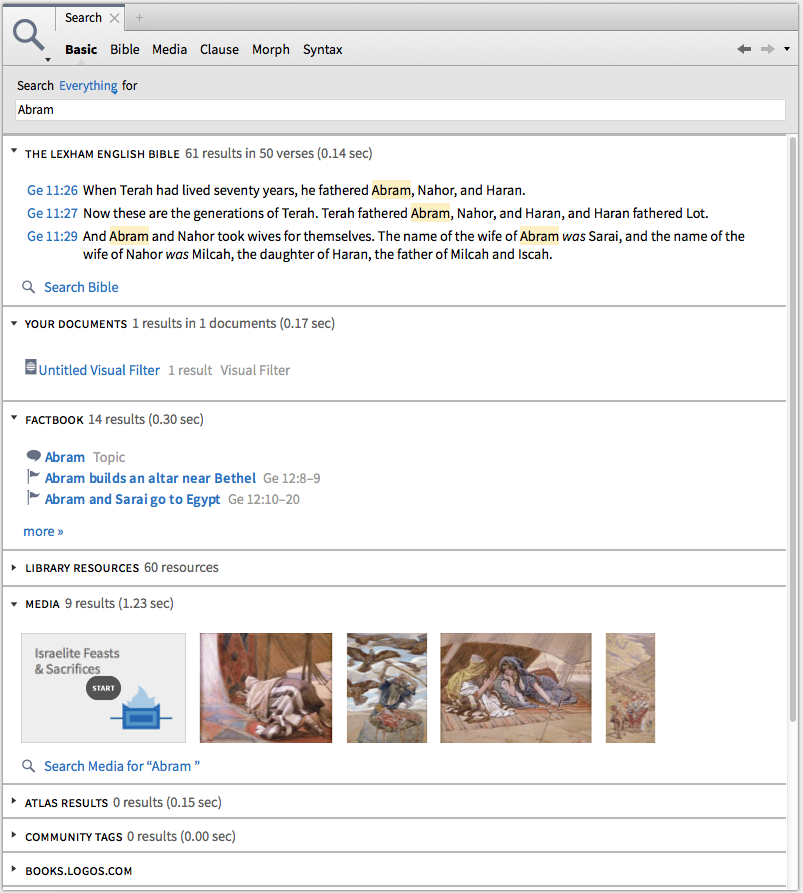
You can search across Bibles and commentaries and resources. Here are hit results, all of which are hyperlinked and can be explored for more, when I search everything for Abram:
The new Inline Search feature (watch it in action here) is pretty cool, too.
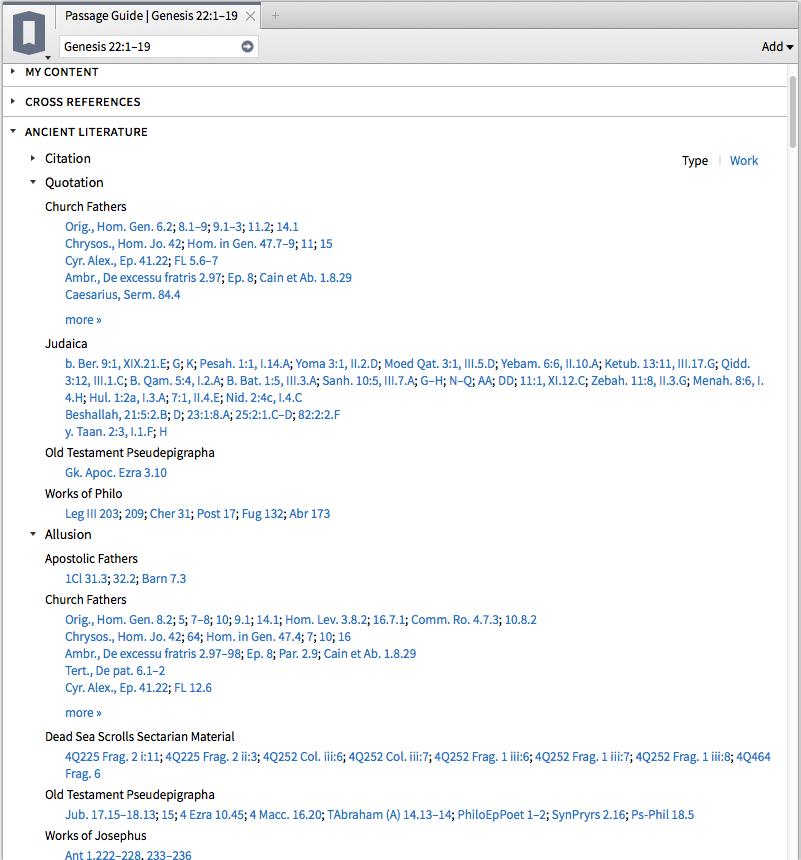
These are two new sections that can be accessed in the Guides (Passage Guide, Exegetical Guide, and Sermon Starter Guide is how I’ve gotten them). Have a look, and note that Ancient Literature is even sub-divided into Quotations, Allusions, and more:
and:

I run Logos 6 on an early 2008 iMac, but with a hard drive that’s been replaced in the last year. As a point of comparison, Accordance runs well on the same machine and returns search results quickly.
Logos’s lack of comparative speed on a Mac (even newer ones) improved between Logos 4 and 5. And you can see that the search times in the Search Everything query above are quite fast and impressive. However, it’s not uncommon even in Logos 6 for what I would consider a simple search to take 3 to 5 seconds (or more) to return results. The frequent Indexing and “Preparing Your Library” messages on startup are a pain that I really hope Logos pays attention to improving (or eliminating), especially for Mac users.
I do understand from the Logos forums that PC users and those with Solid State Drives see faster performance, but I would use Logos more often if it had consistently faster overall performance.
All that said, the Interactives alone (which are not sluggish) make Logos 6 worth the price of the upgrade. Sure, you can Google “Israelite Feasts and Sacrifices” and hope for the best. Or you can open the Interactive in Logos and see (and sort) this:

And this:

Check out Logos 6 here, and use the promo code ABRAMKJ6 when you checkout with for 15% off base packages.
Or you can click the banner below:

UPDATE: More on how to upgrade here.
Thanks to Logos for the chance to use Logos 6 as a beta tester.
 A solid time-tracking app for iPad and iPhone–aTimeLogger 2–is free for a limited time.
I’ve made some use of Hours (iPhone only), OfficeTime (iOS and OSX), and StopWatch Plus (OSX). Expect a report back. For now, you can download aTimeLogger, since it’s free at the moment, and see what you think.
Here is a list of features from the developer’s write-up:
– easy and intuitive interface
– goals
– pause/resume activities
– groups
– simultaneous activities (enable them in Settings)
– many statistics available in form of graphs and pie charts
– reports in different formats (CSV and HTML)
– backup and restore
– a huge number of icons for activity types and ability to upload custom icons
– the best support 🙂
The layout is clean and the app fairly easy to figure out how to use. With iOS 8 aTimeLogger 2 introduced widgets so that you can just swipe down on your screen (without unlocking it) to update your time logs.
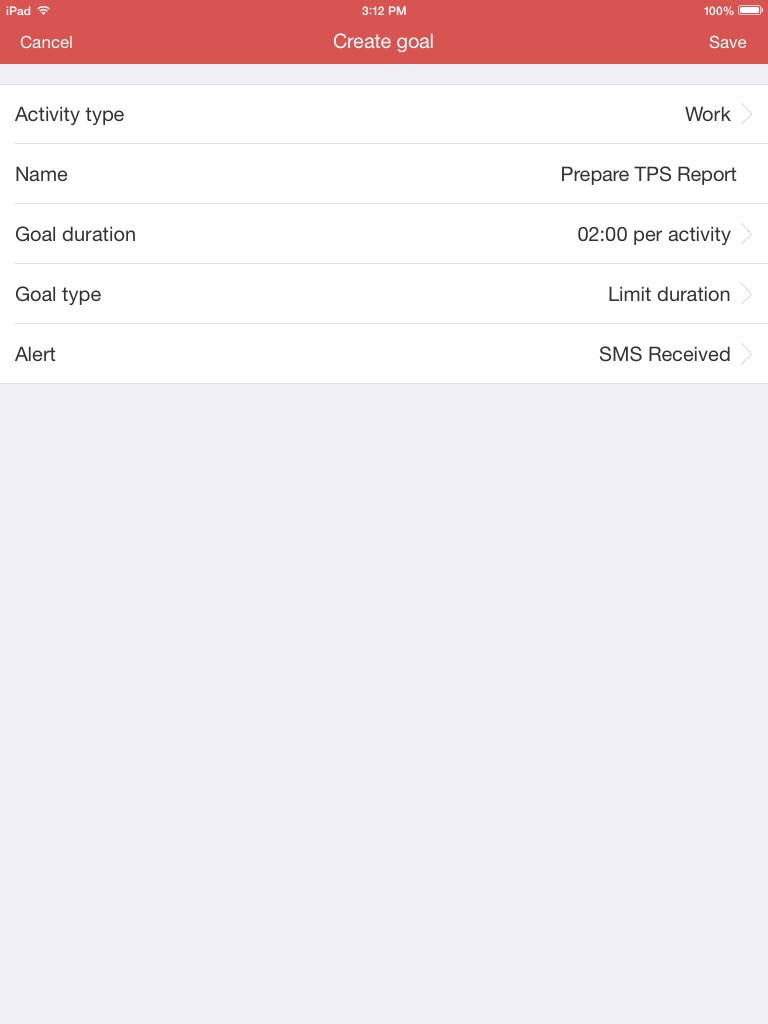
Here are a few iPad screenshots:
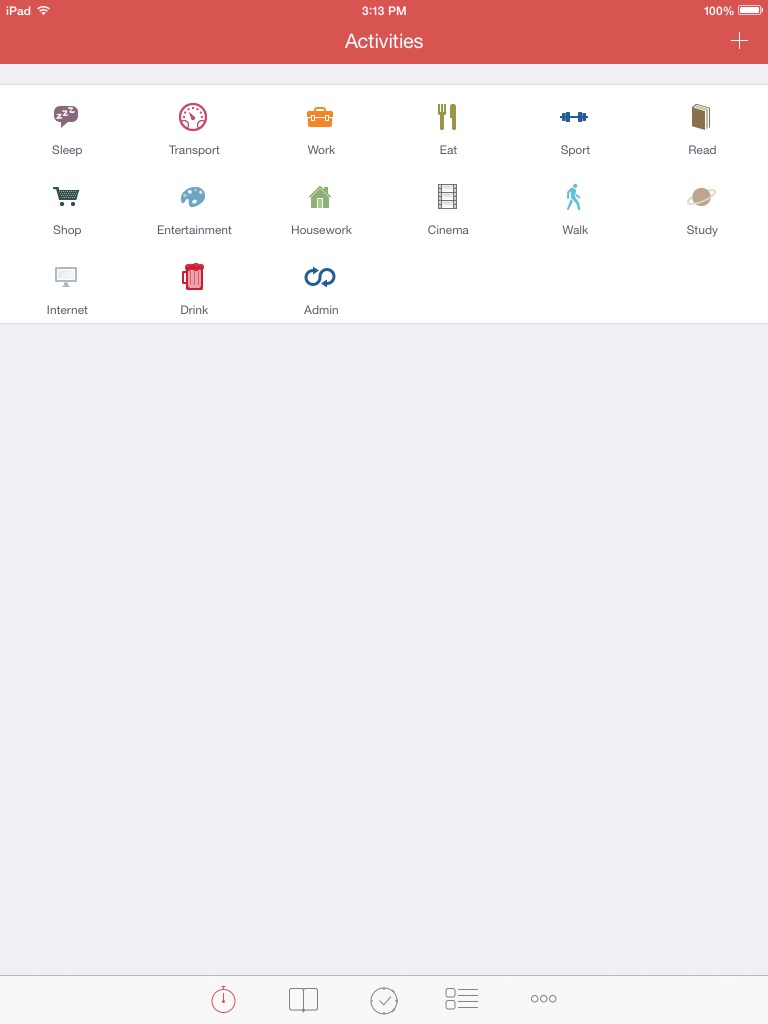
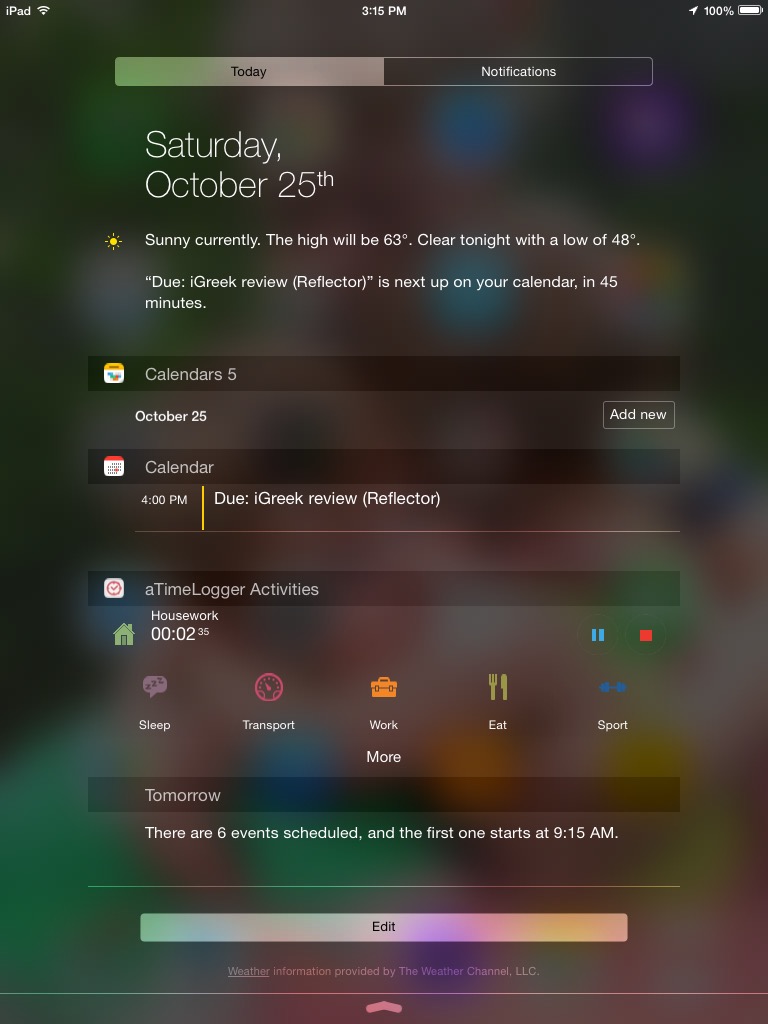
Find the app for free (for now) here.
The developer(s) of aTimeLogger 2 kindly supplied me with a review license when it was a paid app.
Grandma and Grandpa, this post is mostly for you. (Others: feel free to keep reading if you want.)
My seven-year-old son received a LEGO Store gift card from his grandparents. So we went on a Saturday morning to the LEGO Store to pick out a couple of sets. I’ve always been an indecisive shopper, and he showed some signs of that (how could you not?), but made a good decision that he stuck by.
One of the sets he got includes Batman and the Flash. Here’s his build of the Batmobile:


The best part is he’s been sharing quite nicely with his brother!
Here, by the way, is the set. Thank you, Grandma and Grandpa!
 As often as I use Logos Bible Software for personal study, preaching, and teaching preparation, I’ve found the easily digestible guides by Morris Proctor to speed up my learning process in ways that even regular weekly use can’t. When Logos 5 first released, I read and reviewed Proctor’s “What’s New?” guide. And in my review of Logos 5 Gold, I found that guide and his two-volume Logos Bible Software Training Manual to be immensely helpful, especially in explaining the newly released (at that time) Bible Sense Lexicon.
That two-volume set is now on sale for 50% off. The product page describes it:
It’s kind of ironic that the best one-stop shop of a training manual for Logos in 2014 would be a print edition (which is not available in Logos itself), but I actually have appreciated having that format. (And it’s cheaper and easier to get to than seminars, though I’m sure those are useful, too.) Having the manual in print makes it easier to keep focused on the software as I’m trying out the things the guide suggests.
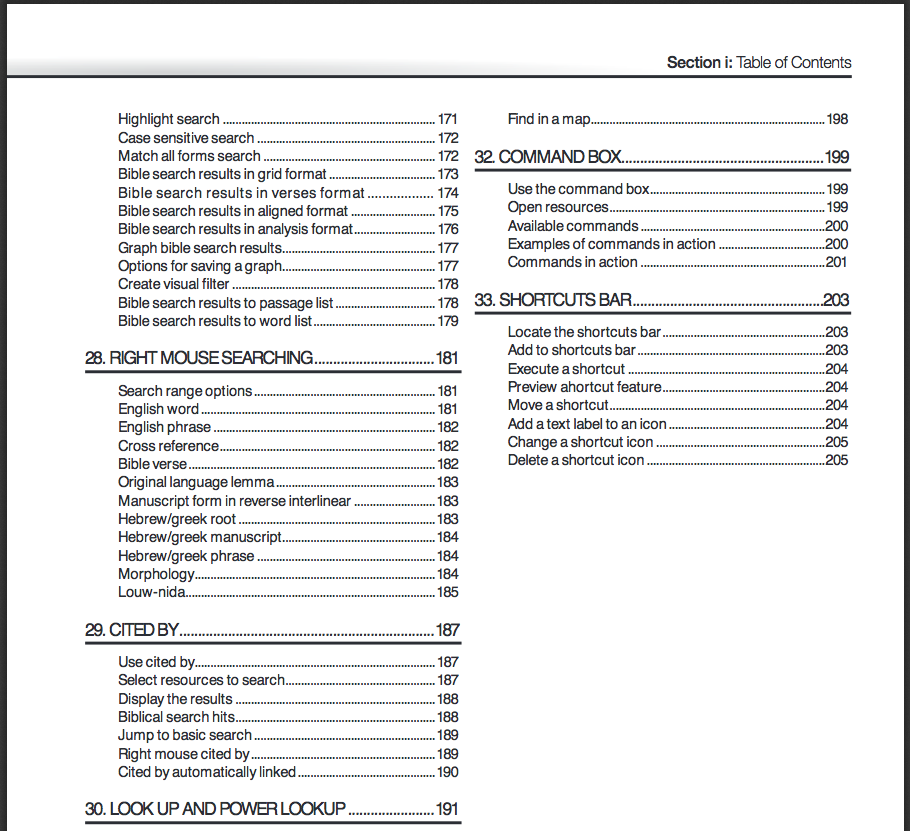
Just to give you an idea of the level of detail, here’s a snapshot of the Table of Contents for volume 1:
I felt at times when using the manual that the author was selling the product to the reader (“And there’s even more,” he notes on “Bible Searching,” and, “Those days are long gone,” he says about parallel printed editions of Bibles). I just chalked this up to his enthusiasm for the software, which is, indeed, an asset. (Though I still use plenty of books in print.)
Proctor’s explanations are clear, simple, and accompanied by screenshots that are well-labeled and easy to follow. The guides offer excellent attention to detail, including the suggestion of keystroke shortcuts to perform different tasks. Follow this link to see some of Proctor’s blog posts at Logos, which are similar in content and style to what’s in the manual. Having a spiral-bound binding is nice, too, because it means the books lay flat when set next to the computer you’re using.
You can check out a multi-page sample of the manual here, and find the product at MP Seminars’ site. Definitely recommended if you want to learn Logos 5.
Thanks to MP Seminars for sending me the two-volume Logos Bible Software Training Manual to review. See also my review of MP Seminars’ “What’s New” guide to Logos 5.
I. Can’t. Wait. To. Read. This. Book.
So I’m simply going to post a picture, leave a few links, publish this post, and close the computer so I can get to reading. Here it is–it just came in the mail today:

Thank you to Baylor University Press and thank you already to Prof. Reggie L. Williams for writing what looks to be an awesome book. Its full title is–get ready–Bonhoeffer’s Black Jesus: Harlem Renaissance Theology and an Ethic of Resistance.
The first sentence is the best one-sentence summary I’ve read about why people like Bonhoeffer so much:
Dietrich Bonhoeffer championed a radical interpretation of Jesus and ethics that was validated by his resistance to the Nazis and his execution by them.
I’ll post a review of it (and of the also exciting Bonhoeffer as Youth Worker) before Christmas. Find Bonhoeffer’s Black Jesus here (Amazon) or here (Baylor).


