Would Mark’s Jesus have us handle snakes and drink poison? (part 2 of 2) (BibleWorks 9 review, concluded)

The Gospel of Mark has a couple of possible (disputed) endings. I wrote a couple of weeks ago about the options for how to understand Mark’s closing chapter.

It is the so-called longer ending of Mark that has Jesus appearing to some of his followers and talking about their picking up snakes and drinking poison.

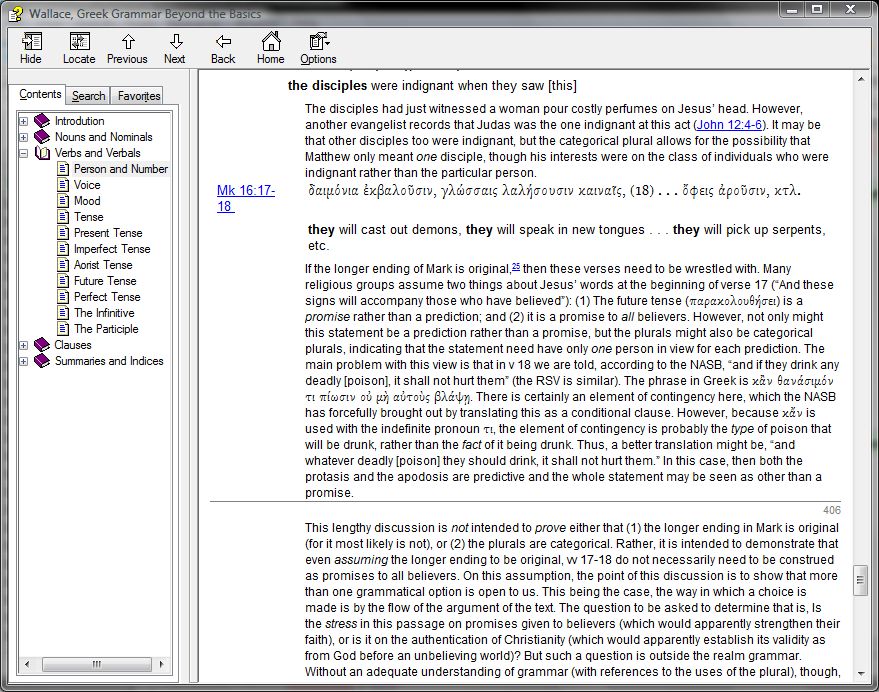
Of course, even if the longer ending is authentic and original to Mark, there is still the matter of interpretation. As a way to complete my review of BibleWorks 9, I set out to use BibleWorks to try to examine some of the manuscript evidence. A BibleWorks module of Daniel Wallace’s Greek grammar (included in BW9) offered some insight into interpretation, which you can read briefly here (screenshot).

BibleWorks 9 features the BibleWorks Manuscript Project, where you can “compare and analyze original manuscript text and images.” As a part of the Analysis Window, the manuscripts are integrated with the Browse Window, so that as you move around in the latter, the former tracks with you. The perfect complement to the Manuscripts Project is the Center for New Testament Textual Studies’ (CNTTS) NT Critical Apparatus. BibleWorks describes it:

For the first time, the New Testament Critical Apparatus from the Center for New Testament Textual Studies is available for PCs. This exhaustive apparatus covers the entire New Testament. The BibleWorks version has been enhanced to show a matrix of Aland categories and time period for the mss for each reading. Users will especially appreciate having the apparatus track and update as the mouse moves over the text in the BibleWorks main window. In addition, the start of each verse entry summarizes the significant, insignificant, and singular variants. When examining a variant, the text of the verse is shown with the variant text highlighted. No unlock required!

You can’t get NA27 and its textual apparatus in BibleWorks but with what CNTTS offers (it’s thorough), it doesn’t matter! Greek textual critics benefit immensely from the additions in BibleWorks from version 8 to 9.

BibleWorks has some great mini-training videos. Here they explain the CNTTS Apparatus. And here they discuss the Manuscripts Tab. If you’re serious about either (a) considering purchasing BibleWorks 9 or (b) have it and want to figure out how to use those two features, those two videos will get you there.

Now, on to the manuscript evidence regarding Mark’s ending in BibleWorks 9. This gives an idea of what the program can do in an applied Bible study.

If I’m wondering what Codex Vaticanus (“B”) has in Mark 16:9, I can simply select that Codex in the drop-down menu in the Mss Tab. (BibleWorks refers to it as m-3, too.) The screenshot below (click for larger) shows that there’s no image for Vaticanus at 16:9. This is because Vaticanus ends Mark at 16:8.
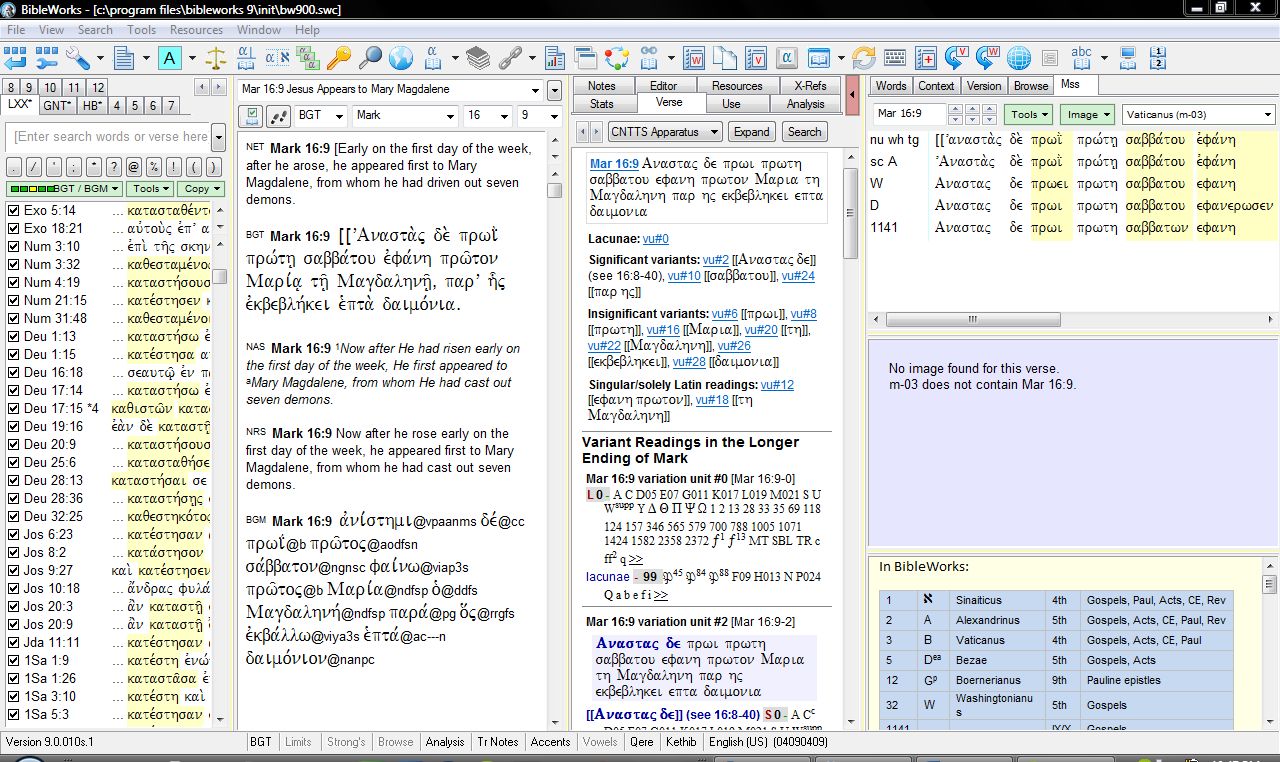
Note, too, something I find exceedingly helpful in the bottom right of the shot above–a key to not only BibleWorks’ manuscript numbering system but to abbreviations for manuscripts, their dates, and their contents. This is the stuff budding text critics always have to look up, flipping from page to page and resource to resource. (Or just using that little insert in the NA27. But this is easier!)

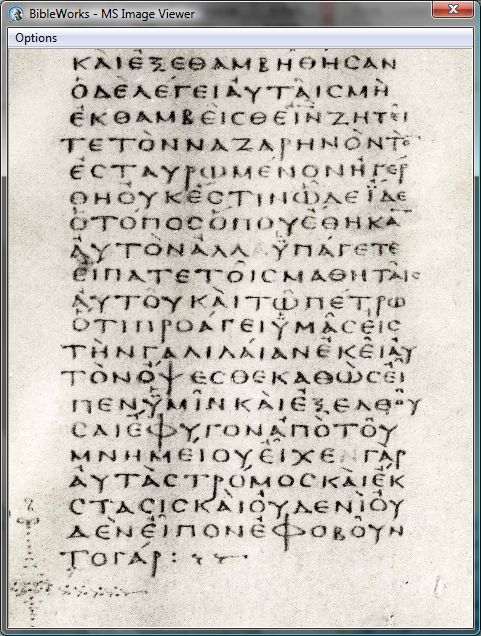
In fact, by right-clicking when you do see an image (e.g., Vaticanus at Mark 16:8), you can “load image in viewer” to pull it out and look at it more closely. There you can zoom and drag your way through the various parts of the text. It looks like this:
The top right section of the Mss Tab (in the full screenshot image above) lines up the various readings available in the manuscripts that BibleWorks contains. I can quickly see that “A” (Alexandrinus) and “W” (Washingtonianus) do have text for a longer ending of mark. Pulling up the image for Alexandrinus, I see this for Mark 16:9 ff.:

Hovering over the verse references (superimposed over the manuscript) brings up the pop-up window that you see there, where I can compare the given manuscript, the English, and the BGT Greek text in BibleWorks. (!!) This is all pretty amazing.

The Mss Tab is easy to figure out. Using the CNNTS Apparatus was less than intuitive for me. But this BibleWorks video explained it quite well. I’ve had to work at it to figure out how to best use it, but having done that, it’s a great apparatus. Especially helpful is its classification of variation types (significant, insignificant, lacunae, etc.). The Apparatus is chock full of abbreviations to learn, but what critical apparatus isn’t? And this one hyperlinks the abbreviations to what they stand for, so it’s not too bad.

For the Greek manuscripts that include some parts of the Septuagint (Sinaiticus, Vaticanus, Alexandrinus), I would love to be able to see both testaments in future BibleWorks editions. That was a loss for me, especially given my appreciation of the Septuagint. So be aware that even though BibleWorks has images of manuscripts that contain parts of the LXX, it’s just the New Testament that appears in BibleWorks.

But the images are already some 8 GB, and this is a work in progress (with future updates promised), so the lack of the LXX/Old Greek is understandable. Viewing Hebrew manuscripts in the future would also be awesome! Until then, what BibleWorks includes and gives the user access to (as part of the purchase price) is pretty remarkable.

BibleWorks won’t actually answer the question I posed in the title of this post: Would Mark’s Jesus have us handle snakes and drink poison? Exegetes will always have to interpret and answer questions like this. (This one’s a bit of a softball, admittedly.) BibleWorks also can’t determine with certainty what the actual ending of Mark is.

But it can sure show you a lot of evidence, and give you just about everything you need to try to have an informed opinion on the matter. Being able to look at images of actual manuscripts still boggles my mind. And it’s not only being able to view those manuscripts (much of which you could do online anyway)–it’s the fact that they’re tied to BibleWorks’ analysis tools that’s truly astounding to me. BibleWorks has enhanced my Bible study immensely.

BibleWorks 9 is easily a five-star program in my book. I’ve enjoyed being able to review it.

See all that’s new in BibleWorks 9 here.

I received a free upgrade to BibleWorks 9 in exchange for an unbiased review. (Thank you, BibleWorks!) See the other parts of my BibleWorks review here. You can order the full program here or upgrade here. It’s on Amazon (affiliate link), too.

My 4-year-old son reviews Field of Peace by Joyce Meyer

This book is about baseball. Buh-buh-buh-buh baseball!

Some of the characters’ names are Boyd, Arnold, Coach Pouch. Boyd is trying to win the baseball game.

Arnold the Armadillo turns into a big ball, because he’s hiding. That means he’s scared. He curls up. The team stops and loses, but the giraffe tries to win.

When they lose, the giraffe feels bad.

The skunk has a rake. He sprays, and then the giraffe has a hat on his nose because it’s stinky!

Boyd [the giraffe] thinks that Arnold wouldn’t win the Wilds’ championship. Then Arnold was by himself in the field because they were gone. But then everyone misses him.

Boyd feels bad because he misses Arnold. So he tries to get Arnold.

And he [Arnold] did this–he batted the ball even though he was a little ball.

At the end of the book, Boyd is feeling peaceful inside. That means you’re feeling happy!

My favorite part is when Arnold shook his hands down and up, down and up, because he was scared. This book made me feel good. I’ll show you what I really like: it has “peaceful” inside the book.

My 4-year-old son received an Advanced Review Copy of Field of Peace from Zonderkidz. Find more about Field of Peace on Amazon or at Zondervan. It’s slated to release September 4. Read the rest of my 4-year-old son’s reviews here.

My 4-year-old son reviews a Duncan Butterfly yo-yo

Not long after my 4-year-old son began doing book reviews on my blog (the best part of this blog, according to some), he had an idea.

“I know, Dad. We could review a toy! We could review a yo-yo!”

I emailed the folks at Duncan, not sure if there even is such a thing as a “review copy” of a toy, but, lo and behold, we got a yo-yo in the mail this week. Below, my 4-year-old son reviews it. Before we could profitably use it, we shortened the string, using this video to guide us, although the packaging did include instructions for that. Here’s my 4-year-old son now, in order of his observations as he played with it:

I’m not really good at using a yo-yo because I just learned.

In response to his two-year-old brother’s “Is it mine?”  “Nope, not yours. It’s mine.  So don’t play with it.”

I don’t think I can do it, Daddy. This is too hard for me. It’s good! But I don’t really know how to use it yet.

It’s a good knocker. It’s a good yo-yo.

I’ll tell you how it works. You roll it up, once you already use it first, and all we have to do is just get it up to your hands and pull it down and then bring it back up. That’s the end. That’s it.

(Later) It’s really easy to use.

(Later later) I can’t really do it! This knocker’s not very easy. I got to go to bed. Good night!

The folks who gave us a yo-yo for review (thanks!) emphasized that it’s for ages six and up. I see the wisdom in their age recommendation. Perhaps when “my 4-year-old son” becomes “my 6-year-old son,” we can have another go. For now, he’s finding other ways of having fun with the yo-yo, racing through the house and dragging it behind him.

UPDATE, three days later: See his original artwork (a yo-yo) here.

Exegetical Guide to the Greek New Testament: Colossians and Philemon, reviewed

Getting from participles to preaching, from grammar to Good News proclamation, can be a challenge to preachers and teachers when working with the biblical text. But if there is theology in those prepositions, as seminary professors have often noted, careful attention to the morphology and syntax of the text can be key in preparing to expound God’s Word with God’s people.

B&H Academic’s Exegetical Guide to the Greek New Testament “aims to close that gap between stranded student (or former student) and daunting text and to bridge that gulf between morphological analysis and exegesis.” As a volume in a projected set of 20 volumes, Murray J. Harris’s Colossians and Philemon “seeks to provide in a single volume all the necessary information for basic understanding of the Greek text and to afford suggestions for more detailed study.” Similar to the Baylor Handbook series, the Exegetical Guide is not a “full-scale” commentary. This affords the author more opportunity to comment on the original language of the biblical text.

Both Colossians and Philemon in this volume contain a brief but sufficient Introduction. It treats authorship (Harris defends Pauline authorship based on Colossians’ similarity to Philemon, which is more generally accepted as Pauline); date (he puts the two letters at 60-61); occasion and purpose; includes an outline of the letter; and makes commentary recommendations.

Each paragraph of the biblical text has the following features in the commentary:

  • A structural analysis of the Greek. This is in sentence flow style–not sentence diagramming; Harris says the former is “a simple exercise in literary physiology–showing how the grammatical and conceptual parts of a paragraph are arranged and related”
  • Commentary on each phrase in the Greek, which ranges from morphological analysis to syntax to lexical analysis (great helps for word studies in this book!) to textual variants. Much of the Greek ends up translated into English in each passage of the commentary
  • “For Further Study,” a bibliography arranged by topic, e.g., “Prayer in Paul” (1:9-12), “The Will of God” (1:9), etc.
  • “Homiletical Suggestions,” not uncommonly more than one for a given passage

In addition, at the end of each letter there is a full English translation of that letter and an “expanded paraphrase” of the Greek. Colossians 3:12-14 in Harris’s translation, for example, reads:

Therefore, as God’s chosen people, who are holy and loved by him, put on heartfelt compassion [σπλάγχνα οἰκτιρμοῦ], kindness, humility, gentleness, and patience. You are to bear with one another, and if anyone has a grievance against someone else, you are to forgive one another. Just as the Lord forgave you, so you also must forgive.

The expanded paraphrase reads, “So, then, since you are God’s chosen people, his elect, dedicated to his service and the objects of his special love….”

The structural analysis, in my view, is the best feature of this densely packed and rich commentary. For example, in his analysis of Colossians 3:1-4, Harris visually shows “Christ” (in Greek) lined up in five different instances, so that he can easily show, “Christ is a central theme of the paragraph (there are five explicit references to him in the four verses).” Just reading the Greek straight through, this may not be as obvious as it is when Harris shows it visually and comments on it.

Harris gives great attention to individual words and phrases within verses. He mentions the major Greek grammars: “Blass-Debrunner-Funk, Robertson, Turner, and Zerwick,” as well as BDAG, the Anchor Bible Dictionary, and other such standard references. Just to give one example, on 1:15 Harris writes:

The ‘firstborn’ was either the eldest child in a family or a person of preeminent rank. The use of this term to describe the Davidic king in Ps 88:28 (LXX) (=Ps 89:27 EVV), ‘I will also appoint him my firstborn (πρωτότοκον), the most exalted of the kings of the earth,’ indicates that it can denote supremacy in rank as well as priority in time.

The sermon suggestions are really just suggestions for the body of a sermon; though they are in outline form, they are not complete sermon outlines. And some of the included outlines (“Wrestling in Prayer” from 2:1-2) will preach better than others (“Introductory Greeting” from Philemon 1-3). Yet anything homiletical like this is more than some Greek-focused, exegetical series offer, and the homiletical suggestions–if not always sufficient in themselves–still make for a good point of departure for the preacher. In fact, Harris only intends “to provide some of the raw materials for sermon preparation.”

The “Glossary of Grammatical and Rhetorical Terms” is one of the best such glossaries I’ve seen in a book like this. It occasionally uses examples from Colossians and Philemon themselves, which is a nice touch.

This Exegetical Guide to the Greek New Testament is a great companion to the Greek text. Harris is sensitive yet incisive, and always thorough. It’s hard to imagine a better guide for the grammatical analysis of Colossians and Philemon in Greek. I look forward to future volumes in this series. (A James volume is coming soon.)

Thanks to B&H Academic for the free review copy of the book. I was under no obligation to provide a positive review. The book’s product page is here (B&H), or see it here (Amazon).

Review: Accordance 10’s Commentary on the New Testament Use of the Old Testament, by Beale and Carson (part 1 of 2: the module)

Baker Academic has made its way to Accordance 10 Bible Software. The first offering is Commentary on the New Testament Use of the Old Testament, edited by G.K. Beale and D.A. Carson. Here I review it, with this first part of the review covering Accordance’s version of it.

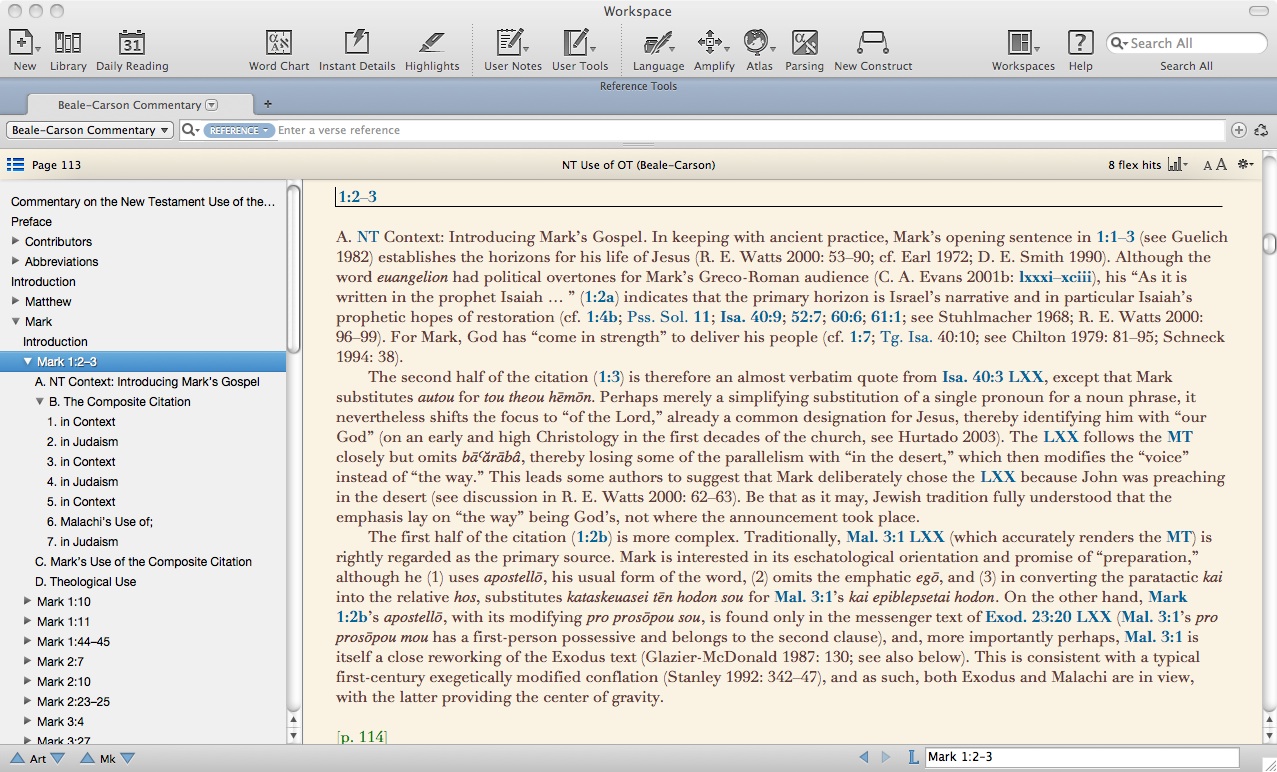
One nice thing about Accordance’s setup is that I can use Commentary on the NT Use of the OT just as any other Accordance tool (for the below and all images in this post, click or open in new tab for larger):

Or I can right-click on the tab to “detach it,” so that it’s its own workspace. For reading through a good deal of text at once, this is ideal. One other great feature, as you’ll see in the left sidebar below, is how easy it is to navigate through all the sections and sub-sections of the book:

But what about how I’d actually need to use this resource? To really make sense of it, I’d need the Hebrew MT, Greek LXX, possibly English translations of each, and the Greek NT all open and easy to view. Combining that kind of layout with the hyperlinking in Accordance’s version of this commentary would be sweet. Wonderfully… it’s possible. Check this out:

For a resource that can be had in print for under $40, it seems like paying nearly $60 for the Accordance module could only be justified if the electronic version could do things the print version can’t. The electronic version can, indeed, do some unique things. (See the image above.) Especially for a commentary like this with lots of cross-references and constant movement between Greek, Hebrew, and other versions, being able to see multiple versions at once–together with the commentary–is a huge benefit. It saves time and allows me to better grasp how NT writers used OT texts by seeing a quotation alongside its original context.

The Instant Details (which I happen to have closed above to maximize screen space for different versions) show whatever hyperlink you hover over–this gives you yet another window for text display, and is particularly useful for, say, quickly seeing a longer passage in English. Things did get a little buggy when I opened the Instant Details the first time, but I assume that was because of how many windows I had open (not the module itself, necessarily):

I was able to get rid of the jumbling on the top right by closing and re-opening the Instant Details. See now below:

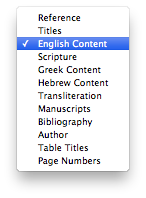
One really nice feature about Accordance’s Beale and Carson commentary module is how many ways you can search it. Accordance then tells you how many hits come up for your search, and using the “move down one mark” arrow keys, you can easily move through the results. You can even see the “real” (i.e., print) page numbers! Look again at that image at right–that’s 12 different ways you can search Beale/Carson. Pretty handy.

Most folks interested in Commentary on the New Testament Use of the Old Testament likely know of its solid reputation and are perhaps now merely trying to decide between a print and electronic version. (In a second post I’ll review the content of the commentary.) If you use Bible software regularly already, I think it is well worth the extra cost to own Accordance’s module. It’s facile to get around, hyperlinked nicely, easy to line up with original language texts, highly searchable, and quite readable as a detachable resource. I, for one, am really glad to have this module on my computer.

Thank you to Accordance for providing me with a copy of the Beale/Carson commentary module for review. Scroll through for all six parts of my Accordance 10 review here.

UPDATE: Read the rest of my review of Beale/Carson here.

These 4 Perks are Divine in BibleWorks 9

Okay–not divine per se, but pretty indispensable for Bible study. Here are four perks in BibleWorks 9 that, the more I use the program, the more I appreciate.

1. Archer and Chirichigno’s Old Testament Quotations in the New Testament

Sure, this is perhaps an obscure thing to highlight. But it’s a major perk in my book! Archer and Chirichigno’s resource is already an invaluable one, particularly for studying the NT use of the OT. But the way it’s laid out in BibleWorks opens up possibilities unavailable to the owner of just the print version.

Because the focus is on OT Quotations, everything is listed in Old Testament canonical order. So if you’re wondering where Exodus 20 (the 10 Commandments) shows up in the New Testament, you can skip ahead to that section and find (click for larger):

Everything in Archer and Chirichigno’s book is there–their commentary at the bottom, their comparison of MT/LXX/NT. You can hide or display the English in BibleWorks (I have it shown above). Also, when you mouse over a blue hyperlinked verse, as I’ve done in the image above, you see a popup with that verse in three different versions. This seems to be an underrated part of BibleWorks, but if you’re serious about LXX or OT/NT study, having this is a great help.

2. Lots of how-to videos

Some six hours worth, according to the BibleWorks site. The videos I’ve watched have been clear, simple, and substantive.

3. Intermediate Hebrew and Greek grammars included

BibleWorks 9 comes with these three classics included:

They’re keyed to individual verses so that the appropriate information from each of these grammars will automatically show in the “Resources” window at any given verse. Using even Amazon prices, just these three grammars cost more than $150 in print. And having them lined up with the OT and NT texts as I use them in BibleWorks saves me time from flipping through indices and physical pages. (See this portion of my BibleWorks review to see Wallace in action.)

4. The Use Tab

In an earlier part of my review I wrote:

[T]he new “Use” tab … instantaneously shows you all the uses of a word with how many occurrences it has in that book and version…. You had to search on a word in previous versions to do this…. I find this particularly useful for vocabulary acquisition. As I come across a word I don’t know in the text, I can easily see–does this occur 121 times and I should know it? Or is it just in the text two or three times, so I was okay in not knowing right away what it means?

This feature was reason enough for me to pursue an upgrade from version 8 to version 9. (!) With the new fourth column (which I mention at more length at the same link above), the Use tab can be open together with an additional analysis window.

Although I still regularly use print copies of the Bible (Greek, Hebrew, and English), BibleWorks has been a useful companion in my personal Bible study and devotions for the last couple years. Especially when I want to do word studies or delve into the grammar of the text or compare multiple translations, BibleWorks has been a great program to use.

See all that’s new in BibleWorks 9 here.

I received a free upgrade to BibleWorks 9 in exchange for an unbiased review. See my prolegomenon to a review here, part 1 (setup and layout) here, part 2 (the Verse tab) here, and part 3 (text criticism 1 of 2) here, with the completion of the text criticism mini-series coming soon.  You can order the full program here or upgrade here. It’s on Amazon, too.

More Bells and Whistles in Accordance 10 (final installment of my review)

Here are a few more bells and whistles in Accordance 10. These are to add to the bells and whistles I mentioned yesterday.

    1. The Context Slider  

I’m in James. Wondering about wisdom.

So I right click on “wisdom” to search for the word in the rest of the Bible. I get the following results:

Great for a word search. I can scroll through the results, seeing one verse at a time–every verse containing “wisdom.” Note that next to the context slider it says there are 202 verses displayed. The frequency count for “wisdom,” though, is toward the top right of the image above, just under the search bar–212 flex hits. (I wrote more about Flex Search here.)

But what if I want to see each of those uses in context, without having to open up a bunch of new windows? Easy, I just slide the context slider one notch to the right:

Note that while my “212 flex hits” stay the same, there are now 546 verses listed. This means a bit more context is listed for each occurrence. Moving the context slider to 3, I get even more context for each use of “wisdom”:

The Context Slider goes all the way to the right for the setting “A,” which shows me all the uses of “wisdom” still marked in red, but with the context of the entire Bible surrounding it:

As you can imagine, being able to see the word search results with varying degrees of context makes for fruitful word studies.

2. Constructs

This feature looks a little more complicated, at least on first glance. But it’s well worth spending the time to figure out how to use it, because of all that it can do.

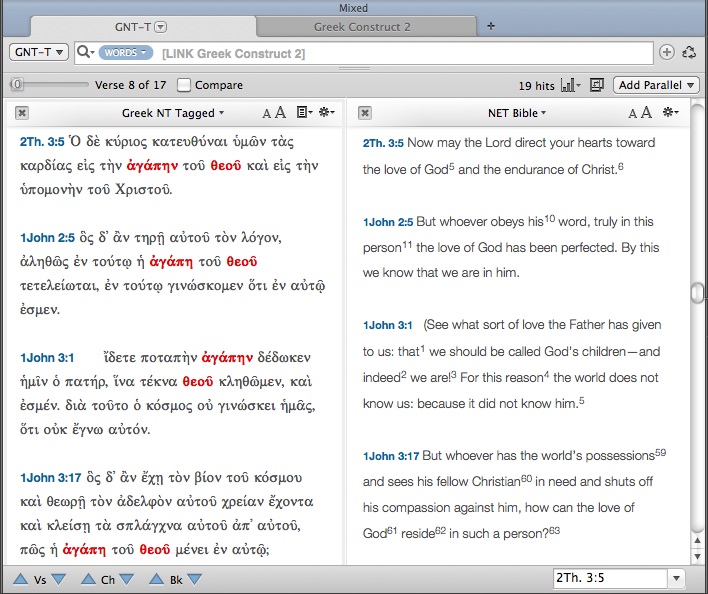
Accordance Constructs are a graphical interface that allow for more complicated searches… you know, things like, “How many times do the words God and love appear in the New Testament within seven words of each other… in Greek?” Setting up this search using the Construct feature looks like this and takes a very short time to do:

Clicking on Search at bottom right, I get the following results:

But that’s a lot of Greek to wade through. If I need an English translation, clicking on “Add Parallel” above gives me the same results, translated:

There is much more the Construct search can do–but this gives an idea of its potential utility. More from Accordance on Constructs can be found in their help files here.

3. Modules

Accordance sells a number of add-on modules. Though I have not used them, two that look to be particularly useful are a bundle for Hebrew text criticism (including the BHS text and apparatus, and new BHQ volumes with apparatus) and some volumes of the critical Göttingen text of the Septuagint (e.g., here and here). Accordance also offers add-ons of various commentaries, including the NIGTC series, NICNT, the JPS Torah Commentary, and quite a few more. Though there are certainly strong opinions in the biblical studies community as to whether one should own commentaries as physical books or as 1s and 0s, Accordance makes the latter possible with modules that integrate with the rest of the program.

———————————————————————————————-

I’ve really enjoyed learning and reviewing Accordance 10 this last week. It’s a great program. I love being able to use Bible software that is native to a Mac, and a really good software at that. Accordance can do a lot. I think what has impressed me the most has been how customizable all the panes, zones, tabs, etc. are, without sacrificing any quality. Already in the last week I’ve been able to use Accordance to speed up some tasks in both my studies and my ministry.

For ease of reference, here are all the parts of my review of Accordance 10, which this post (#6) completes.

Part 1: In which I finally try out Accordance Bible Software for Mac (new version 10!)
Part 2: 4 Cool Features in Accordance 10
Part 3: 3 Powerful Ways to Search in Accordance 10
Part 4: The Original Languages Collection in Accordance 10 meets Septuagint Sunday
Part 5: Accordance 10: Bells and Whistles

Coming soon: Review of Beale and Carson’s Commentary on the New Testament Use of the Old Testament add-on module.

I received a free copy of Accordance 10 for review. There were no expectations placed on me as to the nature (or length!) of my review, whether positive or negative.

Accordance 10: Bells and Whistles

I recently read somewhere in the Accordance Forums that an early Accordance user from the 1990s said the product should come with a warning that it may cause sleepless nights! As I’ve reviewed Accordance 10 (as a long-time Mac user but new Accordance user), I’ve already seen the wisdom in that suggestion. It’s hard to put down. Accordance is actually a really fun program to use: sleek, pleasing, productive, and really easy to customize as I’ve gotten the hang of how to move things around.

The four parts of my Accordance 10 review so far are here, here, here, and here. Specifically I’ve been reviewing the Original Languages CollectionUPDATE: final part, part 6 of my review, is here: “More Bells and Whistles.”

Now that I’m getting more comfortable with the program, I want to post about some bells and whistles in Accordance 10. These are features that really make the program stand out.

1. Instant Details: more than I thought

That Accordance has instant parsing details is great, but to be expected of any Bible software program.

Image from Accordance’s features page

But here are two cool bells and whistles about the Instant Details.

Instant Details already parse whatever word you hover over. But this same area can also be used to just as quickly give you information from a given tool that is tied to a biblical text. If you hold down ⌘ (the command key) while you hover over a word, the Instant Details will give you the information from the first tool related to the text. So you can see your top lexicon’s entry for that word, for example. Or if you hover over a verse number and press , you get the information from the first reference tool you have. For example, hovering over a verse reference and pressing the command key gives me this in my Instant Details (click on image for larger):

One other sweet feature about the Instant Details is that you can arrange the order of how parsing elements occur. This accounts for those who will come to Accordance having learned under any number of different grammars and systems. You can drag and drop elements to put them in the order you desire:

A nice touch.

2. Interlinears: however you want them

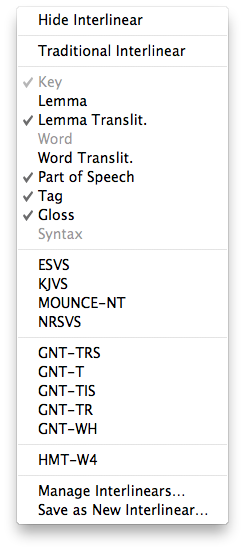
Having been trained at a seminary that prizes original languages, I am a little biased against interlinears for those who are really seeking to learn the language. (I find the “burn your interlinear” mantra I’ve heard from some quarters a little excessive, though.) Realistically, however, some exposure to biblical languages is better than none, and there are surely users who will want to make use of an interlinear. Greek and Hebrew texts come with interlinear English translation and word parsing as the default, but you can easily turn it off and back on again as needed. See the options at left, where you can set up exactly what you want to show in your interlinear. Here’s what the interlinear feature looks like with the options at left checked (click for larger):

3. It is so, so fast

When I first started using Accordance, I’d open it and then go to Safari or some other program to wait for it to load. But what I quickly realized is that I didn’t actually have to. This thing is up and running fast. I had Accordance set up so that four different workspaces would come up upon opening the program (NT, Hebrew OT, LXX, and a “Search all” workspace I created). Everything was ready to go in 8 seconds. That’s a lot of workspaces to have open fast!

Then when I opened Accordance such that it only needed to load two workspaces, that time dwindled to 5 seconds. Don’t bother surfing the Internet while you wait for Accordance to load. It’s ready to work when you are.  Searches on words are immediate, and the Instant Details give you the details, well… instantly.

Part 6 of my Accordance review will be my final review of the program itself. In that I’ll look at a few more bells and whistles: the Construct search and the context slider. After that I expect to be able to review an add-on module. Stay tuned!

I received a free copy of Accordance 10 for review. There were no expectations placed on me as to the nature of my review, whether positive or negative.

The Original Languages Collection in Accordance 10 meets Septuagint Sunday

Here I look closely at a “workspace” I’ve set up in Accordance 10 to study the Septuagint.

This series of reviews has been made possible by my having received a review copy of Accordance 10, Original Languages Collection. I have not been asked or expected to provide a positive review–just an honest one. See the first three parts of my review here (installation and setup), here (4 cool features), and here (3 powerful ways to search). UPDATE: Here is part 5, “Bells and Whistles.” UPDATE 2: part 6, “More Bells and Whistles.”

Here’s what my Septuagint workspace looks like (click for larger):

I’ve got three texts open–the Hebrew on the left, the Greek in the middle, and the English on the right. These each come with the Original Languages Collection. With hyperlinks to Accordance’s product info page, they are:

As I mentioned in a previous post, the NETS, while not perfect, is the best English translation of the Septuagint on the market. I have been really glad to be able to access it. The Original Languages Collection also includes the older and still helpful Brenton English translation of the Septuagint.

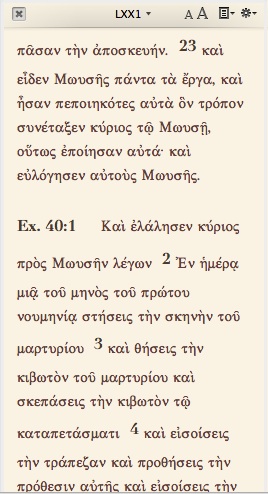
By going to “Set Text Plane Display” (available easily by right clicking from within a pane, or from Accordance’s “Display” menu, or by the shortcut T), you can change the theme/color of the individual text. If you wanted the LXX to stand out, for example, you could change it to the “Vintage” theme which makes it a nice, pleasing yellow, as in the picture at right. In fact, I’ve changed the colors on my Greek Tools (the LEH Lexicon) and Reference Tools (The IVP New Bible Commentary)–just so they stand apart a bit more as references. Being a long-time user and now reviewer of BibleWorks, I have been fine with the keep it simple but powerful philosophy. However, it really is a nice touch–especially if you’re looking at a screen for a long time–to be able to customize themes and colors.

Here are a few neat things I can do with the Septuagint setup above:

  • Triple-clicking on a verse reference automatically pulls up the accompanying text in the IVP commentary. This would be of slightly limited value for books that are in the Septuagint but not the Protestant canon that commentary covers. But…
  • …I can open up Conybeare and Stock’s Septuagint Grammar right next to the LEH lexicon
  • Triple-clicking on a word automatically displays the entry for that word in the lexicon

There are other ways to do searches without triple-clicking (for example, Amplify, which I discuss here), but triple-clicking is the quickest way I’ve found so far.

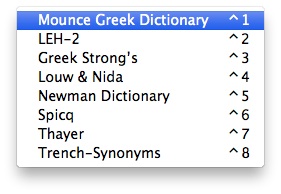
At this point I did run into a little bit of difficulty. Mounce’s Greek Dictionary is set as the default Greek lexicon. And triple-clicking always goes to the default lexicon, i.e., whatever is first in the list.

Working with the LXX, I wanted the LEH lexicon to be the one a triple-click would look up. But Mounce comes by default in the first position. So even with the LEH open, triple-clicks would look up in Mounce. 15 minutes searching through menus, icons, and Preferences and 10 more minutes in Accordance’s help section gave me no solution. Finally I turned to the Accordance Forums and–voila!–my answer. Not an immediately intuitive way forward, but I was grateful for the help.

That done, I now have my LXX workspace just how I like it.

Speaking of help, Accordance has multiple sources of support, from active user forums (in which Accordance staff participate) to extensive help files. The podcasts are good, too (index here). Because the layout/interface change from Accordance 9 to 10 was pretty significant, I looking forward to hopefully seeing updated podcasts for 10 that reflect this. Right now there is this episode on Accordance 10.

I have a Greek New Testament workspace set up similarly. The Original Languages Collection has the Greek dictionaries/lexicons you can see above–Mounce works well for the NT, and I love that it has word frequency counts. (Although you can easily get this and more from Accordance for any given word.) As far as I can tell, I have to change the default Greek dictionary back to Mounce when I’m in my NT workspace, if I want triple-clicking on a word to lead there.

For my Hebrew Bible study, the Original Languages Collection gives me the Hebrew MT (mentioned above) and these solid lexicons:

The Original Languages Collection also comes with Ross’s Hebrew Grammar.

The Concise Dictionary of Classical Hebrew (Concise DCH) is a relatively new publication. Its inclusion is a highlight of this package. From Accordance’s product page:

This Dictionary (CDCH) is an abridgment of the 8-volume Dictionary of Classical Hebrew (DCH), the first volume of which appeared in 1993. The DCH was the first dictionary of the Classical Hebrew language ever to be published. Unlike other dictionaries of the ancient Hebrew language, which cover only the texts of the Hebrew Bible, either exclusively or principally, DCH records the language of all texts written in Hebrew from the earliest times down to the end of the second century CE. That is to say, it includes not only the words used in the Hebrew Bible, but also those found in the Hebrew Book of Ben Sira (Ecclesiasticus), the Dead Sea Scrolls, and all the ancient Hebrew inscriptions.

Previous versions of Accordance had tiered-levels within individual collections, so that the Library collection still had intro, standard, and premier. So, too, with the Scholar’s collection: intro, standard, and premier. I found this time-consuming to navigate whenever I’d look at Accordance 9 on their Website, so the simplification in Accordance 10 (there is no tiering in the Original Languages Collection) is a huge improvement. It streamlines the decision-making process for those looking to get into Accordance.

The Original Languages Collection, as the Accordance site notes, has resources close to a $2,000 print retail value. That’s not a padded figure reflecting already electronically free public domain resources, either. I am impressed with the $299.99 price tag on this collection.

And I’m especially impressed that I can have all I currently need to use for text-based Septuagint research in one place. Two thumbs up for this collection.