File Under: I Can’t Believe a Phone Can Do This

I can hardly believe the technology on a little iPhone exists to do this, but this is now how I am going to take and process meeting notes from here on out.

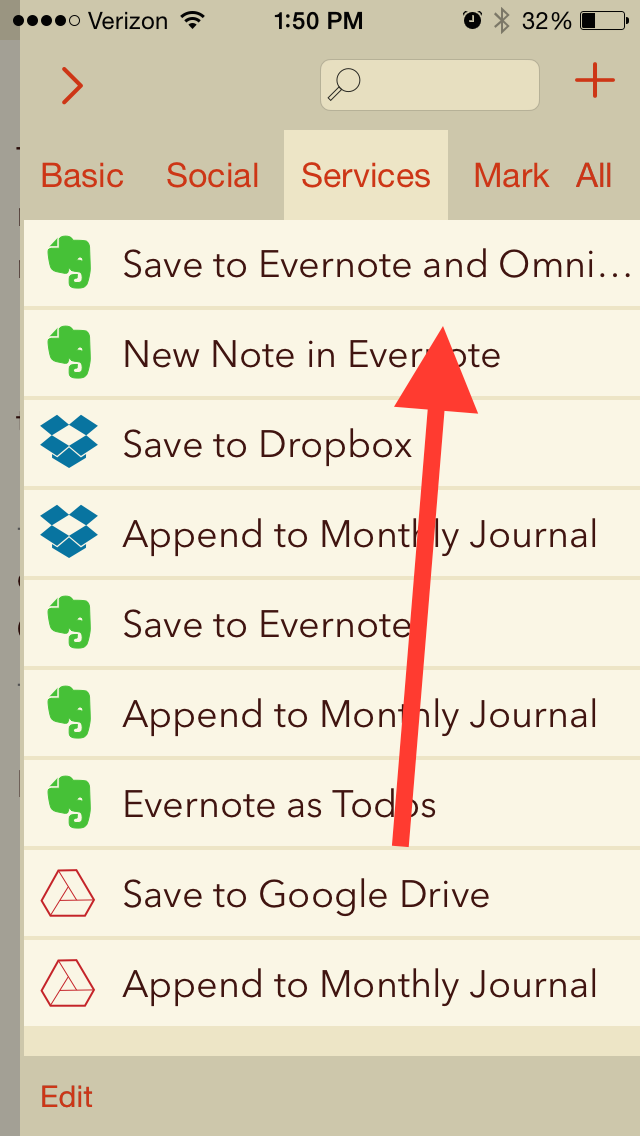
I have an app (Drafts 4) that has a downloadable action I found at their Web Action Directory.

Let me show you what it can do:


Drafts to EN and OF 1


Drafts to EN and OF 2


This means I simply open the Drafts app (which is quite aesthetically pleasing, and fast, too) and take meeting notes there…including marking action steps with the checkbox keyboard shortcut key (!).

Then I tap the action above, and all my meeting notes are saved as an Evernote note, with all the checkboxes I made automatically converting to OmniFocus tasks.

Many, many thanks to Agile Tortoise for the awesome app and to @rosscatrow for the action above to install into Drafts 4. A good step forward in my ongoing quest to stay organized.

With Him in Death, With Him in Life

S 1


When I saw the Whoopie Pie truck in the drop-off lane of a local workout facility, I was reminded that life is full of oxymorons. Or at least things that go together that seem to be contradictory. (Chocolate and cream-filled power up for the elliptical? Yes, please!)

Jesus once said:

Whoever wants to be my disciple must deny themselves and take up their cross and follow me. For whoever wants to save their life will lose it, but whoever loses their life for me and for the gospel will save it.”

There’s another oxymoron for you—or at least it sure sounds like one. The disciples thought it was. “Lose your life to save it? If you lose your life, you’re dead.”

Jesus applied that idea to himself. Before he could rise again from the dead, he had to… well… die first. That you would have to die before you could come back from death is logical enough. But that Jesus even could come back once he was in the irreversible state of death sounded as oxymoronic to the disciples as a dessert delivery driver stopping by the morning Zoomba class.

Peter “knew better.” After his teacher’s death-to-life crazy-talk, Peter pulled Jesus aside and started to “rebuke him.” Jesus rebuked him right back, “Get behind me, Satan! You do not have in mind the concerns of God, but merely human concerns.”

Shortly after that episode with Peter, Jesus said again to his disciples, “‘The Son of Man is going to be betrayed into human hands, and they will kill him, and three days after being killed, he will rise again.’”

Once again, the Gospel of Mark tells us, “They did not understand what he was saying,” but this time they “were afraid to ask him.”


I-Thou: Why Jesus’ Death Was So Devastating


Peter and the others thought that death could only be the career-ending move that it has been, is, and will be for every other human being. It’s not something you come back from.

The idea of resurrection supersedes rationality and, generally, so-called empirical evidence.

And underneath Peter’s blockheaded attempt to tell Jesus who he really was and what he should do, there was a real love. Peter would confess Jesus as “the Messiah, the Son of the living God.”

The disciples didn’t understand Jesus’ teaching of, “I must die and you must die so that we together may truly live.” And even if they could grasp it intellectually, Jesus’ disciples were a group of men and women who had left home, jobs, ways of life to follow someone they believed was going to save them, guide them, and just be with them.

Someone you love that much is the last person you want to even think about dying, let alone hear that person repeatedly referring to their death and saying it has to happen. So there was, I’m sure, an emotional resistance on the disciples’ part to hearing Jesus talk about his own death.

The Jewish theologian Martin Buber offers some insight into why the death of a loved one is so difficult. In his I and Thou, Buber writes that the identity of the individual is constituted not just in isolation, but in relationship to others:

If Thou is said, the I of the combination I-Thou is said along with it.
The primary word I-Thou can only be spoken with the whole being.
There is no I taken in itself, but only the I of the primary word I-Thou.

The disciples’ sense of self was fully interdependent with their sense of who Jesus was. They knew, at least at some level, that they lived and died with him. When they heard Jesus talk about his own death, whether they kept living or not, they knew that a part of themselves would die with him.

It was that knowledge—that gut sense of their intertwined identity—that would lead Peter to say just before the crucifixion, “Even if I have to die with you, I will never disown you.”

Jesus’ death was devastating to his followers. Their sense of self and of the world would never be the same. How could they ever hope again? How could they ever trust? How could they dig out of the hole they now found themselves in?

In the Gospel John’s resurrection account, the stone is gone, but the disciples still don’t understand about Jesus’ dying-then-living. Even with the tombstone rolled away, it was all Mary Magdalene could do to stand “outside the tomb crying… [weeping].”


But There’s More Beneath the Surface


It seems like every time I walk back to our house from the church, I find something new in the driveway or yard. As the snow continues its slow, steady melt, we keep discovering things we forgot we lost. A whiffle ball bat. The pink plastic shovel that caused so much discord back when the kids were fighting over who would use it. Or that hand towel I was reaching for to wipe snotty noses in between shoveling piles of snow off the van several times a week.

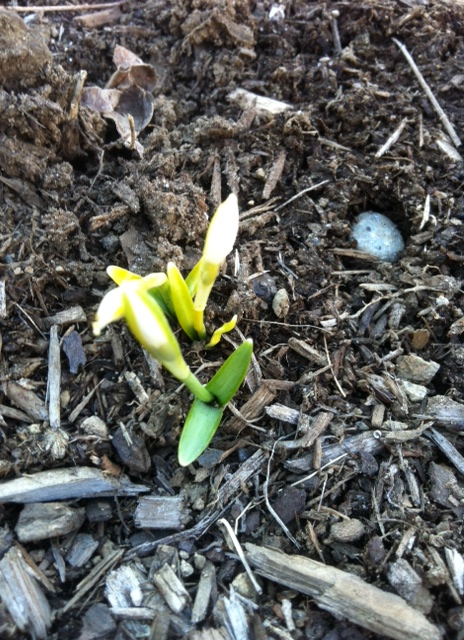
I asked our Deacons if they, too, were able to testify to the signs of life emerging from underneath the snow, shooting up from the ground. And they were—let me show you.

 

B 1


B 3


S 2


S 3


There’s always more beneath the surface. Life is so rich and the universe so mysterious and wonderful that what you see on first glance isn’t all that’s there.

The workings of God exceed what we can comprehend. We may think or live as if he’s limited by natural laws. Yet the One who wrote those laws, who put them into place, can re-order the universe as he sees fit.

The one who breathed and still breathes life into creation does not find death to be an obstacle to his purposes.

What seems to be the end is not the end. What the disciples thought was the Last Supper they would ever have with Jesus was, in fact, the first communion meal, an observance that would be repeated countless times by Christians everywhere. That bread—in its brokenness‚ representing death—would be the very source of life to followers of Jesus throughout the ages. One early church father called the communion bread, “medicine of immortality” and “an antidote to prevent us from dying.”


I-Thou, Redux: With Him in Death, With Him in Life


Jesus’ death was heart-wrenching to his disciples. This is because, for them, participation in Jesus’ suffering and death was not a spiritual discipline, or a spiritual state to try to attain—it was their natural reaction to an immense loss. They died with him, as the fire in their hearts went out.

But if they died with Jesus that awful Friday we dare to call “Good,” they came right back life with him, at his resurrection.

“I have seen the Lord!” Mary Magdalene proclaimed. When Jesus came—in person—to the fear-struck, mourning disciples, John says they “were overjoyed when they saw the Lord.”

The disciples were buried with Christ, and they rose again with him to new life. Jesus breathed on them, gave them the Holy Spirit, and the book of Acts happened. The church spread at an amazing rate. Christ’s followers could not contain the joy of new life.

We who call ourselves disciples today also have participated in the death of Jesus. We take part with Jesus in his suffering any time we are compassionately attuned to the unjust treatment and oppression of others. We associate ourselves with Christ’s crucifixion again today when we receive the elements of communion. We join with the first disciples when we observe Holy Week, or practice austerity during Lent, and when we affirm that we, too, were there when they crucified our Lord.

One well-known disciple, Paul, would say, “Is not the cup of thanksgiving for which we give thanks a participation in the blood of Christ? And is not the bread that we break a participation in the body of Christ?”

We participate in Jesus’ death when we accept that it was a sacrifice made on our behalf, offered to bring us into communion with God. From the cross came life–our life, springing forth from the cold, dead ground.

Elsewhere Paul would write, “We were therefore buried with him through baptism into death in order that, just as Christ was raised from the dead through the glory of the Father, we too may live a new life. For if we have been united with him in a death like his, we will certainly also be united with him in a resurrection like his.”

If we have died with Christ, then we live with Christ. We have participated in his death, so we participate in his resurrection.


Conclusion: The Stone Has Been Rolled Away


The stone has been rolled away. Jesus did not stay in the land of the dead, but rose to the land of the living. When death gets the last word in the lives of the ones we love, we know that life actually has a rejoinder. Dead isn’t dead forever.

This is why the Psalmist, perhaps in anticipation of the coming Messiah, could say, “I will not die but live, and will proclaim what the Lord has done.”

So, like those beautiful buds and flowers that improbably spring forth from under an impossible mound of snow, come on out of the hole you’ve dug into the ground. The stone has been rolled away–Jesus himself has done this! There’s no more need to hibernate or hide out.

Jesus, thought to have breathed his last, springs forth from the grave, finds the disciples he so loves, and breathes his own new life on them, so that they can share with him in the resurrected life. The darkness of the tomb is now illuminated by the light of Christ. The somber purple of Lent has give way to the bright white of Easter.

Jesus is risen from the dead! Death is so last season. Resurrection is the new black.

Apparent endings can become starting points, seedbeds, for unexpected beginnings. We now have access to new life in Christ.

The world is lit up with the light of the resurrection of Jesus. Jesus died and lived through it. He took us with him from cross to grave to glory.

We who have died with Christ, who “were there” when they crucified our Lord, now share in the abundant, new life he gives us, through his resurrection from the dead. Thanks be to God!

A Tale of Two Eucharists

The Last Supper


I just got home from our congregation’s Maundy Thursday service of communion. We came forward, knelt down, and partook of the bread and the cup–the body broken, the blood poured out for us. The altar has now been stripped and the cross covered with black cloth.

Our church’s practice is to celebrate communion on the first Sunday of the month. This Easter, then, will be a Communion Sunday for us.

As we do not have communion every Sunday, the idea of two Eucharists in such close proximity–one on the betrayal-and-death side of the story, the other on the resurrection side–has been fascinating to me.

Below is an adaptation of a short message I wrote to our congregation last night.


I’m writing to invite you again to our Maundy Thursday communion service of worship tomorrow night at the church.

And Sunday is Easter Day, Resurrection Sunday, the most glorious day of the calendar year.

As it turns out, because April 5 is the first Sunday of the month, it is also a Communion Sunday for us.

This offers as a unique lens through which to experience this last half of Holy Week and Easter. We might even think of it as A Tale of Two Eucharists.


The First Eucharist

On Thursday Jesus broke bread and gave thanks (this latter verb is the underlying meaning of the Greek-based Eucharist). But even as he was filled with gratitude for his Father’s love, surrounded by the ones who loved him most, he knew there was a betrayer at the table.

In a more cosmic sense, the next day—Good Friday—he would be betrayed by all of the ones he came to save. Not I!, we protest with the disciples at the table. But we, too, “were there when they crucified our Lord.” We have been complicit.


The Second Eucharist

Yet Jesus forgives us of that complicity. Every other Eucharist that has taken place since that first Thursday Eucharist has been on the other side of Resurrection. Our moral failings, stubborn hearts, and forgetfulness in doing good have now all been put to death. We rise to new life with Christ, given a second (and a third, and a fourth…) chance to embody Jesus to a world that is as broken today as it was when our Savior was crucified.

Easter reminds us that the crucifixion was not the closing chapter the disciples thought it was. Rather, it was a preface (a “cold open,” as TV shows call it) to the real story of why Jesus came—to defeat sin and suffering and death through his resurrection, and to invite us into the resurrected life with him.

Just as we participate with Jesus in his death and suffering–Maundy Thursday’s bread of betrayal–we also participate with him in his glorious victory over darkness–Easter morning’s bread of new life.

New OmniFocus iOS Universal App, Explained in 2 Charts

OmniFocusToday OmniFocus is expected to release an update that makes their iOS apps universal. The iPhone app, for the first time, will carry with it the capability to view and create custom Perspectives.

There are several upgrade paths, depending on what you’ve already purchased from Omni in the past. (Before the universal update, the iPhone and iPad apps were paid, separate purchases, with only iPad carrying a Pro upgrade version.)

It’s not the easiest upgrade process to understand, but here are two charts from Ken Case (via the Twitter) that will help:


The upgrade paths (click to enlarge)


More Options on the iPhone Version (click to enlarge)


And check out this lovely screenshot from the updated help files. You can now re-arrange your Perspectives on the phone.


Reordering Perspectives in iOS Pro


You can see everything that’s new in iOS 2.1 here. My overly eager and long-winded review of OmniFocus is here.

Group Text+ (App Store’s best iPhone Texting App) is Now Free

Group Text


The best texting app in the iOS App Store is (for the moment) free.

I’m a big fan (and daily user) of Launch Center Pro, which is created by the same developers who make Group Text+.

Group Text+ makes sending texts to a pre-saved group (or individuals) really easy and fast… and it even comes with a bunch of hilarious gifs you can send! (I’ve gotten way more into this last feature than a man my age probably should….)
Check out the app here–free, for the time being.

AppTastic Tuesday: Drafts 4 for iOS

drafts4-banner-880x220


The purpose of Drafts 4 is twofold:

  1. Provide the easiest and quickest way to get to a blank text entry screen on iPhone and iPad.
  2. Allow you then to send or export that text to as many other apps as possible.

This may sound like one of those apps that developers made just because they could, but I’ve been surprised to find myself increasingly reliant on Drafts 4.

drafts4-icon-512x512-roundedJust the last two days I used it to (a) jot down some stand-up meeting notes (which I then exported to an OmniFocus task) and (b) send an email to someone when I didn’t want to have to be distracted by unread emails in my inbox.

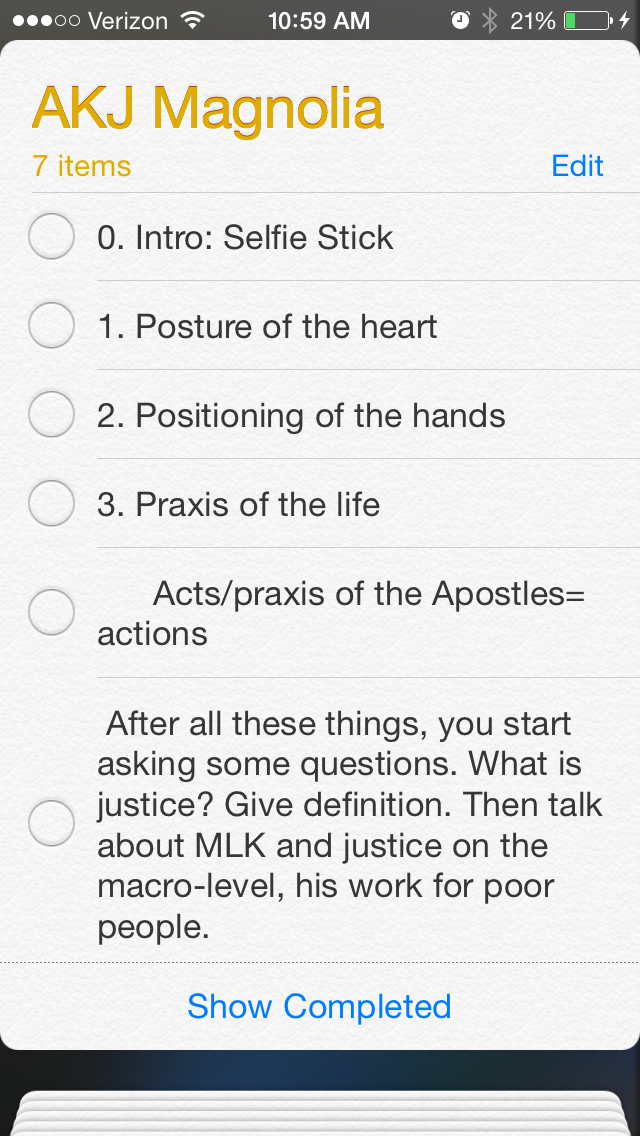
Open the app, and you get a blank screen, into which you can quickly type (or dictate, via Siri) text. I recently was fortunate enough to have inspiration for a sermon outline strike me when I was doing some chores around the house. Not sure what to do with this newly found locus for creativity, I quickly reached for Drafts and jotted my thoughts down:


1_Text Entry


From here I could access a wealth of sharing options:


2_Basic Sharing Options


3_Basic Share Options 2


This particular draft went into Evernote, where I could easily get it later. I could have exported it some other ways:


4_Export to iCloud


Also amazingly cool is that when I exported it to Reminders, Drafts made each separate line into its own task:


5_Export to Reminders


This is sweet enough–an app that lets you quickly jot down text and export/share to just about anywhere. But Drafts is built with an eye to detail. You can make your text look nice, too:


6_Text Appearance
Note the option to have a night mode. And all those fonts!


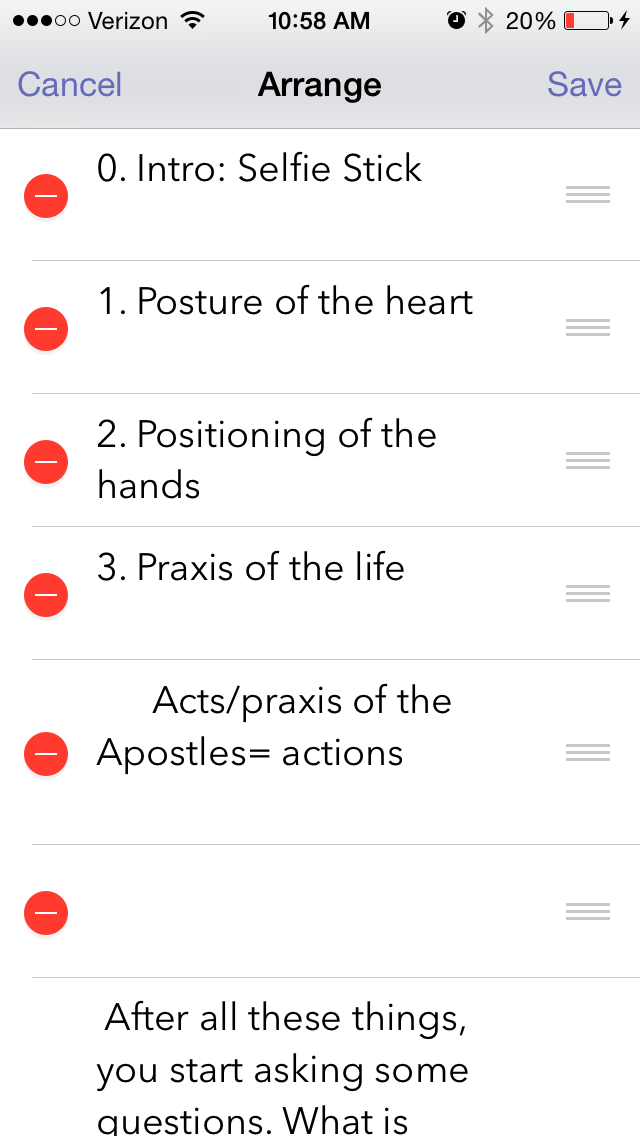
You can even re-arrange your text from within Drafts, just by virtue of having started a new line when you were entering text:


7_Arrange


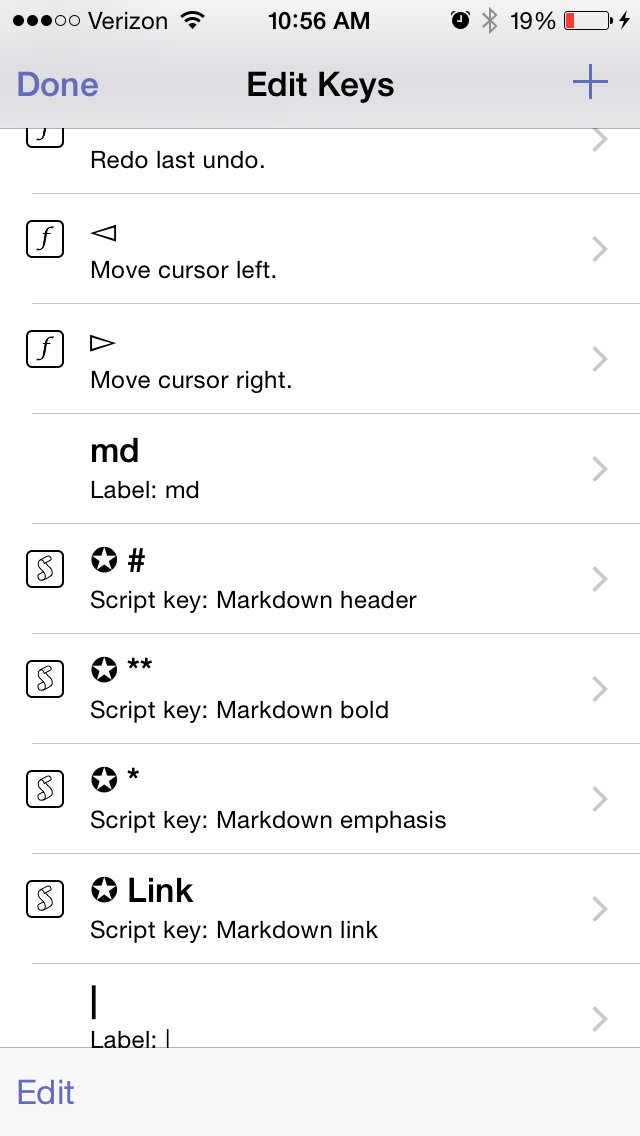
You can edit the keyboard keys that are available to you:


8_Edit Keys
Note, too, the Markdown capabilities


There are quite a few settings you can adjust:


9_Settings


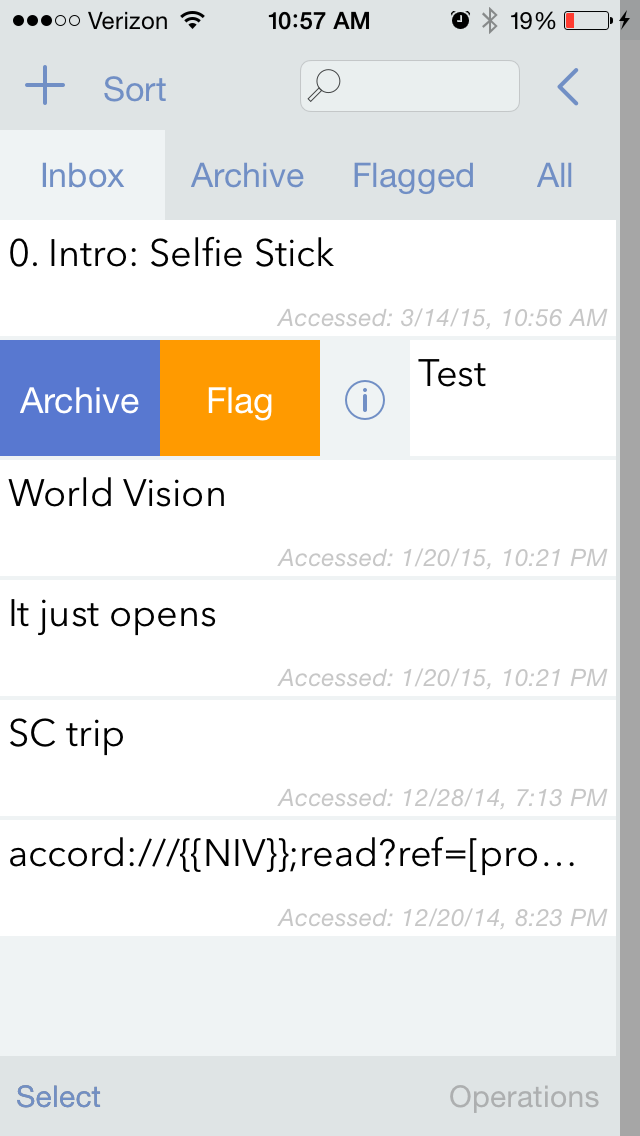
And Drafts can keep everything you enter, regardless of whether you’ve shared or exported it. (Drafts also keeps a record of where you’ve shared/exported your draft.)


10_Sort Inbox


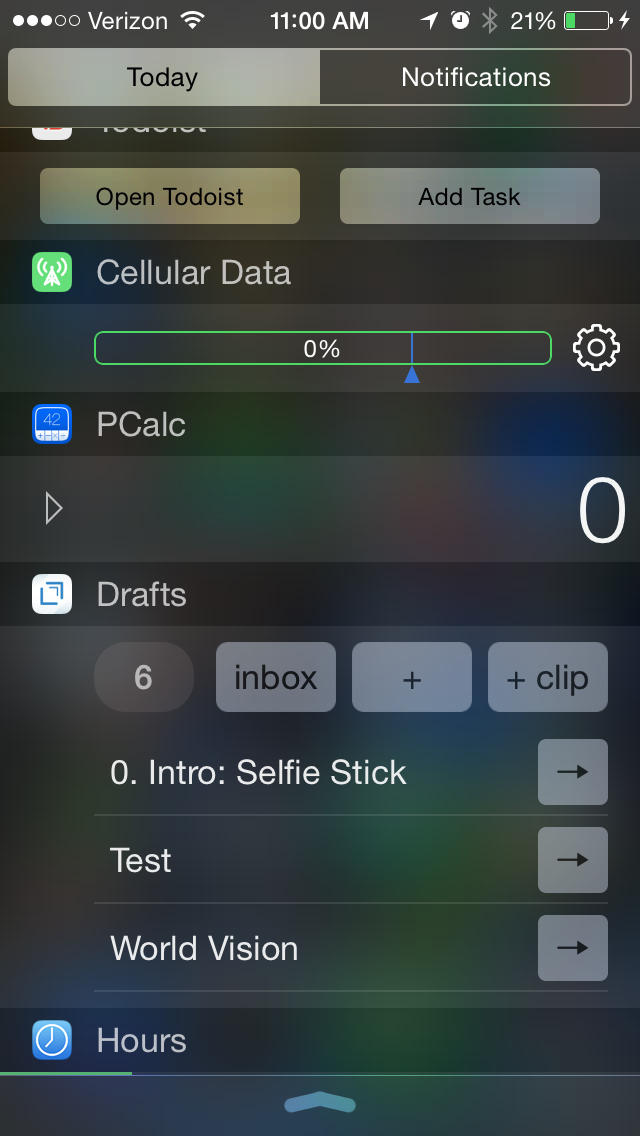
Yes, you guessed it, there’s a Today widget, too:


11_Today Widget


Drafts 4 is just as awesome on iPad (not pictured here) as it is on iPhone. The only possible downside to this app is that $9.99 is more than most iOS users are used to paying for an app. But it’s easily one of the most carefully developed and detailed apps I’ve used, and robust in its features and capabilities.

It’s well worth checking out, and has found a home in my daily workflow.


Thanks to the fine folks at Agile Tortoise, the makers of Drafts 4, for giving me a download of the app for this review. See my other AppTastic Tuesday reviews here.

From Conflict to Opportunity (“Red Zone, Blue Zone”)

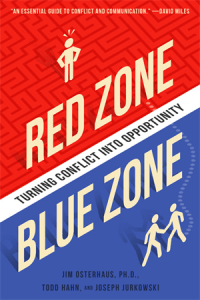
Red Zone Blue ZoneOne of the people who has most influenced my understanding and practice of leadership is Dr. Jim Osterhaus. Case in point: one can survive so-called middle management by understanding a concept that Jim introduced me to (via Ron Heifetz): leading without authority.

Osterhaus’s Thriving Through Ministry Conflict, co-authored with Todd Hahn and Joe Jurkowski, offers some of the most practical advice I’ve ever read or heard on how to deal with conflict.

Drawing on the same “red zone” and “blue zone” distinction, a new book from Osterhaus, Jurkowski, and Hahn is due soon: Red Zone, Blue Zone: Turning Conflict into Opportunity. Here is the publisher’s description:

Most of us fear and dread conflict, at home or at work. But conflict can be your ally, not your enemy. Conflict doesn’t have to tear your family or organization apart.

Using the story of a family business leader embroiled in generational conflict, Red Zone, Blue Zone shows how to navigate conflict in a way that is healthy and leads to enhanced relationships, self-awareness, and greater leadership success. Practical response activities and personal reflection questions help the reader understand the sources of conflict, have a working command of conflict navigation principles, and be equipped to help others navigate conflict in their own lives.

You can find the book on Amazon, or at the publisher’s page linked above.

If you now find yourself or ever have found yourself in vexing conflict situations (i.e., if you are human), you should check this book out as soon as you can.

The Last To-Do App You’ll Ever Need: OmniFocus

OmniFocusYou know that creeping suspicion that some of your strangest idiosyncrasies could not possibly be shared by anyone else ever?

You’re usually wrong.

Case in point: it turns out I’m far from the only one who has had about a dozen different to-do apps on his phone in the last couple months. But it’s a bad idea to use multiple apps to organize tasks. All the better if you can track everything through one clearinghouse.

OmniFocus is that place for me. In more than half a year of daily use (exception: techno-Sabbath), I’ve only found one real flaw in the program (sync is not seamless). Otherwise OmniFocus (a.k.a. OF) does everything I want a task management app to do, and many things I didn’t know I would want such an app to do.


First Things First: Learn OmniFocus Language


There’s a lot to OmniFocus. To get a quick overview, check out this video, or this one, which explains the fundamental OF concept of “perspectives,” ways of organizing and accessing your tasks.

Or skip the videos and read this one-paragraph simplification of what you need to know about OF terminology before using it:

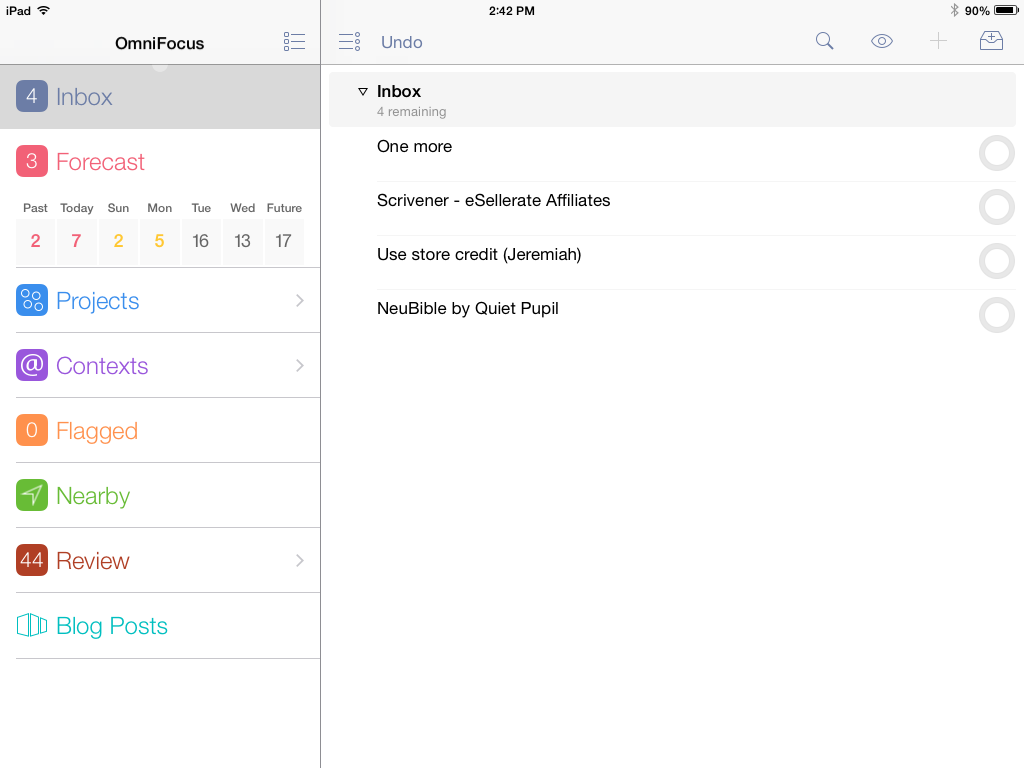
Projects help you break a bigger endeavor down into its component actions. Projects can be Sequential (you have to do action 1 before you can do action 2) or Parallel (it doesn’t matter in which order you do the individual tasks). For that matter Projects can just have what Omni refers to as loosely-related but not interdependent “Single Actions,” like a grocery shopping list. Contexts allow you to organize actions according to the things/people/environment you need to do them: Office, iPad, Internet, Computer, Car (careful!), etc. The Forecast view shows your tasks chronologically in one place–I spend most of my time in this view. Or you can just make a quick entry in the Inbox, and then decide how to categorize it later.


iPad, showing various perspectives and Inbox
iPad, showing various perspectives and Inbox (“Blog Posts” is a “custom perspective” available with iPad Pro version)


The Inbox is the starting point–OmniFocus suggests that you take some time to just “brain dump” everything there and then assign Contexts and Projects, due dates and duration times later.

Using OF requires some patience and learning, but is worth the investment of time if you’re serious about project and task management.


Contexts in iPad
Contexts perspective in iPad


OmniFocus is Ubiquitous Across Devices and Apps


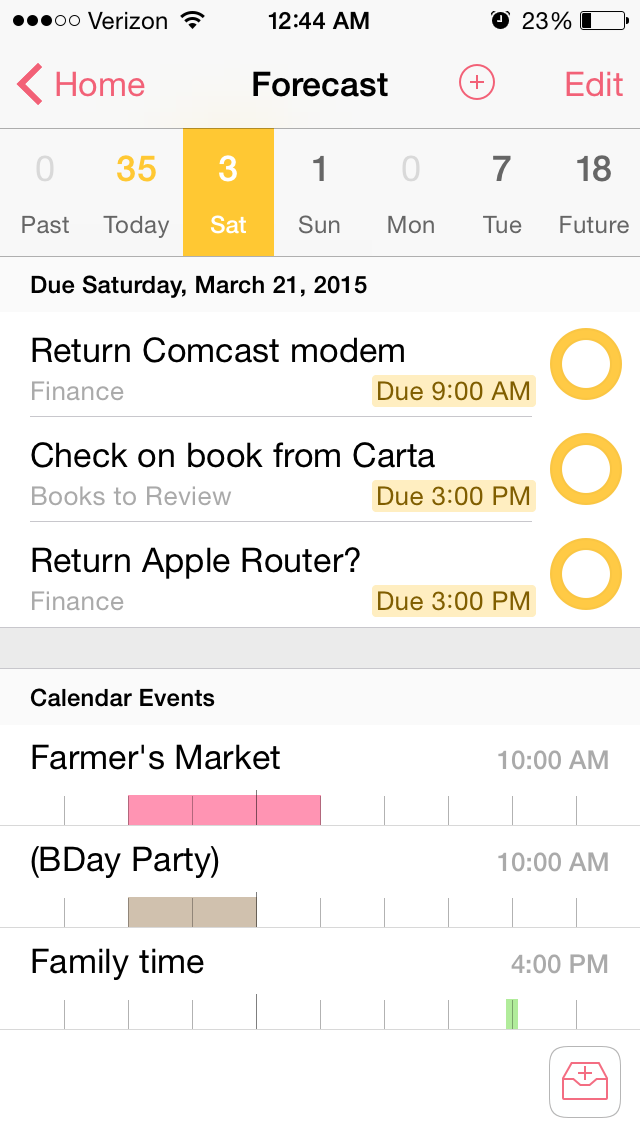
OF syncs automatically across Mac, iPad, and iPhone. When you are in the Forecast perspective, both the iOS apps and the OSX app allow you to see your Calendar Events right next to your actions for the day:


iPhone Forecast View
iPhone Forecast perspective


I even figured out, using their Clip-o-Tron 3001, how to turn Mac Mail messages into tasks with a keyboard shortcut. (Email inboxes are not a good place to keep tasks, you realize.)

And I love the Share Extension in iOS8. From almost any app I can create an OmniFocus task. I do this regularly. I see something I like, so share to OF:


iPhone Share 1


From Safari, for example, the Note is automatically populated with the article link, and I can set the Project and Context:


iPhone Share 2


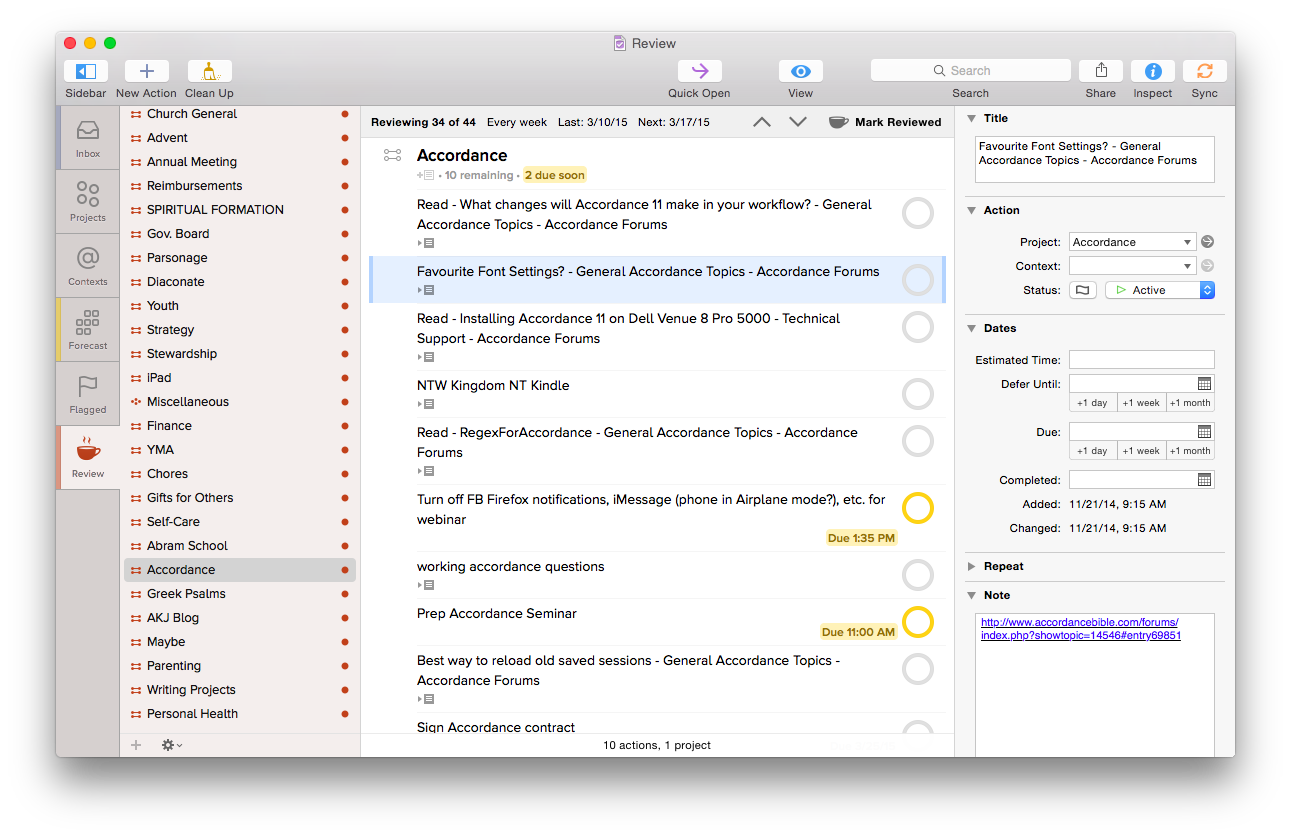
One lack in the Share Extension is the ability to assign a due date from the screen shown above–you have to manually open OmniFocus if you want to do that. However, the more I use OmniFocus, the more convinced I am to only set due dates if absolutely necessary–you can always look through undated tasks in your weekly review, which OF makes really easy with their excellent Review perspective:


OmniFocus for Mac Review Perspective
OmniFocus for Mac Review perspective


What if you’re on a library computer or PC or purchased OF for Mac only and see something on your phone that needs to become a task?

OmniFocus gives you your own unique email address, to which you can email a task. This “Mail Drop” feature helps get the user close to Inbox Zero on email, too, since you can just forward a Gmail message to OmniFocus, where it will end up in your OF for future processing. In other words, you can input OmniFocus tasks from anywhere.

And TextExpander helps here. That app allows you to type your own abbreviations that then expand into text of your choosing. With TextExpander enabled, I write “.omni” and my OmniFocus task capture email address (which is neither short nor memorable) pops up right away.

Another way you can input tasks? Connect your OmniFocus in iOS to the Reminders app, then you can tell Siri to remind you something, and it goes into OmniFocus. Awesome!


Bonus: It Does Photos and Voice Memos


The iOS OF apps even allow attachments to tasks. If I’m processing paperwork and need to set a reminder to pay a bill, I can just take a picture of the bill from OF and save it to a task. Whenever I pull that task up on my computer or other device, the photo will be there.

You can also tap on the “Attachments” tab to record a voice memo, and save a task that way.


Limitations


There are some limitations to using OmniFocus, though not many, and far fewer than other task management apps. Its sync function, which uses Omni servers, operates with a delay. Though sync is supposed to be seamless, it doesn’t function with the same instantaneous speed as, say, Apple’s native Reminders app. On the ground level this means that if I work through a task list on my computer but don’t have the OF iPhone app open (even though background refresh is on), I will still get outdated task notifications on my phone until the sync properly takes place. This is a daily frustration, even if a minor drawback compared to all the other robust features.

The workaround for this is to manually sync the app each time I update it, to make sure it’s up-to-the-minute. OmniFocus has made improvements here since I started using it, but I hope it will soon match what other apps do by way of syncing speed.

OmniFocus is not cheap–they’re working on making their iOS app universal (very soon), but in the meantime, there is a separate Mac app, iPad app, and iPhone app available for purchase. It’s not on Windows or Droid.

However, if (a) you have a complex set of roles, priorities, and tasks to manage, (b) you don’t feel fully on top of them, and (c) you’re willing to take the time to learn OF, it’s well worth the purchase price. One could probably get by with OF on just one platform, too, though if funds permit, having it on a mobile device and a desktop is an advantage.


Made with Care: Some More Thoughtfully Designed Features


Perspectives sidebarThe longer I use OmniFocus, the more I appreciate some little features. Just the other day I noticed for the first time that in your perspectives sidebar on Mac, if there are items in that perspective to process, a little colored bar on the left highlights that perspective.

The image at left tells me I am due my Review, that there are items in the Forecast (i.e., scheduled actions), and that there are some entries in my OmniFocus Inbox needing attention.

There are lots of nice little touches like this–the color of your task circles, for example, varies depending on the status of the task (whether flagged, due soon, overdue, repeated, etc.).

And one of the best intangibles for me has been the ease of accessing the help manuals. Sure, you can get impressive help information from within the app, but OmniFocus has made their iPhone, iPad, and Mac help manuals available as free iBooks downloads so you can annotate them to your heart’s content.

Also, using Control-Option-Space on Mac, you can open a Quick Entry pop-up to enter an Inbox item. As long as OF is open, you can do this from anywhere on your computer.

Two more sweet little features I love about the iPhone version–there’s a little “+” icon for an new Inbox entry on just about any screen within the app, so adding tasks is easy, no matter where you are in the app. And once you add a task in iPhone or iPad, you can not only Save it, but can tap on “Save +” to go right to a new task entry. In other words, you can add a task and not be sent back to your Inbox, but keep adding task after task. I find this feature essential when I’m using OF to track action steps in meetings.

I could go on. Lots of people have! It seems that explaining OmniFocus is its own third-party cottage industry.


TL;DR version? (I know–I am supposed to put that at the top of the post.) OmniFocus is an amazing app, designed with care, and more than any other tool has helped me to greatly improve personal productivity. With a good system in place, I spend less time worrying about what I’m forgetting and more time doing what I know I’m supposed to do.


Thanks to the fine folks at Omni Group, the makers of OmniFocus, for giving me downloads for the Mac and iOS apps for this review. See my other AppTastic Tuesday reviews here.

Two New Greek-Related Books Coming from Baker Academic

Invitation to the Septuagint 2nd EdDecember 1 is a long way away. But it’s the release date for two Baker Academic books I’m looking forward to checking out. (HT: Cliff Kvidahl.)


1. Going Deeper with Biblical Greek: Reading the New Testament with Fluency and Devotion, by Rodney A. Whitacre

From what I can tell, Whitacre explains lectio divina… using the Greek text. I had never even considered the possibility, but it sounds amazing.


2. Invitation to the Septuagint (Second Edition), by Karen H. Jobes and Moisés Silva

Jobes and Silva update and revise their classic work in Septuagint studies.

I’ll do what I can to report more on each of these books when they arrive. They are both volumes to eagerly await.


I Don’t Have an iPhone 6, but Here is a Review of Anker’s Ultra Protective Case for iPhone 6

Anker Ultra Protective Case With Built-in Clear Screen Protector for iPhone 6


The iPhone 6 upgrade never happened, but Anker had already sent the review sample of a sweet iPhone 6 case. I told them I’d still post about the thing, reviewing it as best as I could.

The Anker Ultra Protective Case With Built-in Clear Screen Protector for iPhone 6 appears to achieve that rare balance in mobile device cases between lightness and durability. You put its front screen protector and back casing on separately. It’s not a heavy case at all, so I doubt your hand will get sore even after playing too many minutes of games on your encased phone! The case adds only 0.15 inches and 1.6 ounces to the dimensions of the iPhone 6.

The openings for the charger cord and earbuds appear to be cleanly cut:


Anker iPhone 6 case openins
Image via Amazon/Anker product page


Anker says the case was “drop tested 6 times from 3 feet onto its corners and back on a hard concrete floor without sustaining any damage.” Presumably this test took place with the iPhone 6 in it.

As much as you think you will just be careful and never drop your phone… you WILL drop your phone. This case has some good grip to it, so your phone is unlikely to slip out of your hands, but if so, you may get lucky and still have a working phone after the drop!

Especially for the $15.99 current price at Amazon, this kind of protection is a good idea.

  Thanks to Anker for the review sample, offered for my honest impressions.