Launch Center Pro: Usually $5, Get it Free

It’s got to be the best tagline I’ve ever seen in the App Store:

Launch actions, not just apps.

If you are interested a free code for the paid app that does this, read on….


The “just” in that tagline is precisely placed, too, because Launch Center Pro can launch both apps and actions. But its ability to launch actions is what sets it apart. With minimal effort required for setup, I open up Launch Center Pro (hereafter, LCP) on ye ole phone to see these options:


Yes, that’s right. I can message (or call) my wife, text my whole family, post a selfie (I don’t really do that), enter a new Calendars 5 event, and much more with a single tap.

“It’s like speed dial for everyday tasks,” the app description rightly claims.

Already included in the app (though customizable) is a slew of app search options:


You can create your own actions via the Action Composer, which requires zero knowledge of Apple’s x-callback-url functionality, even though it utilizes it.


My phone allows me just four apps in the dock. LCP is so handy, I moved the Phone app to my home screen, and put LCP in its place in the dock. If that doesn’t speak to an app’s utility—that I use it more than I place calls on my phone—I don’t know what does.

I can’t recommend it highly enough. It’s not just a five-star App (though it is that, too), but LCP is a really smart innovation that will simplify repeated actions on your phone. See it in action in this short video.

It’s been priced as high as $4.99 recently. Right now it’s $2.99 for iPhone in the App Store. There is a separate iPad version, too, which can sync with the iPhone LCP.

But you want a chance to get the app free, you say? You came to the right place. Thanks to good folks at Contrast, who make the app, I’ve got a promo code for the iPhone version to give away.

Just comment here (and make sure you type in your email address, which goes undisplayed) for a chance at winning the code… share this post (and comment where you did) for a second entry. I’ll announce the winner some time this weekend. Leave your comment where it says, “What do you think?” below.

Launch Center Pro supports a ton of apps, too.

All of Joy of Cooking’s Recipes, On Your Phone

http://a2.mzstatic.com/us/r30/Purple5/v4/0c/24/75/0c24758d-bcc6-2a84-1e00-9e308d7b5740/icon175x175.jpegDid you know that you can get the entirety of Joy of Cooking in your iPhone or iPad?

The iconic and ever-useful cookbook would be hard to improve upon in its print edition (though some duct would help ours), but the iOS app does just that.

It’s currently on sale through New Year’s Day, $4.99 at the App Store. EDIT: They’ve changed the price twice since I posted. As of 12/22, it’s $6.99.

If I procure the app unto myself, I shall report back, but for now here’s a bit of what it claims to be able to do:

• Universal app supports both iPhone and iPad.

• Thousands of recipes and reference materials cover everything from enchiladas to lemon meringue pie.

• All materials are included in the app. No internet access is required.

• Pre-set digital timers enable you to get each recipe just right.

• Let the app speak each step aloud so you can concentrate on cooking, rather than reading.

• Navigate each recipe with simple voice commands. No need to touch the screen with sticky fingers!

• Thousands of photos and illustrations leave nothing to interpretation.

• Built-in menu-maker allows you to create a menu and use it to
navigate among recipes while you cook; you can even print it out or
email it to your guests.

• Joy of Cooking classic red bookmarks help you keep track of several recipes at once.

• The Favorites list lets you store recipes that you want to cook again and again.

• Shopping lists can be created easily from one or more recipes.

• The Sleep-Block feature prevents your iPad from sleeping when you just want to cook.

• A switch to enable metric units can adapt recipes to your preference.

• A built-in conversion calculator makes it easy to substitute just
about anything. Want to know how many teaspoons are in a half-cup? That
answer, and many others, is just a few taps away.

…and more.

Here are a couple screenshots from the App Store:


Read more about this impresive-looking app here.

My New External Brain: Evernote

Evernote Icon


I’ve finally seen what all the Evernote fuss is about: It’s more impressive than almost any other productivity app I’ve used, and a basic account is free.

The company claims a lot for its app:

Evernote makes modern life more manageable by letting you easily collect and find everything that matters. From work notes and to-do lists to recipe collections and travel plans, add everything to Evernote to help you get organized without the effort.

But it’s so easy to access from any other app on any device, and so well-organized that it really can help you remember (or, rather, access) everything.

For example, do you want to file away the information in an email in a safe place, but not lose it among hundreds of email folders? Email it to your custom-created Evernote address, and it automatically files in your default notebook.

Do you want to make a simple shopping list with check marks and tap them as you go? Evernote can do that.

Do you have a bill you need to pay, and want to remind yourself of that unfortunate reality, but also have the relevant info at hand? Just take a picture of your bill with Evernote, add in a few comments, and it all saves in one place. You can even set a time-basd reminder to a note.

EvernoteAre you trying to make sense out of that stack of recipe notecards, and want to have it all in one easily accessible location for next time you cook? You can take photos of everything and file it in a “Recipes” notebook in Evernote. You can even tag your recipes with primary ingredients or nutritional details, so that pulling up your “Protein” tags gives you some good ideas for dinner.

There are at least a dozen more ways I’m using Evernote now every day to organize myself. I highly recommend it.

If you want to try it, you can register for free here. Going to that link also gives you and me both a free month of Premium, which adds some nice features like (get ready): keyword searching the three pages of text you just photographed from your favorite textbook. Yes, Evernote can do that.

But you don’t really need Premium to get a lot of utility out of it. It’s free, no strings attached.

It’s not perfect, of course. But I have yet to run into a limitation for the many ways I’ve already put it to use. Check it out and see what you think.

App Santa–Sweet iOS Apps on Sale

App Santa


I’m not sure how the actual St. Nick would feel about iTechnology, but App Santa offers a surprisingly large selection of excellent iOS (and Mac) apps for sale, starting today.

A few highlights of apps I use (and like):

  • PDF Expert 5 ($6.99, from $9.99)
  • Scanner Pro ($2.99, from $6.99), which I use regularly for e-filing
  • Calendars 5 ($2.99, from $6.99), even better than Apple’s native Calendars app
  • TextExpander Touch ($2.99, from $4.99)

And a few apps that I haven’t reviewed (but will soon) that look sweet:

  • Drafts 4 ($4.99, from $9.99), “where text starts on iOS”
  • Launch Center Pro ($0.99, from $4.99), the tag line of which is, “Launch actions, not just apps”
  • Screens ($13.99, from $19.99). This morning after having it installed for less than a minute, I was using a tiny little phone to control a big desktop computer. Amazing!
  • MindNode ($4.99, from $9.99): a smooth mind mapping app, which I’ll post about more in coming months

Find them all (and others) here.

Nisus Writer Pro: One Day Festivus Sale

Strong, Fast
Excellent Word Processing for Mac


I don’t really know much about Festivus, but in honor of it, for less than 24 hours, Nisus Writer Pro is on sale. I was pleasantly surprised by this really versatile and smooth (and high-powered) word processor when I started using it a few months ago.

Find Nisus Writer Pro here. You can also get Nisus Writer Express and a sweet Mac Mail searching program (InfoClick) on sale. I don’t think it gets priced this low, usually.

Here’s the pricing info, from the Nisus newsletter:

Nisus Writer Pro is $55 for the full version (regular price $79) and $35 for the upgrade (regular price $49). Nisus Writer Express is priced at $20, the upgrade price is just $15. InfoClick is only $10! Family Packs for both Express and Pro are also discounted. You can purchase from our store and from the Mac App Store (full versions only).

All you need to do is go to our store and buy, no coupons required. You will be happy you did as you will receive a fantastic deal on great Nisus products.

I have switched almost all of my work away from Word and Pages to Nisus Writer Pro. I highly recommend it. There are also demo/trial versions at the links above.

15% Off All Logos 6 Base Packages

Logos 6 is Here


Now you can get 15% off any base package in Logos 6 through Words on the Word. If you order a base package through this Logos landing page, Logos feeds a percentage back to me, which I’d use for resources supporting the work of Words on the Word. (Current project I’m excited about: Greek Psalms in a Year.)

Check it out here, or just use the promo code ABRAMKJ6 when you checkout with a base package in your Logos cart. My review of Logos 6 is here.

A Full Review of Accordance 11

Acc 11_Simply Brilliant_logo


Accordance 11 is now available. Here I offer a full review.


Don’t Forget: Version 10 Was Already Sweet


To fully understand all I appreciate in Accordance, I offer you this collection of links to my Accordance 10 review posts. While potential upgraders will want to know what is new in 11, those new to Accordance altogether will find a wealth of practical and impressive features. For example, a few initial standouts when I reviewed version 10 were: Analytics (#1 here), Flex Search (first feature noted here), the use of the Command key on Mac to make the Instant Details pane do even more, and Construct searches (see #2 here).


What to Love About Accordance: Improvements in Version 11


None of the features that so impressed me in Accordance 10 has disappeared. The overall layout and appearance of 11 is similar to 10. (Accordance 10 offered a significant update in appearance over version 9.)

An overview of the features in Accordance 11 is here. I’ve found 7 improvements in particular to be laud-worthy:


1. The New Info Pane


A new option is available when you have a Bible text open and click the “Add Parallel” button: Info Pane. Here’s what it looks like:

Info Pane

Though you can save a Workspace with dozens of commentaries tied to a Bible text, Info Pane automatically pulls up all the commentaries (and Study Bibles!) you own that treat a given verse. Clicking on the cover image takes you (in a new pane) to that commentary. What’s especially thoughtful about how this feature was programmed is that just hovering the cursor over a cover image shows the text from that commentary in the Instant Details pane.

You can also choose from a variety of Cross-Reference modules to display hyperlinked related verses in the Info Pane. The Topics section quickly links you to other verses that address the same themes your passage does.

The Apparatus portion is an especially nice feature for doing textual criticism–you can see the information multiple apparatuses contain very quickly.

Accordance 11.0.1 already added something neat: you can command-click on your Cross-References in the Info Pane to see them all at once.

So command-clicking on the Cross-References at right here:


X Ref 1


yields this:


X Ref 2


The Info Pane is useful in the Gospels, too, where it pulls up “Parallel Passages.”

Whereas in Accordance 10 I had to create and save new Workspaces with relevant commentaries for a given book of the Bible, now in 11 the Info Pane means I can get up and running with research on any book, right away.

And the speed with which everything operates from the Info Pane is quite incredible. Long-time Accordance users probably won’t be surprised, but it is good to see that even a more advanced and robust feature like the Info Pane operates with the same expected speed that makes Accordance what it is.


2. Custom Upgrades


New to the online store in Accordance 11 is the chance to “Custom Upgrade,” which provides users with a discounted collection rate if they already own modules contained in that collection. The Custom Upgrade option is recently also available for various Add-on Bundles. This new feature will especially be welcomed by long-time users who will essentially be rewarded now for past purchases, should they decide to upgrade in various instances.


3. Quick Entry


When I first heard about this feature, I didn’t think it would be that big of a deal–predictive text entry is already available in Google and a host of other free programs. But Quick Entry really does speed up my work with Accordance. One especially neat thing about this feature is how it works with Bible texts.

One can toggle between searching a Bible by Words or Verses. But here I get both options suggested at once, just by typing in the letter “G.” I can then select an option from the drop-down menu, which narrows if I type additional letters. This is a good refinement to the program.


Acc11_Quick Entry


4. Better Library Organization for Tools


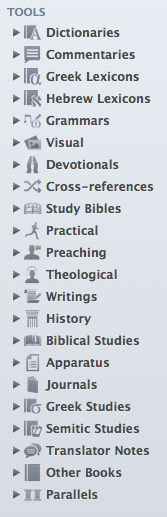
You can have Accordance 11 automatically organize your tools into the following folders:


Acc11 Library Tools Organized


Of course, further customization is possible, but this makes for a great starting point, having everything so well-sorted, which it wasn’t in Accordance 10. David Lang from Accordance has explained the re-organization in detail here. (If you’re already an Accordance user considering an upgrade to 11, you’ll appreciate what David has to say.)

This easier organization also greatly enables what has recently become my most used new feature in Accordance 11….


5. Research, or, The Feature Formerly Known as Search All


Search All (Accordance 10) was fine, but Research (Accordance 11) is even better.

We’re in the season of Advent now. What does my Accordance library have to say about this important time of preparation? Think of Research as harnessing the power of a Google search, but utilizing the content of all the books Google only allows limited preview to. In a matter of seconds, or less, Accordance goes through all my Dictionaries (selected in the drop-down menu at top left in the image below) for “Advent.” The resources that have search hits are neatly listed in the left sidebar, and the main pane of the window below allows me to quickly scroll through all the places “Advent” appears. There is an option to see “More…” of a hit result, while still staying in the same Research tab. Or you can just click on “Open” to go directly to the resource:

Research in Acc11At first I thought the new Research was just pretty cool, but it’s much more advanced than Search All, well-executed, and easy to navigate. I find myself using it much more than I used Search All in version 10.

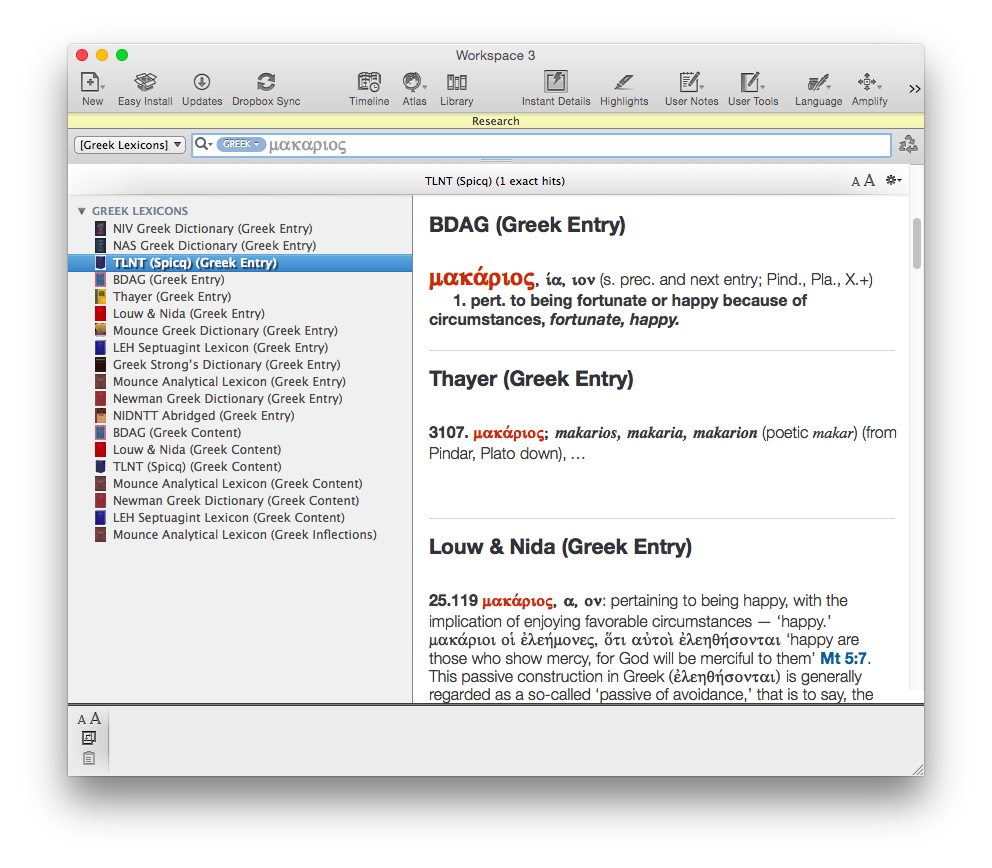
How does it tie in to the newly organized Library? From that drop-down menu that gave me “Dictionaries,” I can hone my search in on any category of tools in the library–Grammars, Commentaries, Greek Lexicons, etc.

Here–it’s worth showing two more search results, just so you can see how cool a thing Research is:

Acc11 Research_Greek Lexicons

Acc11 Research_Jonah

6. User Notes Extended to Commentaries and Books


Accordance 11 offers some improvements to User Notes, not the least of which is that users can at last take notes on commentaries, books, and other non-biblical resources they own. You can do this in Kindle, iBooks, Logos, etc., so I’m glad Accordance is caught up here. This has been a long-requested user request, so will be a much-appreciated addition.

You can make a single note file that is notes on one book, or you can make a note file that includes notes on multiple books you own.

There is also now full Unicode support for Notes.


7. Speed


Okay, this is definitely not a new feature, but it’s so much a part of what makes Accordance Accordance that I am compelled to mention it. Even running Research queries returns results before you can even think to navigate away to Firefox and check your email. Once again Accordance has added new features without sacrificing their trademark speed.


Desiderata


There’s still room for improvement, though. Here are some desired features:


1. More Seamless Syncing for User-Created Tools and Notes


The iOS version of Accordance allows the syncing and editing of User Notes, but does not allow the preservation of formatting styles therein. The iOS app also does not permit editing of User Tools at all. Accordance has noted that both are forthcoming in future updates, which I’ll be happy to see. The lack of ability to edit User Tools on iOS however, has led me to begin to use Evernote in place of Accordance on iPad, since Evernote edits and syncs automatically across multiple devices.

This is not a criticism of Accordance 11 per se (i.e., the desktop app), but it does affect the overall Accordance user experience. The installation screens in Accordance 11 hint that a 2.0 iOS app is not too far off.


2. More Robust Editing Capabilities in User Notes


I’ve often wished (whether in User Notes tied to a biblical verse or for my “Books of the Bible” User Tool) to be able to drop and drag images, or even just make a bulleted list easily. There are workarounds, but not easy ones. Editing options are fairly limited:


User Notes 1


User Notes 2


The “Auto Link” button was an addition in a later version of Accordance 10. That’s one thing Evernote can’t do; any verse references in notes you write are automatically hyperlinked to the version of your choice.

Accordance has hinted more is on the horizon. In the meantime, I’ve become reliant on with Evernote for sermon preparation and note-taking.


3. Future Additions to Info Pane


Given that Logos has had both a Passage Guide and Exegetical Guide since at least Logos 4, Accordance’s Info Pane feels a bit overdue. Similarly, BibleWorks’s Resource Summary Window (bottom left pane here) quickly links to grammars, lexicons, and other verse-by-verse references.

At the time of this review, the Info Pane does not have a Grammars section or Lexicons section or (what would be really fun) a Diagrams section. The improvements in Library organization and the Research feature make it really easy to get to words in multiple lexicons at once, so this is not a huge critique, but a more robust Info Pane would be great. Knowing Accordance’s responsiveness to user requests, I expect the Info Pane will grow and expand over time.


Conclusion: Get It


I have a contact form at Words on the Word. (Feel free to drop me a line.) Easily the most common inquiry I receive is folks asking things like, “Which is better: Accordance or Logos or BibleWorks?” or, “How can I do x in Accordance?” This post is not a comparative review (this one is). So I won’t answer that question in those terms here.

But I will say that the speed of Accordance and its search capabilities are hard to beat. Bibleworks is just as fast and can also run complex queries, but Accordance has more biblical studies resources, and just as many (or more) original language resources, not to mention the most customizable workspace setup of any software program (Bible or otherwise) I can think of. You gathered from the above that I like Evernote–though I also find myself wishing I could set up my workflow in it as flexibly as I can in Accordance.

Thinking about diving in? Check out all the Accordance collections here.

If you’re already using Accordance and wondering about the upgrade to 11, it’s a no-brainer. Go for it. It’s quite affordable for all the features you’ll get. The upgrade costs $59.90 ($49.90 if you have Accordance 10). And don’t forget about potential discounts you may qualify for.

Accordance has quite a few sources of support, too. Check out their blog for more features and tips and tricks in Accordance 11. All their sources of support (a video podcast, user forums, online seminars, and more) are here.

Accordance 11 is one of the apps I use almost every day. Accordance 10 was already good enough to be my first stop in Bible software. Version 11 has taken several significant steps forward that make it even more enjoyable and efficient to use.


Thanks to Accordance for the review license to Accordance 11. See my other Accordance posts (there are many) gathered here.

TextExpander Touch On Sale for $1.99 in the App Store

Text Expander TouchNow that I’ve made it through Black Friday without (a) buying anything or (b) blogging about any sales….

TextExpander Touch is on sale at the App Store for $1.99. Given how long it can take to type long swaths of text on an iPad or iPhone, TextExpander is a great time-saver, especially for stock replies or snippets (e.g., if you email directions to your house a lot).

Here is my review of TextExpander. You can find the app for sale here.

Accordance at SBL/AAR 2014: 50% Off

sblIf you’re at SBL/AAR 2014 this last day, Accordance Bible Software is offering the best deal I’ve ever seen from them: $250 gets you the (normally $499) Essential Collection.

The deal is only available for new users. If you’re trying to decide what you think, you can see my Accordance 10 review series here, and my initial impressions of the new Accordance 11.

Here are a few other booths you might check out, too, before the conference ends.


Conference Prices on Some Hebrew Language Gems from Eisenbrauns

This month Eisenbrauns has a sale on my favorite series of theirs: Linguistic Studies in Ancient West Semitic (LSAWS). These titles are not often on sale, and you can rarely (if ever) find a cheaper copy of anything here, even if used via Amazon.

I highlight two volumes:

Word Order in the Biblical Hebrew Finite Clause, by Adina Moshavi


Moshavi Hebrew Word OrderMany of Moshavi’s examples come from Genesis, which make them easy to understand, as she is mostly using a narrative/historical text for purposes of illustration. I’ve read 75 pages (closely) and found the book both substantive and easy to understand.

Here is the publisher’s description:

Over the last 40 years, the study of word-order variation has become a prominent and fruitful field of research. Researchers of linguistic typology have found that every language permits a variety of word-order constructions, with subject, verb, and objects occupying varying positions relative to each other. It is frequently possible to classify one of the word orders as the basic or unmarked order and the others as marked.

Moshavi’s study investigates word order in the finite nonsubordinate clause in classical Biblical Hebrew. A common marked construction in this type of clause is the preposing construction, in which a subject, object, or adverbial is placed before the verb. In this work, Moshavi formally distinguishes preposing from other marked and unmarked constructions and explores the distribution of these constructions in Biblical Hebrew. She carries out a contextual analysis of a sample (the book of Genesis) of preposed clauses in order to determine the pragmatic functions that preposing may express. Moshavi’s thesis is that the majority of preposed clauses can be classified as one of two syntactic-pragmatic constructions: focusing or topicalization.

This meticulous yet approachable study will be useful both to students of Biblical Hebrew and to persons doing general study of syntax, especially those interested in the connection between linguistic form and pragmatic meaning.


Phonology and Morphology of Biblical Hebrew, by Joshua Blau


Blau Phonology and MorphologyI haven’t read as much of this one, but is it ever detailed! It’s an excellent reference tool to look up and learn why Hebrew words are formed the way they are, and how each little part (morpheme) of a word comes into being and functions. Easily worth the $39 sale price.

From the publisher:

More than 80 years have passed since Bauer and Leander’s historical grammar of Biblical Hebrew was published, and many advances in comparative historical grammar have been made during the interim. Joshua Blau, who has for much of his life been associated with the Academy of the Hebrew Language in Jerusalem, has during the past half century studied, collected data, and written frequently on various aspects of the Hebrew language.

Phonology and Morphology of Biblical Hebrew had its origins in an introduction to Biblical Hebrew first written some 40 years ago; it has now been translated from Modern Hebrew, thoroughly revised and updated, and it distills a lifetime of knowledge of the topic. The book begins with a 60-page introduction that locates Biblical Hebrew in the Semitic family of languages. It then discusses various approaches to categorization and classification, introduces and discusses various linguistic approaches and features that are necessary to the discussion, and provides a background to the way that linguists approach a language such as Biblical Hebrew—all of which will be useful to students who have taken first-year Hebrew as well those who have studied Biblical Hebrew extensively but have not been introduced to linguistic study of the topic.

After a brief discussion of phonetics, the main portion of the book is devoted to phonology and to morphology. In the section on phonology, Blau provides complete coverage of the consonant and vowel systems of Biblical Hebrew and of the factors that have affected both systems. In the section on morphology, he discusses the parts of speech (pronouns, verbs, nouns, numerals) and includes brief comments on the prepositions and waw. The historical processes affecting each feature are explained as Blau progresses through the various sections. The book concludes with a complete set of paradigms and extensive indexes.

Blau’s recognized preeminence as a Hebraist and Arabist as well as his understanding of language change have converged in the production of this volume to provide an invaluable tool for the comparative and historical study of Biblical Hebrew phonology and morphology.


Access the sale here. The two volumes above–and some other really good titles–are available at the best discounts you’re likely to find.