A Look Inside Zondervan’s New NIV Cultural Backgrounds Study Bible

Image via Zondervan
Image via Zondervan


The aim of Zondervan’s just-released NIV Cultural Backgrounds Study Bible is simple:

This study Bible has been purpose-built to do one thing: to increase your understanding of the cultural nuances behind the text of God’s Word so that your study experience, and your knowledge of the realities behind the ideas in the text, is enriched and expanded.

John H. Walton and Craig S. Keener are the editors. Walton oversaw The Zondervan Illustrated Bible Backgrounds Commentary: Old Testament (ZIBBCOT), a resource I consult for almost every passage I preach on. Walton also co-wrote the IVP Bible Background Commentary: Old Testament.

Keener has written a page or two in his time, too. Just today I found great help with Ephesians 5:21ff in his IVP Bible Background Commentary: New Testament. (Although some of Keener’s contextual explanations of “submission” and “headship” and slavery did not make their way into this study Bible, where those verses unfortunately received a less nuanced approach.)

Content from both the ZIBBCOT and the IVP Bible Background Commentary finds its way into this study Bible. (As do a couple dozen articles from the NIV Archaeological Study Bible.) As for the 2011 New International Version—used in this volume—I write more about it here.

This definitely-not-compact Bible has more than 10,000 study notes. No, I didn’t count, but check out this page from Micah 1, a chapter which needs a lot of background explanation. The Cultural Backgrounds Study Bible delivers:


thumb_IMG_8337_1024


The accompanying maps, images, diagrams, and charts are all in color:


thumb_IMG_8338_1024


Micah’s introduction is fair in presenting a few different viewpoints on dating, and concludes:

The modern reader of Micah should at least be aware of the variety of ways in which different historical backgrounds have made a difference in the understanding of, and even translations of, several difficult passages in the book of Micah.

And it’s not just historical background for its own sake. The authors and editors seem to have the aim of helping the reader understand the text.

Micah 4:4 reads:

Everyone will sit under their own vine

and under their own fig tree,

and no one will make them afraid,

for the Lord Almighty has spoken.

Here is the study note on Micah 4:4:

The vine and fig were the two most important fruits of an ancient Israelite garden. The vine, because of the length of time necessary before good grapes were produced, was often a symbol of a sedentary life. The fig was known for its sweet produce (Jdg 9:11) and, like the vine, for its pleasant shade. …[T]he picture of the vine and fig tree also point to long-term investment and stability.

The Old Testament introductory materials include a helpful “Hebrew to English Translation Chart,” for instances where “there is no English word that corresponds sufficiently to capture the breadth of nuance that the Hebrew word contains. “ It’s a nice addition, and not one I can recall seeing in a study Bible before.

The inclusion of those Hebrew words caused me to be a little surprised, then, that the study Bible missed the opportunity to point out the Hebrew wordplay on Micah’s name in Micah 7:18: “Who is a God like you…?”

So one may still want the larger background commentaries that this study Bible makes use of. However, the Bible is already fairly large, so the level of detail is understandable.

All in all, though it’s difficult to justify yet another study Bible, this one does fill a void, since many study Bibles treat background, but in nowhere near this level of detail.

You can learn much more about the study Bible here. If you want to see some nice shots of the inside of the print edition, check out this post over at Bible Buying Guide. And you can find a couple different versions of the Bible at Amazon here.


AcademicPS and Zondervan set me up with a hard copy of the Bible, as well as electronic access, so I could review it, though this kindness did not influence my objectivity.

Logos 7: Review, Screenshots, Video

Image via Logos
Image via Logos


Bible software nerds, rejoice! Today Logos 7 comes into the world.

I’ve been using Logos (alongside Accordance and BibleWorks) since Logos 4. There hasn’t been a major interface overhaul since that version, but Logos has been steadily adding loads of features since then.

From a few weeks of beta testing, I offer here my initial impressions of Logos 7, as well as a look at its features in action.

Here’s the best of what’s new in Logos 7.


1. Interactives (Again)


The Interactives were my favorite feature in Logos 6. The addition of more Interactives makes it the part I most like about Logos 7.

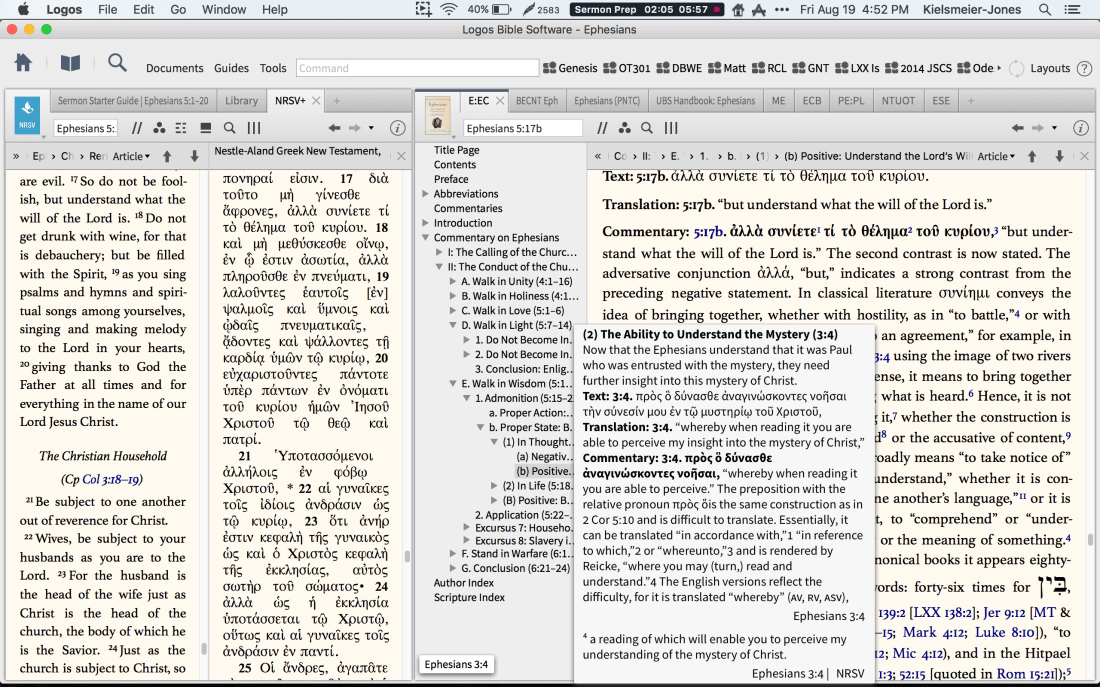
Here is a screenshot of all the Interactives, which you can pull up from your library with the search: “type:interactive”.


Logos 7 Interactives


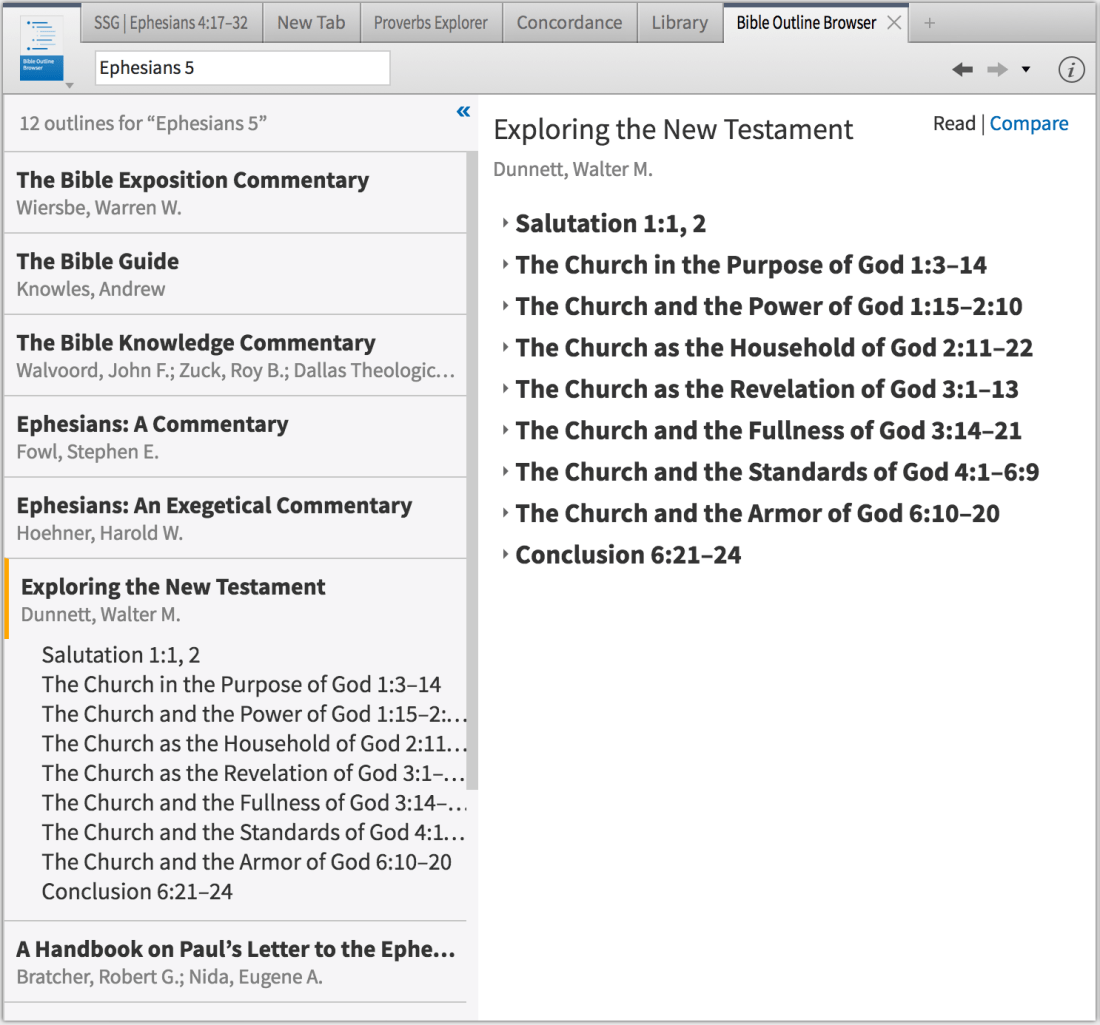
Some of those were in Logos 6, like the Bible Outline Browser, which shows you all the Bible text outlines you have in your library for the passage you’re considering.


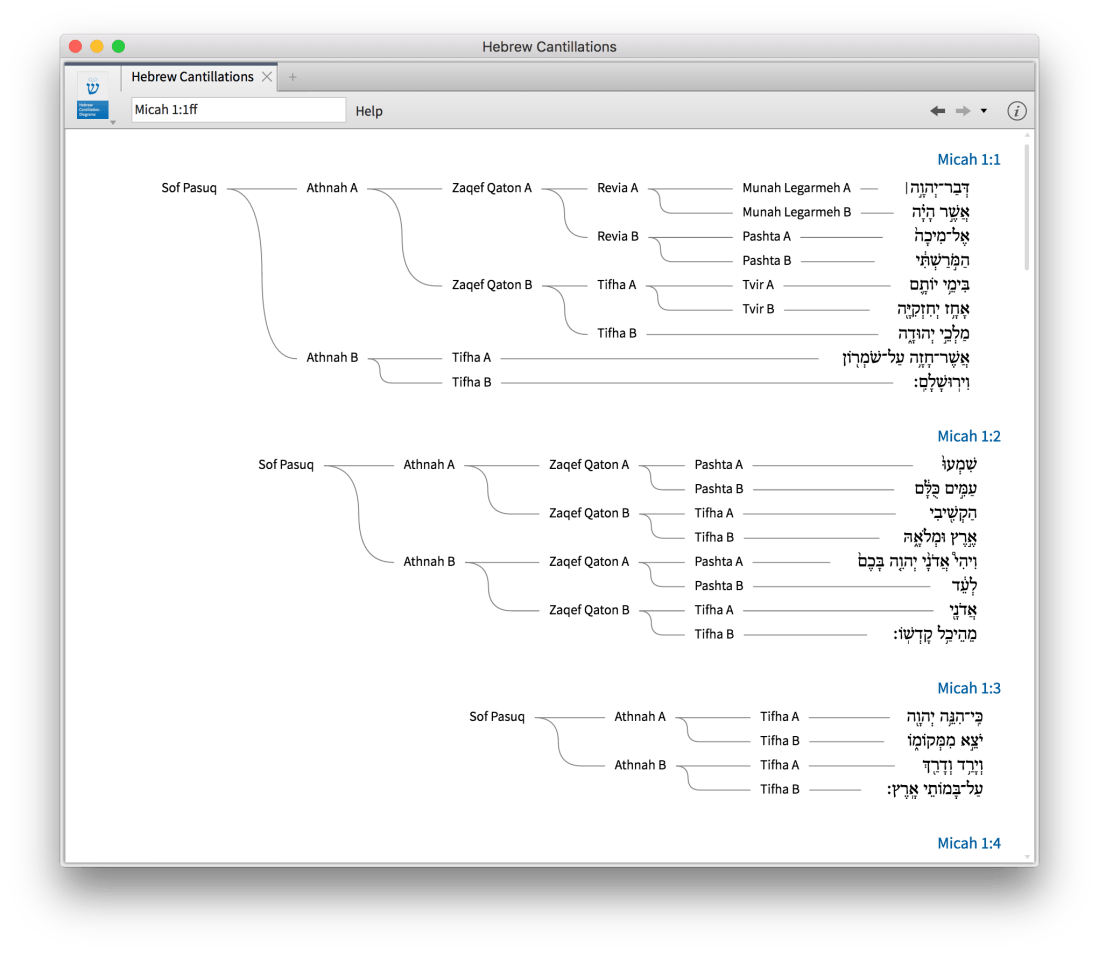
The Hebrew Cantillations Interactive in Logos 7 has seen improvement since its release in Logos 6 (it wasn’t ready for prime time initially):


Logos 7 adds the Septuagint Manuscript Explorer, which students of the Göttingen editions will especially appreciate:

We’ve cataloged information about Septuagint manuscripts, including contents, date, language, holding institute, and more. With this interactive, discover the earliest Septuagint manuscripts see how many contain the book of Psalms, and even view scanned images of many fragments, like Codex Sinaiticus.


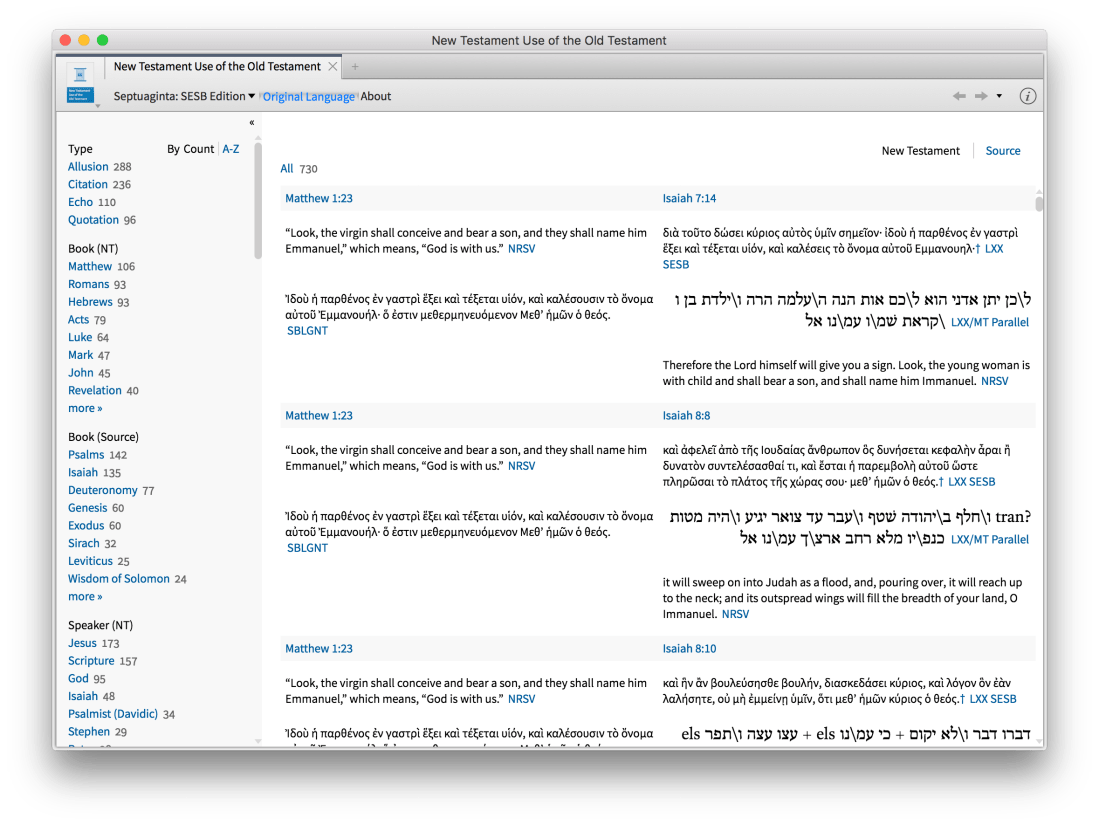
My most used Interactive at the moment is the New Testament Use of the Old Testament. I would have made great use of it when I took a seminary course by that name. There are lots of ways to get access to what OT passages the NT is using (commentaries, Bible text footnotes, words searches), but this Interactive consolidates and sorts the data in a highly convenient way.

You can sort by allusion, quotation, echo, and citation. I always thought allusion and echo were more or less the same—though the use of terminology is itself at issue in the field! At any rate, the authors of the Interactive define their terms:

• Citation: An explicit reference to scripture with a citation formula (e.g. “It is written,” or “the Lord says,” or “the prophet says”).

• Quotation: A direct reference to scripture, largely matching the verbatim wording of the source but without a quotation formula

• Allusion: An indirect but intentional reference to scripture, likely intended to invoke memory of the scripture.

• Echo: A verbal parallel evokes or recalls a scripture (or series of scriptures) to the reader, but likely without authorial intention to reproduce exact words.

This Interactive probably deserves its own post. You can change what versions it displays, and even set it so that the English NT and OT passages are displaying alongside Greek (NT) and Greek and Hebrew (OT). (Getting this part set up was not really intuitive to me.) You can even hover over Greek and it cross-highlights the corresponding English, and vice versa:


If software programs had Pulitzers, the NT Use of the OT should win one for best feature. Here’s what it looks like, including the sidebar, which allows you to focus your study using a ton of criteria. You could easily find, for example, all the times Matthew cites or alludes to an OT passage with Jesus in mind.


2. Sermon Editor


I have worked hard to get a sermon writing workflow I really like. (Detailed article at CTPastors.com forthcoming!) So I doubt I will use the new Sermon Editor much, but it looks pretty awesome, if you want to use Logos for sermon writing. In the image below, the Sermon Starter Guide (introduced in Logos 5) is next to the Sermon Editor.


Not only does the Sermon Editor offer rich text writing and multiple Export options, if you mark your Headers, it automatically generates a Powerpoint slide show for your text. It’s also got a Handout option, which allows you to easily generate a one-pager to accompany your sermon, as well as to automatically set up a handout with blanks to fill in.

AND… if you type in a Scripture reference, the Sermon Editor automatically creates a slide with the text of that Scripture, even fitting text to multiple slides if necessary. Watch:


You can also save a step and have the slides auto-generate with just a keyboard shortcut, after typing in the reference. Amazing.


3. QuickStart Layouts


This is not a ground-breaking feature, per se, but it is a time-saving addition. Now the Layouts option in the Logos toolbar offers access to “QuickStart” saved layouts that get a user up and running for various tasks.


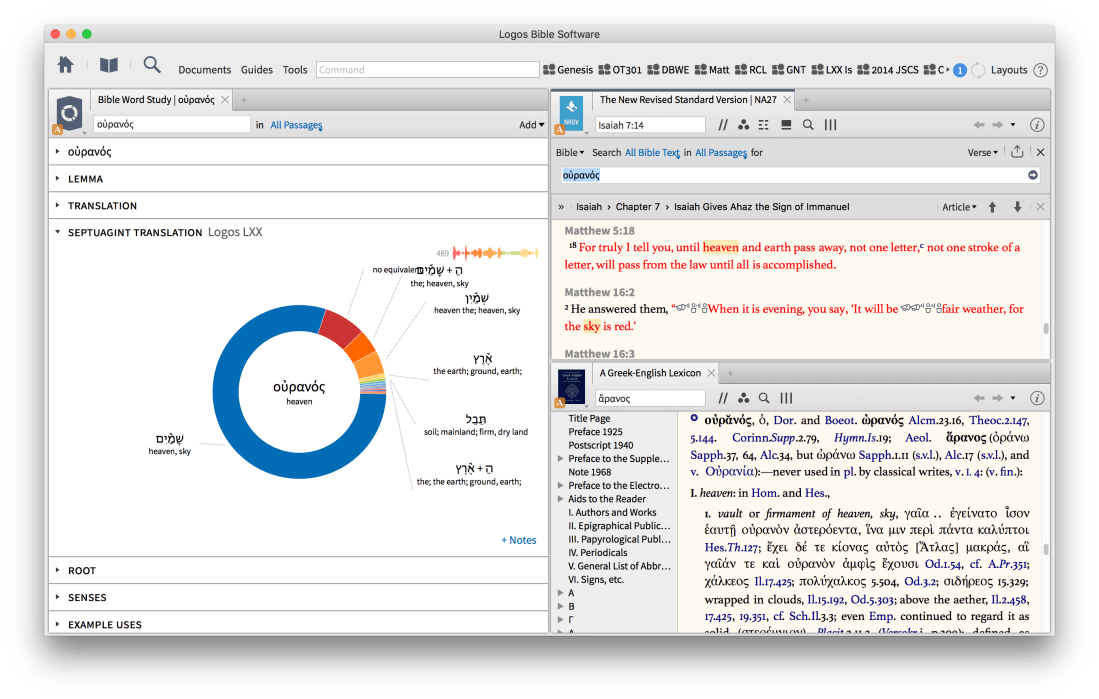
The Greek Word Study layout, for example, is nicely executed:


4. Systematic Theologies in the Passage Guide


The Passage Guide has been around a while, but Logos keeps adding to it. Logos 7 features a Systematic Theologies guide, an admittedly subjective but still helpful aggregator of theology resources in your library, keyed to the verse you’re studying. You can sort it by theology subject (Christology, pneumatology, etc.) or by denomination.


5. Everything Is (Still) Hyperlinked


The hyperlinking seems to have improved since I was last using Logos regularly when Logos 6 launched. (Only now with a recent laptop upgrade does Logos run well on my Mac.) Of course the Scripture verses are hyperlinked, but commentaries are also hyperlinked to previous sections they mention. As here:


Improvements That Weren’t


Logos 7 is cutting-edge software, impressive in its innovation and a huge time saver from a task standpoint. The designers and developers clearly created it with real users in mind.

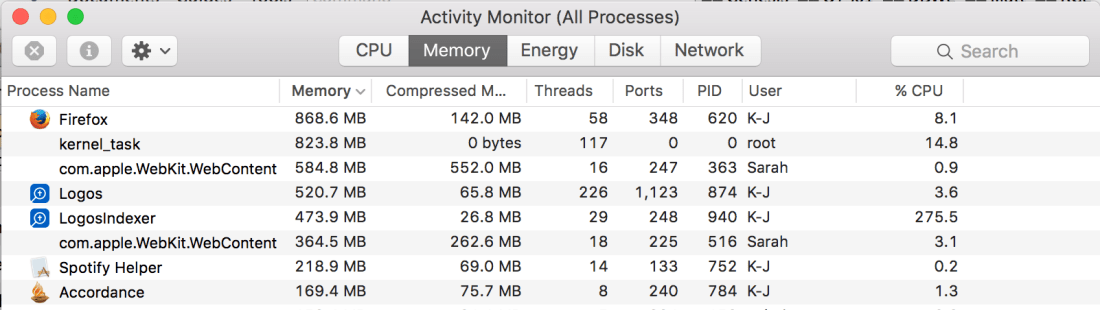
However, even on a new and higher-end Mac, Logos 7 is system resource intensive. It’s a CPU hog, a battery drain, and uses significant energy.

I can always tell if I have Logos open on my laptop because the computer is almost always warm when it is—and almost never warm with any other combination of apps open.


This has been my (and others’) enduring criticism of Logos since at least Logos 4, and I continue to fail to understand why program sluggishness is not Code Red at Faithlife HQ. My slightly educated opinion is that Faithlife (makers of Logos) is “going for more” instead of “sticking to the core” (to quote a Harvard Business Review article). Lots of spin-off apps and ideas and focus on marketing and shipping frequent feature updates have hindered development of the core product—at least where speed is concerned. Wanting to get at the info in the Passage Guide, for instance, can be an exercise in patience (and frustration):


Logos 7 is far more responsive and fast in searching on my newer Mac machine than it was on my previous MacBook (a 2008!). Though, for that matter, both Accordance and BibleWorks ran fast on the 2008—one shouldn’t have to buy a new machine to use Logos well, though I don’t think that stops some users from doing it, especially when they feel they’ve invested a lot of money in building their library.


In Conclusion


Speed and massive CPU usage and battery drainage are the Achilles’ Heel of Logos Bible software. I hope—for their sake and for the sake of their user base—that they shift their development focus back to whatever they need to do with the code to ensure a speedier user experience. The developers I’ve interacted with on the forums seem great—it appears to be an issue of larger company focus and resources.

It’s often not slow. (Though it’s always a CPU and battery drain.) For the couple of hours that I use Logos for sermon prep, I can search and open and highlight individual resources with ease. The feature set and Interactives are innovative and cut out unneeded research steps for users. The app itself is powerful, and does a good job of getting users into even larger libraries to cull the most relevant information for tasks at hand. Their accompanying iOS app is really good, too. Users should just be ready–even with the new Logos 7–to check email while they wait for a Passage Guide or Sermon Starter Guide to return results.

If you’re a happy Logos 6 or 5 user, should you upgrade? Definitely. The so-called data sets and features in Logos 7 are a significant step up. If you are on Windows or if your Mac is handling Logos fine and you want to keep using it, Logos 7 is a creative step in a good direction.

Never used Logos and trying to decide if you should get it? (Especially with other Bible software options available?) Then ask away in the comments below, and I’ll respond there.

Logos 7 launches with a 15% off discount. If you go to Words on the Word’s landing page, you get the discount, and the blog gets a small commission if it’s a first-time purchase. The landing page also includes links to more information about Logos 7.


Thanks to Logos for the chance to beta test and review. I received early access to Logos 7 as well as a package of library resources to test, for the purposes of this review. That did not, however, influence my objectivity…as I expect is clear. 🙂

Nothing Like Some Good Fiction from an Indie Bookstore! (A Man Called Ove)

A Man Called Ove cover 2

Last week I purchased a book at nearly full price at a wonderful independent bookseller in Minneapolis. It was, of all things, a work of fiction, a genre I don’t read much. (That may be changing.)

The book is A Man Called Ove (pronounced “OOH-vuh”) by Swedish novelist Fredrik Backman.

It begins like this:

Ove is fifty-nine.

He drives a Saab. He’s the kind of man who points at people he doesn’t like the look of, as if they were burglars and his forefinger a policeman’s flashlight. He stands at the counter of a shop where owners of Japanese cars come to purchase white cables. Ove eyes the sales assistant for a long time before shaking a medium-sized white box at him.

“So this is one of those O-Pads, is it?” he demands.

The assistant, a young man with a single-digit body mass index, looks ill at ease. He visibly struggles to control his urge to snatch the box out of Ove’s hands.

“Yes, exactly. An iPad. Do you think you could stop shaking it like that . . . ?”

Every day Ove is frustrated by a highly tech-oriented world, where IT consultants and men in white shirts run society but can’t tighten a screw or back up a moving trailer properly.

Already at 59 Ove is a grumpy old man—but not beyond hope, and maybe even lovable if the author has his way.

A Man Called Ove begins with a young family moving into the neighborhood and crashing their trailer into Ove’s mailbox. Each new day thereafter is destined to bring a new interruption to the solitary peace Ove desires.

The story is interesting, compelling, and moves along well. Beckman deftly weaves between Ove’s past and present. At first the flashbacks felt like intrusions, but then I found myself equally engaged in both the back story and the main story.

The writing is enjoyable. Backman’s use of metaphor is clever and funny. A number of chapters make use of inclusio, using the same thought (and even wording) to both open and close a scene. And the occasional clipped writing style fits well with Ove’s character, as here, where subjects drop out:


There is lots of nodding and shoving of hands into pockets—maybe just a touch more than necessary. Some coincidences, especially toward the end of the book, are a little unbelievable. And I spotted about a dozen typos, as well as a couple handfuls of places that wanted a closer edit.

Those faults do not outweigh the pleasure of reading the story. As a bonus, the layout and cover and typesetting are some of the best I’ve seen in a novel, and made me want to pick it up even more. (Though the compelling story, especially in its second half, was sufficient for keeping me engaged.)

And–get this–there’s a movie version of the book. It’s supposed to be coming to the U.S. this fall. I watched the trailer after reading the book, and it looks like it perfectly captures the essence of the characters and interactions in Backman’s story.

Here’s the publisher’s page. You can find it on Amazon here, or (better yet!) at your local independent bookseller, or even at your local library.

Show Your Work! 10 Ways to Share Your Creativity and Get Discovered (REVIEW)

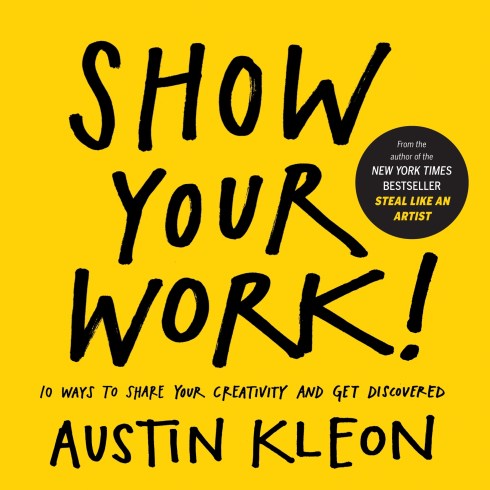
Show Your Work Cover Image


Since starting Words on the Word four years ago, I’ve spent far more of my blogging energies on writing and reviewing books and apps than on marketing what I do.

I’m fine with the focus as it’s been, but I know I could stand to explore more ways to “get discovered,” as Austin Kleon promises to address in his Show Your Work! 10 Ways to Share Your Creativity and Get Discovered.

I heard about Austin Kleon from Shawn Blanc. By telling you that, by the way, I’m following some of Kleon’s advice:

It’s always good practice to give a shout-out to the people who’ve helped you stumble onto good work and also leave a bread-crumb trail that people you’re sharing with can follow back to the sources of your inspiration.

Kleon’s got his own site which is worth checking out. Sitting down to write this review was the first time I’d been on it, and I’ve already got 15 tabs open that I’ll either read later or save to Evernote. A highlight: in his post on how to read more, suggestion #1 is “Throw your phone in the ocean.” Great idea. Not to mention this amazing wallpaper for your phone, to keep you off it.


Take It


Kleon organizes his book around 10 main suggestions:

1. You don’t have to be a genius.

2. Think process, not product.

3. Share something small every day.

4. Open up your cabinet of curiosities.

5. Tell good stories.

6. Teach what you know.

7. Don’t turn into human spam.

8. Learn to take a punch.

9. Sell out.

10. Stick around.

Chapter six, “Teach what you know,” is the shortest (barely 700 words) but best chapter.

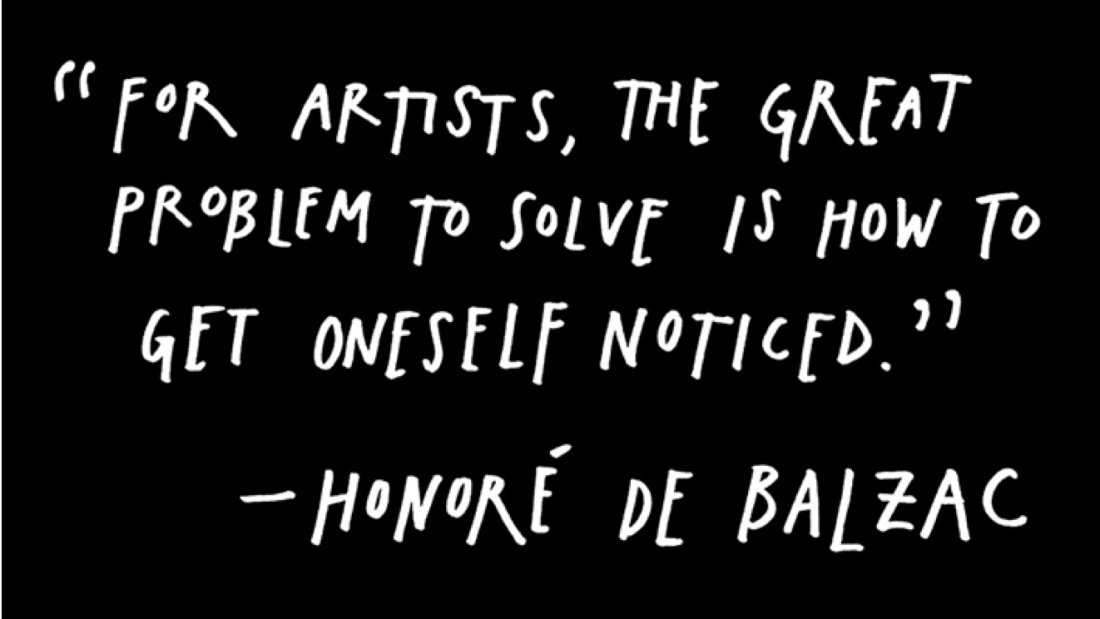
I didn’t care a whole lot for the graphics (on every other page or so), but they do make the book easier to fly through, and a few of them illustrated the points creatively. The first one is compelling:


Some others are interesting:


And there are some real gems in this book, whether they are Kleon’s or others’ words:

When Radiohead frontman Thom Yorke was asked what he thought his greatest strength was, he answered, “That I don’t know what I’m doing.” Like one of his heroes, Tom Waits, whenever Yorke feels like his songwriting is getting too comfortable or stale, he’ll pick up an instrument he doesn’t know how to play and try to write with it. This is yet another trait of amateurs— they’ll use whatever tools they can get their hands on to try to get their ideas into the world.

And:

“The stupidest possible creative act is still a creative act,” writes Clay Shirky in his book Cognitive Surplus. “On the spectrum of creative work, the difference between the mediocre and the good is vast. Mediocrity is, however, still on the spectrum; you can move from mediocre to good in increments. The real gap is between doing nothing and doing something.” Amateurs know that contributing something is better than contributing nothing.

Much of the book can be summed up by this sage advice:

The best way to get started on the path to sharing your work is to think about what you want to learn, and make a commitment to learning it in front of others.

Kleon encourages writers and artists to “become a documentarian of what you do.” That can be a “daily dispatch” (think: email newsletter) or a behind-the-scenes video on how you do what you do. Kleon says:

Once a day, after you’ve done your day’s work, go back to your documentation and find one little piece of your process that you can share.

Leave It


Kleon encourages those who quote or borrow to cite, but he falls short of a robust understanding of what plagiarism is and isn’t.

He says:

If you have a weird hybrid job, say something like, “I’m a writer who draws.” (I stole that bio from the cartoonist Saul Steinberg.)

A nice citation, but unfortunately “I’m a writer who draws” appears uncited in his book jacket bio, on his Website, on his Instagram, etc.

He shows his work on the books he reads (great idea), but then appears to copy-paste in publisher’s descriptions without citing them.

No need to lambast the guy—but I already didn’t like the title Steal Like an Artist (his first book), let alone the concept. I get it’s supposed to be a pithy way to say, “Let others influence you.” (Just like “content creation” means “writing.”) But the lack of nuance around what I consider an important issue in art creation bugged me.

Show Your Work! is more than 200 pages, but could just as well have been a series of 10 short (albeit good) blog posts. It’s got even fewer words per page than a Rob Bell book! (All due respect to Rev. Bell….)


Image via Austin Kleon


More to the point than a low word-to-page ratio is that there are plenty of pieces of advice Kleon offers that lack specifics. For example, in his section on getting a good domain name, he says:

Buy http://www.[ insert your name here].com. If your name is common, or you don’t like your name, come up with a pseudonym or an alias, and register that. Then buy some web hosting and build a website. (These things sound technical, but they’re really not— a few Google searches and some books from the library will show you the way.)

Because this is a print book, you don’t even get the benefit of a hyperlink to start you in the right direction.

But there are other parts where in even a few words Kleon fleshes out his ideas, as in the section, “Turn your flow into stock.”


Should You Get It? (Yes.)


Even with its flaws, this book was well worth the time I spent reading and marking it up. The book gave me some good, specific action steps to pursue, in the hopes of spreading the word about the work I’m doing on this blog (and elsewhere). And it’s given me months and months of sermon illustrations, inspiring quotes, and writing prompts.

For its reasonable price, the book is worth the purchase, though this might be better checked out from the library first. One way or the other, I found the book overall to be encouraging, inspiring, and motivating.

Check it out via Amazon or the publisher’s page.


Thanks to the good folks at Workman for sending the review copy.

IVP’s 5-Volume Ancient Christian Doctrine in Accordance, On Sale this Week

Ancient Christian Doctrine


This week Accordance Bible Software has put their five-volume Ancient Christian Doctrine (IVP) on sale for $129 (normally $199). Ancient Christian Doctrine is a full-blown compendium of early church commentary on the Nicene Creed. I write more about the resource here.

If you’re teaching or preaching on the Creed, this is possibly the best resource to start with. (And, of course, it’s likely available for free in print at your local theological library.)

The related Ancient Christian Commentary on Scripture (covering the entire OT and NT) is also included in the sale.

Here‘s the link to find Ancient Christian Doctrine at Accordance.


This week’s blog sponsor is MailButler, the feature set you always wished your Mac Mail had (and that I’m glad mine does). Find out more about it here or download and try it free here.


Word Counter App for Mac OS X

Word Counter iconWord count is by no means the best measure of effective writing, but it’s a useful metric for tracking your progress.

The Mac Word Counter app by Christian Tietze lives in the menu bar and automatically tracks your word count across apps. This is especially helpful for us writers who can’t seem to settle on a single app for writing.

Even when Word Counter is out of site, you can have its menu bar icon display your running word count for the day:


0_Menu Bar


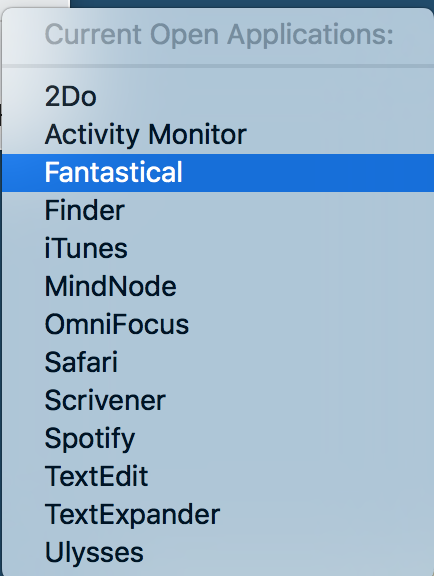
You can specify which apps you want Word Counter to track:


2_Add Apps


3_Add Apps 2


Once you’ve added your apps, just click on the menu bar icon to see a breakdown:


4_Word Count in Menu Bar


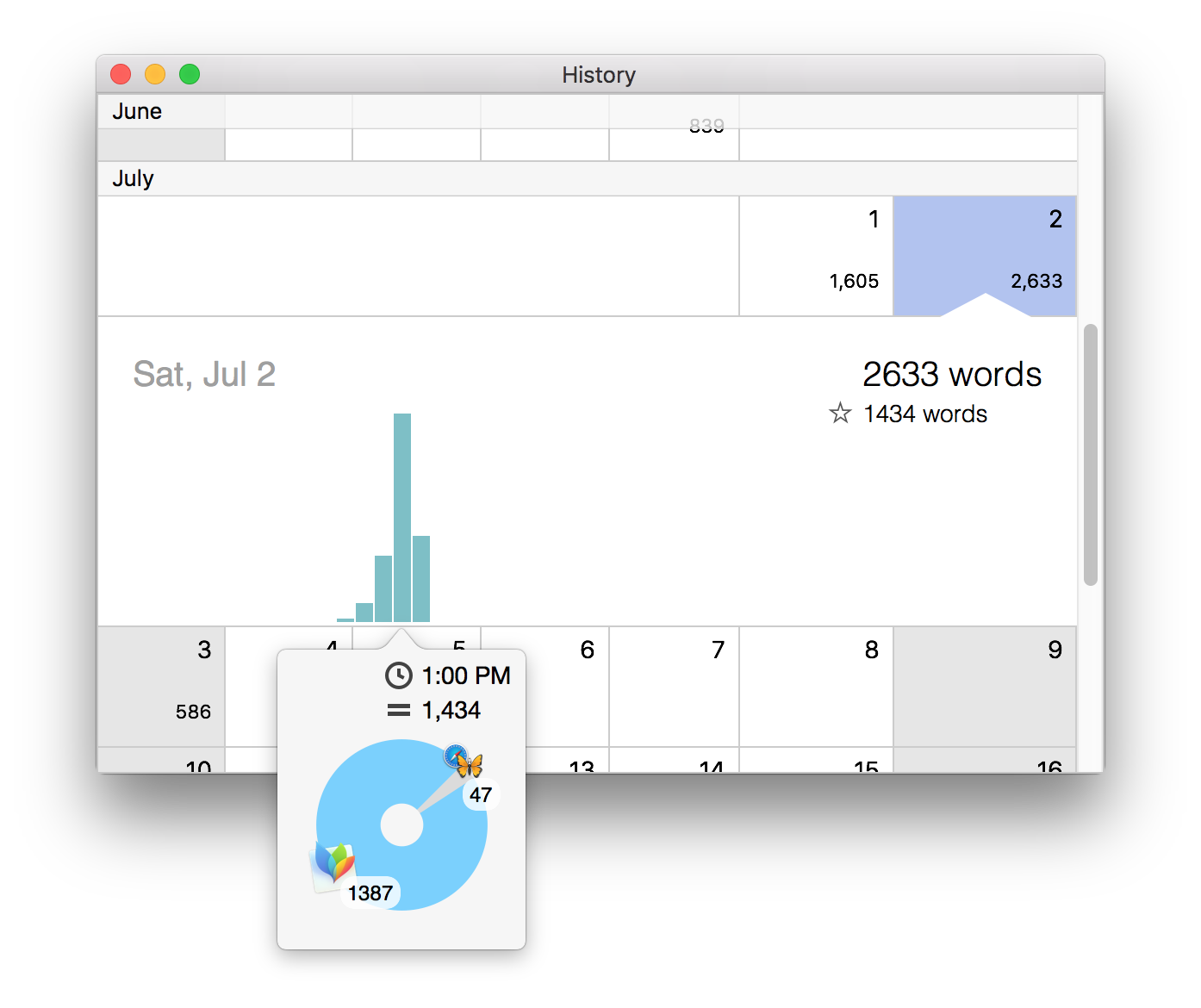
Hovering over the bars gives you an hour-by-hour, app-by-app breakdown of your progress. Very cool!

You can look at your day-by-day word count history, which is also impressively sub-divided into hours and apps:


5_Word Count History


And that’s honestly probably enough for most of us–a detailed word counting tool that is easy to access, updates automatically, and tracks multiple apps.

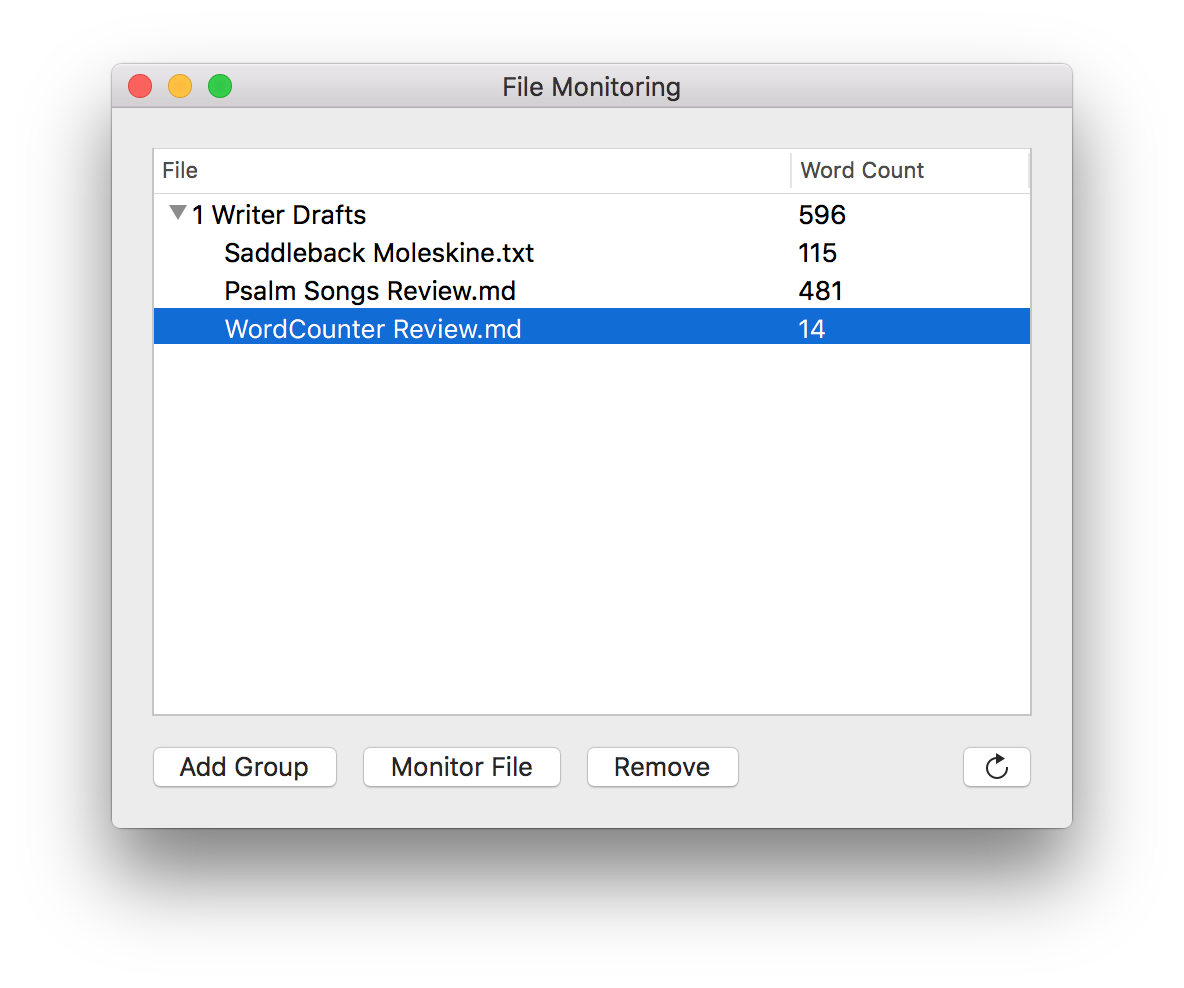
But there is also a nice additional feature of being able to track word counts on individual files. This comes in handy especially for a file you’re working on via Dropbox across multiple machines. Word Counter will track the word count for you via Dropbox, no matter what device you typed the words on.


9_Refresh


The only downside to this feature is you have to manually refresh (icon at bottom right hand corner in the image above) to get the word count to update. (UPDATE: I’ve just learned it does refresh on its own every few minutes.)

Word Counter does provide a solution to the as-of-yet-non-existent word count feature in OmniOutliner.

The only other possible area for improvement is that when you add a file for tracking from the File Monitoring window, you have to select “Monitor File” and go find it in Finder, rather than being able to just drag and drop a file from an already-open Finder window. This would be a nice feature for a future update.

The app is easily worth its $9.99, and there’s a free 14-day trial so you can test it out. Find it here.


Thanks to the dev at Word Counter for the promo code so I could review the app.

A Smooth Note-Taking Workflow for Drafts 4 and Logos in iOS

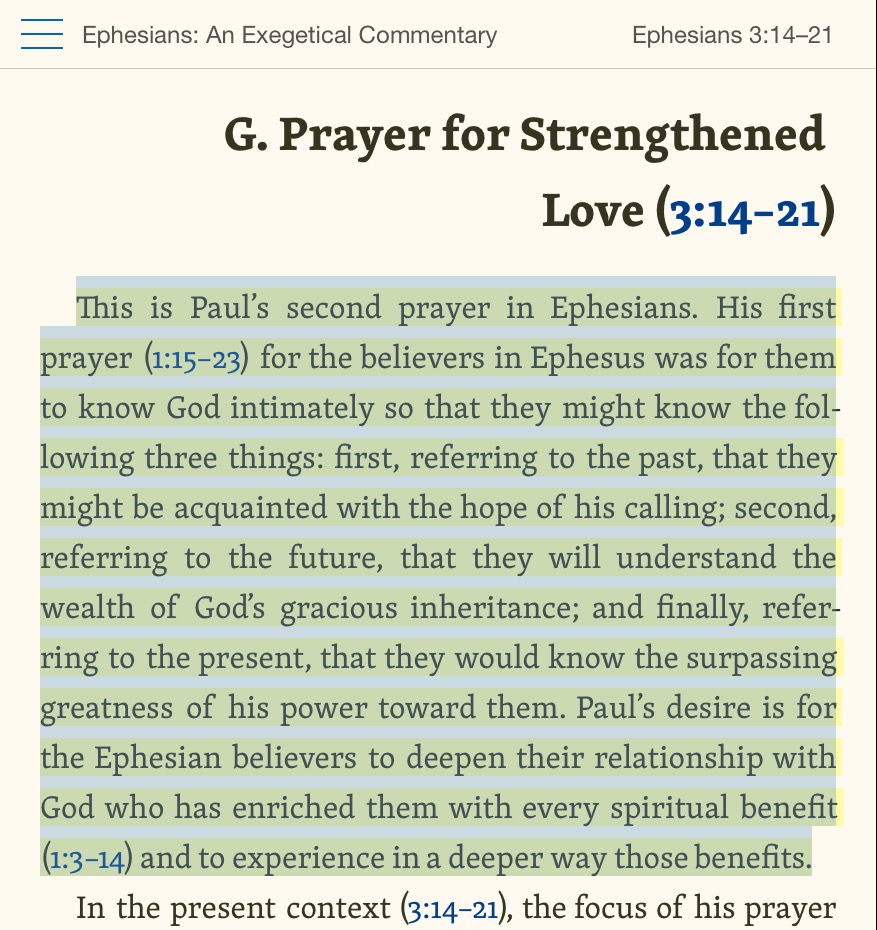
I’ve got a sweet Logos–>Drafts 4 workflow I’ve been using on the iPad for a few months now. (I find Logos’s iOS app to be significantly zippier than its Mac counterpart.) Allow me to demonstrate, using Harold W. Hoehner’s excellent Ephesians commentary.


1. Open up Logos in iOS.


Here’s Hoehner’s lovely commentary.


IMG_0383


2. Tap selected text to bring up highlighting and share options.


I’ve got Drafts open with Logos in Split View, just so you can see them together. All these steps work with Drafts not visible, however.


IMG_0384


3. Select Drafts in the share option.


IMG_0385


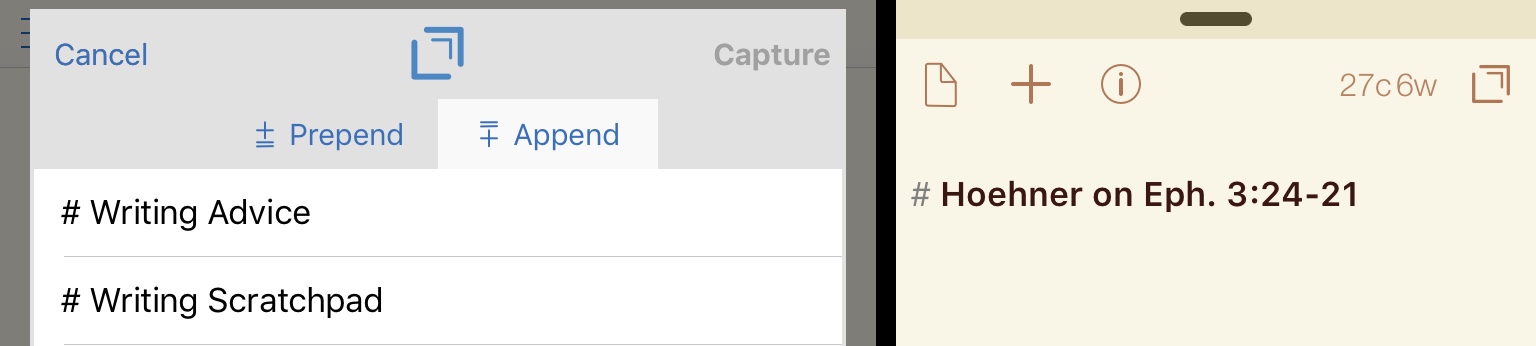
4. Now you can “Capture” to send the selected text right to Drafts OR prepend (add to the beginning) or append (add to the end) to an existing draft. (!)


IMG_0386


If you do Prepend or Append, Drafts comes up to let you choose where to put your text.


IMG_0387


5. When you’re done repeating this process for as much text as you want to copy, you can merge individual drafts, if needed.


IMG_0388


IMG_0389


IMG_0389


You can even choose your own text or symbol to separate merged drafts:


IMG_0390


From here it’s easy export from a single draft to Ulysses or MindNode, and on goes my sermon preparation! Drafts4 has been the most indispensable app in my attempt to do as much sermon preparation as possible on the iPad.


Thanks to Logos for the Hoehner commentary so I could write up the workflow–review of the commentary itself to follow. The Logos mobile apps are free, available here: iOS / Google Play.

Probably the Best Broadly Evangelical Systematic Theology

Erickson Introducing Christian DoctrineMillard J. Erickson’s massive Christian Theology is now in its third edition (published in 2013). The hallmark of the 1,200-page book is its evangelical perspective, concern for application to life, and balance in covering multiple perspectives fairly.

There’s also a newly updated abridged version of the work, Introducing Christian Doctrine, which clocks in at a more modest 512 pages.

Introducing Christian Doctrine begins each chapter with an easy-to-grasp one-page summary, featuring “Chapter Objectives,” a short “Chapter Summary,” and a detailed “Chapter Outline.” This makes navigating the work a breeze, especially if you’re after a particular topic–as I am currently, since my five-year-old keeps asking me about heaven!

Erickson offers an engaging read from the beginning:

To some readers, the word “doctrine” may prove somewhat frightening. It conjures up visions of very technical, difficult, abstract beliefs, perhaps propounded dogmatically. Doctrine is not that, however. Christian doctrine is simply statements of the most fundamental beliefs the Christian has, beliefs about the nature of God, about his action, about us who are his creatures, and about what he has done to bring us into relationship with himself. Far from being dry or abstract, these are the most important types of truths. They are statements on the fundamental issues of life: namely, who am I, what is the ultimate meaning of the universe, where am I going? Christian doctrine is, then, the answers the Christian gives to those questions that all human beings ask. (4)

Readers can count on, even in this abridged version, a thorough survey of biblical references and concepts from which to derive a solid theology. Erickson covers well the expected basics: revelation, the nature of humanity, salvation, eschatology, and so on.

Balanced as he is, there are occasional areas that deserve further nuance, even in the unabridged version. In the larger edition, for example (preserved in the abridgement), Erickson says, “Jesus did not make an explicit and overt claim to divinity” (611). He means that Jesus never explicitly said, “I am God,” although verses like “I and the Father are one” seem to counter Erickson’s claim here. What follows, though, is a great read on Jesus: there are what can only be divine “prerogatives Jesus claimed” (611).

The Unabridged Version

To take just one example, Jesus forgives the sins of a paralyzed man in Mark 2:5-10. The teachers of the law object, “Who can forgive sins but God alone?” They are right, of course, that only God can forgive sins. Jesus here is exercising a divine role: “But I want you to know that the Son of Man has authority on earth to forgive sins” (Mark 2:10). Jesus also exercises an authority reserved only for God when he re-casts the Decalogue in his Sermon on the Mount with a refrain of, “But I say to you.” And when Jesus raises Lazarus from the dead in John 11, he displays power over life and death themselves, a power available to no mere human being. This is not to mention Christ’s own resurrection, showing his divine power over death.

Erickson offers some nice turns of phrase, too. Speaking of God’s age, he says God “is no older now than a year ago, for inifinty plus one is no more than infinity” (91). Together with the Scriptural support Erickson gives for God’s being “infinite in relation to time” (91), one easily sees how useful Introducing Christian Doctrine can be in church settings.

The abridged version does a impressive job at condensing Christian Theology without significantly compromising or neglecting the content. One surprising move in the abridged version is that the chapters are re-ordered and numbered differently from the full edition.

This may be inevitable with an abridgement, but most readers will want to be able to know how the two titles relate, for purposes of accurate cross-referencing and further reading. Future editions ought to bring the abridged chapter numbering in line with that of the fuller version. Even the section headings change, so that Part 5 of the condensed version is “The Person and Work of Christ” (spanning chapters 23-27), while Part 5 of the unabridged edition is “Humanity” (chapters 20-24).

The annotated Table of Contents (see them here) in Introducing Christian Doctrine do, however, allow the reader to easily locate a given theme and sub-topic.

There’s much more to interact with in Erickson’s book, but it’s the best broadly evangelical theology of which I’m aware. Erickson blends academic thoroughness with pastoral concern, an approach I love.

And now, some link love: You can find the condensed Introducing Christian Doctrine here (Amazon), here (Baker), and in electronic form here (Logos) and here (Olive Tree). The fuller, unabridged Christian Theology is here (Amazon), here (Baker), and in electronic form here (Logos) and here (Olive Tree).


Thanks to Baker Academic for the copy of Introducing Christian Doctrine, which they sent me for review, but with no expectation as to this review’s content.


Done with Threes? Sworn off 2048? Try Diced

Agile Tortoise (Greg Pierce) is probably the best iOS developer there is. I use his Drafts 4 app all the time–an amazing combination of text editor simplicity and power user export options.

He’s just made a $0.99 game called Diced.


IMG_6858


IMG_6856


From Agile Tortoise’s blog announcement:

Diced is a simple puzzle game. Place dice on a grid to make five of a kind or five in a row (straight) combinations to score points and clear the die. Score as many points as you can before the grid fills up and the game ends. Some game play features:

  • Quick launch and game restore. Easy to leave and come back where you left off.
  • Wild die.
  • Bombs.
  • Random blocks to add difficulty as the game progresses.
  • Game Center support with leaderboards and achievements

There are no ads, no in-app purchases, and it works perfectly. It’s universal, so you can play on iPhone and iPad, where Split View is also supported. (This guy thinks of everything.)

It’s not quite like poker–a full house combination won’t clear a row for you. But between the five of a kind and five straight goals, you’ve got enough ways to clear the board (the bombs help, too). Also cool is the dark mode, which you can toggle off and on.

Check out the app here.

What I’m Learning About Preaching, and a Massive Resource that Helps

Art and Craft of Biblical Preaching

The Art & Craft of Biblical Preaching (Zondervan, 2005) is a massive and indispensable reference work for preachers. It is true to its sub-title: A Comprehensive Resource for Today’s Communicators. When it comes to the process of preaching–start to finish–there is very little the book does not cover. Virtually all aspects of sermon preparation and delivery are here, such as the call of the preacher (chapter 1), careful consideration of the listeners (chapter 3), sermon structure (chapter 5), delivery (chapter 8), and seeking sermon feedback (chapter 11).

The book’s 201 (!) chapters vary in length. A handful of the articles are barely a page, while others approach ten pages. Not that length correlates with quality. One of the most beneficial articles is the one-page set of self-evaluation questions by Haddon Robinson (“A Comprehensive Check-Up,” 701).

The quality of article is high, with just a few exceptions along the way–perhaps inevitable among over 100 contributors. (A handful of articles feel more vague than I would have hoped.) There is also an overwhelmingly disproportionate inclusion of male contributors, while there are just a few articles from female contributors, and no women on the book’s accompanying 14-track sermon audio CD. The CD is otherwise a great inclusion, since you get to hear great preaching examples in action. My five-year-old loved the first few stories on the disc.

The Art & Craft is a joy to read and a goldmine of a resource. Following are three highlights of the rich book, as well as some reflections on how they have informed my preaching.


1. Preaching with Intensity


“Preaching with Intensity” (596), by my friend Kevin A. Miller, is one of the best essays in the book. I first read the article two years ago, and only realized when re-reading it recently how much of Miller’s advice I’ve internalized. It’s that good.

He leads off by asking, “Why is it that sometimes we as preachers feel a message so deeply, yet our listeners don’t feel that? Why is something that’s so intensely meaningful to us not always communicated in a way that grips the congregation as intensely?” (596) He suggests four factors as to “why intensity doesn’t transfer.” One of these is “the time factor,” and Miller’s point hit me so hard the first time that I’ve never forgotten it. (That’s a rare occurrence for me.)

By the time I step into the pulpit, I have studied for this message all week. I meditated on the text. I read commentaries. I prayed about the message. I gave this sermon from eight to twenty hours of my best thought, prayer and energy.

Amen! say the preachers! But here’s the blunt truth:

But the people listening to me are hearing the sermon cold. What’s become so meaningful to me has had no time to sink in to them. I can’t expect the truths that have gripped me during hours of study to automatically grip a congregation–unless I practice the skills I describe below.

Once you pick up this book, turn to page 597 to pick it up from here. Miller will walk you through what to do next.

Because of “the time factor,” one of my first steps in preaching prep (on my better weeks!) is reading through the text out loud in English, since that is what will happen immediately before the sermon in the actual church service. With note-taking capability ready at hand, I try to anticipate what questions and reactions might come up when the congregation hears it Sunday–that is what will be top of mind for them (not my hours of study!) as soon as I begin the sermon. It’s not that I need to try to come up with FAQ For Sunday-Morning Hearers of This Passage to start off every sermon, but keeping the congregation in mind like this has become an essential part of my process.

One more takeaway from Kevin Miller, since it’s stuck with me: don’t over-nuance your points. I was a philosophy major, and I have an educated congregation, so this is difficult for me. Miller doesn’t mean don’t be nuanced–our faith requires it at times. He just means:

Every nuance and qualifier, though it may add technical accuracy, also blunts the force of the statement we’re trying to make. Even if we believe something intensely, we can drain the energy out of our statement so that the congregation doesn’t sense that. It’s good to be accurate, to use nuance, to balance. But we must never let those good practices dull the share edge of the Bible’s two-edged sword. (598)

I’ve kept this advice close during my sermon editing process in recent months. Almost every draft revision includes taking out an overly (and probably unnecessarily) nuanced sentence or two.


2. Manuscript, Outline, or No Notes?


After my first 60 or so weekly sermons in the church I pastor, I remember moving from a 10-page manuscript to a 2-page outline. That entire fall I thoroughly enjoyed the flexibility of an outline, and found it enhanced my preaching, not made it worse (which I had feared). I swore off manuscripts forever.

The next spring, and ever since, I’ve been preaching from word-for-word manuscripts. (Ha!) Of course I add and delete and rephrase on the fly, once I look at the congregation and make connection with them. But I’m also thinking it’s time again for me to go back to using a more minimal outline.

Whether a preacher should write out her or his sermon, whether she should preach from an outline, or whether he should go into the pulpit with nothing but a Bible is a matter for the preacher to decide. It is, after all, a matter of style and personal preference.

In “No Notes, Lots of Notes, Brief Notes” (600), Jeffery Arthurs explores the benefits and drawbacks of each approach. I was pleasantly surprised by the nuance and balance offered, since Arthurs teaches at Gordon-Conwell Theological Seminary, where the modus operandi is to require preaching with virtually no pulpit notes. Arthurs explores “no notes, lots of notes, and brief notes” (600). For each he asks, “Why Use This Method?”, “Why Avoid This Method?”, and, “How to Use This Method.”

The point I found most useful was under the “Lots of Notes” section. Two of the drawbacks to such an approach (as in my current practice of preaching from a manuscript) are, “Most readers cannot read with skill” (604) and, “Eye contact is difficult or impossible” (604). Those two points have not been challenges for me, but the third drawback has been an area of growth: “Most writers write in a written style” (604). Arthurs suggests preachers should write for the ear, and specifically gives tips to that end. “Your writing will seem redundant and choppy,” he says, “But that is how we talk” (605). So I’ve made efforts this year to preach with orality in mind.


3. The Value of Sermon Feedback


Since I’ve been soliciting preaching feedback from a few members recently, I was especially eager to read Part 11, Evaluation. Bill Hybels leads off with “Well-Focused Preaching” (687), one of the longer essays in the book. Hybels shares in detail how he looks for sermon evaluation, especially from his church’s elders. It’s a refreshingly honest essay. Hybels also helped me see again the connection between what the sermon is trying to do in relation to larger church goals and vision. This is a link that is too easy to forget when yet another Sunday message seems to be just around the corner.

William Willimon includes a questionnaire for sermon evaluation: “Getting the Feedback You Need” (698). I’m not sure I would use his numbers for rating a preacher’s sermon, though. To my mind there’s a subtle but important difference between sermon feedback and sermon evaluation. The book speaks in terms of sermon evaluation, but I prefer to use feedback when soliciting input from congregants. The sermon is not a performance to be graded or an initiative to be voted on by the congregation. Using the language of evaluation could easily put a congregant in a mindset of grading a sermon, which feels like a category mistake for something that is supposed to be formative. There may already exist among churchgoers the evaluation of, “I liked it” or, “I didn’t like it,” and asking for “evaluation” could unintentionally encourage that. Of course, preachers need feedback to know what’s connecting and not, and we can always improve in our proclamation of God’s Word. Either way I found benefit in the section on evaluation.

Haddon Robinson’s “Comprehensive Check-Up” (701) is short but sweet. He gives the preacher a host of good questions to ask herself or himself. There are questions especially for the introduction of the sermon (“Does the message get attention?”) and its conclusion (“Are there effective closing appeals or suggestions?”). There is a sense in which some of these questions read as common-sense measurements, but in the press of weekly ministry and preaching, it’s really to forget them. Robinson does preachers (and has done me) a great service by putting so many good self-evaluation questions in one place.

Barbara Brown Taylor offers a refreshing perspective in her “My Worst and Best Sermons Ever” (710). Her account of a sermon at the death of a baby girl is moving:

When it came time for the service, I walked into a full church with nothing but a half page of notes. I stood plucking the words out of thin air as they appeared before my eyes. Somehow, they worked. God consented to be present in them. (710)

She concludes–in a subtle corrective to the use of sermon “evaluation”–that there is value in being “reluctant to talk about ‘best’ and ‘worst’ sermons” (710). Indeed, “Something happens between the preacher’s lips and congregation’s ears that is beyond prediction or explanation” (710). The reader finishes her short piece wishing her writing had been featured more than in this and one other article.

Finally, “Lessons from Preaching Today Screeners” (704), features 10 questions “by which we evaluate all the sermons received by Preaching Today, and some of the lessons we’ve learned from listening” (704). It’s a fascinating read, and a set of questions to use in sharpening one’s own preaching. I was especially convicted by, “Is the sermon fresh?” There Lee Eclov cautions against preaching to the congregation “things they surely already know and believe, and doing so in terms the congregation would probably find overly familiar” (705). This one is a big challenge for me.


Conclusion


The Art & Craft of Biblical Preaching easily lends itself to both quick and sustained study. Whether you just pick it up and read what you need to give you a boost one week, or whether you spend hours poring over its advice, it’s an outstanding resource to keep at the desk or quick-access bookshelf. In “How to Use This Book,” the editors wisely say, “A manual like this–overflowing with helpful information–must be managed. …You will consciously focus on one important principle from a chapter for weeks or months. Eventually it will become second nature, and you will be ready to focus deliberate attention on another principle” (15).

As a production note, the book’s glued binding is an unfortunate choice for a rich reference book like this.

The editors are right in their expectation: “We expect this manual is one you will grow with for years to come” (15). I’m looking forward to my own continued growth as a preacher, and grateful to have this resource to help me to that end.

Here are all the main sections in the book, with the questions they set out to answer:

Part 1: The High Call of Preaching (“How can I be faithful to what God intends preaching to be and do?”)

Part 2: The Spiritual Life of the Preacher (“How should I attend to my soul so that I am spiritually prepared to preach?”)

Part 3: Considering Hearers (“How should my approach change depending on who is listening?”)

Part 4: Interpretation and Application (“How do I grasp the correct meaning of Scripture and show its relevance to my unique hearers?”)

Part 5: Structure (“How do I generate, organize, and support ideas in a way that is clear?”)

Part 6: Part and Style (“How can I use my personal strengths and various message types to their full biblical potential?”)

Part 7: Stories and Illustrations (“How do I find examples that are illuminating, credible, and compelling?”)

Part 8: Preparation (“How should I invest my limited study time so that I am ready to preach?”)

Part 9: Delivery (“How do I speak in a way that arrests hearers?”)

Part 10: Special Topics (“How do I speak on holidays and about tough topics in a way that is fresh and trustworthy?”)

Part 11: Evaluation (“How do I get the constructive feedback I need to keep growing?”)

You can find the book at Amazon or at the publisher’s page. It’s available in both Accordance and Logos Bible software programs, too.


Thanks to Zondervan for the review copy, given to me with no expectation as to the review’s content, and certainly not with the expectation of a 2,000 word review essay!