More Bells and Whistles in Accordance 10 (final installment of my review)

Here are a few more bells and whistles in Accordance 10. These are to add to the bells and whistles I mentioned yesterday.

    1. The Context Slider  

I’m in James. Wondering about wisdom.

So I right click on “wisdom” to search for the word in the rest of the Bible. I get the following results:

Great for a word search. I can scroll through the results, seeing one verse at a time–every verse containing “wisdom.” Note that next to the context slider it says there are 202 verses displayed. The frequency count for “wisdom,” though, is toward the top right of the image above, just under the search bar–212 flex hits. (I wrote more about Flex Search here.)

But what if I want to see each of those uses in context, without having to open up a bunch of new windows? Easy, I just slide the context slider one notch to the right:

Note that while my “212 flex hits” stay the same, there are now 546 verses listed. This means a bit more context is listed for each occurrence. Moving the context slider to 3, I get even more context for each use of “wisdom”:

The Context Slider goes all the way to the right for the setting “A,” which shows me all the uses of “wisdom” still marked in red, but with the context of the entire Bible surrounding it:

As you can imagine, being able to see the word search results with varying degrees of context makes for fruitful word studies.

2. Constructs

This feature looks a little more complicated, at least on first glance. But it’s well worth spending the time to figure out how to use it, because of all that it can do.

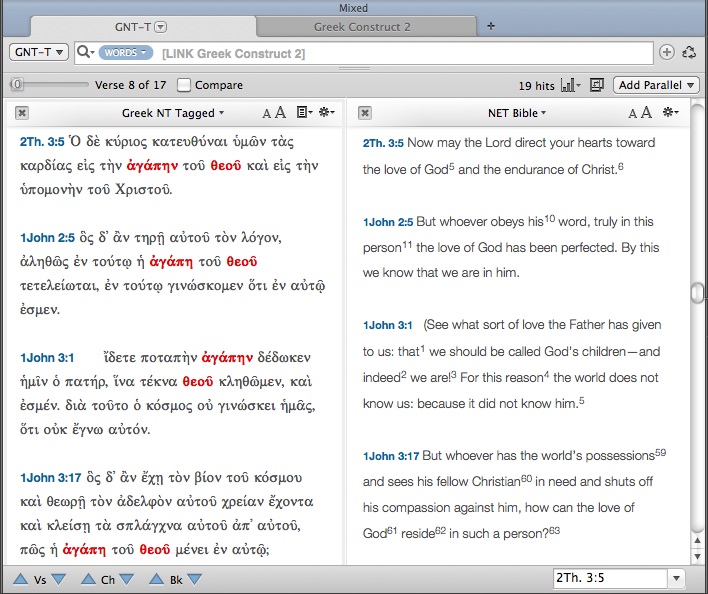
Accordance Constructs are a graphical interface that allow for more complicated searches… you know, things like, “How many times do the words God and love appear in the New Testament within seven words of each other… in Greek?” Setting up this search using the Construct feature looks like this and takes a very short time to do:

Clicking on Search at bottom right, I get the following results:

But that’s a lot of Greek to wade through. If I need an English translation, clicking on “Add Parallel” above gives me the same results, translated:

There is much more the Construct search can do–but this gives an idea of its potential utility. More from Accordance on Constructs can be found in their help files here.

3. Modules

Accordance sells a number of add-on modules. Though I have not used them, two that look to be particularly useful are a bundle for Hebrew text criticism (including the BHS text and apparatus, and new BHQ volumes with apparatus) and some volumes of the critical Göttingen text of the Septuagint (e.g., here and here). Accordance also offers add-ons of various commentaries, including the NIGTC series, NICNT, the JPS Torah Commentary, and quite a few more. Though there are certainly strong opinions in the biblical studies community as to whether one should own commentaries as physical books or as 1s and 0s, Accordance makes the latter possible with modules that integrate with the rest of the program.

———————————————————————————————-

I’ve really enjoyed learning and reviewing Accordance 10 this last week. It’s a great program. I love being able to use Bible software that is native to a Mac, and a really good software at that. Accordance can do a lot. I think what has impressed me the most has been how customizable all the panes, zones, tabs, etc. are, without sacrificing any quality. Already in the last week I’ve been able to use Accordance to speed up some tasks in both my studies and my ministry.

For ease of reference, here are all the parts of my review of Accordance 10, which this post (#6) completes.

Part 1: In which I finally try out Accordance Bible Software for Mac (new version 10!)
Part 2: 4 Cool Features in Accordance 10
Part 3: 3 Powerful Ways to Search in Accordance 10
Part 4: The Original Languages Collection in Accordance 10 meets Septuagint Sunday
Part 5: Accordance 10: Bells and Whistles

Coming soon: Review of Beale and Carson’s Commentary on the New Testament Use of the Old Testament add-on module.

I received a free copy of Accordance 10 for review. There were no expectations placed on me as to the nature (or length!) of my review, whether positive or negative.

Accordance 10: Bells and Whistles

I recently read somewhere in the Accordance Forums that an early Accordance user from the 1990s said the product should come with a warning that it may cause sleepless nights! As I’ve reviewed Accordance 10 (as a long-time Mac user but new Accordance user), I’ve already seen the wisdom in that suggestion. It’s hard to put down. Accordance is actually a really fun program to use: sleek, pleasing, productive, and really easy to customize as I’ve gotten the hang of how to move things around.

The four parts of my Accordance 10 review so far are here, here, here, and here. Specifically I’ve been reviewing the Original Languages CollectionUPDATE: final part, part 6 of my review, is here: “More Bells and Whistles.”

Now that I’m getting more comfortable with the program, I want to post about some bells and whistles in Accordance 10. These are features that really make the program stand out.

1. Instant Details: more than I thought

That Accordance has instant parsing details is great, but to be expected of any Bible software program.

Image from Accordance’s features page

But here are two cool bells and whistles about the Instant Details.

Instant Details already parse whatever word you hover over. But this same area can also be used to just as quickly give you information from a given tool that is tied to a biblical text. If you hold down ⌘ (the command key) while you hover over a word, the Instant Details will give you the information from the first tool related to the text. So you can see your top lexicon’s entry for that word, for example. Or if you hover over a verse number and press , you get the information from the first reference tool you have. For example, hovering over a verse reference and pressing the command key gives me this in my Instant Details (click on image for larger):

One other sweet feature about the Instant Details is that you can arrange the order of how parsing elements occur. This accounts for those who will come to Accordance having learned under any number of different grammars and systems. You can drag and drop elements to put them in the order you desire:

A nice touch.

2. Interlinears: however you want them

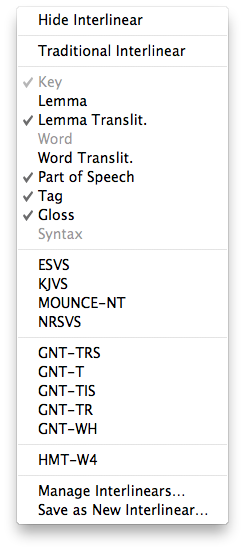
Having been trained at a seminary that prizes original languages, I am a little biased against interlinears for those who are really seeking to learn the language. (I find the “burn your interlinear” mantra I’ve heard from some quarters a little excessive, though.) Realistically, however, some exposure to biblical languages is better than none, and there are surely users who will want to make use of an interlinear. Greek and Hebrew texts come with interlinear English translation and word parsing as the default, but you can easily turn it off and back on again as needed. See the options at left, where you can set up exactly what you want to show in your interlinear. Here’s what the interlinear feature looks like with the options at left checked (click for larger):

3. It is so, so fast

When I first started using Accordance, I’d open it and then go to Safari or some other program to wait for it to load. But what I quickly realized is that I didn’t actually have to. This thing is up and running fast. I had Accordance set up so that four different workspaces would come up upon opening the program (NT, Hebrew OT, LXX, and a “Search all” workspace I created). Everything was ready to go in 8 seconds. That’s a lot of workspaces to have open fast!

Then when I opened Accordance such that it only needed to load two workspaces, that time dwindled to 5 seconds. Don’t bother surfing the Internet while you wait for Accordance to load. It’s ready to work when you are.  Searches on words are immediate, and the Instant Details give you the details, well… instantly.

Part 6 of my Accordance review will be my final review of the program itself. In that I’ll look at a few more bells and whistles: the Construct search and the context slider. After that I expect to be able to review an add-on module. Stay tuned!

I received a free copy of Accordance 10 for review. There were no expectations placed on me as to the nature of my review, whether positive or negative.

The Original Languages Collection in Accordance 10 meets Septuagint Sunday

Here I look closely at a “workspace” I’ve set up in Accordance 10 to study the Septuagint.

This series of reviews has been made possible by my having received a review copy of Accordance 10, Original Languages Collection. I have not been asked or expected to provide a positive review–just an honest one. See the first three parts of my review here (installation and setup), here (4 cool features), and here (3 powerful ways to search). UPDATE: Here is part 5, “Bells and Whistles.” UPDATE 2: part 6, “More Bells and Whistles.”

Here’s what my Septuagint workspace looks like (click for larger):

I’ve got three texts open–the Hebrew on the left, the Greek in the middle, and the English on the right. These each come with the Original Languages Collection. With hyperlinks to Accordance’s product info page, they are:

As I mentioned in a previous post, the NETS, while not perfect, is the best English translation of the Septuagint on the market. I have been really glad to be able to access it. The Original Languages Collection also includes the older and still helpful Brenton English translation of the Septuagint.

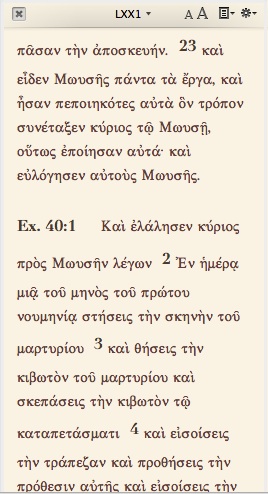
By going to “Set Text Plane Display” (available easily by right clicking from within a pane, or from Accordance’s “Display” menu, or by the shortcut T), you can change the theme/color of the individual text. If you wanted the LXX to stand out, for example, you could change it to the “Vintage” theme which makes it a nice, pleasing yellow, as in the picture at right. In fact, I’ve changed the colors on my Greek Tools (the LEH Lexicon) and Reference Tools (The IVP New Bible Commentary)–just so they stand apart a bit more as references. Being a long-time user and now reviewer of BibleWorks, I have been fine with the keep it simple but powerful philosophy. However, it really is a nice touch–especially if you’re looking at a screen for a long time–to be able to customize themes and colors.

Here are a few neat things I can do with the Septuagint setup above:

  • Triple-clicking on a verse reference automatically pulls up the accompanying text in the IVP commentary. This would be of slightly limited value for books that are in the Septuagint but not the Protestant canon that commentary covers. But…
  • …I can open up Conybeare and Stock’s Septuagint Grammar right next to the LEH lexicon
  • Triple-clicking on a word automatically displays the entry for that word in the lexicon

There are other ways to do searches without triple-clicking (for example, Amplify, which I discuss here), but triple-clicking is the quickest way I’ve found so far.

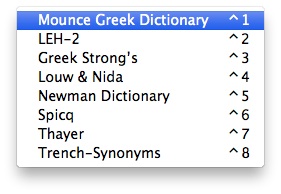
At this point I did run into a little bit of difficulty. Mounce’s Greek Dictionary is set as the default Greek lexicon. And triple-clicking always goes to the default lexicon, i.e., whatever is first in the list.

Working with the LXX, I wanted the LEH lexicon to be the one a triple-click would look up. But Mounce comes by default in the first position. So even with the LEH open, triple-clicks would look up in Mounce. 15 minutes searching through menus, icons, and Preferences and 10 more minutes in Accordance’s help section gave me no solution. Finally I turned to the Accordance Forums and–voila!–my answer. Not an immediately intuitive way forward, but I was grateful for the help.

That done, I now have my LXX workspace just how I like it.

Speaking of help, Accordance has multiple sources of support, from active user forums (in which Accordance staff participate) to extensive help files. The podcasts are good, too (index here). Because the layout/interface change from Accordance 9 to 10 was pretty significant, I looking forward to hopefully seeing updated podcasts for 10 that reflect this. Right now there is this episode on Accordance 10.

I have a Greek New Testament workspace set up similarly. The Original Languages Collection has the Greek dictionaries/lexicons you can see above–Mounce works well for the NT, and I love that it has word frequency counts. (Although you can easily get this and more from Accordance for any given word.) As far as I can tell, I have to change the default Greek dictionary back to Mounce when I’m in my NT workspace, if I want triple-clicking on a word to lead there.

For my Hebrew Bible study, the Original Languages Collection gives me the Hebrew MT (mentioned above) and these solid lexicons:

The Original Languages Collection also comes with Ross’s Hebrew Grammar.

The Concise Dictionary of Classical Hebrew (Concise DCH) is a relatively new publication. Its inclusion is a highlight of this package. From Accordance’s product page:

This Dictionary (CDCH) is an abridgment of the 8-volume Dictionary of Classical Hebrew (DCH), the first volume of which appeared in 1993. The DCH was the first dictionary of the Classical Hebrew language ever to be published. Unlike other dictionaries of the ancient Hebrew language, which cover only the texts of the Hebrew Bible, either exclusively or principally, DCH records the language of all texts written in Hebrew from the earliest times down to the end of the second century CE. That is to say, it includes not only the words used in the Hebrew Bible, but also those found in the Hebrew Book of Ben Sira (Ecclesiasticus), the Dead Sea Scrolls, and all the ancient Hebrew inscriptions.

Previous versions of Accordance had tiered-levels within individual collections, so that the Library collection still had intro, standard, and premier. So, too, with the Scholar’s collection: intro, standard, and premier. I found this time-consuming to navigate whenever I’d look at Accordance 9 on their Website, so the simplification in Accordance 10 (there is no tiering in the Original Languages Collection) is a huge improvement. It streamlines the decision-making process for those looking to get into Accordance.

The Original Languages Collection, as the Accordance site notes, has resources close to a $2,000 print retail value. That’s not a padded figure reflecting already electronically free public domain resources, either. I am impressed with the $299.99 price tag on this collection.

And I’m especially impressed that I can have all I currently need to use for text-based Septuagint research in one place. Two thumbs up for this collection.

3 Powerful Ways to Search in Accordance 10

Here are three powerful and creative ways that Accordance 10 allows you to search through its texts and resources. Add these three cool features to the four I highlighted earlier: analytics, the customizable toolbar, the magnify feature, and the one-volume IVP commentary and one-volume Eerdmans dictionary that come with the Starter Collection and higher.

1. Flex Search

Here is how Accordance’s site describes Flex Search, new in Accordance 10:

Flex Search is a new feature of Accordance 10 that finds variations of the words and phrases you search for. Specifically, Flex Search will find all inflected forms of verbs and all singular and plural forms of nouns. This mode also allows words to occur out of order or to have other words in between them.

If I wonder, for example, whether “Jesus wept” might have some other verses similar to it, I type in “jesus weep” in the search bar, make sure it’s set to “Flex Search,” then enter. You can see that in the results below, even though I searched with “weep,” Flex Search brought up results with any inflection of “to weep” (wept, weeping, weep). Just under the search bar is shown the statistic “18 flex hits.” Click on the image below or open in a new tab to view larger:

Order doesn’t matter here: “weep jesus” gives me the same results as “jesus weep.” You can even combine an Exact Search with a Flex Search by placing the term you want to search exactly in brackets. This is a good move for those of us who use Google frequently, where something like a Flex Search can happen somewhat intuitively.

This option is available only in the English versions–there is no Flex Search option for Hebrew or Greek texts, for example.

 2. Amplify

From the site again:

Accordance offers a highly efficient form of searching known as amplifying, which allows you to search for any word or phrase just by selecting it in the text you are reading and then clicking the Amplify icon in the toolbar. For example, if you are reading about the Ten Commandments in Exodus 34:28 you can amplify to a dictionary article on the topic by selecting the phrase “Ten Commandments” in the Bible text, clicking on the amplify icon in the toolbar, and then choosing the desired dictionary. You can also triple-click on any word to quickly amplify to your default dictionary or lexicon. This method of searching is much faster than opening a new module and manually typing in your search.

Using this feature has taken me a little bit of time to figure out, but now that I have I’m really enjoying it.

In Mark 1 below, I double-clicked on “wilderness” to highlight it and then went to the Amplify icon in the customizable toolbar up top:

Then a whole range of options is available to me. I can look up “wilderness” in English tools and find the definition in the Eerdmans dictionary. And the triple-click option is neat, too–by triple-clicking on a selected word, you look it up in your default dictionary or lexicon.

I can think of one possible way for a future update to improve the Amplify function (I know, I know! this one just came out). I was using Accordance with two Workspaces open: Accordance’s “NT Study” and my own “Hebrew Bible.” When I tried to look up an English word from the Hebrew Bible Workspace in the Eerdmans Dictionary, it moved me over to the NT Study Workspace where Eerdmans was already open. As a result I lost my initial place and had to go back to the “Hebrew Bible” Workspace.

There may be a good explanation for this and an easy way to prevent it from happening that I just don’t know about (if I find one out, I’ll post an update here). But it would have been nice to just have the Amplify search open the dictionary in my same Workspace. UPDATE: It’s an easy fix in the Preferences section. I just had to check “Confine amplify to the same workspace.”

Workspaces, by the way, are a great way to stay organized and working on multiple projects at the same time in Accordance.

3. Search All

The word “Trinity” does not appear in the Bible. But what if I want to see what biblical resources say about the Trinity, and where in the Bible they see the various interrelating persons of the Trinity? The “Search All” bar at the top right of Accordane allows the user to search all of Accordance’s resources by word (or even by Scripture reference). The screen shot below shows in the left sidebar the resources that returned a hit. You can see that Accordance gives me all the times “Trinity” appears in the NET Bible notes! That’s quite useful.

You can also use the “Search All” bar to access images.

There are a few more things I want to cover in my Accordance 10 review, but to those of you reading–are there any features you’d like me to comment on? Or questions you have about the program and its features, how it all works together? I’d be happy to try to take these up in future posts. Feel free to leave me a comment if so.

This series of reviews is made possible by my having received a review copy of Accordance 10, Original Languages Collection. I have not been asked or expected to provide a positive review–just an honest one. Part 1 of my review of Accordance 10 is here, and part 2 is hereUPDATE: Here is part 4, a review of the Original Languages Collection. UPDATE 2: Here is part 5, “Bells and Whistles.” UPDATE 3: part 6, “More Bells and Whistles.”

4 Cool Features in Accordance 10 (Review, part 2)

I am a new Accordance user. As I said in the first part of my review of Accordance: so far, so good.

I’m working my way through some of Accordance’s training materials so I can better utilize the program as I review it. Here is Episode 77 of their Lighting the Lamp podcast series. It is at the “basic level” and provides a “first look” at Accordance 10. It’s a good place to start.

Here I highlight, in no particular order, four cool features in Accordance 10. Each of these not only has a bit of a wow factor, but will also enhance my study of the Bible, especially in its original languages.

1. Pie charts, bar charts, statistics, oh my!

In Mark 1:42 I read: καὶ εὐθὺς ἀπῆλθεν ἀπ᾿ αὐτοῦ ἡ λέπρα, καὶ ἐκαθαρίσθη. (Note: I simply checked off a box in Preferences and was able to export this Greek text as unicode from Accordance into WordPress.) Then I “right click” on ἀπῆλθεν, select “Search For… Lemma,” and I can see all its New Testament occurrences pop up in a separate window. It also notes just under the search bar that my search results in 117 hits. The empty box at the bottom is the “Instant Details” window that shows parsing information when I hover over a word. See below and click for larger or open in a new tab:

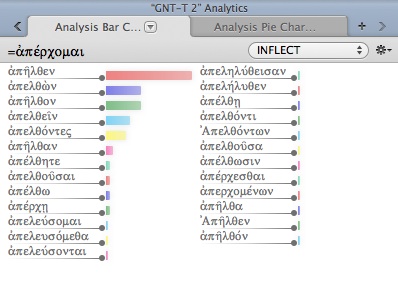
You can see I have Mounce’s Greek Dictionary open at top right. This already includes word statistic information. But–and here’s cool feature #1–check out the “Analysis Pie Chart” at bottom right! This shows the ways and number of times ἀπέρχομαι is variously inflected. Or you can see it in bar chart form, which in this case affords a bit more detail than the pie chart:

I quickly discover, in a visually appealing way, that my word at hand (ἀπῆλθεν) is the most common inflection of ἀπέρχομαι. This analysis tool allows multiple configurations. You can search by inflection, gender, tense, person, etc.

2. Customizable Toolbar

This has so far been one of the things about Accordance I’ve appreciated the most. New to Accordance 10 is the customizable Toolbar. Mine looks like this at the moment:

Users can easily add and re-arrange what they want in the toolbar, simply by “right clicking” in the toolbar area and going from there. (Note: “right clicking” for me on my Mac is just a two finger tap on the trackpad.) Right clicking on the toolbar allows you to customize it, which then gives you this:

Then, simply set it up how you want it. You can always revert back to the default, as noted at the bottom. The “separator” and “space” options are an especially nice touch. See the Accordance blog post here for more ways a user could customize Accordance 10.

3. Magnify this zone

Here’s a setup I’ve been using to work through the Hebrew text. You’ll note my library on the left, the Hebrew Masoretic Text side-by-side with the NET Bible in the middle, the Instant Details (parsing) box on the bottom, and the dictionary pane on the right. That’s a good setup for analyzing my way through the text. But if I just wanted to read the Hebrew (with the English next to it) with no other distractions, I easily could, without losing my other windows. “Magnify this zone” allows me to turn this:

into this:

With a single click I can easily return back to my full setup when I’m done.

4. A great one-volume commentary, and a great Bible dictionary

Both the Starter Collection in Accordance and Original Languages Collection (what I’m reviewing) come with the IVP New Bible Commentary and the Eerdmans Dictionary of the Bible. The IVP Commentary is integrated into the program such that you can have it sync with you through a passage while you read and study. Each of these is a handy resource to have at the ready while working through text.

My only complaint with these has been that the IVP commentary is a “Reference Tool” while the Eerdmans dictionary is an “English Tool.” This means that they’re in two separate places in the library, which wasn’t totally intuitive for me right away. However, this separation may be due to the fact that–from what I can tell–Reference Tools follow you with verse-by-verse integration whereas you have to do a specific look-up by word for the English Tools. All the same, it’s great having access to these texts.

There are more cool features in Accordance 10. I’ll continue to review the program in coming days. You can go here for an overview of some of Accordance’s newest features.

This series of reviews is made possible by my having received a review copy of Accordance 10, Original Languages Collection. I have not been asked or expected to provide a positive review–just an honest one. Part 1 of my review of Accordance 10 is here. UPDATEPart 3 of my review is hereUPDATE 2: Here is part 4, a review of the Original Languages Collection. UPDATE 3: Here is part 5, “Bells and Whistles.” UPDATE 4: part 6, “More Bells and Whistles.”

Would Mark’s Jesus have us handle snakes and drink poison? (part 1 of 2) (BibleWorks 9 review, continued)

First century snake handler?

Many believe that Mark’s Gospel ends rather abruptly at 16:8 (“for they were afraid”), but others have found it difficult to think of a Gospel ending with Jesus’ followers’ being afraid to say anything to anyone about the resurrection.

So there is the so-called shorter (add-on) ending of Mark, which adds to the above, “…the sacred and imperishable proclamation of eternal salvation” (RSV). This has 10 words that otherwise appear nowhere else in the book.  In my view the vocabulary and style of the shorter ending do not seem to fit well with the rest of the Gospel, and have the feel of an effort to give the book closure well after the fact of the writing.

Then there is the so-called longer ending of Mark, which is also not satisfied in ending with his followers’ fear. This records Jesus’ appearance to some of his followers, as well as the commissioning of his disciples, including the hard-to-understand reference to picking up snakes and drinking poison.

Mark could well have ended with “For they were afraid”–Mark is not unknown for being abrupt—nor would he have a problem upbraiding (or reporting Jesus’ upbraiding) people for their lack of faith or for their fear.  But would someone who started so positively with a proclamation of Jesus as “Son of God” in 1:1 have truly ended on such a dour note?  One possibility is that Mark’s original ending was lost.  R.T. France says, “It is one thing to emphasise and exploit paradoxical elements within the story of Jesus’ ministry and passion, as we have seen Mark doing again and again, but quite another to conclude his gospel with a note which appears to undermine not only his own message but also the received tradition of the church within which he was writing” (683).

Of course, lacking evidence of such a “lost” ending means that to postulate one is speculative, and it is perhaps a wiser hermeneutic to accept the text as we have it to be the intended one.

Can BibleWorks help here? One of the major new features in BibleWorks 9 is the BibleWorks Manuscript Project. From the BibleWorks site:

This massive project has been years in the making. BibleWorks 9 includes the first installment of this ongoing work. The BibleWorks Manuscript Project’s initial release covers the following:

  • Sinaiticus
  • Vaticanus
  • Alexandrinus
  • Bezae
  • Washingtonianus
  • Boernerianus
  • GA1141

For these manuscripts, the BibleWorks Manuscript Project includes the following:

  • New full NT transcriptions
  • Complete NT digital image sets (over 7.5 GB!!)
  • Verse location tagging in images
  • Extensive transcription notes
  • MSS comparison tool
  • Morphological tagging (not complete for all manuscripts but updates will be provided free of charge to BibleWorks 9 users as they become available)

Manuscripts are fully searchable and integrated with the full array of BibleWorks analysis tools. As you change verses in BibleWorks, the MS image display tracks with the current verse. Compare, inspect, and analyze the text and images of key original manuscripts. Tweak and enhance the manuscript images using the sophisticated image processing panel now included in BibleWorks.

Before I could even get into the manuscripts, there were two ways BibleWorks immediately helped me to explore this issue. First, with my NET Bible notes open in the Verse Tab (which I review here), I see a nice, lengthy note that explains the options–with manuscript evidence–for Mark’s possible ending. (You can see the NET note itself by clicking on footnote 9 here.) That much I’ve come to expect from BibleWorks.

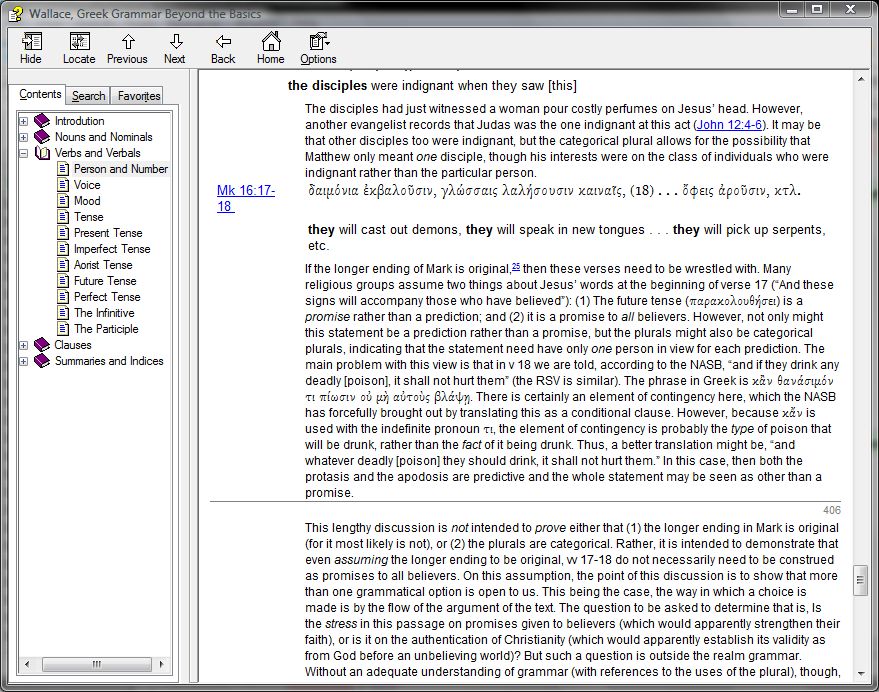
What pleasantly caught me by surprise was that the NET note mentions a section in Wallace’s Greek Grammar that discusses the grammar of the contested snake-handling verses. I quickly and easily navigated over to the “Resources” tab in my analysis window and looked it up (click for larger image, or open in a new tab):

Wallace’s grammar is free with BibleWorks, a nice bonus. And it’s set up so that as you’re working your way through a text, Wallace tracks with you, so you can easily look up what he has to say about a given verse or grammatical topic.

Already some great help from BibleWorks in exploring a difficult textual issue. In my next post, I’ll use BibleWorks to get into the Mark manuscripts themselves, exploring the possible endings of the Gospel of Mark.

See all that’s new in BibleWorks 9 here.

I received a free upgrade to BibleWorks 9 in exchange for an unbiased review. See my prolegomenon to a review here, part 1 (setup and layout) here, and part 2 (the Verse tab) here. You can order the full program here or upgrade here. It’s on Amazon, too.

In which I finally try out Accordance Bible Software for Mac (new version 10!)

I have been an avid and happy BibleWorks user since version 7 (they are now in version 9). But my first computing love is a Mac. (Too bad for expensive taste in that regard!) I have a cheap PC laptop at home on which I run BibleWorks, but have been interested in exploring Accordance for some time. Now, thanks to the kind folks at Accordance who have given me a copy for review, I can take Accordance for a spin.

I apparently got into Accordance at just the right time. This week they launched an upgrade from Accordance 9 to Accordance 10. And it looks like users are pretty happy with the switch.

In a series of posts, I will offer my review of Accordance 10, Original Languages Collection. In this post I report on my installation process and initial impressions as to the program’s layout and interface.

Download and installation was mercifully fast, even over a wireless Internet connection. In 30 minutes or so I was able to download the Accordance application to my computer and the Original Languages Collection with its various modules.

I appreciated the flexibility offered me even in the initial setup. For example, I could make choices at the following spots:

(Although, I confess, I don’t know what “Helvetica Neue Light” looks like off the top of my head! No matter–this can always be changed later.) This next option for text formatting immediately endeared me to Accordance:

These are perhaps little things, but Accordance’s customizability seems obvious from the beginning.

The only snag I hit in installation was being able to install one of the included modules, even after multiple attempts (the BHS Latin Key). Although, taking a look at the forums, I’m not alone. I expect the Accordance team is mighty busy with the new release. Accordance 10 is already in 10.0.1. I don’t think this is a sign of a buggy version released too soon, but rather an indication that the folks behind the software are quick, responsive, and eager to improve upon the program.

Once finishing installation, I played around a bit with my resources, and within just a few minutes and no prior knowledge of Accordance, was able to set things up this way (click image for larger or open in new tab):

On the left you can see my “library” which in this view shows some of the texts that come with the Original Languages Collection. Thing of beauty: it has the New English Translation of the Septuagint. With how often I am in (and blogging about) the Septuagint, this makes me happy to see. The NETS is far from a perfect translation, but it’s the best English translation on the market right now.

In the middle you can see I have the Greek of Genesis 1 open, with the NETS right next to it and the IVP New Bible Commentary on the right of the middle section.

Then in the top right corner I opened the LEH Greek-English Lexicon of the Septuagint, available in previous Accordance versions only as a paid, add-on module (from what I understand). The bottom right corner shows the Hebrew text of Genesis 1.

Each of these boxes/windows are changeable and rearrangeable. I look forward to spending more time exploring the various configurations available to me through Accordance.

In sum: A quick, easy install with just that one hiccup of a missing module–soon to be resolved with a released fix, I’m sure. (UPDATE 8/23/12: It’s fixed!) And the layout and its flexibility has really impressed me on first use.

And, oh. The interface? Absolutely stellar. I love seeing a high-powered Biblical languages-oriented program native to a Mac. The interface in Accordance is as smooth as any program I’ve ever seen from Apple.

So far, so good.

UPDATE: Parts 2 and 3 of my review are here and here.
UPDATE 2: Here is part 4, a review of the Original Languages Collection.
UPDATE 3: Here is part 5, “Bells and Whistles.” UPDATE 4: part 6, “More Bells and Whistles.”

A New Reader’s Lexicon of the Greek New Testament, Reviewed

Unfamiliar vocabulary proves to be an enduring challenge for students of New Testament Greek. Even students who understand the rules of the language get bogged down having to look up uncommon words while translating. Nevertheless the correct interpretation of many passages of Scripture hinges on the meaning of its rare words.

–Michael H. Burer and Jeffrey E. Miller, Preface

Vocabulary acquisition is key to being able to read any language, but so is just reading a text straight through. A “reader’s lexicon” or “reader’s Bible” seeks to bridge the gap so students can both improve their vocabulary and engage in a continuous reading of the text. To that end, Kregel Academic and Professional has published A New Reader’s Lexicon of the Greek New Testament by Michael H. Burer and Jeffrey E. Miller.

But why a new reader’s lexicon when the old one (by Kubo) has been useful to students of the Greek New Testament for so long? That’s been the primary question before me as I’ve reviewed the New Reader’s Lexicon (NRL). Daniel B. Wallace in the preface gives the reasons for this new lexicon:

But as helpful as Kubo was, there were weaknesses. First, it was not updated to the glosses found in the third edition of the Bauer Lexicon (BDAG). Second, there were numerous errors (involving word frequency numbers, omissions of words, inappropriate glosses, etc.) that went uncorrected. Third, the special vocabulary section at the beginning of each book, involving all the words that occurred more than five times in that book but less than fifty times in the New Testament, created its own problems: designed for efficiency of space, it did not prove helpful for efficiency in learning.

While I think Wallace has it right on the first two points, I (sort of) disagree with the third–that list that Kubo offers at the beginning has actually been helpful to me for learning a given book’s vocabulary, since it groups some of that book’s common words together. However, it does mean that words in that beginning list don’t then appear in Kubo’s lexicon throughout the rest of the book. To overcome this, I would make a copy of the list and use it as a bookmark, referring to it often so I didn’t have to keep flipping pages.

Herein lies one area of strength for the New Reader’s Lexicon. There is no common vocabulary list at the beginning of each book (users now can generate those easily enough through Bible software), but it means that every word that occurs less than 50 times in the New Testament is in this lexicon… in the verse in which it appears. So as I’m beginning my way through Mark 6, I can look in the NRL to quickly see that ἐκεῖθεν in verse 1 means “from there.”

To Wallace’s first two points, that the NRL uses the updated BDAG is a great relief–readers now don’t have to guess whether recent advances in lexicography or discoveries of new papyri mean that the word in front of them actually has a slightly different nuance. The NRL updates Kubo here well.

In addition to “concisely defin[ing] in context” each word, the NRL gives statistics for how many times that word appears. (Names and proper nouns are included.) There are up to three numbers listed:

  • How many times the word appears in that given book of the New Testament
  • How many times that word appears “in all canonical works by the traditional author of the book at hand”
  • How many times the word appears in the whole NT

Kubo had the first and third numbers. This second statistic now allows me to see not only how many times ἀνάθεμα appears in 1 Corinthians (twice) and in the NT (six times), but it tells me that five of the six uses of this word in the NT are with Paul.

And here’s where the lexicon is unique and really stands out–in the instance of such a rarely occurring word, it lists cross references, so I can quickly see that the other use of ἀνάθεμα in I Corinthians is at 16:22and that Paul also uses the word in Romans 9:3, Galatians 1:8,9, and that the only non-Pauline NT occurrence of the word is at Acts 23:14.

The NRL truly does improve upon Kubo’s lexicon. It accomplishes its mission quite well.

But don’t take my word for it. I’ve found that what original language resources to own and invest in is often a matter of personal preference and what works best for an individual. If you’re still on the fence about this resource, download a free sample of the lexicon for Colossians here (pdf). Read through Colossians with it in hand and see how it goes. Personally I’ve found this to be an indispensable resource for making my way through the Greek New Testament.

One huge bonus: the book is designed well. The pages are smooth and thick and bright. The font is clear and easy to read. And the binding is sewn! This means it will stand the test of time well, which you’d hope a reference work like this would.

My thanks to Kregel Academic for providing me with a review copy of this book. Find out more about the book at Kregel’s site or look inside on Amazon.

James (Zondervan ECNT), reviewed

James is no “epistle of straw,” as Martin Luther once (in)famously said of the book. But many–with Luther–find it difficult to reconcile Paul and James on faith and works.

Paul: “A person is justified by faith apart from works of the law.”

James: “A person is considered righteous [i.e., justified] by what they do and not by faith alone.”

Here I review James by Craig L. Blomberg and Mariam J. Kamell, from Zondervan’s Exegetical Commentary on the New Testament (ZECNT) series. (Click here to find my review of Luke in that same series; below I use some of my same wording from that post to introduce the ZECNT series more generally.)

Like the rest of the ZECNT series, James is “designed for the pastor and Bible teacher.” The authors assume a basic knowledge of Greek, but Greek is not required to understand the commentary. For each passage the commentary gives the broader literary context, the main idea (great for preachers!), an original translation of the Greek and its graphical layout, the structure, an outline, explanation, and “theology in application” section.

The introduction covers an outline and structure of James, the circumstances surrounding its writing, authorship and date, and significance of the book. It is shorter and less detailed than the introductions in Douglas Moo’s James commentary and that of Peter Davids. Immediately I looked for how the authors would resolve the Paul/James (alleged) discrepancy, but they note in the introduction that they discuss James’s theology after “the commentary proper.” (The ZECNT series has a separate “Theology” section at the back of the book that most other commentaries include as part of the introduction.)

They give just two paragraphs in their theology section–with a bit more in the body of the commentary–to “Faith and Works” (compare Moo’s lengthier discussion in his introduction), but they have their reasons for this:

Contrary to what the extent of the discussion of the topic might suggest, faith and works is not the main focus of James’s letter. It is a subordinate point that grows out of his concern for the poor and the dispossessed (2:14-26; cf. 2:1-13).

I’m a little embarrassed to admit that this idea of faith and works as a subordinate point in James had not really occurred to me prior to working with this commentary. (A good trait in a commentary to produce such thoughts!) But if you click on the references above or look through James 2 (and the rest of James) in your Bible, it’s easy to see where the authors are coming from.

In fact, the “three key topics” in James, according to Blomberg and Kamell, are “trials in the Christian life,” “wisdom,” and “riches and poverty.” They follow Davids here, and note that James 1:2-11 lays out each of the major themes, which James then restates in 1:12-27. 2:1-5:18 then consist of “the three themes expanded,” in reverse order, followed by a closing in 5:19-20.

Blomberg and Kamell are “the first to grant that we may still be imposing more structure on the text than James had in mind.” All the same, their outline of James makes it easier to work through the book, and then finally does, I think, justify their claim in the theology section that “faith and works” is not the central theme of the letter and should be considered in its broader context. Still, they do have a good way forward in understanding Paul and James together: “But this action, these deeds or works, are not put forward in any attempt to merit God’s favor but as the natural, spiritual outgrowth of one’s faith.”

As with Luke, the graphical layout of each passage (in original English translation) is a unique contribution in James. Being able to see main clauses in bold with subordinate clauses indented under them (plus how they relate back to the main clause) gives the reader a quick, visual grasp of the entire passage at hand. See page 45 of the commentary in this sample pdf to see how it looks. This is a highlight of the ZECNT series, and the fact that it’s in English makes it all the more accessible. The translation is smooth and readable, doing great justice to both the Greek it translates and the English language.

James has the full Greek text of James, verse by verse, and the full English translation (passage by passage in the graphical layout, then again verse by verse next to the Greek). As I’ve said before, a value for me in using reference works is not having to pull five more reference works off the shelf to use the first reference work! The authors make comments like this one in 1:5 throughout the work, wedding grammatical and lexical analysis to exegetical application:

We are told to ask of the “giving God” (διδόντος θεοῦ). Here the present participle suggests that “giving” represents a continuous characteristic of God.

To take another example, on James 2:20, which they translate, “Do you want to know, O empty person, that faith without works is workless?” they write:

James incorporates a pun on the word “work” (ἔργον), using the negative adjective from the same root–“workless” (ἀργή). The term can also mean idle or useless. Faith that lacks works does not work! In other words, it is entirely ineffective to save.

Teachers and preachers especially will appreciate the “Theology in Application” section that concludes each passage. James may already strike the preacher as a book that just preaches itself, but the authors do well in helping the preacher connect the text with today’s concerns. For example, for 2:14-17 they note that although James

provides no treatise on the most effective ways to help the poor…, true believers will take some kind of action. At the very least, they must cultivate generous, even sacrificial giving to help the poor as part of their ongoing personal and corporate stewardship of their possessions. But in light of systemic injustice, we probably need to do much more.

Amen. The authors go on, “James certainly would share the concern of liberation theologians to do far more for the poor, individually and systemically, than many branches of recent Christianity have attempted” (my italics). Moo agrees–though he wants to distance himself “from an extreme ‘liberation’ perspective,” he says “we must be careful not to rob his denunciation of the rich of its power.” And James 5:1-6 are pretty damning of the powerful rich who use their power to oppress the poor.

The authors write,

[These oppressors] are the financially wealthy in a world where the rich occupied a miniscule percentage of the population. James does not call them to change their behavior. Instead, he warns them of impending disaster in their lives by commanding them to mourn their coming fate. …”Wail” [ὀλολύζοντες] appears in the LXX of the Prophets in contexts of judgment and can refer to inarticulate shrieks of terror. …James makes it clear that these rich people are going to undergo a terrible ordeal.

There were a few times in the “Theology in Application” section that I wondered (as other reviewers have) whether the authors weren’t getting a bit off-topic from the text. For example, on 3:9-12 they say,

Abortion and euthanasia offend God deeply because they take lives made in his image. But abuse or neglect of the poor and outcast (including the homosexual) proves equally offensive because such treatments likewise demean individuals God made to reflect himself.

They say this to argue against the “stereotypical agendas of both the political and religious ‘right’ and ‘left,'” but it was hard for me to decide whether this was a case of applying an ancient text well to a contemporary set of issues, or if it was an anachronistic stretch. Nothing they say here is incongruent with James, but I did wonder here (and in another place) whether those verses in James really speak to issues like abortion and homosexuality. A minor critique, though.

Those working their way through the Greek of James may still want to have Davids on hand. But as with the Luke volume in this series, the combination of close attention to the Greek text with contemporary application makes James a commentary very much worth using. I know I will want to go back to this commentary right away when I am doing work with the book of James in the future.

(I am grateful to Zondervan for the free review copy of this commentary, which was sent to me with the understanding that I would then write an unbiased review. You can find the book on Amazon or at Zondervan.)