Matthew (NIGTC) in Logos Bible Software

The below is adapted from my full-length review of the print edition of NIGTC Matthew. Here I reproduce some of the content of that post, but with an eye toward the commentary’s presentation and use in Logos Bible Software.

NIGTC MatthewReaders of this blog (and those with whom I worship on Sunday!) will know I’ve been preaching through Matthew this year. I have made profitable use of John Nolland’s commentary almost every week in my preparation.

This is what Nolland says about his commentary:

My central concern in this commentary is with the story Matthew has to tell and how he tells it. Though the reader will recognise that I have been influenced by some scholarly methods more than by others, my work is committedly eclectic.

Nolland comments on Matthew using redaction criticism, grammatical analysis, rhetorical criticism, and more. Though the NIGTC series does not seek to be devotional, per se, and though Nolland’s Matthew is not an application commentary, the author is consistently sensitive to the broader context of Matthew and his aims. (Nolland says he cares about “a close reading of the inner logic of the unfolding text.”)

Nolland’s Introduction to Matthew

The introduction includes the following sections (the bullet points below are all the author’s words):

  • authorship of the Gospel
  • the sources for the Gospel
  • the prehistory of the sources
  • the date and provenance of the Gospel
  • the kind of document the Gospel intends to be
  • the state of the Greek text of the Gospel
  • aspects of the author’s narrative technique
  • the Gospel’s use of the OT and of other Jewish tradition
  • and the theology of the Gospel of Matthew.

Here’s what it looks like in Logos on a PC. You can hide or show the table of contents at the left, and many of its sections have expand/collapse triangles (click or open in a new tab to enlarge the image below):
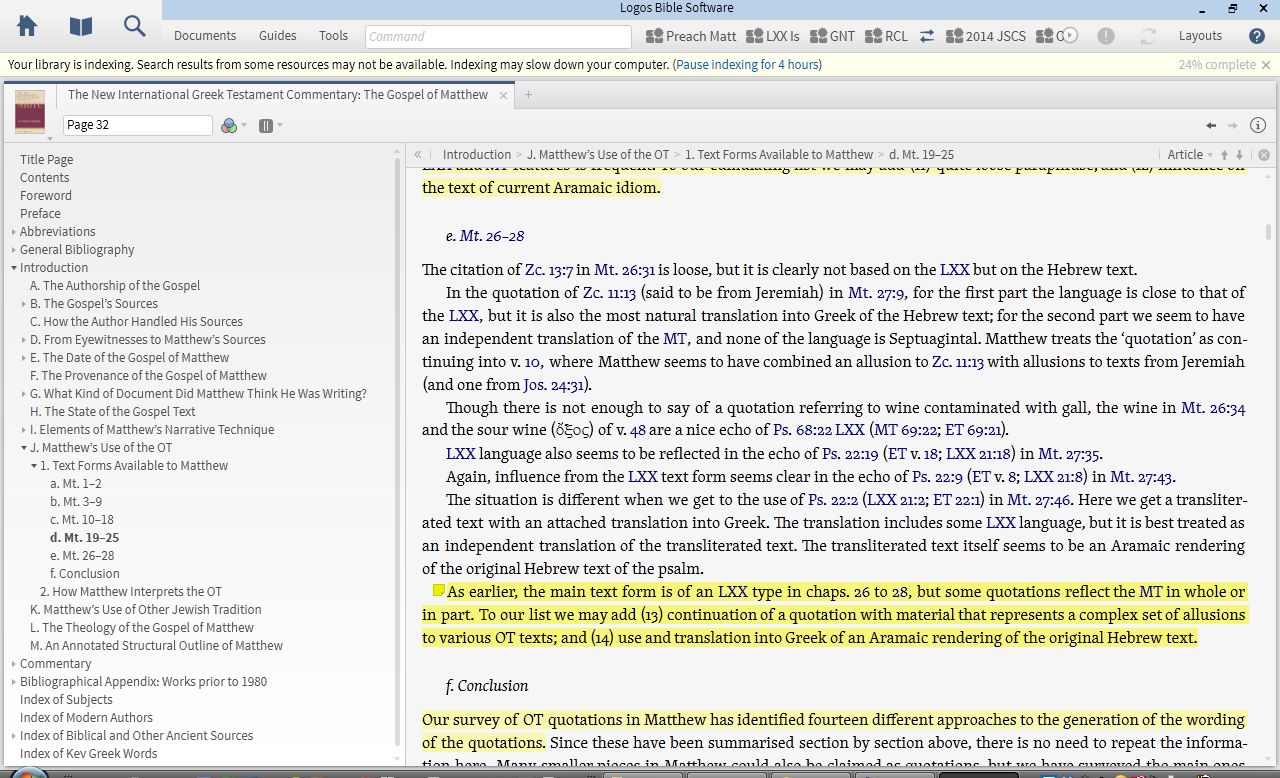
Introduction to Matthew

Any highlights or notes I add (which you can see above) automatically sync with any other devices that run the Logos app.

Like R.T. France, Nolland would rather elaborate on certain points in the body of the commentary itself, which makes the introduction accordingly shorter. I experienced this as a relief, because (a) I could get into the commentary proper more quickly and (b) when primarily coming to the commentary with a specific passage in mind, I found quite a bit of substance in the commentary proper, without having to go back to the introduction. Getting to a given passage via Logos is almost instantaneous.

Nolland on Matthew’s Use of the OT

There is more of note in the introduction, but “Matthew’s Use of the OT” is probably the most exceptional section (pictured above). It details both (a) what text forms Matthew might have had and (b) how he used them. Nolland lists 14 (!) “different approaches to the generation of the wording of the quotations.” And yet, amid the detail, he can conclude:

Though some of Matthew’s text forms come to him straight from the Gospel tradition, the overall impression is of a man who freshly scrutinises, at least on many occasions, the OT texts to which he appeals, and is able to do so in Greek, Hebrew (not always the Hebrew of the preserved MT), and occasionally in Aramaic. When it suits him to do so, he produces translations that reflect influence along more than one track of tradition.

Nolland then identifies eight different ways in which Matthew uses the OT. This section of the commentary alone is worth half the price of the commentary. A nearly 20-page “Annotated Structural Outline of Matthew” at the end of the introduction is quite impressive (and maybe even worth the other half of the price of the commentary).

The Author’s Translation of Matthew

Nolland admits that his translation of Matthew (located at the beginning of each section) “may at times be wooden,” and this woodenness is noticeable in a number passages. For example, the genealogy reads: “Abraham produced Isaac; Isaac produced Jacob….” Nolland acknowledges the “unfortunately impersonal and nonbiological” implications of that translation. Indeed, a better word is needed.

And for the Beatitudes (where the Greek μακάριος is admittedly difficult to translate), he has, “Good fortune now to….” I liked  the “now” part of this (it carries an “implied sense of immediacy”), but the more traditional “blessed” still seems to leave room in English for the divine blesser, who should be kept in view here. “Good fortune now” seems to miss that.
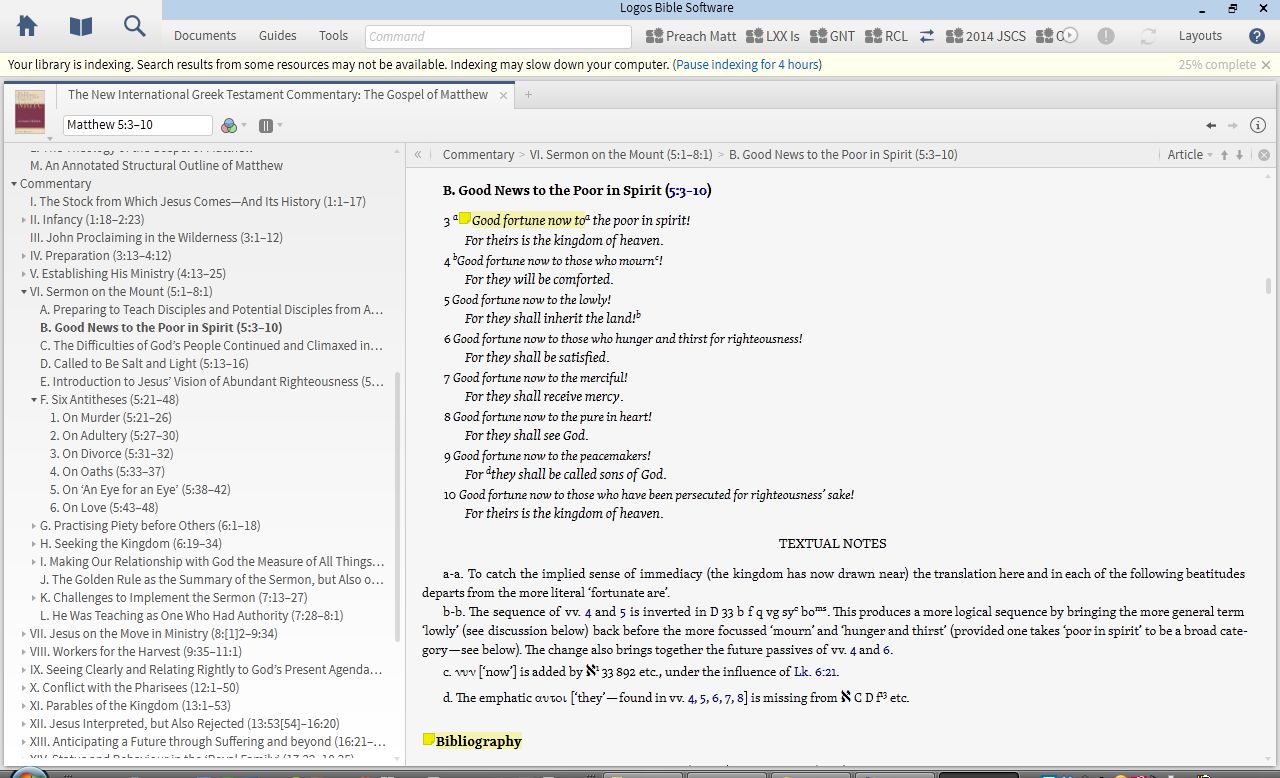
The commentary proper (with original translation)
The commentary (with original translation)

A more readable translation would not have compromised Nolland’s aims in producing a fairly literal rendering of the Greek. It wasn’t an enormous distraction from a well-written commentary, but it stood out, nonetheless.

The Commentary Proper

It would be impossible for Nolland to be comprehensive at every turn. There were some Greek words or passages of Matthew where I had hoped for more detail, but on the whole, Nolland is thorough.

For instance, in the narrative of the devil’s temptation of Jesus in Matthew 4, Nolland writes of verse 1:

The opening ‘then’, the role of the Spirit, and the Son of God language to come in vv. 2 and 6 create a strong link between 4:1–11 and 3:13–17.

and:

Because of the agency of the devil (and the specific temptations to come) πειρασθῆναι has been translated ‘to be tempted’, but there is in fact a play on the two senses of the πειραζ- root: ‘test’ or ‘tempt’.

This commentary matches literary sensitivity and Greek analysis with conclusions that can easily lead the reader to application. In the same passage: “[T]he devil suggests that sonship is a privilege to be exploited, that Jesus should use his opportunities to see to his own needs.”

Nolland often presents multiple scholarly interpretations of a given passage before offering his own–and even then, he does it humbly (though not unconvincingly). In the Beatitudes, for instance, he notes 11 different understandings of “poor” and four different understandings of “in spirit” for Matthew 5:3. One gets the sense that the author is just as interested in historical interpretation of given passages as he is with his own. This is a good thing.

In Logos, one can search the commentary using control+F (PC) or command+F (Mac):
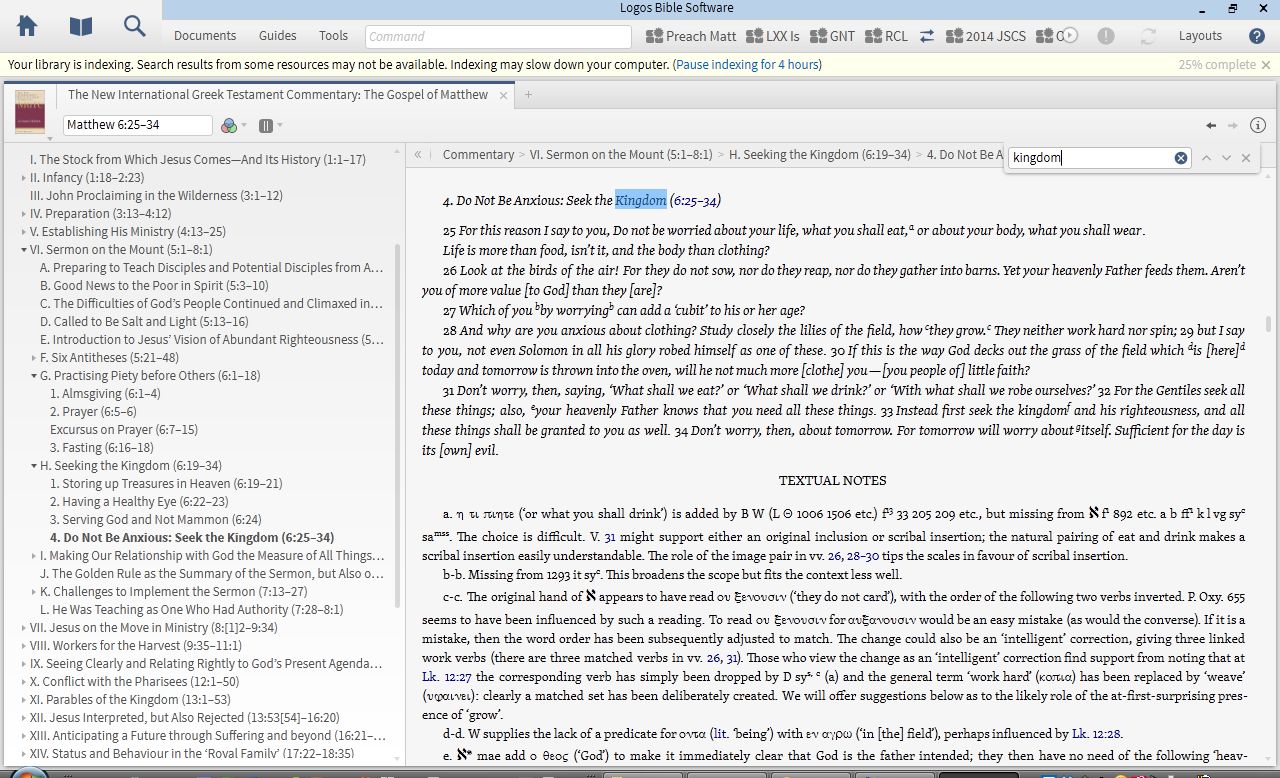
Keyword searching NIGTC
Keyword searching NIGTC for “kingdom”

One cool thing about this is that if you are already in Matthew 6:25 of the commentary (as above), the search results start right where you are (instead of going back to the beginning of the commentary). This way one can research a given word or theme as it unfolds in Nolland’s writing.

Concluding Evaluation

Despite the technical nature of the commentary (which I appreciated), the writing style is engaging and accessible, even inspiring in places. I loved this:

Jesus proclaims the imminent arrival of the kingdom of heaven. God now intends to establish afresh his rule among his people. If people are to be ready for this development, then repentance is urgent. Only a fundamental change of life direction will match the needs of the moment.

The bibliographies are a gold mine. One wonders if there’s any journal article or monograph on Matthew that Nolland hasn’t examined. Even so, he says in his preface that he had to trim his listing to accommodate the requirements of the editors!

My critique of the author’s translation notwithstanding, Nolland’s Matthew is a magnificent work, probably even one of the very first places one should go when doing in-depth study of Matthew’s text. Nolland does not disappoint in his technical analysis of words and passages, and yet he somehow is able to keep the Gospel as a whole before him and the reader as he expounds on its component parts. The reader cannot help but be impressed throughout the commentary, both with Nolland, and with Matthew’s Gospel which he describes.

Thanks to Logos for the review copy of the NIGTC series. I will post more in the future about the series and its use in Logos.

NICOT in Olive Tree, reviewed

NICOT in Olive TreeAsk a group of pastors, seminarians, professors, or serious Bible readers, “What one commentary series on the Old Testament would you most recommend?” and you’re likely to hear: “NICOT.” Eerdmans’ New International Commentary on the Old Testament blends scholarship with application in a readable and engaging manner. Few, if any, commentary series are consistently this good throughout the series. And I don’t know of any other series that has such broad ecumenical appeal.

NICOT in Olive Tree has 23 volumes, spanning 26 biblical books. The bundle includes the 2010 volume on Hosea. The only volume currently in print that is not here is The Book of Judges, by Barry G. Webb (2012). (Judges is not available in any other Bible software at the moment.)

General editor Robert L. Hubbard Jr. writes of the series:

NICOT delicately balances “criticism” (i. e., the use of standard critical methodologies) with humble respect, admiration, and even affection for the biblical text. As an evangelical commentary, it pays particular attention to the textʼs literary features, theological themes, and implications for the life of faith today.

As I preached through Isaiah this past Advent, John N. Oswalt’s two volumes on that book were the first commentary I turned to after spending time with the biblical text. While it was always clear that Oswalt knew Isaiah and his milieu well, the author would find himself swept up at times in praise of the God Isaiah preached. On Isaiah 2:2, for instance, he writes:

What Isaiah was asserting was that one day it would become clear that the religion of Israel was the religion; that her God was the God. To say that his mountain would become the highest of all was a way of making that assertion in a figure which would be intelligible to people of that time.

NICOT IsaiahOn that passage’s promise of peace among nations, he concludes:

Until persons and nations have come to God to learn his ways and walk in them, peace is an illusion. This does not mean that the Church merely waits for the second coming to look for peace. But neither does it mean that the Church should promote peace talks before it seeks to bring the parties to a point where they will submit their needs to God.

Oswalt is representative of the authors in NICOT, in that he loves the text (and its grammar, history, and background) and loves the God who inspired it.

NICOT in Olive Tree has hyperlinks to biblical references and commentary footnotes, which you can easily and quickly view in the Bible Study (computer) app through the Quick Details corner (by hovering over the hyperlink), or as a pop-up window (which can then also pop out and keep your place in a separate window). It’s just as easy to tap a hyperlink in the mobile app.

There are two ways I’ve used NICOT so far.

1. I use NICOT as my starting point in the main window.

After some time in the biblical text, I have made my way through parts of NICOT by starting from the commentary. I can use hyperlinks to read the verses being commented on, as well as any other references. I can keep a Bible open in the split window and have it follow me along as I read through NICOT.

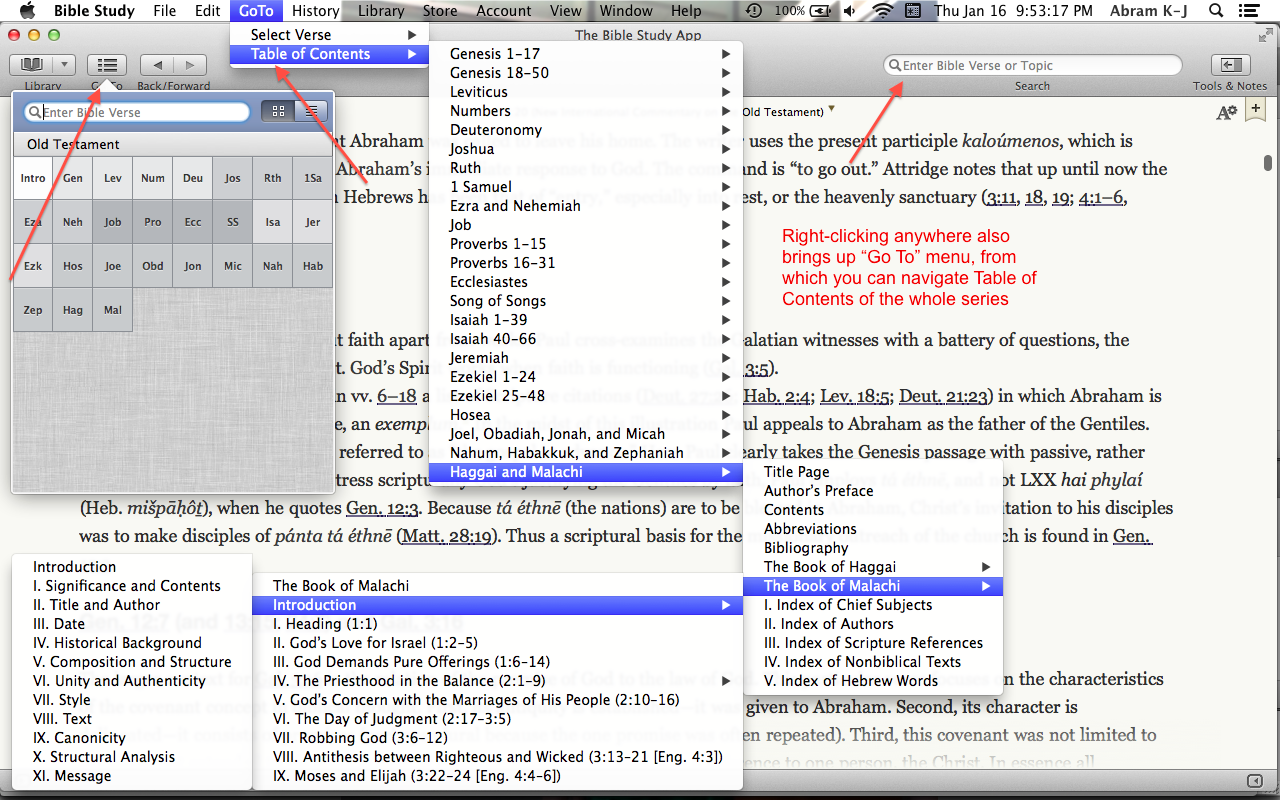
Using NICOT this way, there are quite a few ways to get around, both by looking up a verse in the commentary, and by navigating its Table of Contents. You only need to use one of these options at a time, but here they all are:

(click to enlarge image)

Note that from the Go To drop-down menu, I can keep following the sub-menus till I get to a specific place in the commentary (Introduction to Malachi in the instance above). One could also do this from the Go To item in the toolbar, which allows for both verse searching and Table of Contents navigation.

2. I use the Bible in the main window and NICOT as a supplement in the split window.

This has the advantage of letting me use NICOT as one among multiple resources in the Resource Guide, as shown (in part) here:

Resource Guide shows relevant library results (click to enlarge)

In both of the above setups you can take notes in NICOT, highlight, and bookmark your place. You can also do a search on a word or phrase in the commentary, with the results appearing almost instantaneously. One may wish, for example, to find all the times Oswalt refers to the “Suffering Servant” in Isaiah, which is an easy and fast search to run.

In reviewing Olive Tree I have found it to have the most versatile, smooth, and customizable Bible app I’ve seen on iOS. I write more about the Bible Study iOS app here. The fact that Olive Tree is cross-platform makes it appealing to many. Though the desktop app is well-designed, I would like to see a future update where you can create a saved workspace with multiple resources open in various tabs and windows. That, I think, would take the app to the next level.

But everything is here to help you work through NICOT in a way that you couldn’t in print. There are a couple of options (one free and one paid) for Hebrew Bibles, too, if you want to use NICOT in tandem with the original language. (NICOT uses transliterated Hebrew.)

NICOT volumes consistently top the charts of the Best Commentaries site. Preachers and professors, parishioners and pupils will all find much to mine here, as they seek to better understanding the Old Testament and to more faithfully love the God whose goodness its pages proclaim.

Thanks to Olive Tree for the New International Commentary on the Old Testament (NICOT), given to me for this blog review, offered without any expectations as to the content of the review. You can find the product here. For a little while longer, it’s $349.99 for the series, which is 50% off its regular price.

Review of Anker Slim-Fit iPad Mini Case

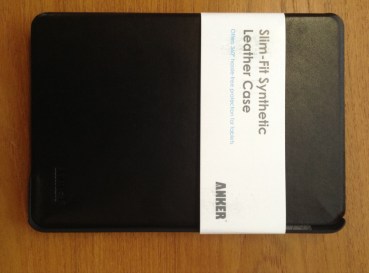
Anker 1

I’ve recently had the chance to try another iPad mini case–the Slim-Fit Synthetic Leather Case from Anker. It’s a decently made case, but it won’t replace my current go-to. I’ll jump right in and break it down into Pros and Cons:

Pros

  • Even though it’s fake leather, it seems to be built well
    • There is no visible stitching that could unravel
    • The cut-out holes (to access camera lens, earbuds, volume switches, etc.) are sized perfectly, as one would expect
    • The wake/sleep function works as it should–shutting the case puts the iPad to sleep, and opening it wakes it up
  • I am able to hold the iPad, with the case front folded back, in one hand
  • The fit of iPad into case is secure and snug
  • It is a classy-looking case
  • It is slim and lightweight

Here’s how it looks–the grey material at left is designed to be scratch-free:

Anker 2

Cons

  • I had a hard time getting the iPad mini out of the case–on the one hand, it’s good that it’s secure, but I was worried something would snap as I tried to remove the iPad (even according to instructions)
  • Won't really stay in this position once iPad is in
    Won’t really stay in this position once iPad is in

    It is possible to use the case in its prop-up mode, but it often slides and doesn’t stay in place, especially if you have it in the typing position

  • It’s pricey (retails at $29.99, slightly cheaper on Amazon), given the cons above
  • It is difficult to access the camera lens for photo and video with the iPad in the case. Since the cover is not a tri-fold, it doesn’t bend back enough to be able to easily take a picture–you’d have to hold the case with two hands or let the cover dangle open

The cons in this case outweigh the pros. Future iterations of the case ought to have some way for the iPad to lock in or not slip when propped up in landscape mode. And a tri-fold front would allow for easier camera access when the case is on. As for protection, the Anker case will get the job done, but there are better options on the market at present.

Thanks to Anker for the review sample, offered for my honest impressions of the case. They make plenty of other cases and products, too. The case reviewed above can be found at Anker’s site here and at Amazon here.

NA28 Greek New Testament in Olive Tree iOS, reviewed

Olive Tree logo

Which Bible software program should I buy? As 2014 begins, my answer to that question is still by far the most-visited post at Words on the Word.

Olive Tree is another popular Bible software option, running on just about any platform and device, whether iOS, Mac, Windows, or Android. I began to review their Bible Study App (for Mac desktop/laptop) here, with the Greek NA28 New Testament in view. In this post I look more in-depth at the NA28 in Olive Tree, with screenshots from their iPad (mini) app.

The Bible Study App for iOS

The Bible Study App is smooth, visually appealing, and easy to learn and use.

Here are a few things I especially like about the app:

You can use “flick scrolling” (as in iBooks) or “page scrolling” (as in Kindle). This accommodates just about any user. I prefer the flick scrolling, so that the books move as a Webpage on my computer would move.

You can search any resource, and view both the results-in-context and individual hits together. As in this screenshot:

Search Results

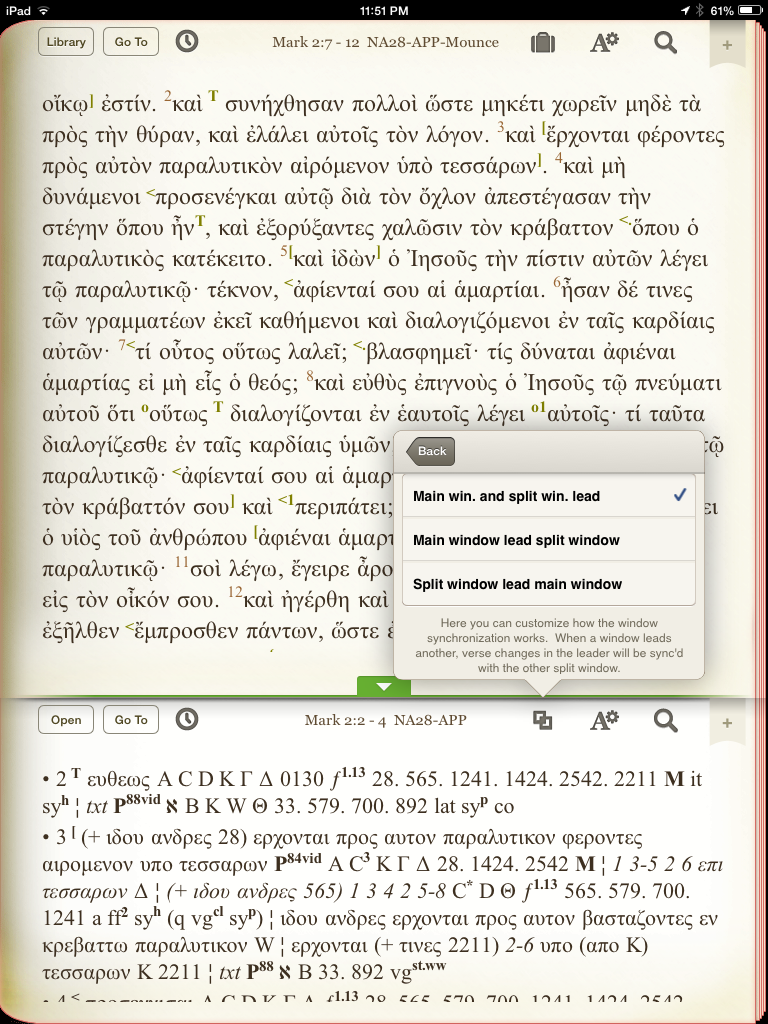
The app allows for you to view one or two resources at a time. This is the same as the iOS apps in Accordance and Logos. What I like about this app is that you can choose whether you want to sync the two windows or not. You can also choose which of the two windows “leads” the other, if you tie them together. Or you can set it up so that whichever one you move (top or bottom/left or right) causes the other to move:

Main and Split Window

There is a whole host of “Gestures/Shortcuts” preferences in the “Advanced Settings” menu. You can assign shortcuts to various gestures. I don’t know of any other iOS Bible app that is this versatile. My two favorites:

  • Two finger swipe left and right takes you through your viewing history, which makes navigation through various passages all the easier. This even works across modules, so that I can swipe between the NA28 and the iPad User Guide I might have just had open. No need to go through menus.
  • Two finger tap takes you from any screen right to your library so you can quickly get at your resources.

NA28 in Olive Tree

There are a few purchase options for the NA28 in Olive Tree. I’ll look here at the “NA28 with Critical Apparatus, Mounce Parsings, and Concise Dictionary,” which you can find hereAt the time of this blog post, it’s on sale for 50% off, so $45 instead of $90. You won’t find it cheaper elsewhere, in any format. The text and apparatus are what you’d get if you bought a print version; the parsings give morphological information, and the dictionary gives lexical detail.

There are some distinct differences between the NA28 and the NA27. If you go about halfway down this post, you can see more detail (as well as click through to some good links) as to what the changes are.

Here I have the text and apparatus open, and have simply tapped once on a Greek word to bring up a pop-up window with a gloss and parsing:

parsing popup

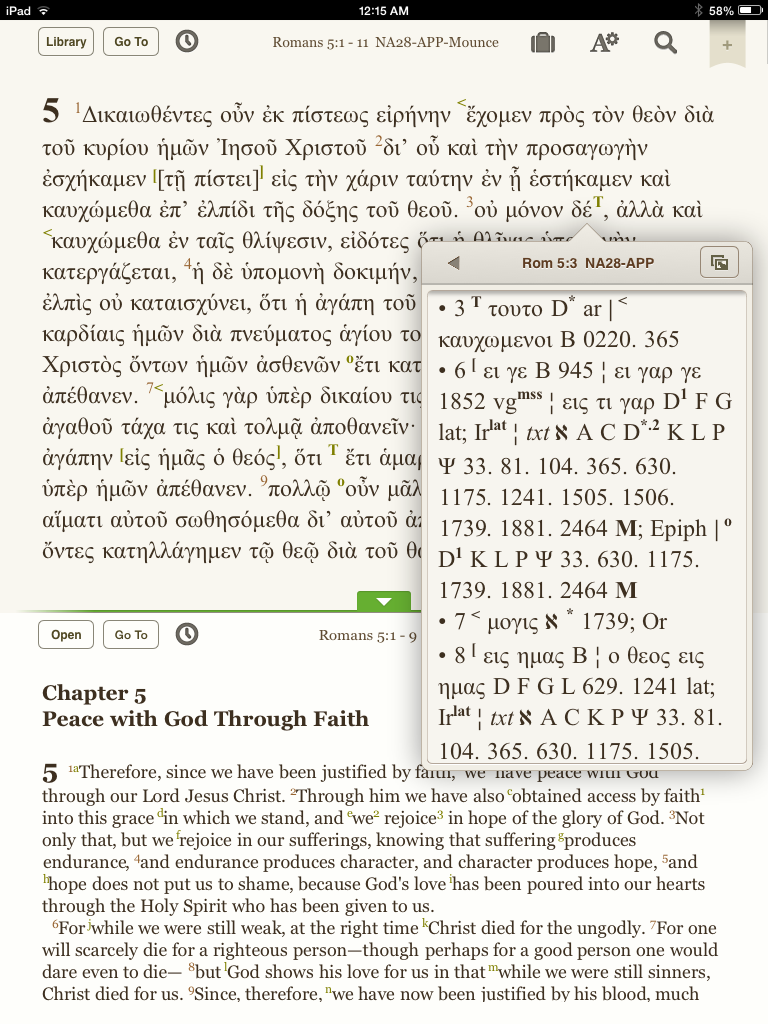
Another possible arrangement would be to use one window for the Greek text, and a second window for an English translation. In that case, one can click on the sigla in the NA28 text for a pop-up with the apparatus. (And still get parsing popups from the surface text, when needed.) This is a good way to economize space:

diglot with apparatus

I appreciate that just a short tap is all that’s required to bring up details about a word or information on a text-critical sign. I find the app overall to be quite intuitive and aesthetically pleasing.  It’s fast on word searches, too.

One critique of the NA28 apparatus is that the text-critical sigla are not hyperlinked to their meanings. In the Accordance version of NA28, for example, when you hover/click/tap on sigla and abbreviations from the apparatus, you instantaneously see (in a popup window or instant details window) what they represent or stand for. In Olive Tree, there is a workaround (described here: bookmark the relevant section of the introduction for quick reference), but this is not an improvement on what one would have to do with a print text anyway. It’s not unmanageable, but also not what one might hope for in this medium. So one will need to regularly consult the NA28 introduction, which is included with the text.

Olive Tree has one of the more active and better Bible software blogs I’ve seen. I’ve learned a good deal from it. Check it out here, especially this post that shows how to use a dictionary in the iOS app.

Since Olive Tree is new to me, and since I already use other Bible softwares, I’m still trying to figure out how it will make its way into my overall workflow. But its smooth interface, speed, and snazzy iOS app will have me coming back for further exploration.

Thanks to Olive Tree for the NA28 with Critical Apparatus, Mounce Parsings, and Concise Dictionary for the purposes of this blog review, offered without any expectations as to the content of the review. You can find the product here

Review of INVELLOP Leatherette iPad Mini Case

As a friend and I were geeking out over iPad mini cases lately, he recommended his to me. Since its arrival in my mailbox, I’ve rarely taken the mini out of this case. It’s got just the right combination of slim and sturdy for my tastes. It’s by INVELLOP, which I had never heard of. Here it is, closed, with no iPad mini in it:

The case closed, in landscape orientation

Here is what the inside looks like:

The inside of the case

The cutouts for earbuds, volume buttons, camera, etc. are all measured well. The material is “leatherette,” but smells fine and has held up well for the six or more weeks I’ve used it. The stitching is all still firmly in place. You can see in the above that the hard plastic back is connected to the front cover. When the screen flap closes, it puts the device to sleep; when it opens, it wakes it up. This function works just as it should (and is standard with these sorts of cases).

Here are a few more things I like about it:

  • This is the easiest time I’ve had holding my encased device with one hand–the case covers the device but does not extend past it much, so it’s low on bulk
  • The price on Amazon is at the moment $19.95, which is worth it for the quality
  • Good craftmanship
    Good craftmanship

    The screen flap is split into thirds so that you can set your iPad upright (in landscape mode) in two different positions (viewing or typing)

  • It has magnets that help the front cover snap even more securely onto the back case
  • The plastic back is stronger than other cases of this size
  • The inside’s microfiber has protected (and not scratched) the iPad
  • It’s easy to manipulate the front screen flap to take photo or video (it folds back quickly)
  • It’s thin and light, yet not at the expense of protecting a device (though I haven’t done a test drop)

There is really not much to critique. For the first few weeks the front cover didn’t lay flat very well. It still doesn’t lay flat perfectly, but that’s improved a good deal over time. And the magnets make sure the sleep/wake function isn’t compromised by this.

Most significantly, even though I’ve reviewed other iPad mini cases I could house my device in, this one is my go-to.

Thanks to INVELLOP for the review sample. The case reviewed above can be found at Amazon hereYou can find my other iOS and gear reviews here.

Review of Sony SRS-BTS50 Bluetooth Wireless Speaker

Sony has just released its SRS-BTS50 bluetooth wireless speaker. Here’s what it looks like in the box (with other colors available):

in the box

Here’s what’s in the box:

box components

Setup, Appearance, and Portability (Two Thumbs Up)

Setup was easy, both with my iPad mini and a Mac laptop. Once you link a bluetooth-enabled device to the speaker, the speaker remembers it. You can link multiple devices to it without Continue reading “Review of Sony SRS-BTS50 Bluetooth Wireless Speaker”

Highlights in Baker Exegetical Commentary on the NT (Stein, Jobes, Köstenberger)

BECNT set

I’ve long benefitted from the 15-volume Baker Exegetical Commentary on the New Testament (BECNT) series. Recently I’ve been able to use it in Logos Bible Software. In this post I introduced the commentary, layout, and setup in Logos on a computer. Then I wrote again here about navigating BECNT for Logos on iPad. Finally, I interacted at length with a passage in Luke from Darrell L. Bock. That third post is here. This post is a fourth part of my BECNT series of posts, concluding my review. Here I highlight some other volumes in the series: Mark (Robert H. Stein), 1 Peter (Karen H. Jobes), and John (Andreas J. Köstenberger). Continue reading “Highlights in Baker Exegetical Commentary on the NT (Stein, Jobes, Köstenberger)”

Video Review of Flash Greek iOS App

And now a video review of a solid and versatile iOS app for learning Greek vocabulary. You can adjust the video setting in the bottom right part of the video below to watch in HD and full screen, if you like.


Thanks to Danny Zacharias for the app, given to me for the purposes of a review. Find out more about FlαshGrεεk here.

UPDATE: I made the video above using the handy Reflector app. Reflector mirrors your iOS device to a computer, from which you can record. (I added the audio later.)

Review of Bear Motion iPad Mini Case

Product image via Bear Motion

“Bites on Bytes” is too trite, but Words on the Word does have a growing tech focus. I’ve reviewed software before, and have moved into iOS and its apps, and now gear. Here I’ll review a classy case for the iPad mini, with another case review to follow, some iOS app reviews on the way, and a forthcoming review of a Sony bluetooth wireless speaker. Stay tuned.

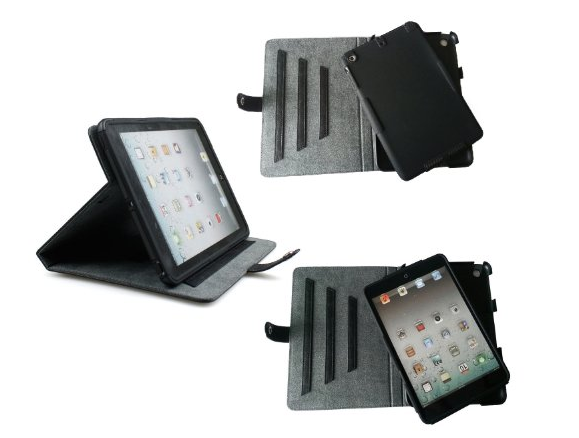
Here is the lengthily-titled 100% Genuine Brazilian Buffalo Hide Leather Dual Protection Folio Stand/Cover/Case for iPad Mini with Built-in Stand and Detachable Inner Silicon Cover (Black), by Bear Motion:

iPad mini in case, the full setup

This is really two cases in one. On the right in the photo below there is the silicon stand-alone backing, which I’d recommend just for home (but not travel) use. On the left is the folio with a hard back plastic shell that is attached to the leather case that wraps around and closes over the iPad mini. It’s got a sleep/wake feature that functions perfectly.

Case both parts

There is actually a third casing option, since the Bear Motion Dual Protection case comes also with a protective velvet sleeve. So your iPad would be well-protected here.

Let me break it down into pros and cons:

Pros

  • The construction quality is high
    • The stitching is careful and tight
    • The holes (to access camera, earbuds, etc.) are cut out just right; you can still access everything
    • The leather smells amazing (I am a notorious smeller of books… and of this case)
  • I can hold the iPad, while in this case, in one hand (results may vary according to hand size)
  • The price is currently $19.99, which is a good deal
  • I haven’t test-dropped the iPad while in this case, but my money is on a safe landing, were some sort of accident to happen
  • There are three notches for standing it up (in landscape mode only) for viewing; these are sturdier than the typical origami-style construction in other cases… as here:
One of three settings

Cons

  • It’s not the slimmest option
    • It is heavier than some mini cases
    • It is bulkier than some
    • This cuts two ways:
      • On the one hand, it is sturdy and classy, a case you’d definitely take to your business meeting
      • On the other hand, the “package weight” Bear Motion lists is 0.7 pounds, which is just a touch more than the iPad mini itself. So you double your weight if you use this case
  • It is difficult to maneuver the case in order to take photo or video (it doesn’t just fold back)
  • There is no place to hold a stylus, which would be a nice feature in a case like this

All told, the pros significantly outweigh the cons. I’ve looked at a number of cases for the iPad mini (and have used four now, with another review to follow), and this is among the best you can get–if the weight is not a problem for you.

Thanks to Bear Motion for the review sample. They make plenty of other cases for various devices, too. The case reviewed above can be found at Amazon here.

Of Millstones and Mustard Seeds: Bock on Luke 17

"Magisterial" is perhaps not an exaggeration
“Magisterial” is perhaps not an exaggeration

The apostles said to the Lord, “Increase our faith!”

 He replied, “If you have faith as small as a mustard seed, you can say to this mulberry tree, ‘Be uprooted and planted in the sea,’ and it will obey you.”

–Luke 17:5-6 (NIV 2011)

This Sunday I’ll preach on the above verses, taken from the lectionary reading of Luke 17:5-10. The rest of the passage goes on:

“Suppose one of you has a servant plowing or looking after the sheep. Will he say to the servant when he comes in from the field, ‘Come along now and sit down to eat’? Won’t he rather say, ‘Prepare my supper, get yourself ready and wait on me while I eat and drink; after that you may eat and drink’? Will he thank the servant because he did what he was told to do? So you also, when you have done everything you were told to do, should say, ‘We are unworthy servants; we have only done our duty.’”

My first three questions of the text were as follows:

  1. How should I take Jesus’ statement about the mulberry tree? Should I really be trying to uproot trees (or move mountains, in a synoptic parallel)? Can I?
  2. What do verses 7-10 have to do with 5-6?
  3. What about Jesus as a servant? Is he here the one being served, and we are just dutiful servants, with no expectation of thanks or “well done” from God?  Continue reading “Of Millstones and Mustard Seeds: Bock on Luke 17”