A Full Review of Accordance 11

Acc 11_Simply Brilliant_logo


Accordance 11 is now available. Here I offer a full review.


Don’t Forget: Version 10 Was Already Sweet


To fully understand all I appreciate in Accordance, I offer you this collection of links to my Accordance 10 review posts. While potential upgraders will want to know what is new in 11, those new to Accordance altogether will find a wealth of practical and impressive features. For example, a few initial standouts when I reviewed version 10 were: Analytics (#1 here), Flex Search (first feature noted here), the use of the Command key on Mac to make the Instant Details pane do even more, and Construct searches (see #2 here).


What to Love About Accordance: Improvements in Version 11


None of the features that so impressed me in Accordance 10 has disappeared. The overall layout and appearance of 11 is similar to 10. (Accordance 10 offered a significant update in appearance over version 9.)

An overview of the features in Accordance 11 is here. I’ve found 7 improvements in particular to be laud-worthy:


1. The New Info Pane


A new option is available when you have a Bible text open and click the “Add Parallel” button: Info Pane. Here’s what it looks like:

Info Pane

Though you can save a Workspace with dozens of commentaries tied to a Bible text, Info Pane automatically pulls up all the commentaries (and Study Bibles!) you own that treat a given verse. Clicking on the cover image takes you (in a new pane) to that commentary. What’s especially thoughtful about how this feature was programmed is that just hovering the cursor over a cover image shows the text from that commentary in the Instant Details pane.

You can also choose from a variety of Cross-Reference modules to display hyperlinked related verses in the Info Pane. The Topics section quickly links you to other verses that address the same themes your passage does.

The Apparatus portion is an especially nice feature for doing textual criticism–you can see the information multiple apparatuses contain very quickly.

Accordance 11.0.1 already added something neat: you can command-click on your Cross-References in the Info Pane to see them all at once.

So command-clicking on the Cross-References at right here:


X Ref 1


yields this:


X Ref 2


The Info Pane is useful in the Gospels, too, where it pulls up “Parallel Passages.”

Whereas in Accordance 10 I had to create and save new Workspaces with relevant commentaries for a given book of the Bible, now in 11 the Info Pane means I can get up and running with research on any book, right away.

And the speed with which everything operates from the Info Pane is quite incredible. Long-time Accordance users probably won’t be surprised, but it is good to see that even a more advanced and robust feature like the Info Pane operates with the same expected speed that makes Accordance what it is.


2. Custom Upgrades


New to the online store in Accordance 11 is the chance to “Custom Upgrade,” which provides users with a discounted collection rate if they already own modules contained in that collection. The Custom Upgrade option is recently also available for various Add-on Bundles. This new feature will especially be welcomed by long-time users who will essentially be rewarded now for past purchases, should they decide to upgrade in various instances.


3. Quick Entry


When I first heard about this feature, I didn’t think it would be that big of a deal–predictive text entry is already available in Google and a host of other free programs. But Quick Entry really does speed up my work with Accordance. One especially neat thing about this feature is how it works with Bible texts.

One can toggle between searching a Bible by Words or Verses. But here I get both options suggested at once, just by typing in the letter “G.” I can then select an option from the drop-down menu, which narrows if I type additional letters. This is a good refinement to the program.


Acc11_Quick Entry


4. Better Library Organization for Tools


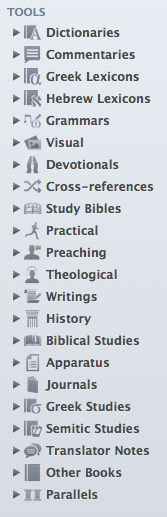
You can have Accordance 11 automatically organize your tools into the following folders:
 

Acc11 Library Tools Organized


Of course, further customization is possible, but this makes for a great starting point, having everything so well-sorted, which it wasn’t in Accordance 10. David Lang from Accordance has explained the re-organization in detail here. (If you’re already an Accordance user considering an upgrade to 11, you’ll appreciate what David has to say.)

This easier organization also greatly enables what has recently become my most used new feature in Accordance 11….


5. Research, or, The Feature Formerly Known as Search All


Search All (Accordance 10) was fine, but Research (Accordance 11) is even better.

We’re in the season of Advent now. What does my Accordance library have to say about this important time of preparation? Think of Research as harnessing the power of a Google search, but utilizing the content of all the books Google only allows limited preview to. In a matter of seconds, or less, Accordance goes through all my Dictionaries (selected in the drop-down menu at top left in the image below) for “Advent.” The resources that have search hits are neatly listed in the left sidebar, and the main pane of the window below allows me to quickly scroll through all the places “Advent” appears. There is an option to see “More…” of a hit result, while still staying in the same Research tab. Or you can just click on “Open” to go directly to the resource:

Research in Acc11At first I thought the new Research was just pretty cool, but it’s much more advanced than Search All, well-executed, and easy to navigate. I find myself using it much more than I used Search All in version 10.

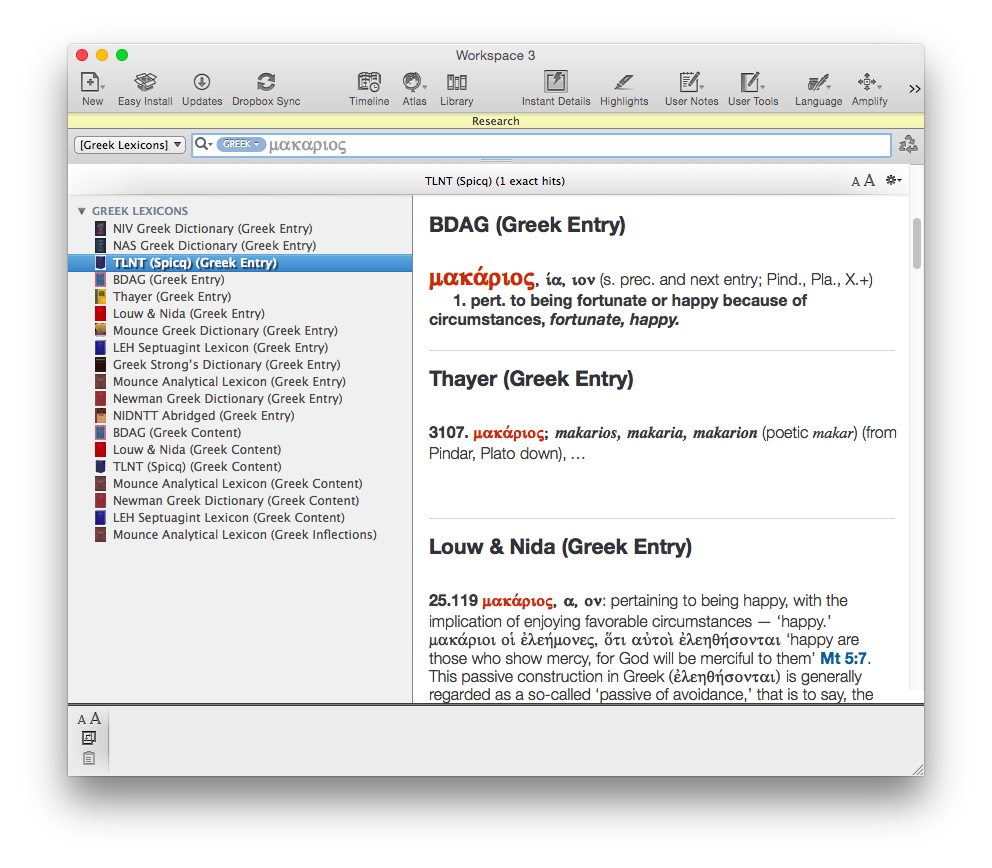
How does it tie in to the newly organized Library? From that drop-down menu that gave me “Dictionaries,” I can hone my search in on any category of tools in the library–Grammars, Commentaries, Greek Lexicons, etc.

Here–it’s worth showing two more search results, just so you can see how cool a thing Research is:
Acc11 Research_Greek Lexicons

Acc11 Research_Jonah

6. User Notes Extended to Commentaries and Books


Accordance 11 offers some improvements to User Notes, not the least of which is that users can at last take notes on commentaries, books, and other non-biblical resources they own. You can do this in Kindle, iBooks, Logos, etc., so I’m glad Accordance is caught up here. This has been a long-requested user request, so will be a much-appreciated addition.

You can make a single note file that is notes on one book, or you can make a note file that includes notes on multiple books you own.

There is also now full Unicode support for Notes.


7. Speed


Okay, this is definitely not a new feature, but it’s so much a part of what makes Accordance Accordance that I am compelled to mention it. Even running Research queries returns results before you can even think to navigate away to Firefox and check your email. Once again Accordance has added new features without sacrificing their trademark speed.


Desiderata


There’s still room for improvement, though. Here are some desired features:


1. More Seamless Syncing for User-Created Tools and Notes


The iOS version of Accordance allows the syncing and editing of User Notes, but does not allow the preservation of formatting styles therein. The iOS app also does not permit editing of User Tools at all. Accordance has noted that both are forthcoming in future updates, which I’ll be happy to see. The lack of ability to edit User Tools on iOS however, has led me to begin to use Evernote in place of Accordance on iPad, since Evernote edits and syncs automatically across multiple devices.

This is not a criticism of Accordance 11 per se (i.e., the desktop app), but it does affect the overall Accordance user experience. The installation screens in Accordance 11 hint that a 2.0 iOS app is not too far off.


2. More Robust Editing Capabilities in User Notes


I’ve often wished (whether in User Notes tied to a biblical verse or for my “Books of the Bible” User Tool) to be able to drop and drag images, or even just make a bulleted list easily. There are workarounds, but not easy ones. Editing options are fairly limited:


User Notes 1


User Notes 2


The “Auto Link” button was an addition in a later version of Accordance 10. That’s one thing Evernote can’t do; any verse references in notes you write are automatically hyperlinked to the version of your choice.

Accordance has hinted more is on the horizon. In the meantime, I’ve become reliant on with Evernote for sermon preparation and note-taking.


3. Future Additions to Info Pane


Given that Logos has had both a Passage Guide and Exegetical Guide since at least Logos 4, Accordance’s Info Pane feels a bit overdue. Similarly, BibleWorks’s Resource Summary Window (bottom left pane here) quickly links to grammars, lexicons, and other verse-by-verse references.

At the time of this review, the Info Pane does not have a Grammars section or Lexicons section or (what would be really fun) a Diagrams section. The improvements in Library organization and the Research feature make it really easy to get to words in multiple lexicons at once, so this is not a huge critique, but a more robust Info Pane would be great. Knowing Accordance’s responsiveness to user requests, I expect the Info Pane will grow and expand over time.


Conclusion: Get It


I have a contact form at Words on the Word. (Feel free to drop me a line.) Easily the most common inquiry I receive is folks asking things like, “Which is better: Accordance or Logos or BibleWorks?” or, “How can I do x in Accordance?” This post is not a comparative review (this one is). So I won’t answer that question in those terms here.

But I will say that the speed of Accordance and its search capabilities are hard to beat. Bibleworks is just as fast and can also run complex queries, but Accordance has more biblical studies resources, and just as many (or more) original language resources, not to mention the most customizable workspace setup of any software program (Bible or otherwise) I can think of. You gathered from the above that I like Evernote–though I also find myself wishing I could set up my workflow in it as flexibly as I can in Accordance.

Thinking about diving in? Check out all the Accordance collections here.

If you’re already using Accordance and wondering about the upgrade to 11, it’s a no-brainer. Go for it. It’s quite affordable for all the features you’ll get. The upgrade costs $59.90 ($49.90 if you have Accordance 10). And don’t forget about potential discounts you may qualify for.

Accordance has quite a few sources of support, too. Check out their blog for more features and tips and tricks in Accordance 11. All their sources of support (a video podcast, user forums, online seminars, and more) are here.

Accordance 11 is one of the apps I use almost every day. Accordance 10 was already good enough to be my first stop in Bible software. Version 11 has taken several significant steps forward that make it even more enjoyable and efficient to use.


Thanks to Accordance for the review license to Accordance 11. See my other Accordance posts (there are many) gathered here.

F.F. Bruce’s Atlas for Young Readers

Bruce Bible History AtlasLast week we received a kindness in the mail from a new friend in Israel–F.F. Bruce’s Bible History Atlas.

My 7-year-old son, who had been looking forward to receiving it, came home from school and smiled widely when I had him open it.

He ran outside to share the good news with his younger siblings, who were running around with sticks and dressed up as a spaceman and ladybug, respectively. He was excited.

His first excited question to me when he came back into the house was, “Where is the battle page?” We have again been reading about the Maccabees recently in The Sacred Bridge (though, of course, I had to for now edit out the forced circumcision portion of that narrative!), so he was eager to find the Maccabees and Hasmonean era in Bruce’s atlas, which we were easily and quickly able to locate.

The atlas covers all of biblical history–both Testaments and everything in between.

The kind folks at Carta publish the Bruce atlas, as well as The Sacred Bridge. Their product page for Bible History Atlas (one of many fine atlases they offer) is here.

Accordance at SBL/AAR 2014: 50% Off

sblIf you’re at SBL/AAR 2014 this last day, Accordance Bible Software is offering the best deal I’ve ever seen from them: $250 gets you the (normally $499) Essential Collection.

The deal is only available for new users. If you’re trying to decide what you think, you can see my Accordance 10 review series here, and my initial impressions of the new Accordance 11.

Here are a few other booths you might check out, too, before the conference ends.


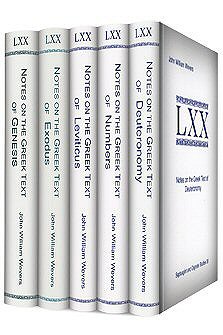
John William Wevers’s Notes on the Greek Text… Coming to Logos

Wevers Notes on Greek Text


The best (only?) complete set of books on the Greek Pentateuch is now up on Pre-Pub through Logos Bible Software: John William Wevers’s Notes on the Greek Text.

The Society of Biblical Literature’s book page has a helpful write-up of the Deuteronomy volume, which gives a sense of what this series is about:

Wevers [spent] most of his adult life studying the Septuagint, the last thirty years being devoted to the Pentateuch. The author considers the Greek text to be the first commentary on the Pentateuch ever written (in the third century B.C.E.) and not merely a collection for emendations of the Hebrew text. The work focuses on how the translator accomplished his task and on the vocabulary and syntax of the resulting text, rather than on either scholarly opinions on the text or how interpreters subsequently used the text. The Notes are intended for students who would like to use the Greek intelligently but are not specialists in Hellenistic Greek or LXX studies.

You can find the 5-volume set on pre-pub at Logos here. Wevers also wrote valuable LXX-Pentateuch text histories, which are available free online in .pdf form, detailed here.

Coming Soon: Greek Psalms in a Year

LXX Psalm 1
LXX Psalm 1

It’s funny–I was just thinking the other day about how much I missed Greek Isaiah in a Year. More than 200 of us read through the Septuagint text of Isaiah in a year, roughly five verses a day. Both the readings and the discussion were rich.

I didn’t do anything like that this past year, though the Greek Isaiah in a Year Facebook group I’d created stayed active, as folks went after it a second time.

Just this afternoon I learned that Russell Beatty, a member of the Greek Isaiah group, has started a Greek Psalms in a Year group, to launch January 1, 2015.

That group is on Facebook, and you can see the well laid out reading plan here.

I preached through some Psalms this past summer, which greatly deepened my love for that book of the Bible.

I can’t wait to get started–feel free to contact me or request to join the Facebook group if you’d like to read along with us.

SBL/AAR 2014: The Best Exhibitor Discounts

sblThe Annual Meeting for the Society of Biblical Literature and the American Academy of Religion is this week: November 22-25.

I’m not going, but if I were, here are the three exhibitor booths I would head to first:


EISENBRAUNS and CARTA JERUSALEM (Booth #814)


Front CoverI love Eisenbrauns’s books. Look especially for this deal.

And Carta is fast becoming one of my favorite publishers. At the very least, treat yourself to a look inside Carta’s magnificent Sacred Bridge (or see some images here). Carta will be featuring new titles like Understanding Biblical Archaeology (by Paul Wright) and Understanding the Alphabet of the Dead Sea Scrolls.


ACCORDANCE BIBLE SOFTWARE (Booth #549, #328 at ETS)


Acc 11_Simply Brilliant_logoYou can see Accordance 11 for yourself. Check out their booth for some even-better-than-usual conference discounts this year, as well as some new releases.

More specifically, at SBL/AAR (and ETS) you’ll find:

  • 20% discount on general purchases
  • New N.T. Wright modules
  • 50% off the Essential Collection (for new users only, have to show a conference badge), which is a deal I can’t recommend highly enough
  • Anchor Bible Commentary (86 volumes) for $1099


FORTRESS PRESS (Booths #734 and #735)


DBWE17You can get the whole 17-volume set of Dietrich Bonhoeffer Works at a discounted price ($564; regular price is $940), which includes a free copy of Interpreting Bonhoeffer (a good book). See my look inside the brand-new DBWE 17.

Fortress has just released The Fortress Commentary on the Bible, which they’re offering at the special conference rate of $78 (regular price is $120).

There’s a 30% general discount, too, with some deeper discounts on ebooks. All of what Fortress has to offer (including sessions) is here.


Really Cheap Ebooks (Whether You’re At the Conference or Not)


Whether you’re at the conference or not, here are three collections of really low-priced ebooks.

Happy book-hunting!


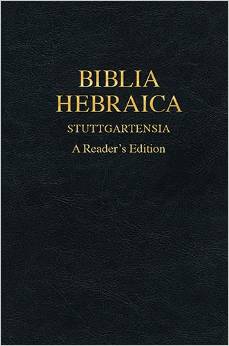
UPDATE: I nearly forgot to mention again that the BHS Reader’s Hebrew Bible is 50% off at Hendrickson’s booth. More here.

Two More Greek Gems from †Rod Decker

Rod Decker on Mark
Long awaited


Before Prof. Rodney Decker passed, he finished writing his Koine Greek Grammar, with which I’m already impressed–having just begun working through the Appendixes!

One other last (and sure-to-be lasting) contribution to the world of Greek readers is his two-volume commentary on the Greek text of Mark, from Baylor University Press. It is part of the Baylor Handbook on the Greek Text, which I’ve reviewed (Luke) here.

The two-volume set came in the mail today, courtesy of Baylor. Decker’s Koine Greek Reader is the best resource of its kind. His scholarship was always careful and engaging. These Baylor books–about which I will post again in the future–look like about the first thing you’d want to have by your side when reading through Mark.

You can find the books here.

Words on the Word Cited in Brill Book on Digital Humanities

You Google yourself about every three months, too, right?

To my surprise, a few months ago I found that Words on the Word had been quoted in a Brill book about digital humanities in biblical studies. (Apparently “digital humanities” is an academic field in which this blog participates.)

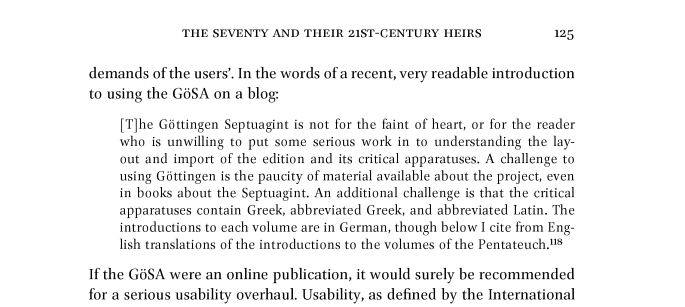
Here is one of the citations:

WotW in Brill


Brill Digital HumanitiesThe book is called Digital Humanities in Biblical, Early Jewish and Early Christian Studies, edited by Claire Clivaz, Andrew Gregory, and David Hamidović. Words on the Word makes its appearance in the chapter called “The Seventy and Their 21st-Century Heirs. The Prospects for Digital Septuagint Research.”

The footnote in the image above cites this primer I wrote on the Göttingen Septuagint; part 2 of the primer also receives mention.

Here is the publisher’s description of the book:

Ancient texts, once written by hand on parchment and papyrus, are now increasingly discoverable online in newly digitized editions, and their readers now work online as well as in traditional libraries. So what does this mean for how scholars may now engage with these texts, and for how the disciplines of biblical, Jewish and Christian studies might develop? These are the questions that contributors to this volume address. Subjects discussed include textual criticism, palaeography, philology, the nature of ancient monotheism, and how new tools and resources such as blogs, wikis, databases and digital publications may transform the ways in which contemporary scholars engage with historical sources. Contributors attest to the emergence of a conscious recognition of something new in the way that we may now study ancient writings, and the possibilities that this new awareness raises.

You can find the book at Brill here and here at Amazon. Looks fun! But, of course, now I’m biased.

New Hebrew Reader’s Bible: 50% Off at ETS, SBL/AAR

BHS Reader's Edition


Hendrickson has published a new Hebrew Reader’s Bible. (See more here.) They’ve also posted a sample pdf online, which features the book of Obadiah (good choice!).

You order now through CBD or Amazon… OR… if you want it at 50% off, you can go to Hendrickson’s booth at the upcoming ETS (booth 222) and SBL/AAR (booth 718) conferences, and find it in its two different bindings, priced at $29.97 (from $59.95 retail) and $39.97 (from $79.95).

Accordance 11: Now Available, and First Impressions

Acc 11_Simply Brilliant_logo


Accordance 11 is now available.

I’ve already highlighted some of the new features, as well as posted about the new Collection upgrades.

I plan to write more soon in review of the program upgrade. For now, I point you to this excellent post from Accordance, describing the “Top 11 Features of Accordance 11.”

Okay, okay–I’ll post a couple more quick looks inside now, too. The overall layout of the program hasn’t changed as much as Accordance did when going from version 9 to 10. But there are two major new features that immediately make themselves indispensable, and better aid the user in accessing resources:


1. Info Pane


With a Bible text open, click on the familiar “Add Parallel” button and select the top “Info Pane” option. You then see this (click or open in new tab to enlarge image):


Info Pane


Commentaries, cross-references, thematic topics, and critical apparatuses from your library all show up instantly. And–this is especially cool–by hovering over the book cover of a commentary or apparatus, you can see the content. The Instant Details in the image above (the pane at the bottom) shows the contents of the BHS apparatus for Exodus 20:1, just by my hovering the cursor over the apparatus image in the Info Pane.


2. Research


I thought Accordance 10’s “Search All” feature was fine–it wasn’t perfect, but it still very quickly helped you comb through all your resources at once for a given search. But the Research Tab is now faster (no idea how they did that), and the search results are (a) more clearly organized and (b) easier to work through. It looks like this when I look up Bonhoeffer:


Research 2


I’ll post more again soon. I’m already making regular use of the new features above in my weekly sermon preparation.


Thanks to OakTree Software, which allowed me to beta test Accordance 11 and has given me a review copy. More to come.