Debate: The Lifeblood of Judaism, a “Holy Act”

Phenomenology of SpiritEver since reading Hegel’s Phenomenology of Spirit in my undergrad days, I’ve often considered the world through the lens of Hegel’s dialectic. Plus, I always thought (and still think, if my sermon yesterday is an indication) it sounded really cool to talk about the “Hegelian dialectic” at work in the world. Yes, a little pretentious, too.

Dialecticophile that I am, I resonate with Rabbi Barry L. Schwartz’s idea that in Judaism, debate (thesis/antithesis) is “more than a valued intellectual exercise…. it is a holy act.”

What a refreshing outlook for anyone who grew up in religious settings that discouraged asking questions!

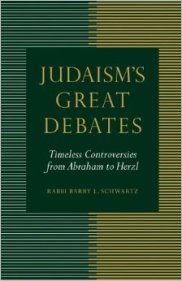
Schwartz’s Judaism’s Great Debates: Timeless Controversies from Abraham to Herzl (Jewish Publication Society, 2012) considers 10 debates in Judaism. He splits the book into three sections: Biblical Judaism, Rabbinic Judaism, and Modern Judaism. The 10 debates he considers are far-ranging: theological, ethical, legal, spiritual, and sociopolitical.

Here’s the publisher’s description of the book:

Ever since Abraham’s famous argument with God, Judaism has been full of debate. Moses and Korah, David and Nathan, Hillel and Shammai, the Vilna Gaon and the Ba’al Shem Tov, Spinoza and the Amsterdam Rabbis . . . the list goes on. Jews debate justice, authority, inclusion, spirituality, resistance, evolution, Zionism, and more. No wonder that Judaism cherishes the expression machloket l’shem shamayim, “an argument for the sake of heaven.”

Judaism's Great DebatesEach of the 10 debates comes to a head with a question that Schwartz considers. For example, the conflict between David and Nathan in chapter 4 considers the question, “Does Might Make Right? The Debate over Accountability and Morality.”

Schwartz helps the debates come alive by blending direct quotes from the Hebrew Bible or other primary source (in italics) with his own “added dialogue” (in regular print). As reluctant as a Bible-lover like myself might be to see words added to a biblical story, Schwartz does this with great reverence and care, in a way that really draws out the characters.

David, in Schwartz’s rendition of Nathan’s calling him out in 2 Samuel 11-12, for example, says, “What are you talking about? I am the king!”

That same chapter refers to prophets as those who “speak truth to power.” Schwartz puts it well:

The prophets were equal-opportunity gadflies; they clashed with kings and countrymen alike.

Issues for modern-day Judaism are included here, too–whether full inclusion of women (as in the Reform movement) or whether holiness is individually ascribed or somehow taken on by osmosis as member of a community. Each debate includes coverage of its original context (“the basic historical backdrop”), content (with emphasis on primary sources), and continuity (“how they echo throughout Jewish history”).

Judaism’s Great Debates would be great for a class or small group setting. Its reflection and discussion questions on p. 99 and following are thought-provoking and much better-written than most discussion questions at the back of a short book like this. (Any Palestinian Jews or Christians reading this book will probably be put off by what come across as pointed questions like, “Are civilians who aid terrorists innocent and deserving of noncombatant immunity?” and, “Should Israel negotiate with sworn terrorist organizations?”)

One other drawback (and the drawbacks are few) is the appearance of typos and some errant punctuation marks every few pages or so. This does not detract, though, from the overall high quality of the writing.

Anyone who wants to know more about Judaism–or anyone with a religious background of any type–will appreciate Schwartz’s boldness, even if it’s alarming:

Abraham’s bold challenge of God for the sake of justice was the first Jewish debate. Generations would look back at the founder of the Jewish people and follow his example. If Abraham argued, so should we. If Abraham had the courage to challenge God, so should we. If Abraham stood up for justice, so should we.

I would love to hear Rabbi Schwartz treat how we hold that reality in tension with the story of Job, whom God does not seem to appreciate being challenged by. That would be an interesting debate to have!

Here‘s an excerpt from the book. I found myself making a lot of pencil notes in the margins, which is a good sign of a book’s ability to engage its readers! It’s a book well worth reading and thinking through.

Thanks to the Jewish Publication Society for the review copy of the book! You can find Judaism’s Great Debates here at the publisher’s page or here at Amazon. See also my book note on the JPS Torah Commentary volume on Genesis, and my review of the JPS Commentary on Jonah.

The JPS Bible Commentary on Jonah

Jonah JPS CommentaryNahum Sarna’s JPS Torah Commentary on Genesis is easily one of the best three commentaries I’ve read on any book of the Bible. I’d put it up there with R.T. France’s Mark commentary, a technical and detailed commentary of which I read every word–France is that good, and so is Sarna.

So as I geared up to preach on Jonah during Advent (see some of the results of that unlikely pairing here), I wanted the JPS Bible Commentary in hand. It’s by Uriel Simon, professor emeritus at Bar Ilan University in Israel, where he also directed the school’s Institute for the History of Jewish Research. Dr. Simon aims for a similar approach to the one that made me appreciate Sarna’s Genesis commentary so much. In the Preface Simon writes:

The present commentary has been written under the sign of a dual commitment: academic rigor, which aims at uncovering the original meaning of the Book of Jonah; and a Jewish commitment to Scripture as the taproot of our national existence and wellspring of our religious life.

The commentary is not very long. The Preface and thorough Introduction make up 38 pages. The commentary itself has 46 pages, followed by a four-page bibliography. Each page in the commentary includes the Hebrew text, an author-modified version of the New JPS translation, and Simon’s comment on passages, verses, and individual words and phrases.


Simon’s Introduction to Jonah


The Introduction begins with a treatment of the book’s theme(s), as well as its history of interpretation. Simon realizes that he “stands on the shoulders of his predecessors,” and gives the reader a nice lay of the land of Jewish/rabinnical exegesis up to the current day. (You can read a good summary version of Simon’s treatments of potential themes in Jonah here.)

I disagree with Simon’s dismissal of “Universalism versus Particularism” as a possible uniting theme for Jonah. He does not think Jonah symbolizes Israel, “and Nineveh does not symbolize the gentile world.” Of course, it is my being a Christian (as Simon would expect) that contributes to this read, but neither did I think Simon’s case against the gentiles as anything more than just “supporting characters” was compelling. I don’t think Jonah has to symbolize Israel–and the book doesn’t even have to be an indictment against God’s chosen–for the text to still have “panhumanist connotations” of the extension of God’s mercy to all people (even vile oppressors of the innocent!).

I do find the author compelling, though, when he speaks of the “Compassion: Justice versus Mercy” motif as one that is “compatible with the entire narrative from beginning to end and encompasses most of its elements.” Simon explains:

Jonah foresaw both the submission of the evildoers of Nineveh, terrified by their impending destruction, and the acceptance of their repentance by the merciful God; but he was totally wrong to believe that he would be allowed to escape to Tarshish. Subsequent surprises undermine his pretense to knowledge‑-the fish that saves him from death but imprisons him in its belly until he gives up his flight and begins to pray; and the plant that saves him from his distress but vanishes as suddenly as it appeared, so that he can feel the pain of loss and open his heart to understand the Creator’s love for His creatures. Only when the proponent of strict justice realizes his own humanity can he understand the fundamental dependence of mortals on human and divine mercy.

The Introduction also treats Jonah’s place in the canon, its literary genre and features, structure (it’s got “seven scenes”), style, links to other biblical books, vocabulary, date of writing, textual history (there is an “excellent state of preservation of the text”), and a section on the unity of the book and its prayer/psalm in Jonah 2. I’m not totally opposed (in theory) to Simon’s idea that the prayer of that chapter was a later addition, but its absence of “confession and an appeal for forgiveness” don’t have to make it an interpolation–it could just point more to the character of Jonah, in all its complexities and with all his foibles.

Regarding the historicity of Jonah and the large fish (which is “really external to the [meaning of the] story” itself), Simon has a great insight:

The repentance of the Ninevites, from a psychological standpoint, is less plausible than the physical possibility of the miracles that happened to Jonah. There is nothing like it anywhere else in the Bible. What is more, their repentance, unlike miracles, cannot be ascribed to divine intervention, because it is emphatically described as a human action (3:10).


 The Commentary Proper


The questions that arise as one reads the text (reprinted in the commentary in Hebrew and English) so often seem to be the ones that Simon answers. Regarding “Nineveh, that great city” in Jonah 1:2, Simon gives historical background, but only insofar as it serves Jonah’s literary purposes:

Nineveh’s size is mentioned, not to emphasize the difficulty of the task, but to highlight its importance–as is the size of the city, so is the magnitude of its wickedness….

The reader, in other words, will find just about anything needed to profitably make her or his way through Jonah.

Like Sarna does for Genesis, Simon goes in depth with Hebrew word meanings in a way that even a non-Hebrew reader will (usually) be able to understand. For example, when the king of Nineveh calls that city to repentance in Jonah 3:7, Simon comments:

In the hif’il (causative), z-‘-q generally means “call to an assembly, muster” (e.g., Judg 4:10; 2 Sam 20:5). Here, though, it means to “proclaim or spread a message”…. The narrator probably selected this verb to reinforce the formal linkage with what took place on the ship–in view of the danger of foundering the sailors cried out to their gods (1:5), while the king of Nineveh had the criers (cf. Dan 3:4) cry out the message of repentance for his subjects to hear.

Simon highlights little nuances readers might miss: the “great fish” of Jonah 2:1 echoes the “great city” (1:2), “great wind” (1:4), and the sailors’ “great fear” (1:10). Everything in Jonah is big–and therefore important–it seems.

There’s more in this well-written and carefully-prepared commentary that deserves further engagement, but this review is already long enough. Don’t be fooled by the commentary’s low page count–its stated 52 pages do not include the nearly 40-page introduction. That may still feel short for a commentary on four chapters of Scripture, but it’s as substantive as most readers will need. If you’re working your way through Jonah, Simon’s JPS commentary is one of three or four you should make sure to use.


Many thanks to the folks at University of Nebraska Press/Jewish Publication Society for sending me the copy of the Jonah commentary for review. The book’s JPS product page is here; you can order it through Nebraska Press here. Find it on Amazon here.

Göttingen Septuagint (Genesis): Lexus of the LXX


The Wire Season 4


Man say if you wanna shoot nails, this here the Cadillac, man.
He mean Lexus, but he ain’t know it.

–Snoop to Chris, Season 4, Episode 1, The Wire


Having recently re-watched the fourth season of the best television show in history, I need now to amend my assessment two years ago that the Göttingen Septuagint is the Cadillac of Septuagint editions. It’s the Lexus of the LXX.


The Göttingen Septuagint


Vandenhoeck & Ruprecht in Göttingen, Germany publishes the Göttingen Septuagint, more formally known as Septuaginta: Vetus Testamentum Graecum Auctoritate Academiae Scientiarum Gottingensis editum.

The series of critical texts with apparatus spans more than 20 volumes and covers some 40 biblical books (counting the minor prophets as 12), with more continuing to appear.

But, as I remarked two years ago when I confused Cadillacs and Lexuses, the Göttingen Septuagint is not for the faint of heart, or for the reader who is unwilling to put some serious work in to understanding the layout of the edition and its critical apparatuses.


The Contributions of John William Wevers


Enter John William Wevers. If Göttingen is the Lexus of LXX editions, Wevers is its chief mechanic. His Notes on the Greek texts of the Pentateuch–though provisional in nature, Wevers intimated–remain some of the best resources for carefully studying the Septuagint. And his Text Histories on those same books (now free online, thanks to the Göttingen Septuaginta-Unternehmen) guide the reader through the transmission of the Greek text in its various manuscripts.

Better yet, before his passing Wevers translated much of his own Göttingen-Pentateuch introductions from German into English. That enduring gift can be found here.


Göttingen-Genesis


Published in 1974, Wevers’s Genesis includes a 70+-page introduction, Wevers’s reconstructed Greek text of Genesis, and two critical apparatuses at the bottom of each page that highlight readings from various manuscripts.

The introduction includes these sections:

  1. The Textual Witnesses (Greek and other versions)
  2. The Text History (“Here only information necessary for the use of this edition is given”)
  3. Re: This Edition
  4. Signs and Abbreviations

A challenge to using the Genesis volume is the scarcity of material available about the Göttingen project in general. Further, the introduction is in German and the critical apparatuses contain Greek, abbreviated Greek, and abbreviated Latin. A few things come in handy:

  • Wevers’s Genesis introduction is here in English.
  • As for deciphering the apparatus and abbreviations, Wevers offers such a key in the introduction, and the print edition comes with a handy insert (in German and Latin, but not unusable to those without command of those languages)
  • Miles Van Pelt has made available his own two-page summary of sigla and abbreviations (here as PDF).
  • Seeing the need, I wrote a two-part primer (here and here, two of my most-visited posts on this blog) to reading and understanding the Göttingen Septuagint–the focus was largely on Genesis, and I draw on those posts for what follows

So equipped, the reader (whether she or he knows German or not) is ready to work through the Greek text itself.


Tour of a Page


Instead of using a text based on an actual manuscript (as BHS, based on the Leningrad Codex, does), the Göttingen Septuagint utilizes a reconstructed text based on a thorough examination of evidence from manuscripts and translations.

Because it is an editio maior and not an editio minor like Rahlfs, any page can have just a few lines of actual biblical text, with the rest being taken up by the apparatuses. Here’s a sample page from Genesis 1 (image used by permission).

Note the #s 1-4 that I’ve added to highlight the different parts of a page.


Page reproduction by permission of publisher (annotations are mine)


1. The reconstructed Greek critical text (“Der kritische Text”)

With verse references in both the margin and in the body of the text, the top portion of each page of the Göttingen Septuagint is the editorially reconstructed text of each biblical book. In the page from Genesis 1 above, you’ll notice that the text includes punctuation, accents, and breathing marks.

Regarding the critical text itself, Wevers writes in the Genesis introduction:

Since it must be presupposed that this text will be standard for a long time, the stance taken by the editor over against the critical text was intentionally conservative. In general conjectures were avoided, even though it might be expected that future recognition would possibly confirm such conjectures.


2. The Source List (“Kopfleiste”)


The Kopfleiste comes just below the text and above the apparatuses in Genesis. Wevers notes it as a list of all manuscripts and versions used, listed in the order that they appear in the apparatus on that page. A fragmentary textual witness is enclosed in parenthesis.


3. and 4. Critical Apparatuses (“Apparat I” and “Apparat II”)

The critical apparatuses are where the user of Göttingen can see other readings as they compare with the critically reconstructed text. Because the Göttingen editions are critical/eclectic texts, no single manuscript will match the text of the Göttingen Septuagint.

The first critical apparatus will be familiar in its aims to readers of BHS. Regarding the second apparatus, Wevers writes:

In view of the fact that the materials presented in the second apparatus [are] not at least in theory a collection of variants within the LXX tradition, but rather one such of readings from other traditions, especially from the “three”, which have influenced the LXX tradition, these readings are given in full.

“The three,” sometimes referred to in Greek as οι γ’, are the texts of Aquila, Symmachus and Theodotion.

In other words–there is virtually no stone unturned here in the quest to reconstruct a Greek text of Genesis.


Concluding Evaluation


Serious work in Septuagint studies uses the Göttingen text, where available, as a base. Wevers’s scholarship and care for the text is clear as one makes her or his way through the Genesis volume. It’s the starting place for studying the Greek text of Genesis.

Vandenhoeck & Ruprecht’s production of the book is stellar, too. It’s got a sewn binding and is beautifully constructed–built to last and look good on the shelf, or in your hands:


Goettingen Genesis


You can find the volume here at V & R’s site, and here at Amazon. ISD distributes the book, as well, and carries it here.


Many thanks to V & R for the review copy of this fine work, given to me with no expectation as to the content of my review. Find more V & R blog posts here.

A Bundle of Septuagint Resources in Olive Tree, Under $50

Rahlfs LXXWant to read the Old Testament in Greek on all your devices? This is the cheapest way I’ve seen to get started: until midnight PST tomorrow (1/6/15) night, you can get this Septuagint bundle for less than $50. It includes

  • The Rahlfs-Hanhart Septuagint text
  • Its critical apparatus
  • The Kraft-Wheeler-Taylor parsings of each word in the text
  • The LEH Greek-English Lexicon of the Septuagint (Lust, Eynikel, and Hauspie)

This is really an incredible deal, given that the Rahlfs-Hanhart text in print is about $50 (and doesn’t include running parsings). The LEH Lexicon in print runs anywhere from $40 to $80.

What can Olive Tree do, you ask? See my gathered posts here, including my recent review of a five-volume dictionary set that is still on sale.

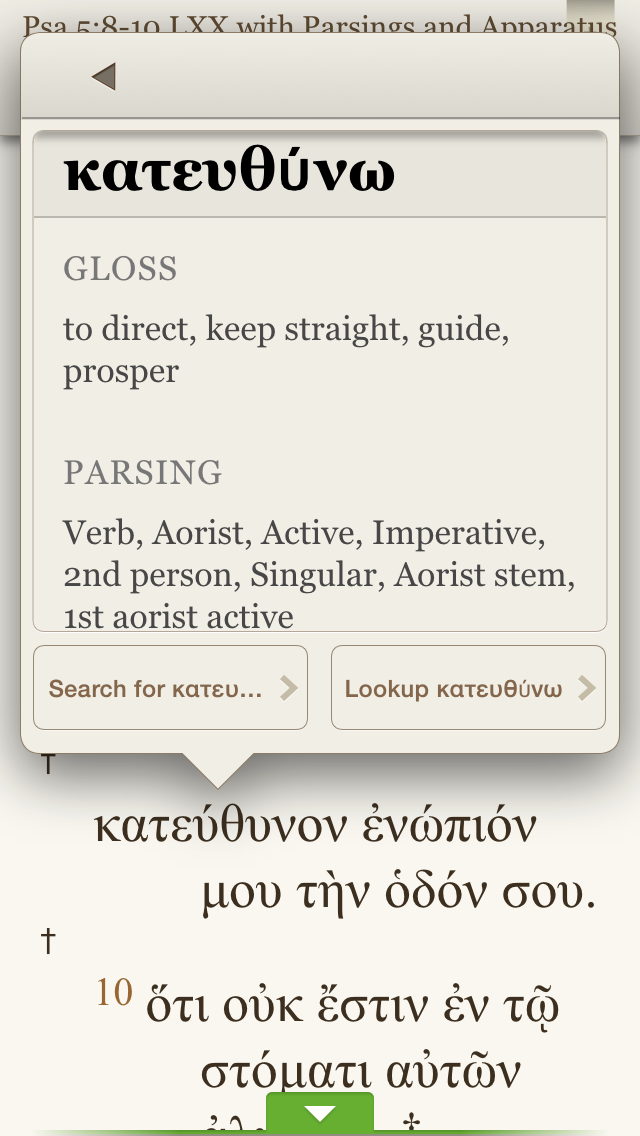
The advantage to having the above combo in Olive Tree is that you can tap any word in the Rahlfs-Hanhart Greek text and get instant parsing information.


Parsing


You can instantly access that word’s lexical entry in the LEH lexicon. I especially appreciate LEH’s inclusion of word frequency counts, according to sections of the LXX:


LEH Entry


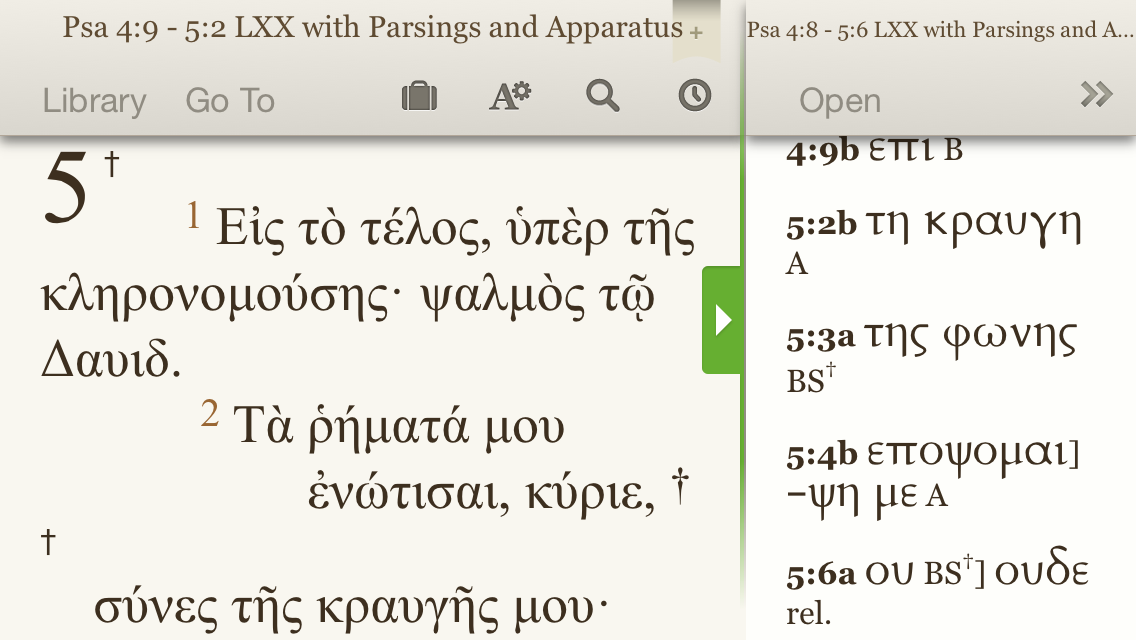
Using the split window setup, here’s what the Rahlfs text with apparatus looks like:


Rahlfs with Apparatus


Though Rahlfs never intended his apparatus in this volume to be fully critical, it does help you at least compare LXX readings as found in Vaticanus (B), Alexandrinus (A), and Sinaiticus (S).

And because Olive Tree is fully cross-platform, you can sync any notes you take or highlights you make and they appear on any device on which you have Olive Tree.

Find the whole bundle here, on sale for just a little while longer.

New Interpreter’s Dictionary of the Bible, $99 in Olive Tree

NIDB Olive TreeAn underrated but really good Bible dictionary is the New Interpreter’s Dictionary of the Bible (NIDB). Published by Abingdon, the five-volume set is edited by Katharine Doob Sakenfeld and includes contributions of nearly 1,000 scholars.

For a short time the dictionary set is $99.99 in Olive Tree Bible software. Below I offer–from my perspective as a preaching pastor and Bible reader–my take on the set, with a focus on Olive Tree’s iOS Bible Study App.


What The NIDB Is and How It Has Helped Me


There are more than 7,000 articles in NIDB. The contributing scholars are diverse in terms of gender, ethnicity, and denominational background–a refreshing mix of voices. The dictionary balances reverence for the biblical text with rigorous scholarship–though the dictionary is rarely arcane.

The NIDB has been eminently useful to me in my weekly sermon preparation. Last fall, for example, when preaching through Genesis, I knew I’d have to make sense somehow of the “subdue” command that God gives the first humans regarding their relationship to the earth. The dictionary’s “Image of God” entry helpfully clarifies:

While the verb may involve coercive activities in interhuman relationships (see Num. 32:22, 29), no enemies are in view here–and this is the only context in which the verb applies to nonhuman creatures.

The same article puts nicely the implications of humanity’s creation in God’s image: the “image of God entails a democratization of human beings–all human hierarchies are set aside.”

This sort of blend between technical detail and pastoral application is present throughout the dictionary.

I’ve also found useful background for my Greek reading. This year, for example, I’m reading through the Psalms in Greek with a group of folks (see here). In the “Septuagint” entry in NIDB I find this:

The 4th-cent. CE “Codex Vaticanus” contains all of the books of the Hebrew Scripture or Protestant OT, and the following material that is today classified as deuterocanonical: 1 Esdras, 2 Esdras, Ps 151, the Wisdom of Solomon, Ecclesiasticus or Ben Sirach, the additions to Esther (several of which were originally composed in a Semitic language; others of which are original Greek compositions), Judith, Tobit, Baruch, the Letter of Jeremiah, and the additions to Daniel (Azariah and the Three Jews, Susanna, and Bel and the Dragon).

The entry goes on to describe other Septuagint manuscripts, with hyperlinks in Olive Tree to related entries.


iOS Features in Olive Tree


Olive Tree logo


Olive Tree is as cross-platform as a Bible study app gets: it runs on iOS (iPhone and iPad), Mac, Windows, and Android. The app itself is free, and you can get some good texts free, too, so you can preview the app before you buy any resources in it.

I’ve got the Olive Tree app on Mac, iPhone, and iPad Mini. It’s one of the best-executed iOS Bible study apps I’ve seen. It is visually appealing, highly customizable (especially with gestures and swipes), and easy to learn.

When reading the New Interpreter’s Dictionary of the Bible (or anything else), here are a few features that have impressed me:

You can navigate with “flick scrolling” (how iBooks is set up) or “page scrolling” (like Kindle). This will make just about any user feel at home in the app. Flick scrolling (how you’d navigate a Web page) feels more natural to me, so I use that.

Dictionary entries are easy to get to. You can simply tap on “Go To” and type in the entry you’re looking for. The auto-complete feature saves having to type very much on the iPhone’s small keyboard:


NIDB Go To


You can search the entire contents of NIDB by word. If I wanted to see not just the entry for “Septuagint,” but every time the NIDB mentions the Septuagint, I would simply type that word in to the search entry bar:


NIDB Search


Then I can select a result and read the given entry.

The full-color photos are zoomable. The NIDB contains full-color photographs that help visualize various entries. You can select the photograph and pinch-zoom for more detail.


NIDB iPad


I’ve noted this before–there is a great deal of customizable “Gestures/Shortcuts” preferences in the “Advanced Settings” menu. Olive Tree is the most versatile Bible study app in this sense. For example:

  • Two-finger swipe left and right takes you through your history within the app. I can swipe between NIDB, and the last NIV Old Testament passage I was reading, and a commentary, and…. No need to go through menus.
  • Two-finger tap gets you from any screen to your library; right away you can get at your other resources.


Concluding Assessment and How to Buy


One of my favorite features of Olive Tree’s apps is that you can view two resources at once that aren’t tied together by Bible verse. It’s like having split windows on an iPad. So you can have the NIDB open in the top half of your screen, and a Bible text or other resource open in the bottom half–even to unrelated topics if you want.

The New Interpreter’s Dictionary of the Bible is about as good a Bible dictionary as you’ll find. If you can use it to complement the Anchor Bible Dictionary (also available in OT), you’d be very well set with Bible dictionaries.

Olive Tree has done a great job, especially with its iOS apps. As much as I loved my print copy of NIDB, I unloaded it not long ago since I can essentially carry it around with me now. And getting at its contents is even easier with the enhancements Olive Tree provides.


Thanks to Olive Tree for the NIDB for the purposes of this review, offered without any expectations as to the content of the review. You can find the product here, where it is currently on sale for $99.99.

Launch Center Pro: Usually $5, Get it Free

It’s got to be the best tagline I’ve ever seen in the App Store:

Launch actions, not just apps.

If you are interested a free code for the paid app that does this, read on….


The “just” in that tagline is precisely placed, too, because Launch Center Pro can launch both apps and actions. But its ability to launch actions is what sets it apart. With minimal effort required for setup, I open up Launch Center Pro (hereafter, LCP) on ye ole phone to see these options:


Yes, that’s right. I can message (or call) my wife, text my whole family, post a selfie (I don’t really do that), enter a new Calendars 5 event, and much more with a single tap.

“It’s like speed dial for everyday tasks,” the app description rightly claims.

Already included in the app (though customizable) is a slew of app search options:


You can create your own actions via the Action Composer, which requires zero knowledge of Apple’s x-callback-url functionality, even though it utilizes it.


My phone allows me just four apps in the dock. LCP is so handy, I moved the Phone app to my home screen, and put LCP in its place in the dock. If that doesn’t speak to an app’s utility—that I use it more than I place calls on my phone—I don’t know what does.

I can’t recommend it highly enough. It’s not just a five-star App (though it is that, too), but LCP is a really smart innovation that will simplify repeated actions on your phone. See it in action in this short video.

It’s been priced as high as $4.99 recently. Right now it’s $2.99 for iPhone in the App Store. There is a separate iPad version, too, which can sync with the iPhone LCP.

But you want a chance to get the app free, you say? You came to the right place. Thanks to good folks at Contrast, who make the app, I’ve got a promo code for the iPhone version to give away.

Just comment here (and make sure you type in your email address, which goes undisplayed) for a chance at winning the code… share this post (and comment where you did) for a second entry. I’ll announce the winner some time this weekend. Leave your comment where it says, “What do you think?” below.

Launch Center Pro supports a ton of apps, too.

My New External Brain: Evernote

Evernote Icon


I’ve finally seen what all the Evernote fuss is about: It’s more impressive than almost any other productivity app I’ve used, and a basic account is free.

The company claims a lot for its app:

Evernote makes modern life more manageable by letting you easily collect and find everything that matters. From work notes and to-do lists to recipe collections and travel plans, add everything to Evernote to help you get organized without the effort.

But it’s so easy to access from any other app on any device, and so well-organized that it really can help you remember (or, rather, access) everything.

For example, do you want to file away the information in an email in a safe place, but not lose it among hundreds of email folders? Email it to your custom-created Evernote address, and it automatically files in your default notebook.

Do you want to make a simple shopping list with check marks and tap them as you go? Evernote can do that.

Do you have a bill you need to pay, and want to remind yourself of that unfortunate reality, but also have the relevant info at hand? Just take a picture of your bill with Evernote, add in a few comments, and it all saves in one place. You can even set a time-basd reminder to a note.

EvernoteAre you trying to make sense out of that stack of recipe notecards, and want to have it all in one easily accessible location for next time you cook? You can take photos of everything and file it in a “Recipes” notebook in Evernote. You can even tag your recipes with primary ingredients or nutritional details, so that pulling up your “Protein” tags gives you some good ideas for dinner.

There are at least a dozen more ways I’m using Evernote now every day to organize myself. I highly recommend it.

If you want to try it, you can register for free here. Going to that link also gives you and me both a free month of Premium, which adds some nice features like (get ready): keyword searching the three pages of text you just photographed from your favorite textbook. Yes, Evernote can do that.

But you don’t really need Premium to get a lot of utility out of it. It’s free, no strings attached.

It’s not perfect, of course. But I have yet to run into a limitation for the many ways I’ve already put it to use. Check it out and see what you think.

Nisus Writer Pro: One Day Festivus Sale

Strong, Fast
Excellent Word Processing for Mac


I don’t really know much about Festivus, but in honor of it, for less than 24 hours, Nisus Writer Pro is on sale. I was pleasantly surprised by this really versatile and smooth (and high-powered) word processor when I started using it a few months ago.

Find Nisus Writer Pro here. You can also get Nisus Writer Express and a sweet Mac Mail searching program (InfoClick) on sale. I don’t think it gets priced this low, usually.

Here’s the pricing info, from the Nisus newsletter:

Nisus Writer Pro is $55 for the full version (regular price $79) and $35 for the upgrade (regular price $49). Nisus Writer Express is priced at $20, the upgrade price is just $15. InfoClick is only $10! Family Packs for both Express and Pro are also discounted. You can purchase from our store and from the Mac App Store (full versions only).

All you need to do is go to our store and buy, no coupons required. You will be happy you did as you will receive a fantastic deal on great Nisus products.

I have switched almost all of my work away from Word and Pages to Nisus Writer Pro. I highly recommend it. There are also demo/trial versions at the links above.

15% Off All Logos 6 Base Packages

Logos 6 is Here


Now you can get 15% off any base package in Logos 6 through Words on the Word. If you order a base package through this Logos landing page, Logos feeds a percentage back to me, which I’d use for resources supporting the work of Words on the Word. (Current project I’m excited about: Greek Psalms in a Year.)

Check it out here, or just use the promo code ABRAMKJ6 when you checkout with a base package in your Logos cart. My review of Logos 6 is here.

A Full Review of Accordance 11

Acc 11_Simply Brilliant_logo


Accordance 11 is now available. Here I offer a full review.


Don’t Forget: Version 10 Was Already Sweet


To fully understand all I appreciate in Accordance, I offer you this collection of links to my Accordance 10 review posts. While potential upgraders will want to know what is new in 11, those new to Accordance altogether will find a wealth of practical and impressive features. For example, a few initial standouts when I reviewed version 10 were: Analytics (#1 here), Flex Search (first feature noted here), the use of the Command key on Mac to make the Instant Details pane do even more, and Construct searches (see #2 here).


What to Love About Accordance: Improvements in Version 11


None of the features that so impressed me in Accordance 10 has disappeared. The overall layout and appearance of 11 is similar to 10. (Accordance 10 offered a significant update in appearance over version 9.)

An overview of the features in Accordance 11 is here. I’ve found 7 improvements in particular to be laud-worthy:


1. The New Info Pane


A new option is available when you have a Bible text open and click the “Add Parallel” button: Info Pane. Here’s what it looks like:

Info Pane

Though you can save a Workspace with dozens of commentaries tied to a Bible text, Info Pane automatically pulls up all the commentaries (and Study Bibles!) you own that treat a given verse. Clicking on the cover image takes you (in a new pane) to that commentary. What’s especially thoughtful about how this feature was programmed is that just hovering the cursor over a cover image shows the text from that commentary in the Instant Details pane.

You can also choose from a variety of Cross-Reference modules to display hyperlinked related verses in the Info Pane. The Topics section quickly links you to other verses that address the same themes your passage does.

The Apparatus portion is an especially nice feature for doing textual criticism–you can see the information multiple apparatuses contain very quickly.

Accordance 11.0.1 already added something neat: you can command-click on your Cross-References in the Info Pane to see them all at once.

So command-clicking on the Cross-References at right here:
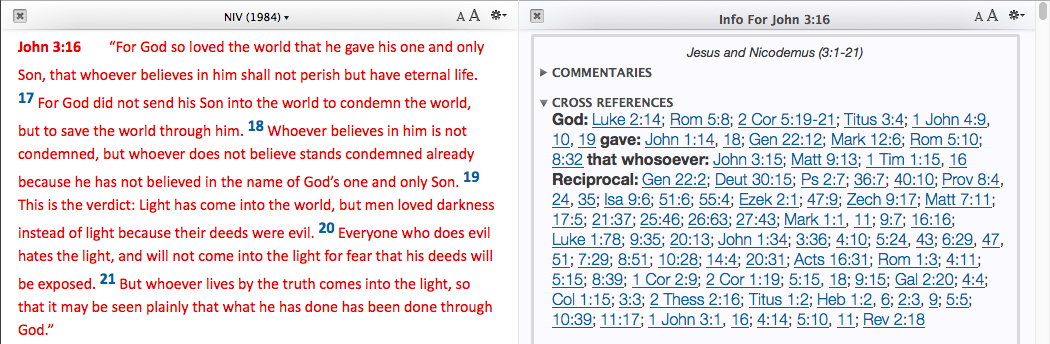
 

X Ref 1


yields this:


X Ref 2


The Info Pane is useful in the Gospels, too, where it pulls up “Parallel Passages.”

Whereas in Accordance 10 I had to create and save new Workspaces with relevant commentaries for a given book of the Bible, now in 11 the Info Pane means I can get up and running with research on any book, right away.

And the speed with which everything operates from the Info Pane is quite incredible. Long-time Accordance users probably won’t be surprised, but it is good to see that even a more advanced and robust feature like the Info Pane operates with the same expected speed that makes Accordance what it is.


2. Custom Upgrades


New to the online store in Accordance 11 is the chance to “Custom Upgrade,” which provides users with a discounted collection rate if they already own modules contained in that collection. The Custom Upgrade option is recently also available for various Add-on Bundles. This new feature will especially be welcomed by long-time users who will essentially be rewarded now for past purchases, should they decide to upgrade in various instances.


3. Quick Entry


When I first heard about this feature, I didn’t think it would be that big of a deal–predictive text entry is already available in Google and a host of other free programs. But Quick Entry really does speed up my work with Accordance. One especially neat thing about this feature is how it works with Bible texts.

One can toggle between searching a Bible by Words or Verses. But here I get both options suggested at once, just by typing in the letter “G.” I can then select an option from the drop-down menu, which narrows if I type additional letters. This is a good refinement to the program.
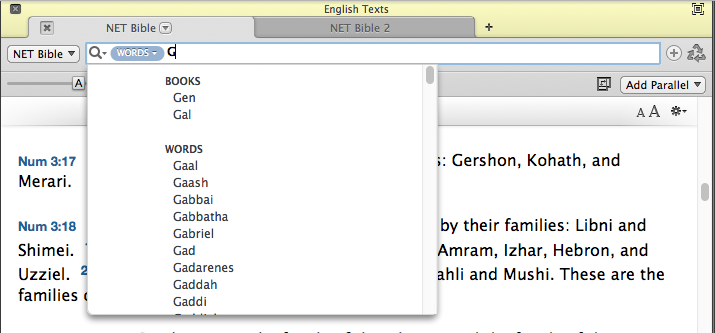
 

Acc11_Quick Entry


4. Better Library Organization for Tools


You can have Accordance 11 automatically organize your tools into the following folders:
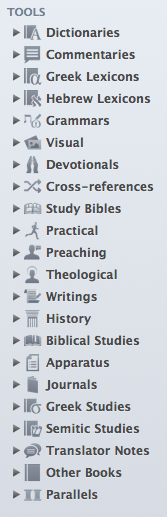
 

Acc11 Library Tools Organized


Of course, further customization is possible, but this makes for a great starting point, having everything so well-sorted, which it wasn’t in Accordance 10. David Lang from Accordance has explained the re-organization in detail here. (If you’re already an Accordance user considering an upgrade to 11, you’ll appreciate what David has to say.)

This easier organization also greatly enables what has recently become my most used new feature in Accordance 11….


5. Research, or, The Feature Formerly Known as Search All


Search All (Accordance 10) was fine, but Research (Accordance 11) is even better.

We’re in the season of Advent now. What does my Accordance library have to say about this important time of preparation? Think of Research as harnessing the power of a Google search, but utilizing the content of all the books Google only allows limited preview to. In a matter of seconds, or less, Accordance goes through all my Dictionaries (selected in the drop-down menu at top left in the image below) for “Advent.” The resources that have search hits are neatly listed in the left sidebar, and the main pane of the window below allows me to quickly scroll through all the places “Advent” appears. There is an option to see “More…” of a hit result, while still staying in the same Research tab. Or you can just click on “Open” to go directly to the resource:

Research in Acc11At first I thought the new Research was just pretty cool, but it’s much more advanced than Search All, well-executed, and easy to navigate. I find myself using it much more than I used Search All in version 10.

How does it tie in to the newly organized Library? From that drop-down menu that gave me “Dictionaries,” I can hone my search in on any category of tools in the library–Grammars, Commentaries, Greek Lexicons, etc.

Here–it’s worth showing two more search results, just so you can see how cool a thing Research is:
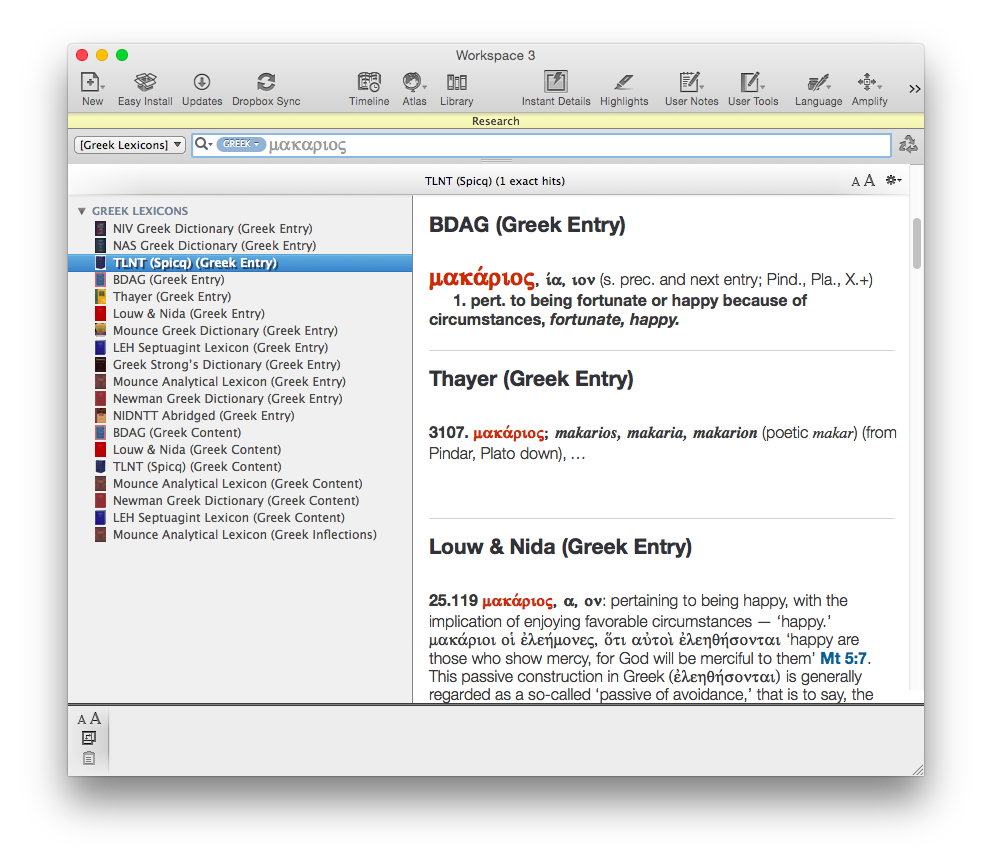
Acc11 Research_Greek Lexicons

Acc11 Research_Jonah

6. User Notes Extended to Commentaries and Books


Accordance 11 offers some improvements to User Notes, not the least of which is that users can at last take notes on commentaries, books, and other non-biblical resources they own. You can do this in Kindle, iBooks, Logos, etc., so I’m glad Accordance is caught up here. This has been a long-requested user request, so will be a much-appreciated addition.

You can make a single note file that is notes on one book, or you can make a note file that includes notes on multiple books you own.

There is also now full Unicode support for Notes.


7. Speed


Okay, this is definitely not a new feature, but it’s so much a part of what makes Accordance Accordance that I am compelled to mention it. Even running Research queries returns results before you can even think to navigate away to Firefox and check your email. Once again Accordance has added new features without sacrificing their trademark speed.


Desiderata


There’s still room for improvement, though. Here are some desired features:


1. More Seamless Syncing for User-Created Tools and Notes


The iOS version of Accordance allows the syncing and editing of User Notes, but does not allow the preservation of formatting styles therein. The iOS app also does not permit editing of User Tools at all. Accordance has noted that both are forthcoming in future updates, which I’ll be happy to see. The lack of ability to edit User Tools on iOS however, has led me to begin to use Evernote in place of Accordance on iPad, since Evernote edits and syncs automatically across multiple devices.

This is not a criticism of Accordance 11 per se (i.e., the desktop app), but it does affect the overall Accordance user experience. The installation screens in Accordance 11 hint that a 2.0 iOS app is not too far off.


2. More Robust Editing Capabilities in User Notes


I’ve often wished (whether in User Notes tied to a biblical verse or for my “Books of the Bible” User Tool) to be able to drop and drag images, or even just make a bulleted list easily. There are workarounds, but not easy ones. Editing options are fairly limited:


 

User Notes 1


User Notes 2


The “Auto Link” button was an addition in a later version of Accordance 10. That’s one thing Evernote can’t do; any verse references in notes you write are automatically hyperlinked to the version of your choice.

Accordance has hinted more is on the horizon. In the meantime, I’ve become reliant on with Evernote for sermon preparation and note-taking.


3. Future Additions to Info Pane


Given that Logos has had both a Passage Guide and Exegetical Guide since at least Logos 4, Accordance’s Info Pane feels a bit overdue. Similarly, BibleWorks’s Resource Summary Window (bottom left pane here) quickly links to grammars, lexicons, and other verse-by-verse references.

At the time of this review, the Info Pane does not have a Grammars section or Lexicons section or (what would be really fun) a Diagrams section. The improvements in Library organization and the Research feature make it really easy to get to words in multiple lexicons at once, so this is not a huge critique, but a more robust Info Pane would be great. Knowing Accordance’s responsiveness to user requests, I expect the Info Pane will grow and expand over time.


Conclusion: Get It


I have a contact form at Words on the Word. (Feel free to drop me a line.) Easily the most common inquiry I receive is folks asking things like, “Which is better: Accordance or Logos or BibleWorks?” or, “How can I do x in Accordance?” This post is not a comparative review (this one is). So I won’t answer that question in those terms here.

But I will say that the speed of Accordance and its search capabilities are hard to beat. Bibleworks is just as fast and can also run complex queries, but Accordance has more biblical studies resources, and just as many (or more) original language resources, not to mention the most customizable workspace setup of any software program (Bible or otherwise) I can think of. You gathered from the above that I like Evernote–though I also find myself wishing I could set up my workflow in it as flexibly as I can in Accordance.

Thinking about diving in? Check out all the Accordance collections here.

If you’re already using Accordance and wondering about the upgrade to 11, it’s a no-brainer. Go for it. It’s quite affordable for all the features you’ll get. The upgrade costs $59.90 ($49.90 if you have Accordance 10). And don’t forget about potential discounts you may qualify for.

Accordance has quite a few sources of support, too. Check out their blog for more features and tips and tricks in Accordance 11. All their sources of support (a video podcast, user forums, online seminars, and more) are here.

Accordance 11 is one of the apps I use almost every day. Accordance 10 was already good enough to be my first stop in Bible software. Version 11 has taken several significant steps forward that make it even more enjoyable and efficient to use.


Thanks to Accordance for the review license to Accordance 11. See my other Accordance posts (there are many) gathered here.