Here’s another quick tip for Accordance users. This one has been there a long time, but I just noticed:
My most regular use of General Tools in Accordance (Bible dictionaries, books, etc.) is to search them for each week’s passage that I’m preaching on. For example, I’ll search the IVP Dictionary of Jesus and the Gospels first by Scripture reference and then by English content and/or section heading. (The tool may have information relevant to me that is best found with one or the other search.)
I already was aware that you could add a second search field for an “AND” search, but I just realized yesterday that you can also select “OR” (from a drop-down menu) before you select your second search field and term:
So now in one search setup (which I can save for next time), I can have this Accordance tool return hits for every time it mentions either Matthew 28 by reference or the Great Commission in the English content… and even throw in another “or” of “Discipleship” in the Entry field (dictionary section titles).
Though Accordance for iOS currently offers the ability to just have two panes open at a time, I have found a good workaround that simulates the effect of having three texts or tools readily available at once.
This image is from an iPhone, in landscape mode. (Click or open in a new tab to enlarge.)
Reading Obadiah
The left pane is the Hebrew text of Obadiah. For my second pane (on the right) I select a tool (commentary) of some sort that has hyperlinked individual verses, which I can then tap (“19,” above) to have a popover English translation show up.
I’ve been making my way through Obadiah in Hebrew like this, for a forthcoming review (6/9/14 UPDATE: now posted here). This way I can read the Hebrew, have a commentary open, and easily get an English translation, all from the same screen.
After using the speakers for a Sunday morning class, I put them on top of our family van as I was strapping in one of the kids. I got my almost-two-year-old daughter strapped in, we were all happy, the kids had done great in church, and we were going out to eat–a rare treat on a Sunday afternoon. The sun was even shining.
So with everyone strapped in and on our way to family lunch, about 10 minutes into our drive–when we were on the highway, of course–I heard a loud thud at the top of the car and saw in my peripheral vision a blur of pink and purple bouncing around behind me as I sped away.
WHAT WAS THAT?
Oh. The speakers. That I had left on top of the van.
I had received the speakers gratis as a review sample, but I had become fond of them. They were quite convenient for toting around and using in various settings. It was especially nice to amplify music without any wires.
I quickly decided that, yes, I did want to go back to get these speakers. But being on the highway, I would have to exit, get on the highway going the other direction, exit again, and go back the way I came.
By the time we neared the spot of the incident, it had been about 8 minutes. Surely some car–or multiple cars–had by now demolished my precious pink-and-purple players of Passion Pit, Pavement, and Petra.
But, no.
THEY WERE STILL THERE.
I slowed down and turned on my hazards to get off to the shoulder to (carefully, only when there were no cars) walk into the highway to retrieve my speakers.
They were right there, miraculously between the two lanes. A hundred cars must have passed them, leaving them mercifully in tact.
As I pulled over and slowed to a stop, the car behind me obliviously moved across the lane divider to pass me and…
Yep.
RAN OVER MY SPEAKERS.
Well, not just ran over. CRUSHED them.
They broke into a hundred pieces, and the car just cruised on by.
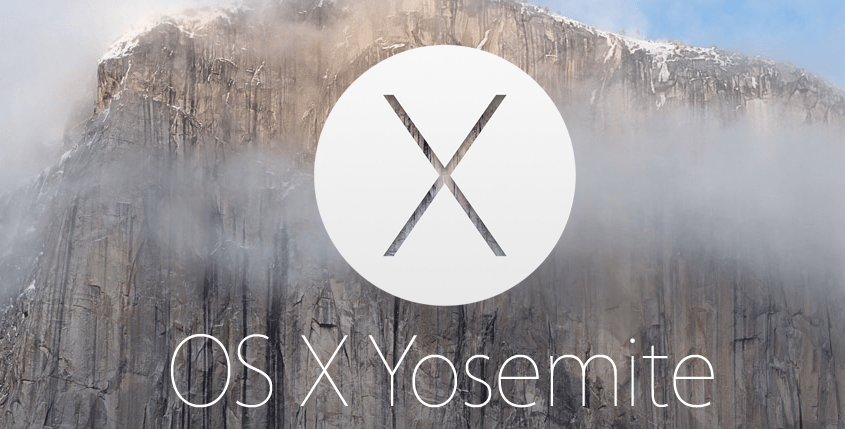
Today Apple announced its new OS X update, Yosemite, to be released this fall. They have also offered free access to the beta version, which is available not only to developers but also to others.
Check out more about Yosemite at the Apple site here, from which the above screen capture comes. The full press release is here.
More information about the Beta Seed Program is here. Here’s what you’ll see once you sign up:
As with any beta testing, there are caveats to consider, but those who want access to the new OS this summer can check it out:
To join the OS X Beta Program, just sign up using your Apple ID. When the beta software is ready, you’ll receive a redemption code that will allow you to download and install OS X Yosemite Beta from the Mac App Store. Then go ahead and start using it. When you come across an issue that needs addressing, report it directly to Apple with the built-in Feedback Assistant application.
Here are, in no particular order, the top 10 tasks for which I use Logos Bible Software. Most of these uses are for preaching and teaching preparation, or for when I’m preparing to lead a Bible study. This post is a visual tour, so if you want to see any image in more detail, you can click to enlarge it or open it in a new tab or window.
10. To look up a word in a dictionary.
Here’s a word l00k-up in the Anchor Yale Bible Dictionary, which I can do from an already-open text, or as a stand-alone, searchable dictionary. Here I move from the article on Jesus I was reading to an article on “Tax Collector”:
Looking Up a Word in Anchor Bible Dictionary
9. To annotate commentaries.
Here you can see both highlights (which sync seamlessly across devices) and a notes icon from where I have recorded my own reactions:
Commentary Reading on Logos on a PC
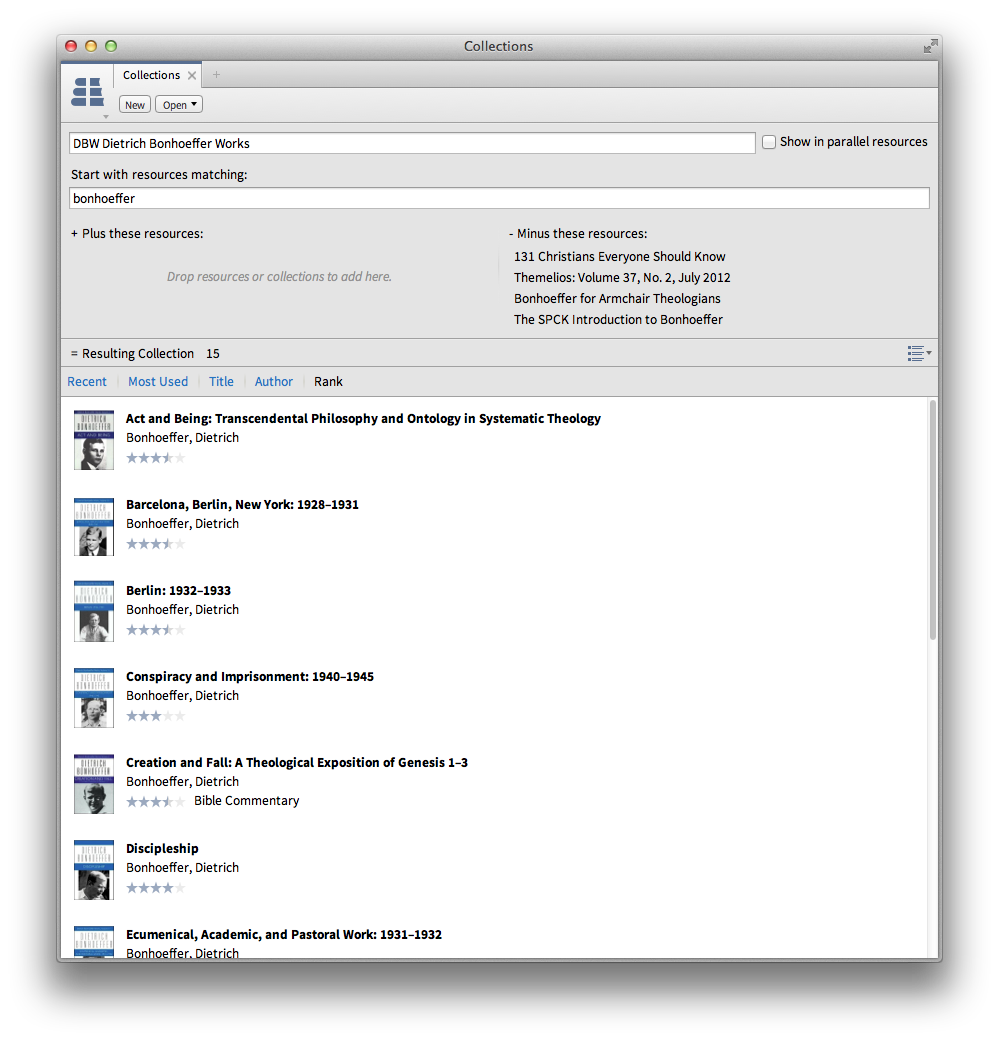
8. To create (and then search) my own defined collection of resources.
7. To navigate through a book via Table of Contents sidebar.
As at left here:
Sidebar Table of Contents
6. As a portable library.
Here’s the searchable library view in Logos in iOS, where one can access almost all of one’s library. In iOS you can access all of your resources with an Internet connection without having to download them. You can also download them, so that you don’t have to use data or a wireless connection. I like the flexibility that offers.
iOS Logos Library
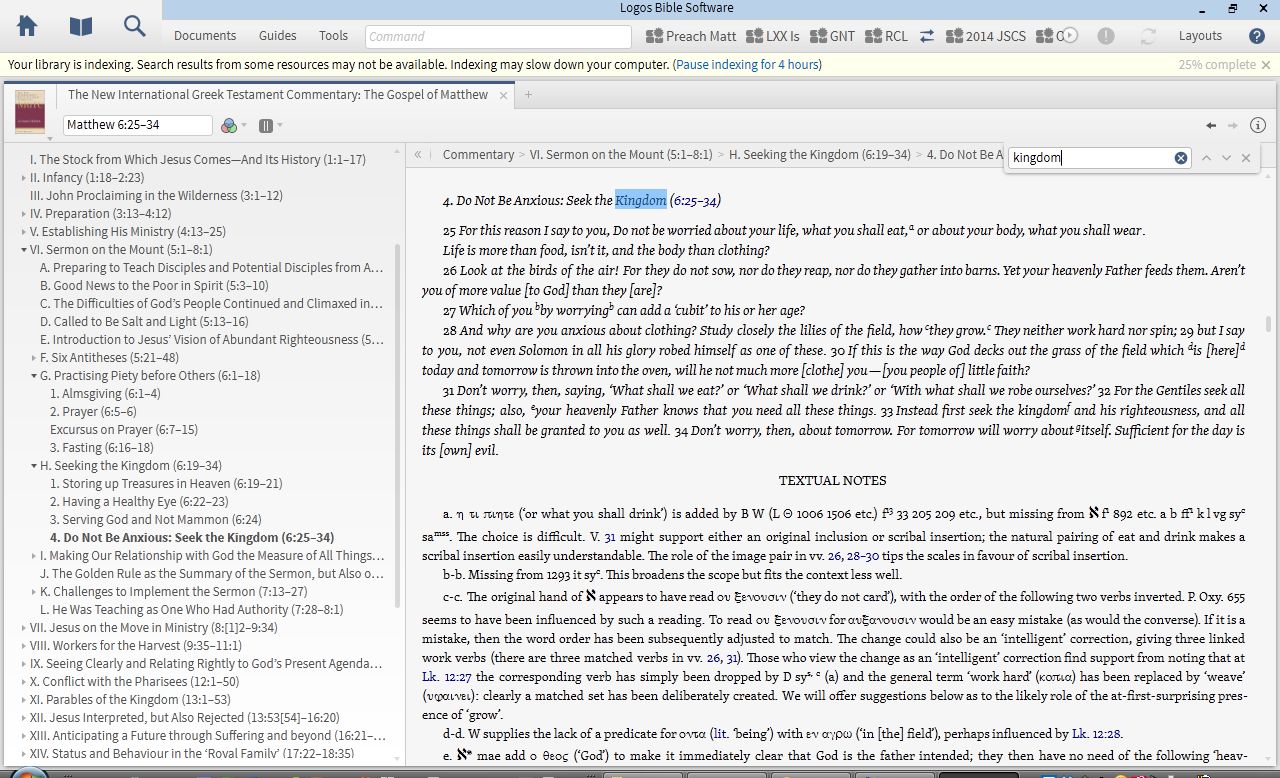
5. For keyword searching a commentary.
This is particularly useful when I want to know not just what a commentary says about a passage, but how it traces a theme throughout the book.
Keyword Searching NIGTC Matthew for “Kingdom”
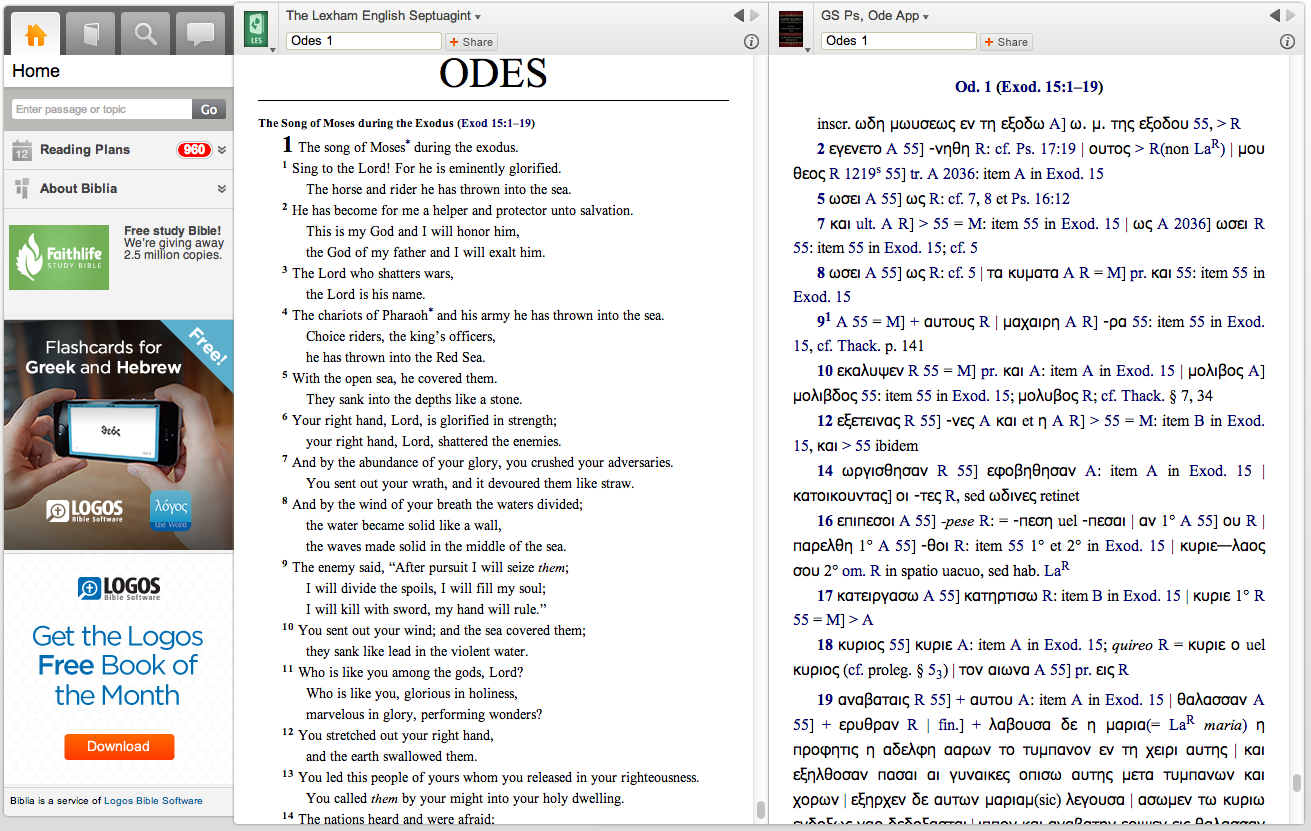
4. Via Logos’s Biblia.com, for quick reference to my Logos library from anywhere with Web access.
Here I am looking at the Odes in Greek and English translation:
Reading the Septuagint at Biblia.com
3. For pulling up at once all I have in my library on a given passage.
Logos’s Passage Guide is available on whatever device you have Logos in; here it is in iOS. Using a split screen, I can read one commentary (and highlight it), as well as see other hyperlinked options to explore:
Passage Guide in Logos iOS
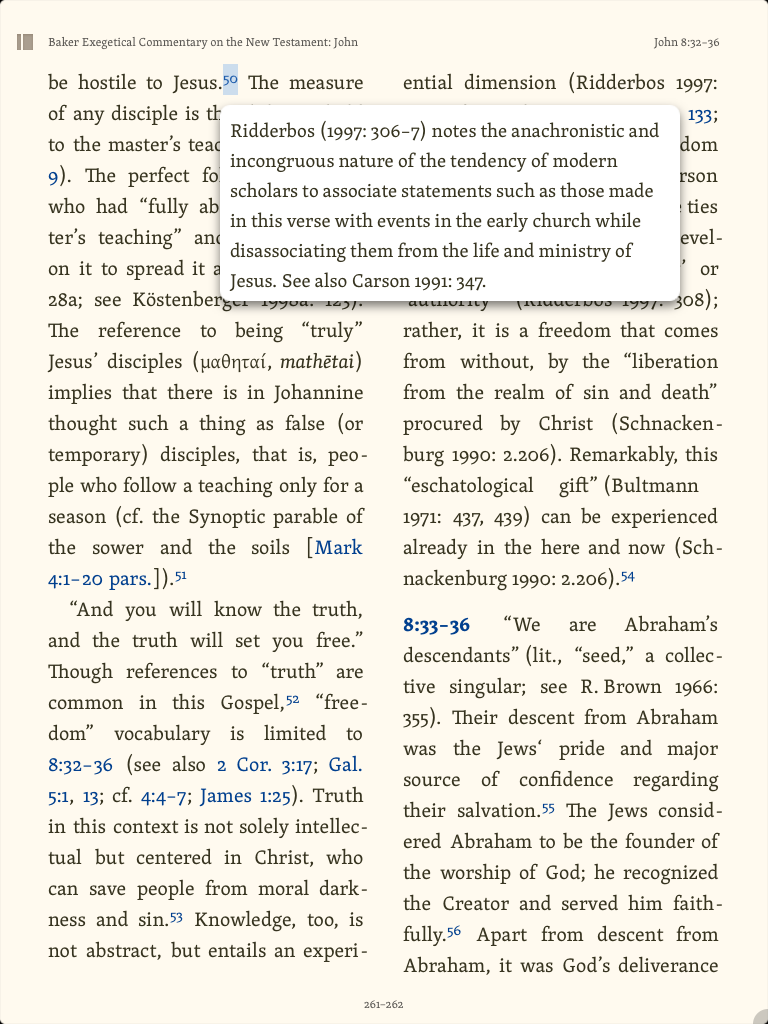
2. For touching footnotes to pull them up.
This I can do in iOS:
Tapping a Hyperlinked Footnote Brings It Up
1. For reading through a book of the Bible, with help.
Here is a layout I used often for when I read with a group of folks through Greek Isaiah in a Year. I could compare multiple Greek texts, a Hebrew text, English translations, lexicons, notes, and more:
Multi-Text and Multi-Resource Layout
The major advantages in Logos are its connections of resources to each other, system of hyperlinks, and ability to sync (notes, highlights, and where you left off reading) across devices. Not only that, but even compared to Amazon Kindle and iBooks, they have the most extensive store/library of resources for biblical studies that I know of. There’s a lot more you can do in Logos than what I’ve highlighted above. You can find all my Logos reviews gathered here.
For an exegesis course in seminary, I was assigned R.T. France’s Mark in the New International Greek Testament Commentary (NIGTC) series. The assignment was to read the entire commentary that semester, and I read every one of its 700+ pages. It was that good.
Like the rest of the NIGTC series, France’s volume focuses first on the Greek text, including textual variants where they arise. France is a careful interpreter and keeps the other synoptic gospels in view throughout the commentary. This is not, however, to the exclusion of a keen awareness of and sensitivity to the literary context of Mark as its own book. Even as he unpacks the lexical range of a Greek word, he keeps the larger contour of Mark in view.
As I mentioned in another France review, despite the technical nature of Mark, France moved me deeply with his interaction with the text. He helped me to know and love Jesus more deeply, using the Greek text of Mark as a means to that end. You can find France’s commentary on Amazon (affiliate link) here. It’s in Logos here, where it is well-produced and thoroughly hyperlinked.
For as much as I’ve reviewed Logos Bible Software, I’ve barely mentioned Biblia.com. It’s a Web-based way of accessing Logos resources you own. This is especially helpful for those times when I just need to pull up a commentary (like France’s) but don’t want to wait for Logos to open, load, or index. It looks like this (click on image to enlarge):
I haven’t found a way to make the ads at lower left disappear. Nor is Biblia intended to be as full-bodied as Logos (note that it’s in Beta). Since you can access it through any Web browser, it’s fairly universally accessible. Only real downside I’ve experienced: unlike Logos on iOS, Mac, and PC, you can’t highlight or take notes in any resources. But for reading texts–two at a time, as shown above–it’s pretty handy.
You can see above how I’m reading France’s Mark on the right, with a Bible open on the left. Regarding the way that Mark introduces John the Baptist at Mark 1:9, France writes:
(ἐν ἐκείναις ταῖς ἡμέραις has an equally formal, ‘biblical’ ring; Mark stands in the tradition of the great chroniclers of the acts of God in the OT.) It introduces a new phase in the story and, in this case, a new actor in the drama.
This is one of many examples of France’s using Greek to help the reader better understand what Mark is up to in his Gospel. His command of Greek and obvious love for God make this the first commentary to reach for when reading, teaching, or preaching on Mark.
Thanks to Logos for the review copy of the NIGTC series. See also my post about NIGTC Matthew in Logos here.
The below is adapted from my full-length review of the print edition of NIGTC Matthew. Here I reproduce some of the content of that post, but with an eye toward the commentary’s presentation and use in Logos Bible Software.
Readers of this blog (and those with whom I worship on Sunday!) will know I’ve been preaching through Matthew this year. I have made profitable use of John Nolland’s commentary almost every week in my preparation.
This is what Nolland says about his commentary:
My central concern in this commentary is with the story Matthew has to tell and how he tells it. Though the reader will recognise that I have been influenced by some scholarly methods more than by others, my work is committedly eclectic.
Nolland comments on Matthew using redaction criticism, grammatical analysis, rhetorical criticism, and more. Though the NIGTC series does not seek to be devotional, per se, and though Nolland’s Matthew is not an application commentary, the author is consistently sensitive to the broader context of Matthew and his aims. (Nolland says he cares about “a close reading of the inner logic of the unfolding text.”)
Nolland’s Introduction to Matthew
The introduction includes the following sections (the bullet points below are all the author’s words):
authorship of the Gospel
the sources for the Gospel
the prehistory of the sources
the date and provenance of the Gospel
the kind of document the Gospel intends to be
the state of the Greek text of the Gospel
aspects of the author’s narrative technique
the Gospel’s use of the OT and of other Jewish tradition
and the theology of the Gospel of Matthew.
Here’s what it looks like in Logos on a PC. You can hide or show the table of contents at the left, and many of its sections have expand/collapse triangles (click or open in a new tab to enlarge the image below):
Introduction to Matthew
Any highlights or notes I add (which you can see above) automatically sync with any other devices that run the Logos app.
Like R.T. France, Nolland would rather elaborate on certain points in the body of the commentary itself, which makes the introduction accordingly shorter. I experienced this as a relief, because (a) I could get into the commentary proper more quickly and (b) when primarily coming to the commentary with a specific passage in mind, I found quite a bit of substance in the commentary proper, without having to go back to the introduction. Getting to a given passage via Logos is almost instantaneous.
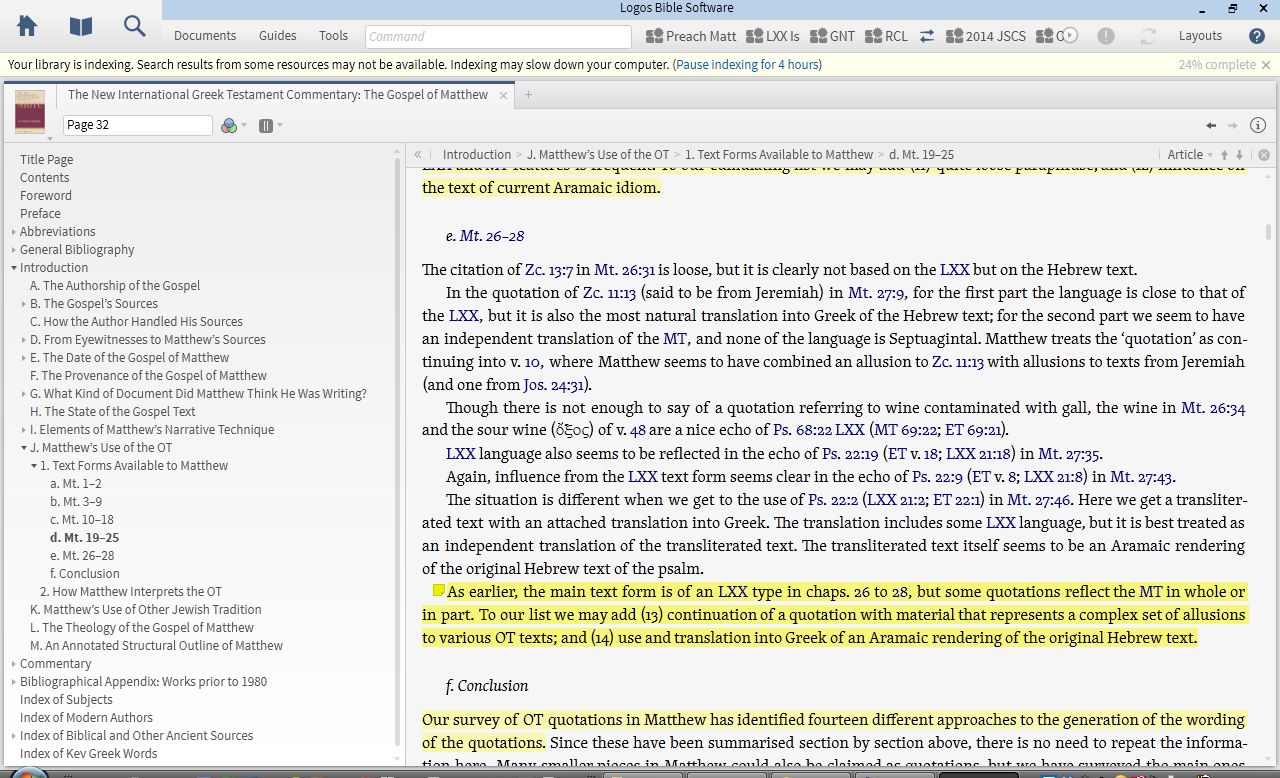
Nolland on Matthew’s Use of the OT
There is more of note in the introduction, but “Matthew’s Use of the OT” is probably the most exceptional section (pictured above). It details both (a) what text forms Matthew might have had and (b) how he used them. Nolland lists 14 (!)“different approaches to the generation of the wording of the quotations.” And yet, amid the detail, he can conclude:
Though some of Matthew’s text forms come to him straight from the Gospel tradition, the overall impression is of a man who freshly scrutinises, at least on many occasions, the OT texts to which he appeals, and is able to do so in Greek, Hebrew (not always the Hebrew of the preserved MT), and occasionally in Aramaic. When it suits him to do so, he produces translations that reflect influence along more than one track of tradition.
Nolland then identifies eight different ways in which Matthew uses the OT. This section of the commentary alone is worth half the price of the commentary. A nearly 20-page “Annotated Structural Outline of Matthew” at the end of the introduction is quite impressive (and maybe even worth the other half of the price of the commentary).
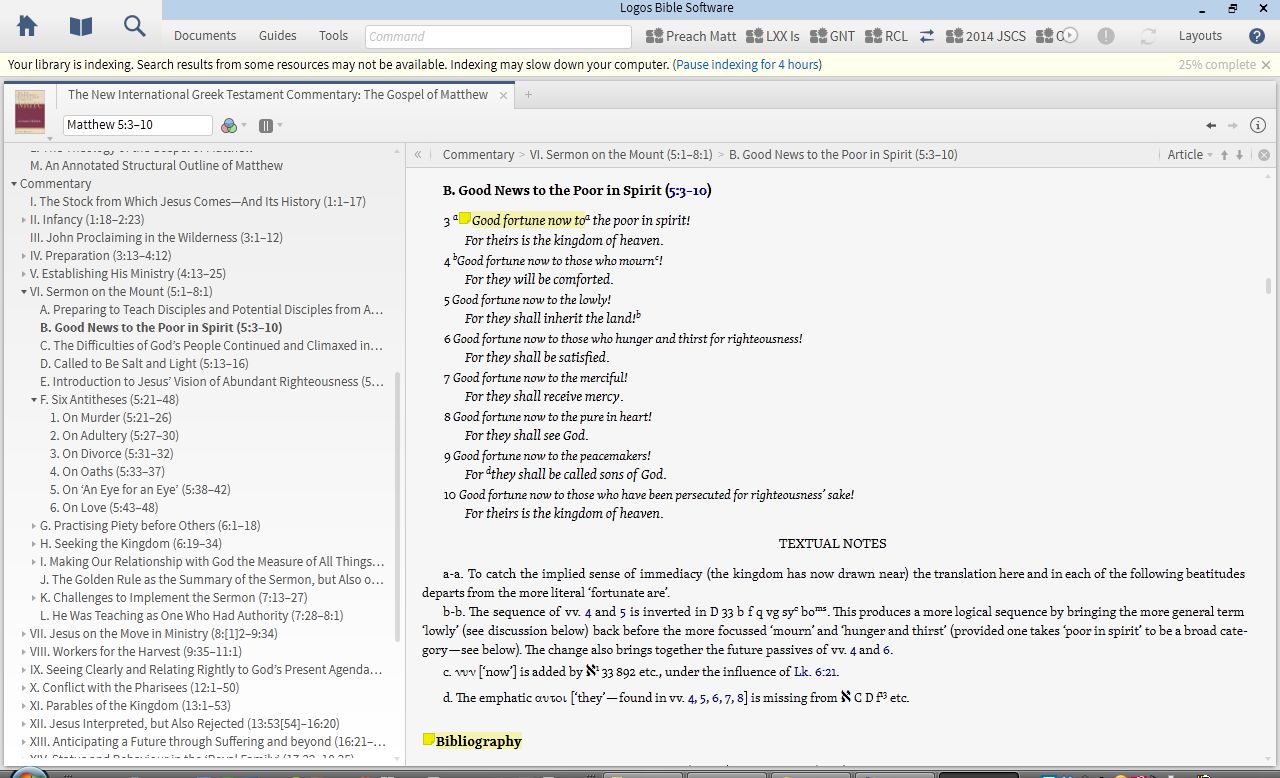
The Author’s Translation of Matthew
Nolland admits that his translation of Matthew (located at the beginning of each section) “may at times be wooden,” and this woodenness is noticeable in a number passages. For example, the genealogy reads: “Abraham produced Isaac; Isaac produced Jacob….” Nolland acknowledges the “unfortunately impersonal and nonbiological” implications of that translation. Indeed, a better word is needed.
And for the Beatitudes (where the Greek μακάριος is admittedly difficult to translate), he has, “Good fortune now to….” I liked the “now” part of this (it carries an “implied sense of immediacy”), but the more traditional “blessed” still seems to leave room in English for the divine blesser, who should be kept in view here. “Good fortune now” seems to miss that.
The commentary (with original translation)
A more readable translation would not have compromised Nolland’s aims in producing a fairly literal rendering of the Greek. It wasn’t an enormous distraction from a well-written commentary, but it stood out, nonetheless.
The Commentary Proper
It would be impossible for Nolland to be comprehensive at every turn. There were some Greek words or passages of Matthew where I had hoped for more detail, but on the whole, Nolland is thorough.
For instance, in the narrative of the devil’s temptation of Jesus in Matthew 4, Nolland writes of verse 1:
The opening ‘then’, the role of the Spirit, and the Son of God language to come in vv. 2 and 6 create a strong link between 4:1–11 and 3:13–17.
and:
Because of the agency of the devil (and the specific temptations to come) πειρασθῆναι has been translated ‘to be tempted’, but there is in fact a play on the two senses of the πειραζ- root: ‘test’ or ‘tempt’.
This commentary matches literary sensitivity and Greek analysis with conclusions that can easily lead the reader to application. In the same passage: “[T]he devil suggests that sonship is a privilege to be exploited, that Jesus should use his opportunities to see to his own needs.”
Nolland often presents multiple scholarly interpretations of a given passage before offering his own–and even then, he does it humbly (though not unconvincingly). In the Beatitudes, for instance, he notes 11 different understandings of “poor” and four different understandings of “in spirit” for Matthew 5:3. One gets the sense that the author is just as interested in historical interpretation of given passages as he is with his own. This is a good thing.
In Logos, one can search the commentary using control+F (PC) or command+F (Mac):
Keyword searching NIGTC for “kingdom”
One cool thing about this is that if you are already in Matthew 6:25 of the commentary (as above), the search results start right where you are (instead of going back to the beginning of the commentary). This way one can research a given word or theme as it unfolds in Nolland’s writing.
Concluding Evaluation
Despite the technical nature of the commentary (which I appreciated), the writing style is engaging and accessible, even inspiring in places. I loved this:
Jesus proclaims the imminent arrival of the kingdom of heaven. God now intends to establish afresh his rule among his people. If people are to be ready for this development, then repentance is urgent. Only a fundamental change of life direction will match the needs of the moment.
The bibliographies are a gold mine. One wonders if there’s any journal article or monograph on Matthew that Nolland hasn’t examined. Even so, he says in his preface that he had to trim his listing to accommodate the requirements of the editors!
My critique of the author’s translation notwithstanding, Nolland’s Matthew is a magnificent work, probably even one of the very first places one should go when doing in-depth study of Matthew’s text. Nolland does not disappoint in his technical analysis of words and passages, and yet he somehow is able to keep the Gospel as a whole before him and the reader as he expounds on its component parts. The reader cannot help but be impressed throughout the commentary, both with Nolland, and with Matthew’s Gospel which he describes.
Thanks to Logos for the review copy of the NIGTC series. I will post more in the future about the series and its use in Logos.
Ask a group of pastors, seminarians, professors, or serious Bible readers, “What one commentary series on the Old Testament would you most recommend?” and you’re likely to hear: “NICOT.” Eerdmans’ New International Commentary on the OldTestament blends scholarship with application in a readable and engaging manner. Few, if any, commentary series are consistently this good throughout the series. And I don’t know of any other series that has such broad ecumenical appeal.
NICOT in Olive Tree has 23 volumes, spanning 26 biblical books. The bundle includes the 2010 volume on Hosea. The only volume currently in print that is not here is The Book of Judges, by Barry G. Webb (2012). (Judges is not available in any other Bible software at the moment.)
General editor Robert L. Hubbard Jr. writes of the series:
NICOT delicately balances “criticism” (i. e., the use of standard critical methodologies) with humble respect, admiration, and even affection for the biblical text. As an evangelical commentary, it pays particular attention to the textʼs literary features, theological themes, and implications for the life of faith today.
As I preached through Isaiah this past Advent, John N. Oswalt’s two volumes on that book were the first commentary I turned to after spending time with the biblical text. While it was always clear that Oswalt knew Isaiah and his milieu well, the author would find himself swept up at times in praise of the God Isaiah preached. On Isaiah 2:2, for instance, he writes:
What Isaiah was asserting was that one day it would become clear that the religion of Israel was the religion; that her God was the God. To say that his mountain would become the highest of all was a way of making that assertion in a figure which would be intelligible to people of that time.
On that passage’s promise of peace among nations, he concludes:
Until persons and nations have come to God to learn his ways and walk in them, peace is an illusion. This does not mean that the Church merely waits for the second coming to look for peace. But neither does it mean that the Church should promote peace talks before it seeks to bring the parties to a point where they will submit their needs to God.
Oswalt is representative of the authors in NICOT, in that he loves the text (and its grammar, history, and background) and loves the God who inspired it.
NICOT in Olive Tree has hyperlinks to biblical references and commentary footnotes, which you can easily and quickly view in the Bible Study (computer) app through the Quick Details corner (by hovering over the hyperlink), or as a pop-up window (which can then also pop out and keep your place in a separate window). It’s just as easy to tap a hyperlink in the mobile app.
There are two ways I’ve used NICOT so far.
1. I use NICOT as my starting point in the main window.
After some time in the biblical text, I have made my way through parts of NICOT by starting from the commentary. I can use hyperlinks to read the verses being commented on, as well as any other references. I can keep a Bible open in the split window and have it follow me along as I read through NICOT.
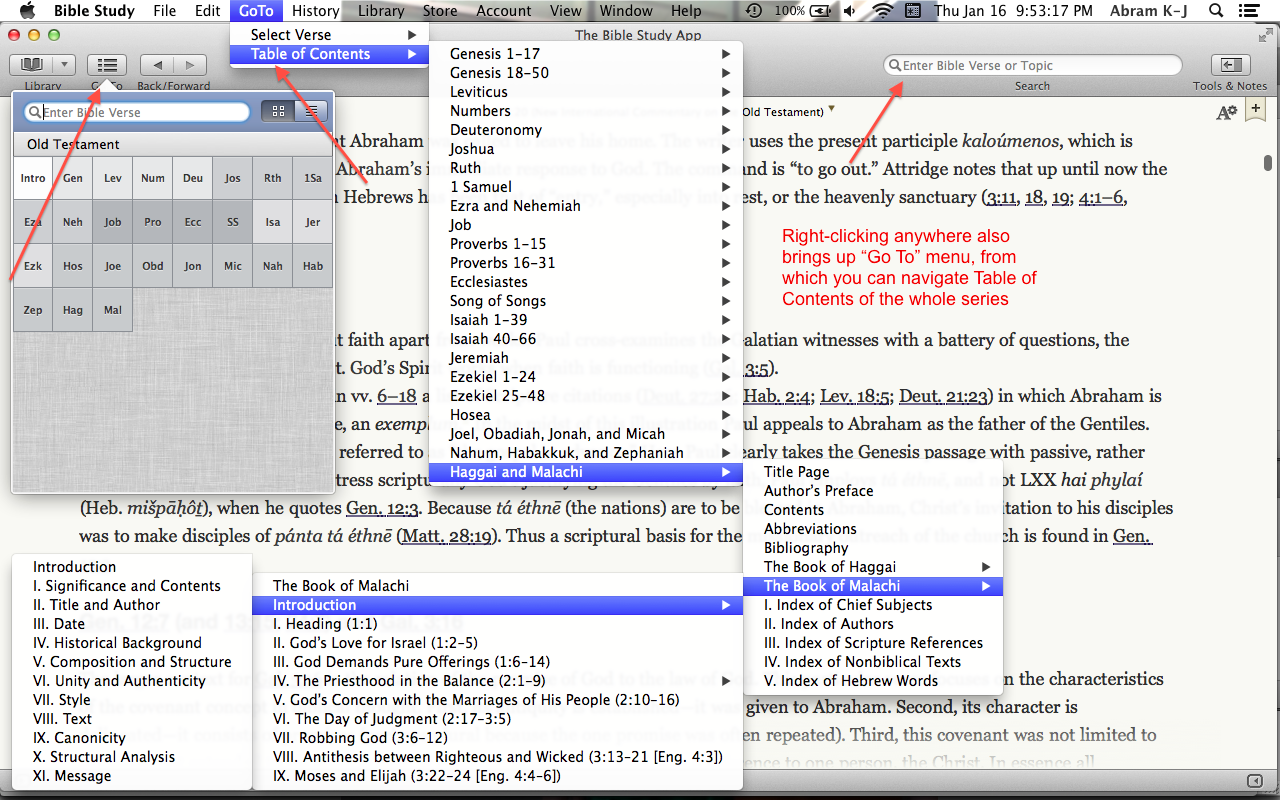
Using NICOT this way, there are quite a few ways to get around, both by looking up a verse in the commentary, and by navigating its Table of Contents. You only need to use one of these options at a time, but here they all are:
(click to enlarge image)
Note that from the Go To drop-down menu, I can keep following the sub-menus till I get to a specific place in the commentary (Introduction to Malachi in the instance above). One could also do this from the Go To item in the toolbar, which allows for both verse searching and Table of Contents navigation.
2. I use the Bible in the main window and NICOT as a supplement in the split window.
This has the advantage of letting me use NICOT as one among multiple resources in the Resource Guide, as shown (in part) here:
Resource Guide shows relevant library results (click to enlarge)
In both of the above setups you can take notes in NICOT, highlight, and bookmark your place. You can also do a search on a word or phrase in the commentary, with the results appearing almost instantaneously. One may wish, for example, to find all the times Oswalt refers to the “Suffering Servant” in Isaiah, which is an easy and fast search to run.
In reviewing Olive Tree I have found it to have the most versatile, smooth, and customizable Bible app I’ve seen on iOS. I write more about the Bible Study iOS app here. The fact that Olive Tree is cross-platform makes it appealing to many. Though the desktop app is well-designed, I would like to see a future update where you can create a saved workspace with multiple resources open in various tabs and windows. That, I think, would take the app to the next level.
But everything is here to help you work through NICOT in a way that you couldn’t in print. There are a couple of options (one free and one paid) for Hebrew Bibles, too, if you want to use NICOT in tandem with the original language. (NICOT uses transliterated Hebrew.)
NICOT volumes consistently top the charts of the Best Commentaries site. Preachers and professors, parishioners and pupils will all find much to mine here, as they seek to better understanding the Old Testament and to more faithfully love the God whose goodness its pages proclaim.
Thanks to Olive Tree for the New International Commentary on the Old Testament (NICOT), given to me for this blog review, offered without any expectations as to the content of the review.You can find the product here. For a little while longer, it’s $349.99 for the series, which is 50% off its regular price.
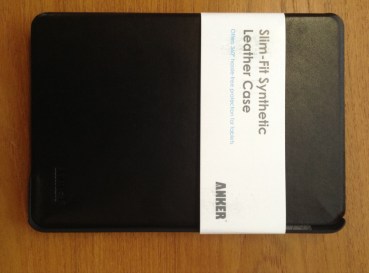
I’ve recently had the chance to try another iPad mini case–the Slim-Fit Synthetic Leather Case from Anker. It’s a decently made case, but it won’t replace my current go-to. I’ll jump right in and break it down into Pros and Cons:
Pros
Even though it’s fake leather, it seems to be built well
There is no visible stitching that could unravel
The cut-out holes (to access camera lens, earbuds, volume switches, etc.) are sized perfectly, as one would expect
The wake/sleep function works as it should–shutting the case puts the iPad to sleep, and opening it wakes it up
I am able to hold the iPad, with the case front folded back, in one hand
The fit of iPad into case is secure and snug
It is a classy-looking case
It is slim and lightweight
Here’s how it looks–the grey material at left is designed to be scratch-free:
Cons
I had a hard time getting the iPad mini out of the case–on the one hand, it’s good that it’s secure, but I was worried something would snap as I tried to remove the iPad (even according to instructions)
Won’t really stay in this position once iPad is in
It is possible to use the case in its prop-up mode, but it often slides and doesn’t stay in place, especially if you have it in the typing position
It’s pricey (retails at $29.99, slightly cheaper on Amazon), given the cons above
It is difficult to access the camera lens for photo and video with the iPad in the case. Since the cover is not a tri-fold, it doesn’t bend back enough to be able to easily take a picture–you’d have to hold the case with two hands or let the cover dangle open
The cons in this case outweigh the pros. Future iterations of the case ought to have some way for the iPad to lock in or not slip when propped up in landscape mode. And a tri-fold front would allow for easier camera access when the case is on. As for protection, the Anker case will get the job done, but there are better options on the market at present.
Thanks to Anker for the review sample, offered for my honest impressions of the case. They make plenty of other cases and products, too. The case reviewed above can be found at Anker’s site here and at Amazon here.
Which Bible software program should I buy? As 2014 begins, my answer to that question is still by far the most-visited post at Words on the Word.
Olive Tree is another popular Bible software option, running on just about any platform and device, whether iOS, Mac, Windows, or Android. I began to review their Bible Study App (for Mac desktop/laptop) here, with the Greek NA28 New Testament in view. In this post I look more in-depth at the NA28 in Olive Tree, with screenshots from their iPad (mini) app.
The Bible Study App for iOS
The Bible Study App is smooth, visually appealing, and easy to learn and use.
Here are a few things I especially like about the app:
You can use “flick scrolling” (as in iBooks) or “page scrolling” (as in Kindle). This accommodates just about any user. I prefer the flick scrolling, so that the books move as a Webpage on my computer would move.
You can search any resource, and view both the results-in-context and individual hits together. As in this screenshot:
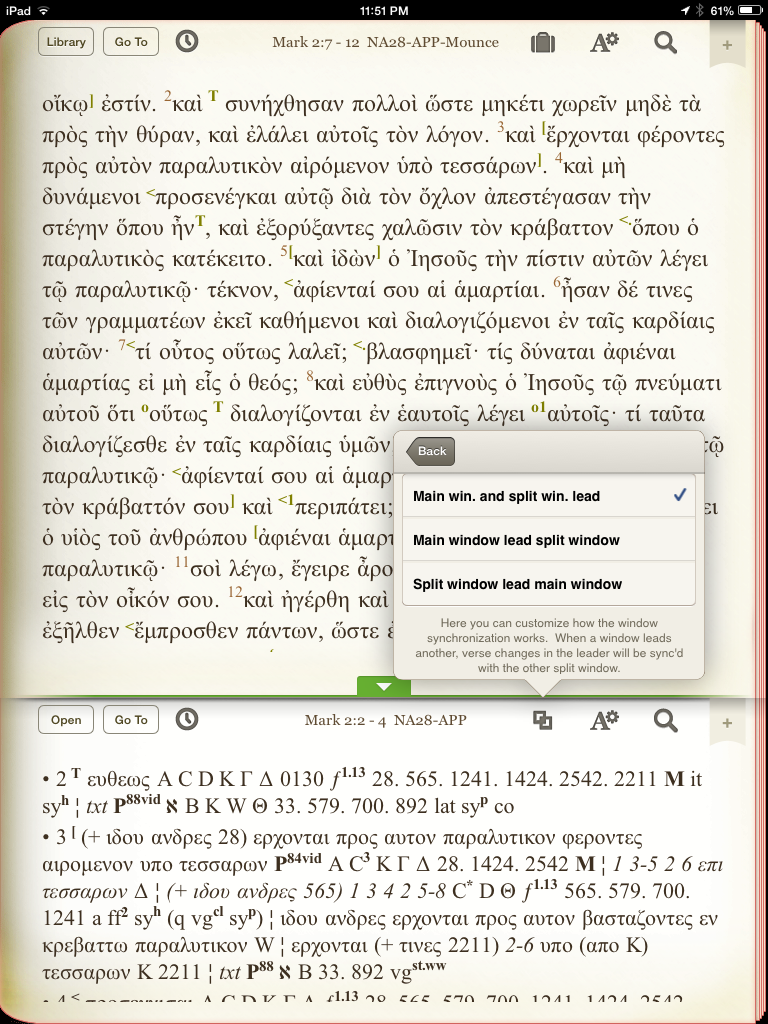
The app allows for you to view one or two resources at a time. This is the same as the iOS apps in Accordance and Logos. What I like about this app is that you can choose whether you want to sync the two windows or not. You can also choose which of the two windows “leads” the other, if you tie them together. Or you can set it up so that whichever one you move (top or bottom/left or right) causes the other to move:
There is a whole host of “Gestures/Shortcuts” preferences in the “Advanced Settings” menu. You can assign shortcuts to various gestures. I don’t know of any other iOS Bible app that is this versatile. My two favorites:
Two finger swipe left and right takes you through your viewing history, which makes navigation through various passages all the easier. This even works across modules, so that I can swipe between the NA28 and the iPad User Guide I might have just had open. No need to go through menus.
Two finger tap takes you from any screen right to your library so you can quickly get at your resources.
NA28 in Olive Tree
There are a few purchase options for the NA28 in Olive Tree. I’ll look here at the “NA28 with Critical Apparatus, Mounce Parsings, and Concise Dictionary,” which you can find here. At the time of this blog post, it’s on sale for 50% off, so $45 instead of $90. You won’t find it cheaper elsewhere, in any format. The text and apparatus are what you’d get if you bought a print version; the parsings give morphological information, and the dictionary gives lexical detail.
There are some distinct differences between the NA28 and the NA27. If you go about halfway down this post, you can see more detail (as well as click through to some good links) as to what the changes are.
Here I have the text and apparatus open, and have simply tapped once on a Greek word to bring up a pop-up window with a gloss and parsing:
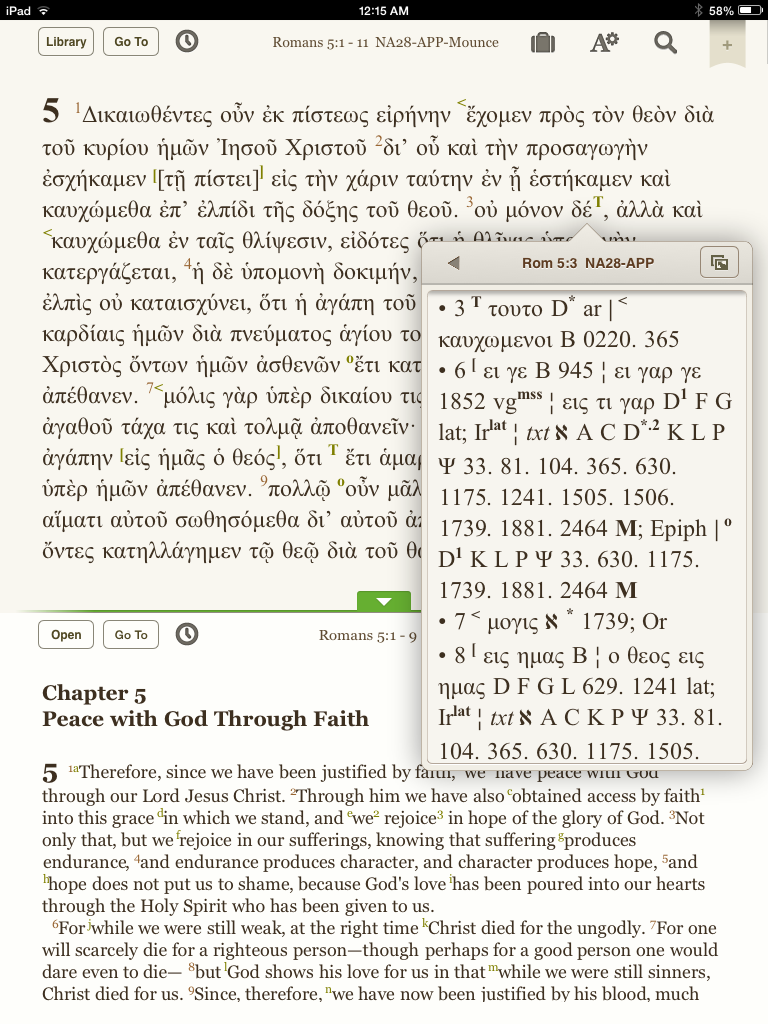
Another possible arrangement would be to use one window for the Greek text, and a second window for an English translation. In that case, one can click on the sigla in the NA28 text for a pop-up with the apparatus. (And still get parsing popups from the surface text, when needed.) This is a good way to economize space:
I appreciate that just a short tap is all that’s required to bring up details about a word or information on a text-critical sign. I find the app overall to be quite intuitive and aesthetically pleasing. It’s fast on word searches, too.
One critique of the NA28 apparatus is that the text-critical sigla are not hyperlinked to their meanings. In the Accordance version of NA28, for example, when you hover/click/tap on sigla and abbreviations from the apparatus, you instantaneously see (in a popup window or instant details window) what they represent or stand for. In Olive Tree, there is a workaround (described here: bookmark the relevant section of the introduction for quick reference), but this is not an improvement on what one would have to do with a print text anyway. It’s not unmanageable, but also not what one might hope for in this medium. So one will need to regularly consult the NA28 introduction, which is included with the text.
Olive Tree has one of the more active and better Bible software blogs I’ve seen. I’ve learned a good deal from it. Check it out here, especially this post that shows how to use a dictionary in the iOS app.
Since Olive Tree is new to me, and since I already use other Bible softwares, I’m still trying to figure out how it will make its way into my overall workflow. But its smooth interface, speed, and snazzy iOS app will have me coming back for further exploration.
Thanks to Olive Tree for the NA28 with Critical Apparatus, Mounce Parsings, and Concise Dictionary for the purposes of this blog review, offered without any expectations as to the content of the review.You can find the product here.














 Words on the Word