The exquisitely designed 2Do app is Apple’s App of the Week in the iOS App Store. It’s usually $15 but is now free. The accompanying Mac app is 50% off, too.
I’ve reviewed Things and OmniFocus, and will soon review 2Do.
For now I can simply say: this is one of the most robust and beautifully designed apps I’ve seen on iPhone or iPad. The developers have–with their imagination and execution–far exceeded what one sees in a typical iOS app.
Read all about the iOS features here. Download it free (for a few more days) here.
When I preached through Jonah last Advent, I knew the JPS Commentary on Jonah would be helpful. What I wasn’t expecting was how often I would eagerly turn to Kevin J. Youngblood’s new Jonah volume in the recently begun Hearing the Message of Scripture commentary series. It might be the best commentary (in this reviewer’s humble opinion) written on Jonah.
Format of the Commentary
Each passage of Jonah includes the following sections:
Main Idea of the Passage–a short, couple-sentence overview, where Youngblood helps you get oriented to the text.
Literary Context–The author shows how the passage under consideration ties in with the rest of the book.
Translation and Outline–the author’s original translation and visual layout of the biblical text.
Structure and Literary Form–this looks at literary features and the rhetorical aims of Jonah. This section is especially strong.
Explanation of the Text–the primary section of each passage, comprising the verse-by-verse commentary proper.
Canonical and Practical Significance–though Youngblood is plenty practical throughout, this section is especially helpful for preachers, teachers, or any Bible reader wanting to know how to apply the message of the text.
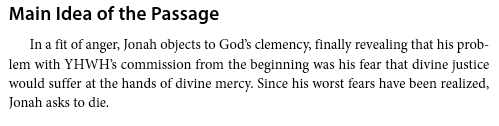
For example, here is Youngblood on the main idea of Jonah 4:1-4:
He then situates the passage in its larger context:
From there he relates Jonah 4:1-4 to the patterns of the rest of the book (“Every encounter with Gentiles brings Jonah to a crisis point”), surmises why Jonah wants to die (“Jonah cannot see how YHWH could simultaneously maintain his covenant faithfulness to Israel and grant clemency to Nineveh”), explains the text in detail, and then relates it to Moses and the other prophets and their interactions with “the nations.”
Youngblood’s Insights Make the Text Come Even More Alive
Youngblood makes the literary features of the text come alive. Regarding Jonah’s short stint in the belly of a fish, Youngblood writes:
The fish, however, functions as a means of deliverance and transportation from the murky depths back to the orderly realm of dry land. In this respect, the fish is the antithesis of the ship, which carried Jonah from the orderly realm of dry land out to the chaotic deadly sea.
Correspondingly, Jonah’s disposition and activity in the fish is the antithesis of his disposition and activity on the ship. Whereas Jonah pays out of his own pocket for passage on the ship, the journey in the fish back to land and life is free, courtesy of YHWH.
He continues to unpack the “important contrast” between ship and fish to help the readers with “the peak episode of the book’s first main section.”
This sort of analysis and clear explanation is emblematic of what the reader will find in every section of the book.
Final Evaluation: Easily a Top 3 Jonah Commentary
And what’s not to love about the first paragraph of the Introduction mentioning a Bruce Springsteen song? Here it is, by the way:
To write a nearly 200-page commentary with a 20-page introduction on a 4-chapter book of the Bible is no small feat; and none of what’s here is fluff. Youngblood notes in his introduction: “An understanding of three overlapping contexts–canonical, historical, and literary–is critical to the book’s interpretation.” He helps the reader attain ample understanding of those contexts and more.
Youngblood says only that this volume “strives to advance the discussion regarding Jonah’s message.” I think it does far more. This is easily a top 3 Jonah commentary–maybe even the best one I’ve used.
You can read a .pdf sample of the commentary here. See also my review of Obadiah in the same series.
I am grateful to Zondervan for the gratis review copy of this commentary, which was offered for an unbiased review. You can find the book on Amazon here. The Zondervan product page is here.
I’ve reviewed enough software to know over-hyped copy writing when I see it, so I was initially skeptical at the Things app’s claim to be “a delightful and easy to use task manager” (my italics).
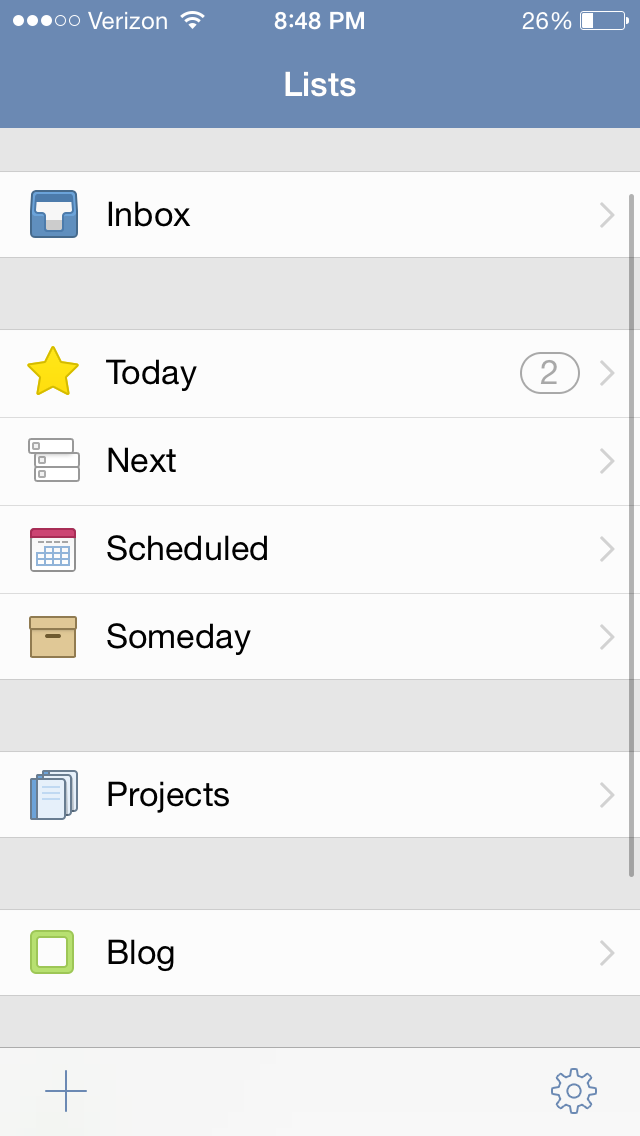
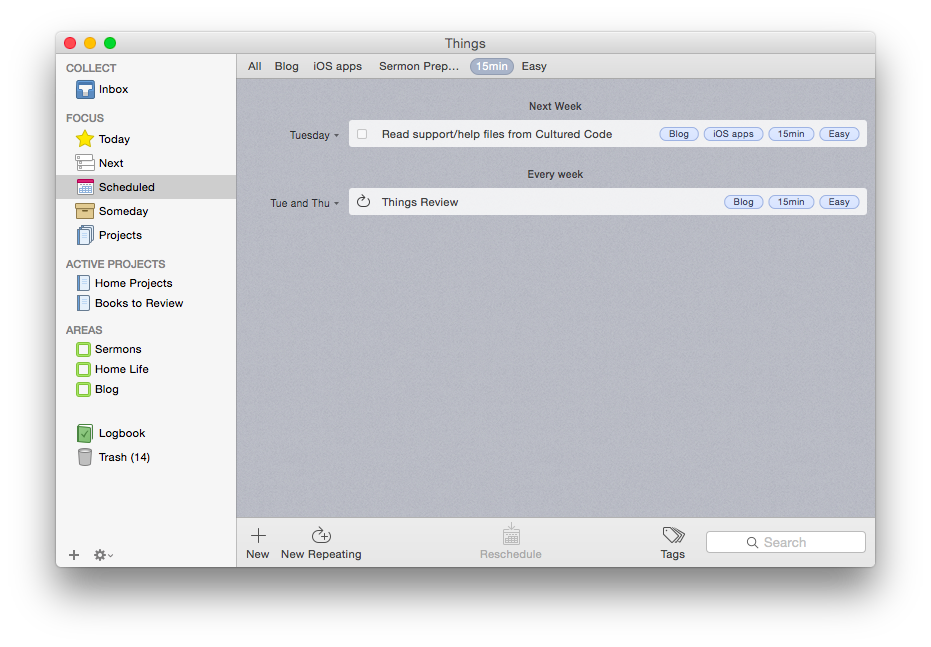
But its aesthetic and usability really are pleasing and enjoyable. The layout is very simple and clean. It has almost a cartoonish (in a comforting way) feel to it. It looks like this:
Mac OSX version (click image to enlarge)
iPhone version
Readers of this blog (especially patient ones) know that I’m a user of OmniFocus, but I’ve also been putting Things through its paces these last few months.
Today is the list for to-dos that you want to start before the day ends. They’re your priorities.
Next is home for all of the to-dos you could start at any time. It’s a good place to look when putting together your Today list, or when you’ve finished everything there and you need more to do.
Scheduled is for to-dos that you’d like to start on a later date, either because there’s nothing you can do to start them yet, or you’d just rather be reminded of them on a specific day.
Someday is the place for to-dos that you might like to get to, but you’re not sure when. Regularly review what you’ve added here to decide if it’s time to act.
It all starts with the Inbox, where you can put items until you’re ready to decide when to do them. Things also allows you to organize by multi-step Projects and Areas of Responsibility, as well as make extensive use of Tags.
Strengths
Things syncs instantaneously via its own cloud service across multiple devices. This makes using it on both a phone and a computer, for example, really easy—you never have to worry about an outdated notification showing up on your device. This is one of the few drawbacks of OmniFocus—if you don’t keep OF open and make sure it’s synced on all your devices, you’ll get a reminder on your iPhone to complete a task you already checked off on your computer. This is not an issue with Things, and it takes away an extra step in the task management process, so you can direct that energy to actually working through your task list.
Things is head and shoulders above other task management apps in this regard.
Things has a really nice tagging system. No GTD-style “contexts,” per se, though you could certainly use your tags as contexts if you wanted to. You can even assign sub-tags to your tags, a feature I really like. So I can tag a task under the category “Blog,” but also assign sub-tags such as “Future post” and “Learn apps.” I used this tagging system to track thank-you notes last Christmas—writing down presents (and who they were from) as we opened them, and then sorting by tag (giver) so that I knew what all I was thanking someone for when I came to their note! Handy, indeed.
The desktop app is feature-rich. As you might expect, in addition to seamless sync with the mobile apps, the desktop version of Things (pictured above) is fuller-bodied than the iOS apps. There is the Quick Entry feature, where a keyboard shortcut (no matter what app you’re using in the foreground, so long as Things is open somewhere) will let you enter a task before you forget. There is a really smooth way of accessing, displaying, and adjusting all your tags (where Things really shines). Editing a task is fast. And it looks good.
The iOS apps have a useful Today widget. Some Today widgets are better than others, and this one is good. You can view items due today, check them off (both without ever opening the app), and tap on New To-Do to be taken to the Things app to make a new entry.
Siri and Things work together (quite nicely). You can set up Things so that reminders you voice dictate to Siri go right into that app as tasks. So that you can use Things safely while driving. As OmniFocus is my task management app of choice, a comparison again is inevitable: to get Siri-generated reminders to show in OF, you have to actually open OF and let it sync. Not so in Things: the reminder goes to your Things Inbox for processing immediately.
Limitations
There are some things that Things can’t do, which I had hoped it could.
There is no way (whether in iOS or OSX) to attach photos or files to an item. I find this a noteworthy lack. In OmniFocus and Evernote you can take a photo of something and immediately set it up with a to-do reminder. Sometimes life’s “inputs” come as visuals, and taking a picture and setting a due date is easiest. That’s not doable in Things. (You can link to actual files on a desktop, but that’s not the same as attaching the file itself, and the file doesn’t show up on an iPad.) There is a “Notes” field that attaches to your to-do, which is essential, though that field just accepts text entry.
The cosmos (or just your co-workers and bosses) also like to give to-do items via email. There’s no way to automate moving from an email into a task in Things. In OmniFocus you can just forward an email to your special OmniFocus email address, and it automatically becomes a task in your inbox. Todoist, like Outlook, can let you turn an email into a task in just a click, without even having to forward it anywhere. Evernote even lets you send an email as a Note to a specific Notebook with Tags, if you phrase your subject line right. Things may add this email-in-to-Inbox feature in the future, but for now, you have to take the extra step of copy-pasting an email into a new task yourself. Not as automated as I’d have liked.
You can get to a new task via the + button on the bottom right screen on iOS—so entering a new task right away is easy—but there is not the “Save +” option that other apps offer… so you have to add an extra tap when doing a rapid-fire brain dump. (This is not as much an issue on the desktop version of the app.)
You can set up repeating tasks, but not easily. This process was not as immediately intuitive as the rest of the app is. Things’s support page (which is awesome) details how you can do it from iOS and OSX. But, wow, did I spend a lot of time figuring out the very specific way in which this must be done in Things—and a couple of methods that you’d think would get you there… don’t.
Conclusion
So many reviews of task management apps affirm that there’s a personal element to what app works best for you. One user’s “intuitive” is another user’s, “Huh?” I’ve bought into the OmniFocus methodology and layout (mostly), which is intuitive enough but not easy out of the box. Things, on the other hand, is easy to figure out how to use right away without using a manual. The “Today” part of the app functions as a sort of daily review, though I prefer OmniFocus’s Forecast and actual Review perspectives. But you might be totally different on that!
In terms of complexity and capability, I’d put Things somewhere between Reminders and OmniFocus. It’s far more robust than Reminders, but not quite the souped-up to-do app some users might need. (Although one could just use the robust tagging system to customize Things for higher levels of complexity.)
Things is well-designed, looks great, and the seamless sync is a huge plus. Try it for yourself here (download link) with a free trial.
Thanks to the fine folks at Cultured Code, the makers of Things, for giving me downloads for the Mac and iOS apps for this review. See my other AppTastic Tuesday reviews here.
Far and away, The Sacred Bridge is the best Bible atlas–and one of the most impressive books–I’ve ever used. Now Carta is beginning to publish bite-sized adaptations from that massive and beautiful work. In the Master’s Steps: The Gospels in the Land is Volume 1 of The Carta New Testament Atlas, to be released in four total volumes. In the Master’s Steps is “partially excerpted” from The Sacred Bridge (TSB). (EDIT/UPDATE: Volume 2 will not be an excerpt from TSB–it’s a new work.)
The hope of the book, author R. Steven Notley writes, “is that a better understanding of the physical setting and events that framed the life of Jesus can assist us to hear more clearly the message he proclaimed.” Or, as St. Jerome puts it (quoted in this book):
Five gospels record the life of Jesus. Four you will find in books and the one you will find in the land they call Holy. Read the fifth gospel and the world of the four will open to you.
Those of us who have not yet had occasion to travel to Israel will have to settle for books such as Notley’s. However, as one makes her or his way through Notley’s careful writing, the vivid images, and the flawlessly rendered maps–one realizes there is no settling with this book. It’s the next best thing until such a day as one can make it to the Holy Land.
This book does not differ very much from its corresponding TSB sections, though this one is intended for a wider, more popular audience. Owners of TSB do not need to buy this volume, which does, however, carry with it the advantage of being portable, affordable, and concisely addressing the life of Jesus. If you don’t have TSB and are interested in geography and the New Testament, definitely pick up this work.
A few highlights in review:
Like all Carta books I’ve put my hands on, this one is of high quality. It’s paperback, but the thick, semi-glossy paper helps the full-color images really pop, and is perfect for making marginal notes in pencil.
As with The Sacred Bridge there is an index of place names, but not an index of Scripture references. Notley includes plenty of references, especially at the multiple points where he seeks to explain what could be, in fact, a harmony of apparently divergent gospel accounts when it comes to certain geographical details. Or if no harmonization is possible, Notley at least offers side-by-side comparisons.
The content of In the Master’s Steps is culled from chapter 22 of The Sacred Bridge, which, as it turns out, is the chapter I chose to profile most in-depth in my TSB review. Rather than repeat myself here, I simply refer you to my section 4 (“Case Study: The Sacred Bridge on The Holy Gospels”) here. Most, if not all, of what I say about the content there would apply to this book under review.
Here are the chapters of In the Master’s Steps:
The Birth of Jesus and the Flight into Egypt
The Ministry of John and the Baptism of Jesus
The Travels of Jesus
The Sea of Galilee: Development of an Early Christian Toponym
The First-century Environs of the Sea of Galilee
The Last Days of Jesus
Jesus and the Myth of an Essene Quarter in Jerusalem
The Arrest and Death of Jesus
From the Empty Tomb to the Road to Emmaus
Okay, I will quote this one helpful paragraph that leads off chapter 5 of In The Master’s Steps:
Events recorded in the ministry of Jesus outside of Jerusalem are primarily located in the region around the Sea of Galilee, specifically in the north and northwest area of the lake. The Gospels are an important historical witness for Jewish settlement in this region. Scholarship seldom notes that for many of these settlements, their first mention in the literary witnesses is in the New Testament. After a confrontation in the synagogue in Nazareth, his boyhood home, Jesus relocated to Capernaum on the Sea of Galilee (Mt 4:13; Mk 1:21; Lk 4:31). This village would become the center of his ministry in the region. We now turn our attention to settlements around the Sea of Galilee that find mention in the New Testament.
Here is a sample of the graphics and maps to be enjoyed (click on each image to enlarge):
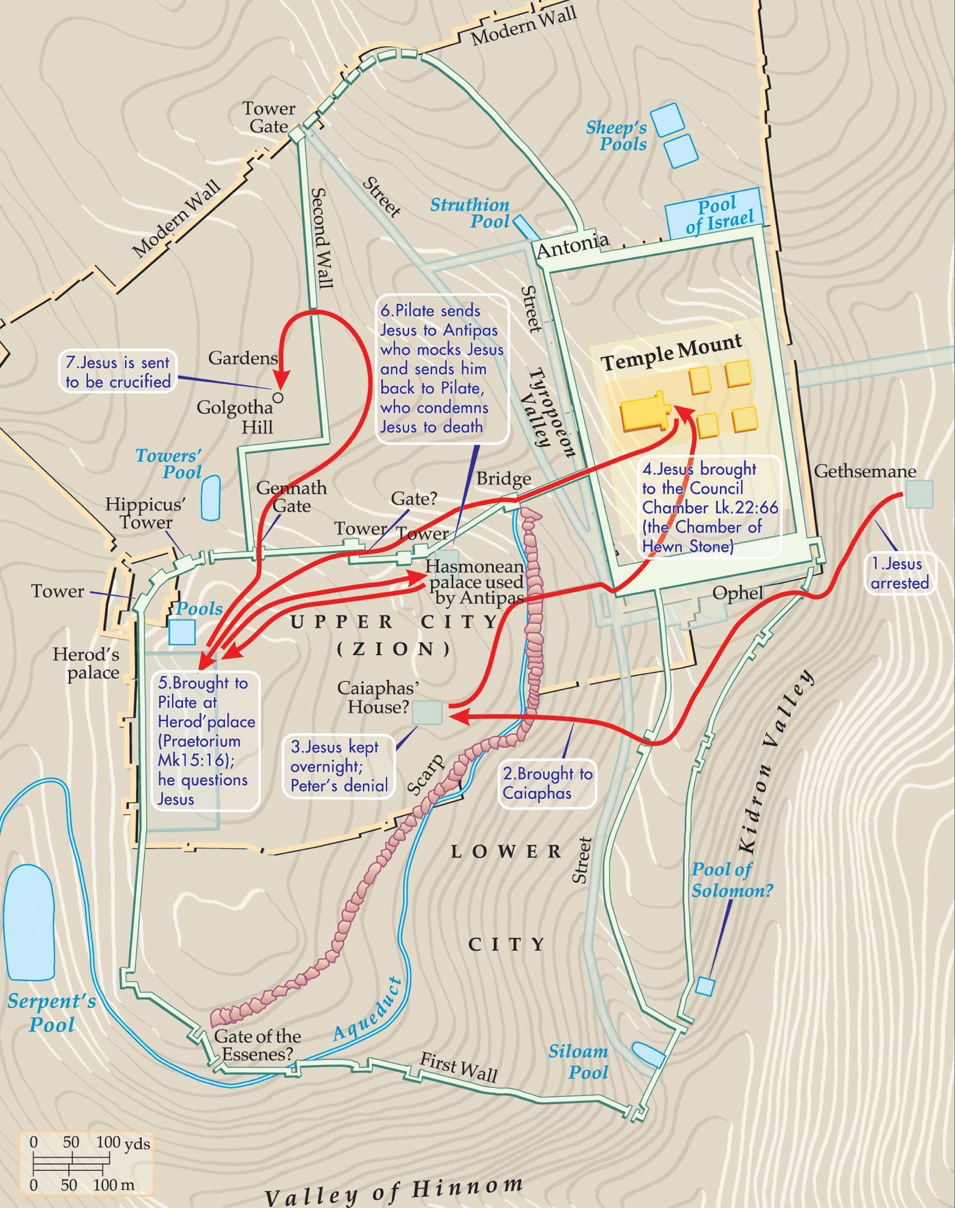
Carta Caption: The arrest, interrogation and execution of Jesus
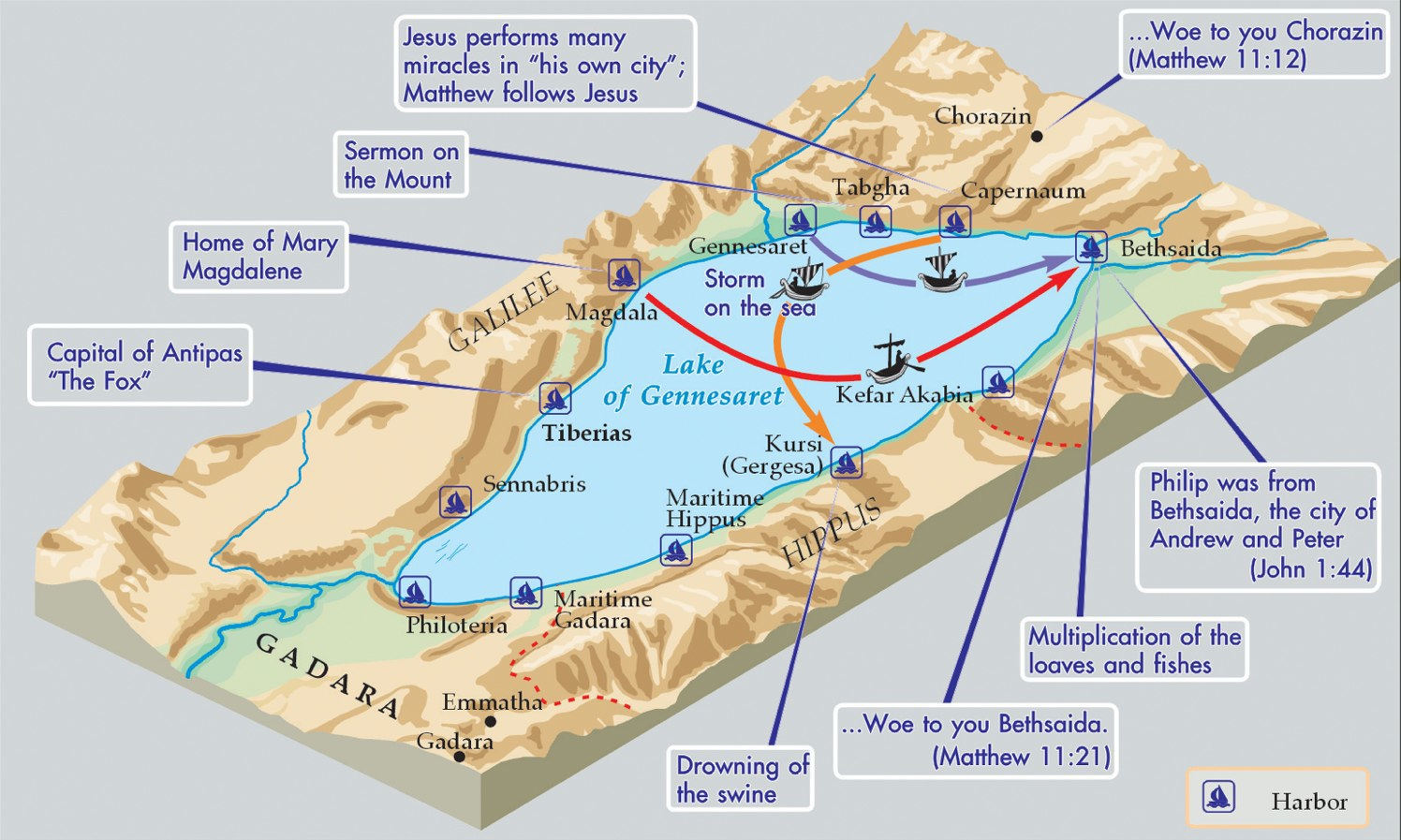
Around the Sea of Galilee (Carta’s caption)
To book’s hope, to revisit it again, “is that a better understanding of the physical setting and events that framed the life of Jesus can assist us to hear more clearly the message he proclaimed.” Reading through In the Master’s Steps will certainly offer such an understanding for the teacher, student, reader, or person of faith who picks up the book. The connections between geography and theological applications are not often made explicit here, but the reader will have more than enough historical background and imagery to begin to make those associations for herself or himself.
Many thanks to the good folks at Carta for sending the book. They didn’t ask for a review, so I write this of my own volition! I think they are one of the finest publishers in the business today. Check out their site here, and go here to see their works via Hendrickson, their U.S. distributor.
My inordinately strong appreciation of Bible software started with BibleWorks 7. BibleWorks 10 was just released, and it came yesterday to my mailbox on a thumb drive.
Go to www.bibleworks.com to see what’s new. After I’ve had a chance to install and use it, I’ll write a review here.
Much as I am grateful to be able to see the text of the Bible in multiple languages at one time on a computer, sometimes you just want to curl up with a good, printed edition of a 6-language polyglot.
Fredrick J. Long and T. Michael W. Halcomb have begun such a series, with the recent publishing of Matthew and Mark in Hebrew, Latin, Greek, English, German, and French. It’s obvious that an English-speaking Bible reader would want access to biblical texts in Greek and Hebrew and Latin. German and French, as major research languages for biblical and theological studies, complete the languages of this almost-500-page polyglot.
It’s a pretty sweet work, and an awesome way to practice multiple languages at once. Here’s what it looks like:
The layout of the polyglot is clean and easy to follow. It would not be all that difficult to read through all of Matthew and/or Mark in a single language, if one so desired. The fonts are quite legible, although the Hebrew font for Mark differs from the Hebrew font for Matthew. (Also, the vowels are not properly centered under the Hebrew consonants in Mark. This doesn’t make reading it impossible, but I found it distracting.)
There is no critical apparatus, but this is no problem–Long and Halcomb intend simply to provide multiple texts for reading. (Text-critical notes on six languages would make this volume unwieldy, indeed!) The versions used are largely ones in the public domain. The Greek text, for example, is the Robinson-Pierpont Byzantine edition. I have a Greek reader’s Bible I used to use with this same edition. At first I worried that I wasn’t using the academic version of the NA28, but after using that reader’s Bible for a few weeks, I realized it really didn’t matter, if the goal was just to get better at reading Greek. So, too, here: not having the NA28 text included is no loss.
The English translation in Matthew is an authors’ revision of the 1901 American Standard Version (ASV). In Mark the authors use their own translation. They aim to be “fairly literal” in translating the Greek, I’ve never really agreed with such translations’ taking the Greek’s historical present, for example, and keeping it in the present tense in English.
For example, Mark 10:35 begins, “And they come near to him…,” which follows a Greek present participle, but then the two verses later in English has “they said to them” (my emphasis). Though this translates a Greek aorist in the expected way, I would have smoothed out the tenses for the purposes of readability in English translation–even while seeking to be close to the Greek text. Even somewhat literal translations of Greek ought to put its historical present into English past tense, in my opinion. But this perhaps just amounts to a difference in translation philosophy. And a benefit of the authors’ translating Mark this way is you can easily tell, if your Greek parsing is rusty, which Greek verbs are present and which are aorist, since Greek historical present is rendered as present in English.
Those concerns aside, this modern-day “Hexapla” is hard to beat as a way of learning (and keeping active) multiple languages at once. A resource like this would be essential for someone preparing for a Ph.D. program in biblical studies or theology. Pastors, such as yours truly, who want to keep their Greek and Hebrew alive can do so with just this single book.
GlossaHouse offers a wide selection of creative resources for language learning and retention. Check out their site here to see the Hexapla and more.
Thanks to the good folks at GlossaHouse for the review copy! Find it here on Amazon.
Accordance Bible Software has just posted the video recording of a recent webinar I taught, Sermon Preparation in Action with Accordance. Here‘s the one-page handout so you can see what I cover in the just-over one hour presentation. Live webinars are coming up, and include a Q and A time not shown in the video below. (The next one is May 21–sign up or learn more here.)
Here’s the video, with Accordance’s description below. (If you’re reading this blog post via email, you may need to go to the original post to watch the video.)
In this previously recorded webinar, pastor Abram Kielsmeier-Jones demonstrates how he uses Accordance for sermon preparation. Anyone who preaches or teaches the Bible regularly will benefit from watching Abram’s presentation. Originally recorded on April 27, 2015.
Accordance has quite a few other online trainings coming up. Check them all out.
I’ve been impressed by the Dell Venue 8 Pro in my use of it these past few months. I recorded my initial impressions here.
This post completes my two-part review of the device by way of a three-question Q and A session. (Leading up to this review I’ve benefited from conversations with R. Mansfield, who knows the Dell Venue 8 Pro–hereafter, DV8P–well.)
How Does the Dell Venue 8 Pro Compare to an iPad?
See… I knew you were going to ask that question! Here are five points of comparison.
First, the iPad still does not allow the user to view and use more than one app on the screen at a time. Why this continues to be the case is unclear to me, but the DV8P lets you have two apps open at once. So you can read an article from your Facebook feed without leaving Facebook. Or you can go to a Web link that pops up in a Kindle book you’re reading, while not having to leave and then navigate back to the Kindle app. Advantage: DV8P.
Second, the DV8P is more compact than a full-sized iPad, but close in dimensions to the iPad Mini. The DV8P is longer and skinnier, by a little bit. Its 8-inch screen size (measured diagonally) just edges out the iPad Mini’s 7.9 inches. To hold it feels about the same as the iPad Mini, though. Advantage: Both.
Third, the Dell Venue Pro is both tablet and personal computer. You can use it as both. You can run full-on Windows programs from the Desktop side, which Apple’s iOS on iPad does not permit.
I love being able to access full-bodied programs on this little tablet. Much as I appreciate Accordance’s iOS mobile app, for example, being able to use the full desktop version–but not having to be at a desktop or laptop–is awesome. Advantage: DV8P.
Fourth, the gesture-based interface of the iPad gives the user more options. Or is more intuitive. Or something. I know “intuitive” is a fuzzy word in software and hardware reviews. Of course, I’m way more used to an iPad than the Dell Venue Pro, but the former is easier to just pick up and tap and swipe your way around. Advantage: iPad Mini.
Finally, battery life on the 8 Pro leaves something to be desired, especially in comparison with the iPad Mini. Battery life when the device is in use is fine, but it does not hold charge very well when it idles/sleeps. If I put the tablet to sleep with full battery life, don’t use it at all for a couple days, then come back to it, it’s completely out of charge. I’ve never had this issue with the iPad mini. (And I’m not the only DV8P user to notice this, either.) Advantage: iPad Mini.
Does it Replace a Computer?
Because you have the computing capabilities of a desktop computer in your hands, one could think about the Dell Venue 8 Pro as a possible replacement for a computer.
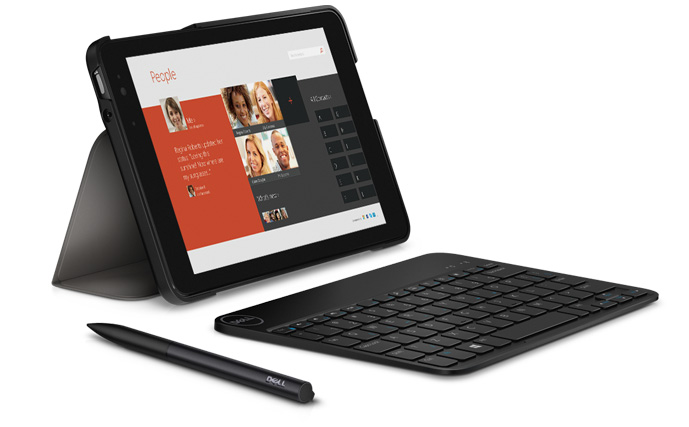
With the loaner review unit Dell sent me, they also included a stylus (with a responsive point) and a keyboard. Each of these are essential companions when using Windows and navigating full-bodied programs like Word or Accordance or whatever else. (Not the least reason for which is that the touch points on Windows apps are too small for even tiny fingers.)
Accordance on the DV8P (click or open in new tab/window to enlarge)
Being able to use–on a portable tablet–programs/apps that you could until now have to get to a desktop or laptop to use… is really sweet. If you don’t want to be limited by Android’s environment or iOS apps, the tablet-as-computer could make sense.
However, a limitation is in the memory size. The Dell Venue 8 Pro comes in 32GB or 64GB models, but even the latter is too small to make this your one-and-only computer (think: lots of images and movies stored). The Dell Venue 11 Pro model, however, has a hard drive up to 256 GB, which is definitely workable for making the DVP your only computing device.
Speaking of, here are the specs of the machine (compared to the 11) from Dell:
Does Abram K-J of Words on the Word
Recommend this Device?
I would be too tied to the Apple app ecosystem to be able to move all my work over to the DV8Pro, much as I like the device. I’d have no way to run OmniFocus, for example. Or Nisus Writer Pro. I could easily still access Evernote, and other such apps.
But if you’re already rocking in the Windows free world, with no Mac or iOS-only apps to consider, this small but powerful device is worth looking into. (I can’t say from experience how it compares to the Microsoft Surface.) It’s reasonably priced, too. And while I experienced more learning curve with the Dell Venue 8 Pro than I did when I first picked up an iPad, after a while it becomes intuitive, and convenient to have more computing power than one would expect in a tablet.
Thanks to the fine folks at Dell for loaning me a Venue 8 Pro 5000 Series Tablet to test for the review. Check out the Dell tablet page here.
Mark 13 is one of the most difficult chapters of the Bible to interpret and understand. From the “abomination of desolation” to the claim of Jesus that “this generation will not pass away until all these things have taken place,” the chapter is full of statements that could refer either to the near (historical) or far (apocalyptic) future.
Here is Stein’s outline of Mark 13, in his words (p. 49):
13:1-4: Jesus’ prediction of the destruction of the temple (and Jerusalem) (chapter 3 of this book)
13:5-23: The coming destruction of the temple (and Jerusalem) and the sign preceding it (ch. 4)
13:24-27: The coming of the Son of Man (ch. 5)
13:28-31: The parable of the fig tree and the coming destruction of the temple (and Jerusalem) (ch. 6)
13:32-37: The parable of the watchman and the exhortation to be alert for the coming of the Son of Man (ch. 7)
The majority of the book (chapters 3-7) is taken up with Stein’s exposition of each verse in Mark 13. Chapter 1 defines the goal of the book: “to understand what the author of the Gospel we call Mark meant and sought to convey by the present text of Mark 13” (39). Stein focuses especially on what Mark meant to “teach his readers by the Jesus traditions that he chose to include in this chapter, his arrangement of these traditions and his editorial work in the recording of this material” (45). Chapter 2 is “Key Issues Involved in Interpreting Mark 13.”
Chapter 8 is a really nice add-on, which consists of Stein’s “interpretive translation” of Mark 13. What a great idea! You can read the chapter in one sitting and see right away how Stein interprets it. This could be a really good starting point for the reader, as could the excellent and detailed “Outline” starting on p. 9 (basically an annotated table of contents).
Stein offers at the outset a nice tour of the so-called quests for the historical Jesus, and how that relates to reading Mark. But Stein doesn’t seem to think the authorship (Mark) or genre (historical narrative) of Mark matters much to the purpose of this short commentary. I find his views here less than compelling, but that didn’t keep me from being convinced by the rest of the book.
Two key points the book makes will give a sense of Stein’s approach:
Stein differentiates between three settings we need to keep in mind: “the first involving the teaching of the historical Jesus to his disciples, the second involving the situation of the early church between the death and resurrection of Jesus and the writing of the Gospels, and the third involving the situation in which and for which the Evangelist Mark wrote his Gospel” (47).
Because of the above point, Stein can tease out different settings and time-frames that different portions of Mark 13 refer to. He says, for example, “Mark does not see the coming of the Son of Man [AKJ: the apocalyptic imagery in 13:24-27] as part of Jesus’ answer (13:5-23) to the disciples’ twofold question (13:4) concerning the destruction of the temple” (72).
Throughout the book Stein keeps in view the distinction between the soon-to-come, 1st century future (destruction of the temple) and the distant, unknown day of the coming of the Son of Man. Stein acknowledges that it is “easy to intermix these two horizons [two settings in time] of the text, and the result is confusion and lack of clarity in understanding either setting in time” (100). Much of the chapter, Stein argues (but not all), anticipates the destruction of the Jerusalem temple in A.D. 70.
You don’t need to know Greek to make good use of this text, but Stein does keep (transliterated) Greek in front of him so he can analyze the text at the word and phrase level. He is really good, too, at using a broader biblical context to help explain specific parts of Mark 13.
I read the book cover-to-cover in a few sittings—it was that intriguing! As detailed and in-depth as Stein’s reasoning is, it reads really nicely: his tone is conversational, which makes it easy to try to sort through some tough hermeneutical issues. Stein’s is certainly not the only possible interpretation of Mark 13, but it’s a persuasive one.
Thanks to the fine folks at IVP Academic for the review copy. Find the book here at IVP’s site, or here on Amazon.

 The exquisitely designed 2Do app is Apple’s App of the Week in the iOS App Store. It’s usually $15 but is now free. The accompanying Mac app is 50% off, too.














 Words on the Word